Get it from the App Store.
In XCode's Preferences > Downloads you can install command line tools.


| /* ---------------------------------------------------------------------------------------------------- | |
| Super Form Reset | |
| A couple of things to watch out for: | |
| - IE8: If a text input doesn't have padding on all sides or none the text won't be centered. | |
| - The default border sizes on text inputs in all UAs seem to be slightly different. You're better off using custom borders. | |
| - You NEED to set the font-size and family on all form elements | |
| - Search inputs need to have their appearance reset and the box-sizing set to content-box to match other UAs |

| # encoding: utf-8 | |
| class AvatarUploader < CarrierWave::Uploader::Base | |
| include CarrierWave::MiniMagick | |
| # Choose what kind of storage to use for this uploader: | |
| storage :file | |
| # Override the directory where uploaded files will be stored. |

| # | |
| # Run as root | |
| # $ bash <(curl -s https://raw.github.com/gist/1631411) | |
| # | |
| # Update, upgrade and install development tools: | |
| apt-get update | |
| apt-get -y upgrade | |
| apt-get -y install build-essential git-core curl \ | |
| libssl-dev \ |


| # | |
| # Cookbook Name:: sphinx | |
| # Recipe:: default | |
| # | |
| # Set your application name here | |
| appname = "todo" | |
| # Uncomment the flavor of sphinx you want to use | |
| flavor = "thinking_sphinx" |

| ## Configure max open file | |
| ref : [nodejs.production](https://github.com/dreamerslab/nodejs.production), only `nodejs` user can open more files | |
| $ sudo su | |
| $ echo "nodejs soft nofile 51200" >> /etc/security/limits.conf | |
| $ echo "nodejs hard nofile 51200" >> /etc/security/limits.conf | |
| $ echo "www-data hard nofile 51200" >> /etc/security/limits.conf | |
| $ echo "www-data hard nofile 51200" >> /etc/security/limits.conf | |
| $ echo "session required pam_limits.so" >> /etc/pam.d/common-session |
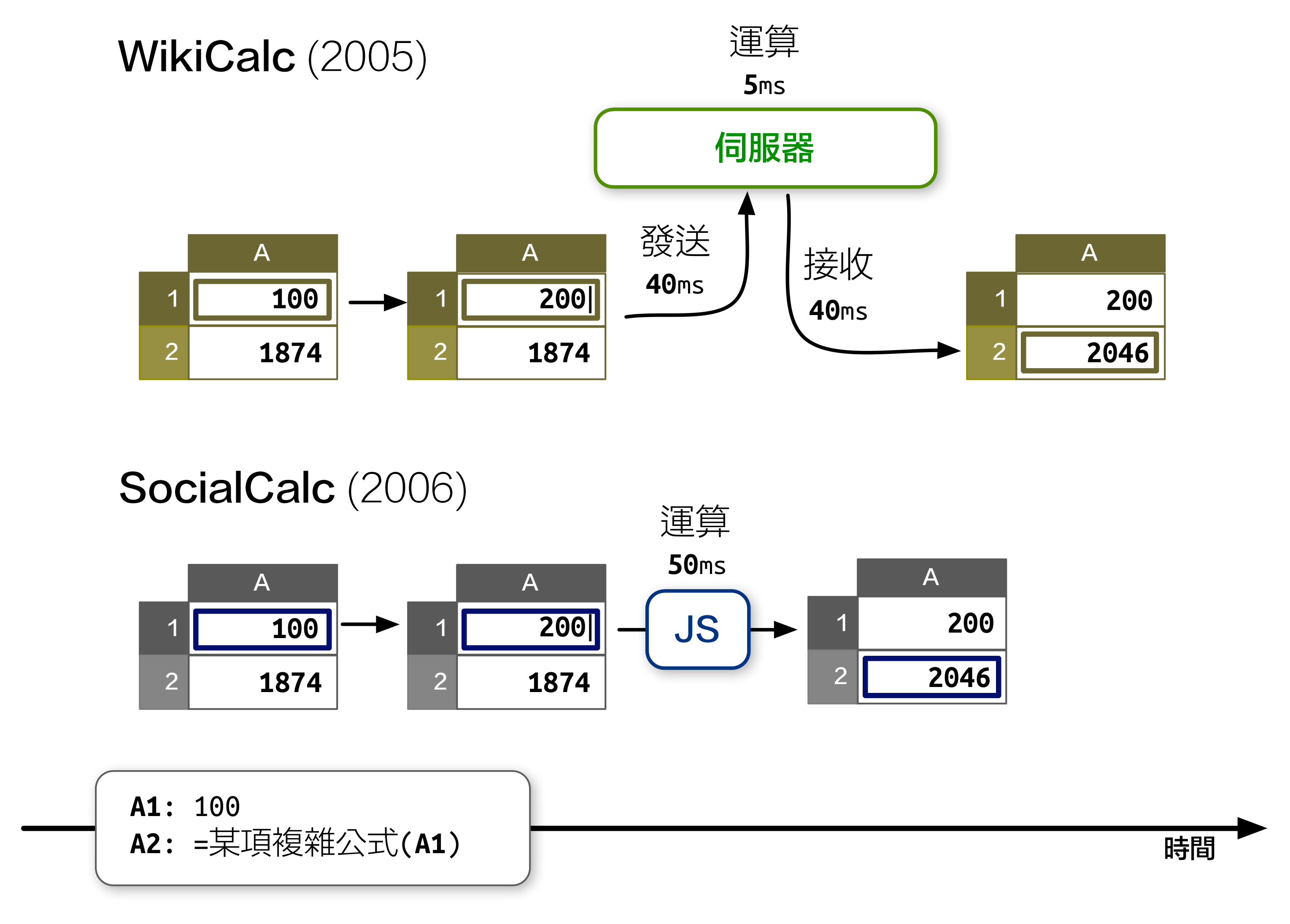
先前在《開源應用程式架構》 一書中,我介紹了 SocialCalc 這個在瀏覽器中運行的試算表編輯器,以取代伺服器為中心的 WikiCalc 架構。SocialCalc 在瀏覽器中執行所有的運算,只有在載入和儲存試算表時才會使用伺服器。
追求效能是 Socialtext 團隊在 2006 年時設計 SocialCalc 的主要目的。重點在於:在 JavaScript 環境下執行客戶端運算,儘管在當年的速度僅有伺服器端 Perl 運算的十分之一,但仍然勝過 AJAX 來回傳輸資料造成的網路延遲: