
As of the 0.3 release, LangChain uses Pydantic 2 internally.
Users should install Pydantic 2 and are advised to avoid using the pydantic.v1 namespace of Pydantic 2 with
LangChain APIs.
If you're working with prior versions of LangChain, please see the following guide on Pydantic compatibility.# LLMonitor
LLMonitor is an open-source observability platform that provides cost and usage analytics, user tracking, tracing and evaluation tools.
Create an account on llmonitor.com, then copy your new app's tracking id.
Once you have it, set it as an environment variable by running:
export LLMONITOR_APP_ID="..."If you'd prefer not to set an environment variable, you can pass the key directly when initializing the callback handler:
from langchain_community.callbacks.llmonitor_callback import LLMonitorCallbackHandler

handler = LLMonitorCallbackHandler(app_id="...")from langchain_openai import OpenAI
from langchain_openai import ChatOpenAI
handler = LLMonitorCallbackHandler()
llm = OpenAI(
callbacks=[handler],
)
chat = ChatOpenAI(callbacks=[handler])
llm("Tell me a joke")Make sure to pass the callback handler to the run method so that all related chains and llm calls are correctly tracked.
It is also recommended to pass agent_name in the metadata to be able to distinguish between agents in the dashboard.
Example:
from langchain_openai import ChatOpenAI
from langchain_community.callbacks.llmonitor_callback import LLMonitorCallbackHandler
from langchain_core.messages import SystemMessage, HumanMessage
from langchain.agents import OpenAIFunctionsAgent, AgentExecutor, tool

llm = ChatOpenAI(temperature=0)

handler = LLMonitorCallbackHandler()

@tool
def get_word_length(word: str) -> int:
    """Returns the length of a word."""
    return len(word)

tools = [get_word_length]

prompt = OpenAIFunctionsAgent.create_prompt(
    system_message=SystemMessage(
        content="You are very powerful assistant, but bad at calculating lengths of words."
    )
)

agent = OpenAIFunctionsAgent(llm=llm, tools=tools, prompt=prompt, verbose=True)
agent_executor = AgentExecutor(
    agent=agent, tools=tools, verbose=True, metadata={"agent_name": "WordCount"}  # <- recommended, assign a custom name
)
agent_executor.run("how many letters in the word educa?", callbacks=[handler])
Another example:
import os

from langchain_community.agent_toolkits.load_tools import load_tools
from langchain_community.callbacks.llmonitor_callback import LLMonitorCallbackHandler
from langchain_openai import ChatOpenAI
from langgraph.prebuilt import create_react_agent

os.environ["LLMONITOR_APP_ID"] = ""
os.environ["OPENAI_API_KEY"] = ""
os.environ["SERPAPI_API_KEY"] = ""

handler = LLMonitorCallbackHandler()
llm = ChatOpenAI(temperature=0, callbacks=[handler])
tools = load_tools(["serpapi", "llm-math"], llm=llm)
agent = create_react_agent("openai:gpt-4.1-mini", tools)

input_message = {
    "role": "user",
    "content": "What's the weather in SF?",
}

agent.invoke({"messages": [input_message]})
User tracking allows you to identify your users, track their cost, conversations and more.
from langchain_community.callbacks.llmonitor_callback import LLMonitorCallbackHandler, identify

with identify("user-123"):
    llm.invoke("Tell me a joke")

with identify("user-456", user_props={"email": "user456@test.com"}):
agent.invoke(...)For any question or issue with integration you can reach out to the LLMonitor team on Discord or via email.
Streamlit is a faster way to build and share data apps. Streamlit turns data scripts into shareable web apps in minutes. All in pure Python. No front‑end experience required. See more examples at streamlit.io/generative-ai.

In this guide we will demonstrate how to use StreamlitCallbackHandler to display the thoughts and actions of an agent in an
interactive Streamlit app. Try it out with the running app below using the MRKL agent:
pip install langchain streamlitYou can run streamlit hello to load a sample app and validate your install succeeded. See full instructions in Streamlit's
Getting started documentation.
To create a StreamlitCallbackHandler, you just need to provide a parent container to render the output.
from langchain_community.callbacks.streamlit import (
    StreamlitCallbackHandler,
)
import streamlit as st

st_callback = StreamlitCallbackHandler(st.container())
Additional keyword arguments to customize the display behavior are described in the API reference.
The primary supported use case today is visualizing the actions of an Agent with Tools (or Agent Executor). You can create an
agent in your Streamlit app and simply pass the StreamlitCallbackHandler to agent.run() in order to visualize the
thoughts and actions live in your app.
import streamlit as st
from langchain import hub
from langchain.agents import AgentExecutor, create_react_agent, load_tools
from langchain_openai import OpenAI

llm = OpenAI(temperature=0, streaming=True)
tools = load_tools(["ddg-search"])
prompt = hub.pull("hwchase17/react")
agent = create_react_agent(llm, tools, prompt)
agent_executor = AgentExecutor(agent=agent, tools=tools, verbose=True)

if prompt := st.chat_input():
    st.chat_message("user").write(prompt)
    with st.chat_message("assistant"):
        st_callback = StreamlitCallbackHandler(st.container())
        response = agent_executor.invoke(
            {"input": prompt}, {"callbacks": [st_callback]}
        )
        st.write(response["output"])
Note: You will need to set OPENAI_API_KEY for the above app code to run successfully.
The easiest way to do this is via Streamlit secrets.toml,
or any other local ENV management tool.
Currently StreamlitCallbackHandler is geared towards use with a LangChain Agent Executor. Support for additional agent types,
use directly with Chains, etc will be added in the future.
You may also be interested in using StreamlitChatMessageHistory for LangChain.
Welcome to this sample Markdown document. Markdown is a lightweight markup language used for formatting text. It's widely used for documentation, readme files, and more.
Markdown supports multiple levels of headers:
- Header 1:
# Header 1 - Header 2:
## Header 2 - Header 3:
### Header 3
- Item 1
- Item 2
- Subitem 2.1
- Subitem 2.2
- First item
- Second item
- Third item
OpenAI is an AI research organization.
Here's an example image:
Use code for inline code snippets.
def greet(name):
    return f"Hello, {name}!"

print(greet("World"))This page covers how to use the Remembrall ecosystem within LangChain.
Remembrall gives your language model long-term memory, retrieval augmented generation, and complete observability with just a few lines of code.

It works as a light-weight proxy on top of your OpenAI calls and simply augments the context of the chat calls at runtime with relevant facts that have been collected.
To get started, sign in with Github on the Remembrall platform and copy your API key from the settings page.
Any request that you send with the modified openai_api_base (see below) and Remembrall API key will automatically be tracked in the Remembrall dashboard. You never have to share your OpenAI key with our platform and this information is never stored by the Remembrall systems.
To do this, we need to install the following dependencies:
pip install -U langchain-openaiIn addition to setting the openai_api_base and Remembrall API key via x-gp-api-key, you should specify a UID to maintain memory for. This will usually be a unique user identifier (like email).
from langchain_openai import ChatOpenAI
chat_model = ChatOpenAI(openai_api_base="https://remembrall.dev/api/openai/v1",
                        model_kwargs={
                            "headers":{
                                "x-gp-api-key": "remembrall-api-key-here",
                                "x-gp-remember": "user@email.com",
                            }
                        })

chat_model.predict("My favorite color is blue.")
import time; time.sleep(5)  # wait for system to save fact via auto save
print(chat_model.predict("What is my favorite color?"))First, create a document context in the Remembrall dashboard. Paste in the document texts or upload documents as PDFs to be processed. Save the Document Context ID and insert it as shown below.
from langchain_openai import ChatOpenAI
chat_model = ChatOpenAI(openai_api_base="https://remembrall.dev/api/openai/v1",
                        model_kwargs={
                            "headers":{
                                "x-gp-api-key": "remembrall-api-key-here",
                                "x-gp-context": "document-context-id-goes-here",
                            }
                        })

print(chat_model.predict("This is a question that can be answered with my document."))
Abso is an open-source LLM proxy that automatically routes requests between fast and slow models based on prompt complexity. It uses various heuristics to chose the proper model. It's very fast and has low latency.
pip install langchain-absoSee usage details here
Airtable is a cloud collaboration service.
Airtableis a spreadsheet-database hybrid, with the features of a database but applied to a spreadsheet. The fields in an Airtable table are similar to cells in a spreadsheet, but have types such as 'checkbox', 'phone number', and 'drop-down list', and can reference file attachments like images.
Users can create a database, set up column types, add records, link tables to one another, collaborate, sort records and publish views to external websites.
pip install pyairtable- Get your API key.
- Get the ID of your base.
- Get the table ID from the table url.
from langchain_community.document_loaders import AirtableLoaderSee an example.
AwaDB is an AI Native database for the search and storage of embedding vectors used by LLM Applications.
pip install awadbfrom langchain_community.vectorstores import AwaDBSee a usage example.
from langchain_community.embeddings import AwaEmbeddingsSee a usage example.
Baseten is a provider of all the infrastructure you need to deploy and serve ML models performantly, scalably, and cost-efficiently.
As a model inference platform,
Basetenis aProviderin the LangChain ecosystem. TheBasetenintegration currently implements a singleComponent, LLMs, but more are planned!
Basetenlets you run both open source models like Llama 2 or Mistral and run proprietary or fine-tuned models on dedicated GPUs. If you're used to a provider like OpenAI, using Baseten has a few differences:
- Rather than paying per token, you pay per minute of GPU used.
- Every model on Baseten uses Truss, our open-source model packaging framework, for maximum customizability.
- While we have some OpenAI ChatCompletions-compatible models, you can define your own I/O spec with
Truss.
Learn more about model IDs and deployments.
Learn more about Baseten in the Baseten docs.
You'll need two things to use Baseten models with LangChain:
- A Baseten account
- An API key
Export your API key to your as an environment variable called BASETEN_API_KEY.
export BASETEN_API_KEY="paste_your_api_key_here"See a usage example.
from langchain_community.llms import BasetenBreebs is an open collaborative knowledge platform. Anybody can create a
Breeb, a knowledge capsule based on PDFs stored on a Google Drive folder. ABreebcan be used by any LLM/chatbot to improve its expertise, reduce hallucinations and give access to sources. Behind the scenes,Breebsimplements severalRetrieval Augmented Generation (RAG)models to seamlessly provide useful context at each iteration.
from langchain.retrievers import BreebsRetrieverDatabricks Intelligence Platform is the world's first data intelligence platform powered by generative AI. Infuse AI into every facet of your business.
Databricks embraces the LangChain ecosystem in various ways:
- 🚀 Model Serving - Access state-of-the-art LLMs, such as DBRX, Llama3, Mixtral, or your fine-tuned models on Databricks Model Serving, via a highly available and low-latency inference endpoint. LangChain provides LLM (
Databricks), Chat Model (ChatDatabricks), and Embeddings (DatabricksEmbeddings) implementations, streamlining the integration of your models hosted on Databricks Model Serving with your LangChain applications. - 📃 Vector Search - Databricks Vector Search is a serverless vector database seamlessly integrated within the Databricks Platform. Using
DatabricksVectorSearch, you can incorporate the highly scalable and reliable similarity search engine into your LangChain applications. - 📊 MLflow - MLflow is an open-source platform to manage full the ML lifecycle, including experiment management, evaluation, tracing, deployment, and more. MLflow's LangChain Integration streamlines the process of developing and operating modern compound ML systems.
- 🌐 SQL Database - Databricks SQL is integrated with
SQLDatabasein LangChain, allowing you to access the auto-optimizing, exceptionally performant data warehouse. - 💡 Open Models - Databricks open sources models, such as DBRX, which are available through the Hugging Face Hub. These models can be directly utilized with LangChain, leveraging its integration with the
transformerslibrary.
First-party Databricks integrations are now available in the databricks-langchain partner package.
pip install databricks-langchain
The legacy langchain-databricks partner package is still available but will be soon deprecated.
ChatDatabricks is a Chat Model class to access chat endpoints hosted on Databricks, including state-of-the-art models such as Llama3, Mixtral, and DBRX, as well as your own fine-tuned models.
from databricks_langchain import ChatDatabricks

chat_model = ChatDatabricks(endpoint="databricks-meta-llama-3-70b-instruct")
See the usage example for more guidance on how to use it within your LangChain application.
Databricks is an LLM class to access completion endpoints hosted on Databricks.
:::caution
Text completion models have been deprecated and the latest and most popular models are chat completion models. Use ChatDatabricks chat model instead to use those models and advanced features such as tool calling.
:::
from langchain_community.llm.databricks import Databricks

llm = Databricks(endpoint="your-completion-endpoint")
See the usage example for more guidance on how to use it within your LangChain application.
DatabricksEmbeddings is an Embeddings class to access text-embedding endpoints hosted on Databricks, including state-of-the-art models such as BGE, as well as your own fine-tuned models.
from databricks_langchain import DatabricksEmbeddings

embeddings = DatabricksEmbeddings(endpoint="databricks-bge-large-en")
See the usage example for more guidance on how to use it within your LangChain application.
Databricks Vector Search is a serverless similarity search engine that allows you to store a vector representation of your data, including metadata, in a vector database. With Vector Search, you can create auto-updating vector search indexes from Delta tables managed by Unity Catalog and query them with a simple API to return the most similar vectors.
from databricks_langchain import DatabricksVectorSearch

dvs = DatabricksVectorSearch(
    endpoint="<YOUT_ENDPOINT_NAME>",
    index_name="<YOUR_INDEX_NAME>",
    index,
    text_column="text",
    embedding=embeddings,
    columns=["source"]
)
docs = dvs.similarity_search("What is vector search?)
See the usage example for how to set up vector indices and integrate them with LangChain.
In the context of LangChain integration, MLflow provides the following capabilities:
- Experiment Tracking: Tracks and stores models, artifacts, and traces from your LangChain experiments.
- Dependency Management: Automatically records dependency libraries, ensuring consistency among development, staging, and production environments.
- Model Evaluation Offers native capabilities for evaluating LangChain applications.
- Tracing: Visually traces data flows through your LangChain application.
See MLflow LangChain Integration to learn about the full capabilities of using MLflow with LangChain through extensive code examples and guides.
To connect to Databricks SQL or query structured data, see the Databricks structured retriever tool documentation and to create an agent using the above created SQL UDF see Databricks UC Integration.
To directly integrate Databricks's open models hosted on HuggingFace, you can use the HuggingFace Integration of LangChain.
from langchain_huggingface import HuggingFaceEndpoint

llm = HuggingFaceEndpoint(
    repo_id="databricks/dbrx-instruct",
    task="text-generation",
    max_new_tokens=512,
    do_sample=False,
    repetition_penalty=1.03,
)
llm.invoke("What is DBRX model?")
Fiddler provides a unified platform to monitor, explain, analyze, and improve ML deployments at an enterprise scale.
Set up your model with Fiddler:
- The URL you're using to connect to Fiddler
- Your organization ID
- Your authorization token
Install the Python package:
pip install fiddler-clientfrom langchain_community.callbacks.fiddler_callback import FiddlerCallbackHandlerSee an example.
Fireworks AI is a generative AI inference platform to run and customize models with industry-leading speed and production-readiness.
-
Install the Fireworks integration package.
pip install langchain-fireworks -
Get a Fireworks API key by signing up at fireworks.ai.
-
Authenticate by setting the FIREWORKS_API_KEY environment variable.
There are two ways to authenticate using your Fireworks API key:
-
Setting the
FIREWORKS_API_KEYenvironment variable.os.environ["FIREWORKS_API_KEY"] = "<KEY>"
-
Setting
api_keyfield in the Fireworks LLM module.llm = Fireworks(api_key="<KEY>")
See a usage example.
from langchain_fireworks import ChatFireworksSee a usage example.
from langchain_fireworks import Fireworks See a usage example.
from langchain_fireworks import FireworksEmbeddings This page covers how to use the Marqo ecosystem within LangChain.
Marqo is a tensor search engine that uses embeddings stored in in-memory HNSW indexes to achieve cutting edge search speeds. Marqo can scale to hundred-million document indexes with horizontal index sharding and allows for async and non-blocking data upload and search. Marqo uses the latest machine learning models from PyTorch, Huggingface, OpenAI and more. You can start with a pre-configured model or bring your own. The built in ONNX support and conversion allows for faster inference and higher throughput on both CPU and GPU.
Because Marqo include its own inference your documents can have a mix of text and images, you can bring Marqo indexes with data from your other systems into the langchain ecosystem without having to worry about your embeddings being compatible.
Deployment of Marqo is flexible, you can get started yourself with our docker image or contact us about our managed cloud offering!
To run Marqo locally with our docker image, see our getting started.
- Install the Python SDK with
pip install marqo
There exists a wrapper around Marqo indexes, allowing you to use them within the vectorstore framework. Marqo lets you select from a range of models for generating embeddings and exposes some preprocessing configurations.
The Marqo vectorstore can also work with existing multimodal indexes where your documents have a mix of images and text, for more information refer to our documentation. Note that instantiating the Marqo vectorstore with an existing multimodal index will disable the ability to add any new documents to it via the langchain vectorstore add_texts method.
To import this vectorstore:
from langchain_community.vectorstores import MarqoFor a more detailed walkthrough of the Marqo wrapper and some of its unique features, see this notebook
Pebblo enables developers to safely load and retrieve data to promote their Gen AI app to deployment without worrying about the organization’s compliance and security requirements. The Pebblo SafeLoader identifies semantic topics and entities found in the loaded data and the Pebblo SafeRetriever enforces identity and semantic controls on the retrieved context. The results are summarized on the UI or a PDF report.
Pebblo provides a safe way to load and retrieve data for Gen AI applications.
It includes:
- Identity-aware Safe Loader that loads data and identifies semantic topics and entities.
- SafeRetrieval that enforces identity and semantic controls on the retrieved context.
- User Data Report that summarizes the data loaded and retrieved.
For a more detailed examples of using Pebblo, see the following notebooks:
- PebbloSafeLoader shows how to use Pebblo loader to safely load data.
- PebbloRetrievalQA shows how to use Pebblo retrieval QA chain to safely retrieve data.
Pipeshift is a fine-tuning and inference platform for open-source LLMs
- You bring your datasets. Fine-tune multiple LLMs. Start inferencing in one-click and watch them scale to millions.
-
Install the Pipeshift integration package.
pip install langchain-pipeshift -
Get your Pipeshift API key by signing up at Pipeshift.
You can perform authentication using your Pipeshift API key in any of the following ways:
-
Adding API key to the environment variable as
PIPESHIFT_API_KEY.os.environ["PIPESHIFT_API_KEY"] = "<your_api_key>"
-
By passing
api_keyto the pipeshift LLM module or chat modulellm = Pipeshift(api_key="<your_api_key>", model="meta-llama/Meta-Llama-3.1-8B-Instruct", max_tokens=512) OR chat = ChatPipeshift(api_key="<your_api_key>", model="meta-llama/Meta-Llama-3.1-8B-Instruct", max_tokens=512)
See an example.
from langchain_pipeshift import ChatPipeshiftSee an example.
from langchain_pipeshift import PipeshiftPortkey is the Control Panel for AI apps. With it's popular AI Gateway and Observability Suite, hundreds of teams ship reliable, cost-efficient, and fast apps.
Portkey brings production readiness to Langchain. With Portkey, you can
- Connect to 150+ models through a unified API,
- View 42+ metrics & logs for all requests,
- Enable semantic cache to reduce latency & costs,
- Implement automatic retries & fallbacks for failed requests,
- Add custom tags to requests for better tracking and analysis and more.
Since Portkey is fully compatible with the OpenAI signature, you can connect to the Portkey AI Gateway through the ChatOpenAI interface.
- Set the
base_urlasPORTKEY_GATEWAY_URL - Add
default_headersto consume the headers needed by Portkey using thecreateHeadershelper method.
To start, get your Portkey API key by signing up here. (Click the profile icon on the bottom left, then click on "Copy API Key") or deploy the open source AI gateway in your own environment.
Next, install the Portkey SDK
pip install -U portkey_aiWe can now connect to the Portkey AI Gateway by updating the ChatOpenAI model in Langchain
from langchain_openai import ChatOpenAI
from portkey_ai import createHeaders, PORTKEY_GATEWAY_URL

PORTKEY_API_KEY = "..." # Not needed when hosting your own gateway
PROVIDER_API_KEY = "..." # Add the API key of the AI provider being used

portkey_headers = createHeaders(api_key=PORTKEY_API_KEY,provider="openai")

llm = ChatOpenAI(api_key=PROVIDER_API_KEY, base_url=PORTKEY_GATEWAY_URL, default_headers=portkey_headers)

llm.invoke("What is the meaning of life, universe and everything?")
The request is routed through your Portkey AI Gateway to the specified provider. Portkey will also start logging all the requests in your account that makes debugging extremely simple.
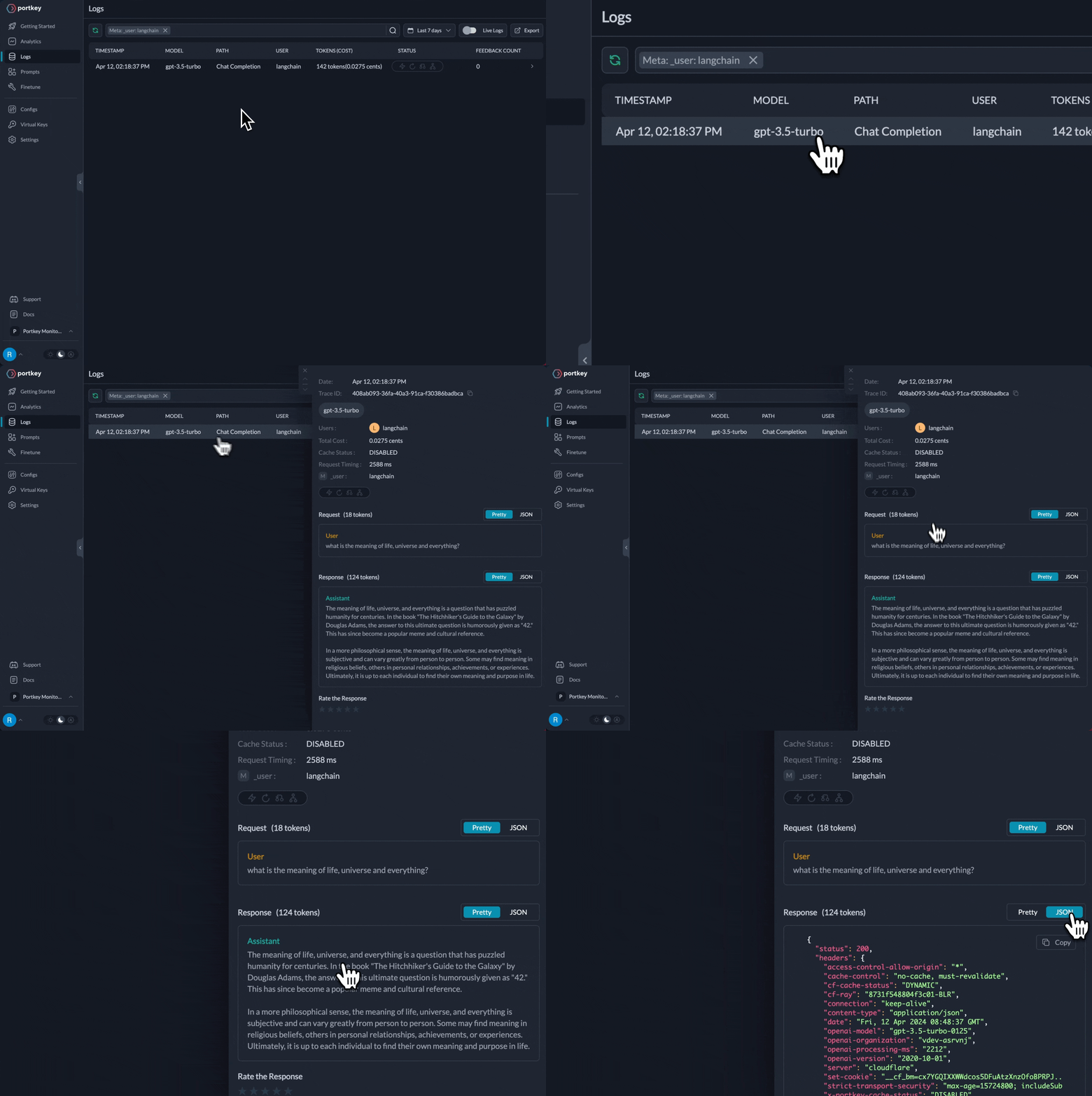
The power of the AI gateway comes when you're able to use the above code snippet to connect with 150+ models across 20+ providers supported through the AI gateway.
Let's modify the code above to make a call to Anthropic's claude-3-opus-20240229 model.
Portkey supports Virtual Keys which are an easy way to store and manage API keys in a secure vault. Lets try using a Virtual Key to make LLM calls. You can navigate to the Virtual Keys tab in Portkey and create a new key for Anthropic.
The virtual_key parameter sets the authentication and provider for the AI provider being used. In our case we're using the Anthropic Virtual key.
Notice that the
api_keycan be left blank as that authentication won't be used.
from langchain_openai import ChatOpenAI
from portkey_ai import createHeaders, PORTKEY_GATEWAY_URL

PORTKEY_API_KEY = "..."
VIRTUAL_KEY = "..." # Anthropic's virtual key we copied above

portkey_headers = createHeaders(api_key=PORTKEY_API_KEY,virtual_key=VIRTUAL_KEY)

llm = ChatOpenAI(api_key="X", base_url=PORTKEY_GATEWAY_URL, default_headers=portkey_headers, model="claude-3-opus-20240229")

llm.invoke("What is the meaning of life, universe and everything?")
The Portkey AI gateway will authenticate the API request to Anthropic and get the response back in the OpenAI format for you to consume.
The AI gateway extends Langchain's ChatOpenAI class making it a single interface to call any provider and any model.
The Portkey AI Gateway brings capabilities like load-balancing, fallbacks, experimentation and canary testing to Langchain through a configuration-first approach.
Let's take an example where we might want to split traffic between gpt-4 and claude-opus 50:50 to test the two large models. The gateway configuration for this would look like the following:
config = {
    "strategy": {
         "mode": "loadbalance"
    },
    "targets": [{
        "virtual_key": "openai-25654", # OpenAI's virtual key
        "override_params": {"model": "gpt4"},
        "weight": 0.5
    }, {
        "virtual_key": "anthropic-25654", # Anthropic's virtual key
        "override_params": {"model": "claude-3-opus-20240229"},
        "weight": 0.5
    }]
}
We can then use this config in our requests being made from langchain.
portkey_headers = createHeaders(
    api_key=PORTKEY_API_KEY,
    config=config
)

llm = ChatOpenAI(api_key="X", base_url=PORTKEY_GATEWAY_URL, default_headers=portkey_headers)

llm.invoke("What is the meaning of life, universe and everything?")
When the LLM is invoked, Portkey will distribute the requests to gpt-4 and claude-3-opus-20240229 in the ratio of the defined weights.
You can find more config examples here.
Portkey's Langchain integration gives you full visibility into the running of an agent. Let's take an example of a popular agentic workflow.
We only need to modify the ChatOpenAI class to use the AI Gateway as above.
from langchain import hub
from langchain.agents import AgentExecutor, create_openai_tools_agent
from langchain_openai import ChatOpenAI
from langchain_core.tools import tool
from portkey_ai import PORTKEY_GATEWAY_URL, createHeaders

prompt = hub.pull("hwchase17/openai-tools-agent")

portkey_headers = createHeaders(
    api_key=PORTKEY_API_KEY,
    virtual_key=OPENAI_VIRTUAL_KEY,
    trace_id="uuid-uuid-uuid-uuid"
)

@tool
def multiply(first_int: int, second_int: int) -> int:
    """Multiply two integers together."""
    return first_int * second_int


@tool
def exponentiate(base: int, exponent: int) -> int:
    "Exponentiate the base to the exponent power."
    return base**exponent


tools = [multiply, exponentiate]

model = ChatOpenAI(api_key="X", base_url=PORTKEY_GATEWAY_URL, default_headers=portkey_headers, temperature=0)

# Construct the OpenAI Tools agent
agent = create_openai_tools_agent(model, tools, prompt)

# Create an agent executor by passing in the agent and tools
agent_executor = AgentExecutor(agent=agent, tools=tools, verbose=True)

agent_executor.invoke({
    "input": "Take 3 to the fifth power and multiply that by thirty six, then square the result"
})
You can see the requests' logs along with the trace id on Portkey dashboard:
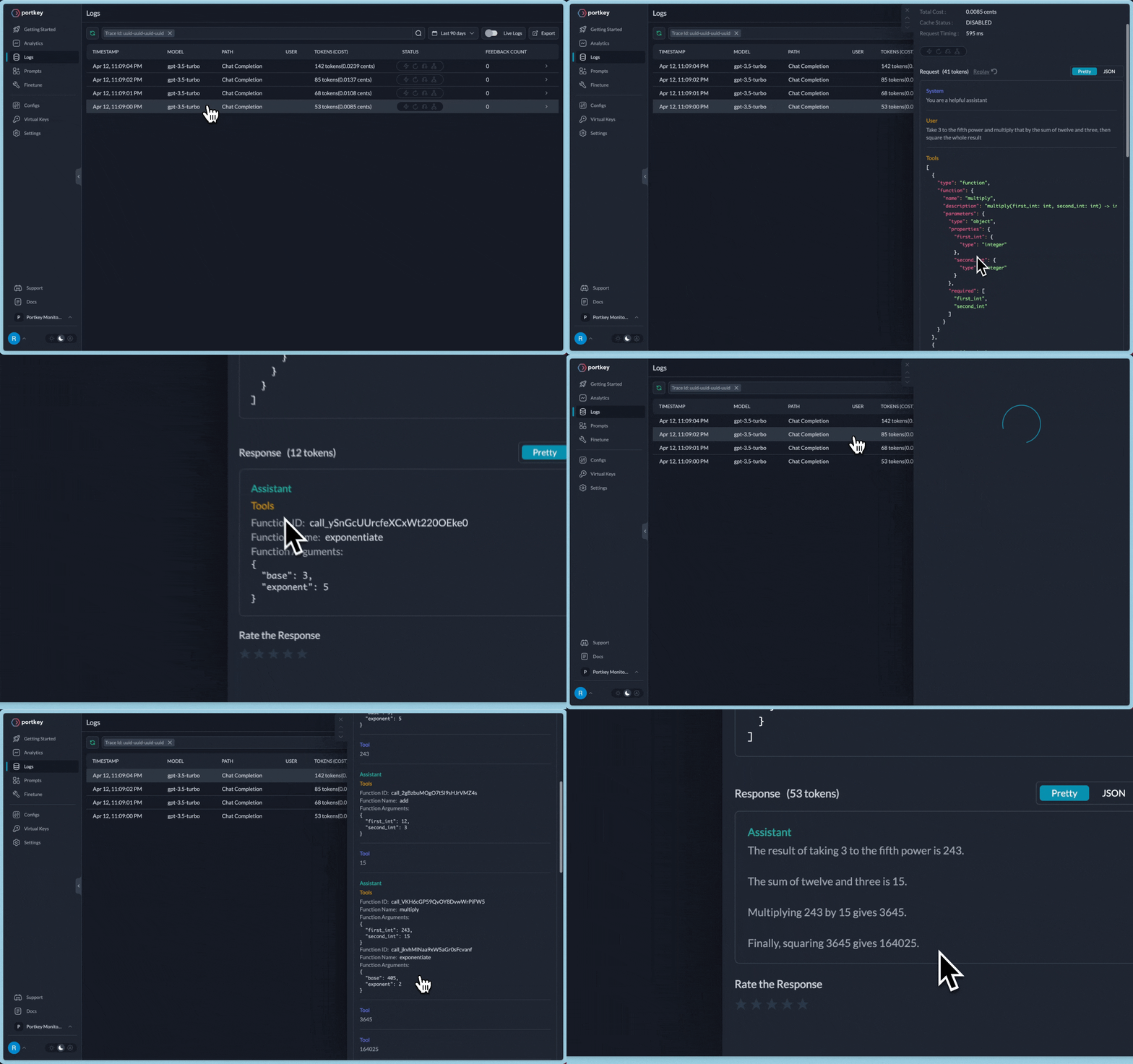
Additional Docs are available here:
- Observability - https://portkey.ai/docs/product/observability-modern-monitoring-for-llms
- AI Gateway - https://portkey.ai/docs/product/ai-gateway-streamline-llm-integrations
- Prompt Library - https://portkey.ai/docs/product/prompt-library
You can check out our popular Open Source AI Gateway here - https://github.com/portkey-ai/gateway
For detailed information on each feature and how to use it, please refer to the Portkey docs. If you have any questions or need further assistance, reach out to us on Twitter. or our support email.
Learn how to use LangChain with models on Predibase.
- Create a Predibase account and API key.
- Install the Predibase Python client with
pip install predibase - Use your API key to authenticate
Predibase integrates with LangChain by implementing LLM module. You can see a short example below or a full notebook under LLM > Integrations > Predibase.
import os
os.environ["PREDIBASE_API_TOKEN"] = "{PREDIBASE_API_TOKEN}"

from langchain_community.llms import Predibase

model = Predibase(
    model="mistral-7b",
    predibase_api_key=os.environ.get("PREDIBASE_API_TOKEN"),
    predibase_sdk_version=None,  # optional parameter (defaults to the latest Predibase SDK version if omitted)
    """
    Optionally use `model_kwargs` to set new default "generate()" settings.  For example:
    {
        "api_token": os.environ.get("HUGGING_FACE_HUB_TOKEN"),
        "max_new_tokens": 5,  # default is 256
    }
    """
    **model_kwargs,
)

"""
Optionally use `kwargs` to dynamically overwrite "generate()" settings.  For example:
{
    "temperature": 0.5,  # default is the value in model_kwargs or 0.1 (initialization default)
    "max_new_tokens": 1024,  # default is the value in model_kwargs or 256 (initialization default)
}
"""
response = model.invoke("Can you recommend me a nice dry wine?", **kwargs)
print(response)
Predibase also supports Predibase-hosted and HuggingFace-hosted adapters that are fine-tuned on the base model given by the model argument:
import os
os.environ["PREDIBASE_API_TOKEN"] = "{PREDIBASE_API_TOKEN}"

from langchain_community.llms import Predibase

# The fine-tuned adapter is hosted at Predibase (adapter_version must be specified).
model = Predibase(
    model="mistral-7b",
    predibase_api_key=os.environ.get("PREDIBASE_API_TOKEN"),
    predibase_sdk_version=None,  # optional parameter (defaults to the latest Predibase SDK version if omitted)
    adapter_id="e2e_nlg",
    adapter_version=1,
    """
    Optionally use `model_kwargs` to set new default "generate()" settings.  For example:
    {
        "api_token": os.environ.get("HUGGING_FACE_HUB_TOKEN"),
        "max_new_tokens": 5,  # default is 256
    }
    """
    **model_kwargs,
)

"""
Optionally use `kwargs` to dynamically overwrite "generate()" settings.  For example:
{
    "temperature": 0.5,  # default is the value in model_kwargs or 0.1 (initialization default)
    "max_new_tokens": 1024,  # default is the value in model_kwargs or 256 (initialization default)
}
"""
response = model.invoke("Can you recommend me a nice dry wine?", **kwargs)
print(response)
Predibase also supports adapters that are fine-tuned on the base model given by the model argument:
import os
os.environ["PREDIBASE_API_TOKEN"] = "{PREDIBASE_API_TOKEN}"

from langchain_community.llms import Predibase

# The fine-tuned adapter is hosted at HuggingFace (adapter_version does not apply and will be ignored).
model = Predibase(
    model="mistral-7b",
    predibase_api_key=os.environ.get("PREDIBASE_API_TOKEN"),
    predibase_sdk_version=None,  # optional parameter (defaults to the latest Predibase SDK version if omitted)
    adapter_id="predibase/e2e_nlg",
    """
    Optionally use `model_kwargs` to set new default "generate()" settings.  For example:
    {
        "api_token": os.environ.get("HUGGING_FACE_HUB_TOKEN"),
        "max_new_tokens": 5,  # default is 256
    }
    """
    **model_kwargs,
)

"""
Optionally use `kwargs` to dynamically overwrite "generate()" settings.  For example:
{
    "temperature": 0.5,  # default is the value in model_kwargs or 0.1 (initialization default)
    "max_new_tokens": 1024,  # default is the value in model_kwargs or 256 (initialization default)
}
"""
response = model.invoke("Can you recommend me a nice dry wine?", **kwargs)
print(response)
PremAI is an all-in-one platform that simplifies the creation of robust, production-ready applications powered by Generative AI. By streamlining the development process, PremAI allows you to concentrate on enhancing user experience and driving overall growth for your application. You can quickly start using our platform here.
This example goes over how to use LangChain to interact with different chat models with ChatPremAI
We start by installing langchain and premai-sdk. You can type the following command to install:
pip install premai langchainBefore proceeding further, please make sure that you have made an account on PremAI and already created a project. If not, please refer to the quick start guide to get started with the PremAI platform. Create your first project and grab your API key.
from langchain_core.messages import HumanMessage, SystemMessage
from langchain_community.chat_models import ChatPremAIOnce we imported our required modules, let's setup our client. For now let's assume that our project_id is 8. But make sure you use your project-id, otherwise it will throw error.
To use langchain with prem, you do not need to pass any model name or set any parameters with our chat-client. By default it will use the model name and parameters used in the LaunchPad.
Note: If you change the
modelor any other parameters liketemperatureormax_tokenswhile setting the client, it will override existing default configurations, that was used in LaunchPad.
import os
import getpass

if "PREMAI_API_KEY" not in os.environ:
    os.environ["PREMAI_API_KEY"] = getpass.getpass("PremAI API Key:")

chat = ChatPremAI(project_id=1234, model_name="gpt-4o")ChatPremAI supports two methods: invoke (which is the same as generate) and stream.
The first one will give us a static result. Whereas the second one will stream tokens one by one. Here's how you can generate chat-like completions.
human_message = HumanMessage(content="Who are you?")

response = chat.invoke([human_message])
print(response.content)
You can provide system prompt here like this:
system_message = SystemMessage(content="You are a friendly assistant.")
human_message = HumanMessage(content="Who are you?")

chat.invoke([system_message, human_message])
You can also change generation parameters while calling the model. Here's how you can do that:
chat.invoke(
    [system_message, human_message],
    temperature = 0.7, max_tokens = 20, top_p = 0.95
)
If you are going to place system prompt here, then it will override your system prompt that was fixed while deploying the application from the platform.
You can find all the optional parameters here. Any parameters other than these supported parameters will be automatically removed before calling the model.
Prem Repositories which allows users to upload documents (.txt, .pdf etc) and connect those repositories to the LLMs. You can think Prem repositories as native RAG, where each repository can be considered as a vector database. You can connect multiple repositories. You can learn more about repositories here.
Repositories are also supported in langchain premai. Here is how you can do it.
query = "Which models are used for dense retrieval"
repository_ids = [1985,]
repositories = dict(
    ids=repository_ids,
    similarity_threshold=0.3,
    limit=3
)
First we start by defining our repository with some repository ids. Make sure that the ids are valid repository ids. You can learn more about how to get the repository id here.
Please note: Similar like
model_namewhen you invoke the argumentrepositories, then you are potentially overriding the repositories connected in the launchpad.
Now, we connect the repository with our chat object to invoke RAG based generations.
import json

response = chat.invoke(query, max_tokens=100, repositories=repositories)

print(response.content)
print(json.dumps(response.response_metadata, indent=4))
This is how an output looks like.
Dense retrieval models typically include:

1. **BERT-based Models**: Such as DPR (Dense Passage Retrieval) which uses BERT for encoding queries and passages.
2. **ColBERT**: A model that combines BERT with late interaction mechanisms.
3. **ANCE (Approximate Nearest Neighbor Negative Contrastive Estimation)**: Uses BERT and focuses on efficient retrieval.
4. **TCT-ColBERT**: A variant of ColBERT that uses a two-tower
{
    "document_chunks": [
        {
            "repository_id": 1985,
            "document_id": 1306,
            "chunk_id": 173899,
            "document_name": "[D] Difference between sparse and dense information\u2026",
            "similarity_score": 0.3209080100059509,
            "content": "with the difference or anywhere\nwhere I can read about it?\n\n\n      17                  9\n\n\n      u/ScotiabankCanada        \u2022  Promoted\n\n\n                       Accelerate your study permit process\n                       with Scotiabank's Student GIC\n                       Program. We're here to help you tur\u2026\n\n\n                       startright.scotiabank.com         Learn More\n\n\n                            Add a Comment\n\n\nSort by:   Best\n\n\n      DinosParkour      \u2022 1y ago\n\n\n     Dense Retrieval (DR) m"
        }
    ]
}
So, this also means that you do not need to make your own RAG pipeline when using the Prem Platform. Prem uses it's own RAG technology to deliver best in class performance for Retrieval Augmented Generations.
Ideally, you do not need to connect Repository IDs here to get Retrieval Augmented Generations. You can still get the same result if you have connected the repositories in prem platform.
In this section, let's see how we can stream tokens using langchain and PremAI. Here's how you do it.
import sys

for chunk in chat.stream("hello how are you"):
    sys.stdout.write(chunk.content)
    sys.stdout.flush()
Similar to above, if you want to override the system-prompt and the generation parameters, you need to add the following:
import sys

for chunk in chat.stream(
    "hello how are you",
    system_prompt = "You are an helpful assistant", temperature = 0.7, max_tokens = 20
):
    sys.stdout.write(chunk.content)
    sys.stdout.flush()
This will stream tokens one after the other.
Please note: As of now, RAG with streaming is not supported. However we still support it with our API. You can learn more about that here.
Writing Prompt Templates can be super messy. Prompt templates are long, hard to manage, and must be continuously tweaked to improve and keep the same throughout the application.
With Prem, writing and managing prompts can be super easy. The Templates tab inside the launchpad helps you write as many prompts you need and use it inside the SDK to make your application running using those prompts. You can read more about Prompt Templates here.
To use Prem Templates natively with LangChain, you need to pass an id the HumanMessage. This id should be the name the variable of your prompt template. the content in HumanMessage should be the value of that variable.
let's say for example, if your prompt template was this:
Say hello to my name and say a feel-good quote
from my age. My name is: {name} and age is {age}
So now your human_messages should look like:
human_messages = [
    HumanMessage(content="Shawn", id="name"),
    HumanMessage(content="22", id="age")
]
Pass this human_messages to ChatPremAI Client. Please note: Do not forget to
pass the additional template_id to invoke generation with Prem Templates. If you are not aware of template_id you can learn more about that in our docs. Here is an example:
template_id = "78069ce8-xxxxx-xxxxx-xxxx-xxx"
response = chat.invoke([human_message], template_id=template_id)
Prem Templates are also available for Streaming too.
In this section we cover how we can get access to different embedding models using PremEmbeddings with LangChain. Let's start by importing our modules and setting our API Key.
import os
import getpass
from langchain_community.embeddings import PremEmbeddings


if os.environ.get("PREMAI_API_KEY") is None:
    os.environ["PREMAI_API_KEY"] = getpass.getpass("PremAI API Key:")
We support lots of state of the art embedding models. You can view our list of supported LLMs and embedding models here. For now let's go for text-embedding-3-large model for this example. .
model = "text-embedding-3-large"
embedder = PremEmbeddings(project_id=8, model=model)

query = "Hello, this is a test query"
query_result = embedder.embed_query(query)

# Let's print the first five elements of the query embedding vector

print(query_result[:5])
:::note
Setting model_name argument in mandatory for PremAIEmbeddings unlike chat.
:::
Finally, let's embed some sample document
documents = [
    "This is document1",
    "This is document2",
    "This is document3"
]

doc_result = embedder.embed_documents(documents)

# Similar to the previous result, let's print the first five element
# of the first document vector

print(doc_result[0][:5])print(f"Dimension of embeddings: {len(query_result)}")Dimension of embeddings: 3072
doc_result[:5]Result:
[-0.02129288576543331, 0.0008162345038726926, -0.004556538071483374, 0.02918623760342598, -0.02547479420900345]
LangChain PremAI supports tool/function calling. Tool/function calling allows a model to respond to a given prompt by generating output that matches a user-defined schema.
- You can learn all about tool calling in details in our documentation here.
- You can learn more about langchain tool calling in this part of the docs.
NOTE:
The current version of LangChain ChatPremAI do not support function/tool calling with streaming support. Streaming support along with function calling will come soon.
In order to pass tools and let the LLM choose the tool it needs to call, we need to pass a tool schema. A tool schema is the function definition along with proper docstring on what does the function do, what each argument of the function is etc. Below are some simple arithmetic functions with their schema.
NOTE:
When defining function/tool schema, do not forget to add information around the function arguments, otherwise it would throw error.
from langchain_core.tools import tool
from pydantic import BaseModel, Field

# Define the schema for function arguments
class OperationInput(BaseModel):
    a: int = Field(description="First number")
    b: int = Field(description="Second number")


# Now define the function where schema for argument will be OperationInput
@tool("add", args_schema=OperationInput, return_direct=True)
def add(a: int, b: int) -> int:
    """Adds a and b.

    Args:
        a: first int
        b: second int
    """
    return a + b


@tool("multiply", args_schema=OperationInput, return_direct=True)
def multiply(a: int, b: int) -> int:
    """Multiplies a and b.

    Args:
        a: first int
        b: second int
    """
return a * bWe will now use the bind_tools method to convert our above functions to a "tool" and binding it with the model. This means we are going to pass these tool information everytime we invoke the model.
tools = [add, multiply]
llm_with_tools = chat.bind_tools(tools)
After this, we get the response from the model which is now binded with the tools.
query = "What is 3 * 12? Also, what is 11 + 49?"

messages = [HumanMessage(query)]
ai_msg = llm_with_tools.invoke(messages)
As we can see, when our chat model is binded with tools, then based on the given prompt, it calls the correct set of the tools and sequentially.
ai_msg.tool_callsOutput
[{'name': 'multiply',
  'args': {'a': 3, 'b': 12},
  'id': 'call_A9FL20u12lz6TpOLaiS6rFa8'},
 {'name': 'add',
  'args': {'a': 11, 'b': 49},
  'id': 'call_MPKYGLHbf39csJIyb5BZ9xIk'}]
We append this message shown above to the LLM which acts as a context and makes the LLM aware that what all functions it has called.
messages.append(ai_msg)Since tool calling happens into two phases, where:
-
in our first call, we gathered all the tools that the LLM decided to tool, so that it can get the result as an added context to give more accurate and hallucination free result.
-
in our second call, we will parse those set of tools decided by LLM and run them (in our case it will be the functions we defined, with the LLM's extracted arguments) and pass this result to the LLM
from langchain_core.messages import ToolMessage

for tool_call in ai_msg.tool_calls:
    selected_tool = {"add": add, "multiply": multiply}[tool_call["name"].lower()]
    tool_output = selected_tool.invoke(tool_call["args"])
    messages.append(ToolMessage(tool_output, tool_call_id=tool_call["id"]))
Finally, we call the LLM (binded with the tools) with the function response added in it's context.
response = llm_with_tools.invoke(messages)
print(response.content)
Output
The final answers are:

- 3 * 12 = 36
- 11 + 49 = 60Above we have shown how to define schema using tool decorator, however we can equivalently define the schema using Pydantic. Pydantic is useful when your tool inputs are more complex:
from langchain_core.output_parsers.openai_tools import PydanticToolsParser

class add(BaseModel):
    """Add two integers together."""

    a: int = Field(..., description="First integer")
    b: int = Field(..., description="Second integer")


class multiply(BaseModel):
    """Multiply two integers together."""

    a: int = Field(..., description="First integer")
    b: int = Field(..., description="Second integer")


tools = [add, multiply]
Now, we can bind them to chat models and directly get the result:
chain = llm_with_tools | PydanticToolsParser(tools=[multiply, add])
chain.invoke(query)
Output
[multiply(a=3, b=12), add(a=11, b=49)]Now, as done above, we parse this and run this functions and call the LLM once again to get the result.# SWI-Prolog
SWI-Prolog offers a comprehensive free Prolog environment.
Once SWI-Prolog has been installed, install lanchain-prolog using pip:
pip install langchain-prologThe PrologTool class allows the generation of langchain tools that use Prolog rules to generate answers.
from langchain_prolog import PrologConfig, PrologToolSee a usage example.
See the same guide for usage examples of PrologRunnable, which allows the generation
of LangChain runnables that use Prolog rules to generate answers.
PubMed® by
The National Center for Biotechnology Information, National Library of Medicinecomprises more than 35 million citations for biomedical literature fromMEDLINE, life science journals, and online books. Citations may include links to full text content fromPubMed Centraland publisher web sites.
You need to install a python package.
pip install xmltodictSee a usage example.
from langchain.retrievers import PubMedRetrieverSee a usage example.
from langchain_community.document_loaders import PubMedLoaderShale Protocol provides production-ready inference APIs for open LLMs. It's a Plug & Play API as it's hosted on a highly scalable GPU cloud infrastructure.
Our free tier supports up to 1K daily requests per key as we want to eliminate the barrier for anyone to start building genAI apps with LLMs.
With Shale Protocol, developers/researchers can create apps and explore the capabilities of open LLMs at no cost.
This page covers how Shale-Serve API can be incorporated with LangChain.
As of June 2023, the API supports Vicuna-13B by default. We are going to support more LLMs such as Falcon-40B in future releases.
1. Find the link to our Discord on https://shaleprotocol.com. Generate an API key through the "Shale Bot" on our Discord. No credit card is required and no free trials. It's a forever free tier with 1K limit per day per API key.
2. Use https://shale.live/v1 as OpenAI API drop-in replacement
For example
from langchain_openai import OpenAI
from langchain_core.prompts import PromptTemplate
from langchain_core.output_parsers import StrOutputParser

import os
os.environ['OPENAI_API_BASE'] = "https://shale.live/v1"
os.environ['OPENAI_API_KEY'] = "ENTER YOUR API KEY"

llm = OpenAI()

template = """Question: {question}

# Answer: Let's think step by step."""

prompt = PromptTemplate.from_template(template)


llm_chain = prompt | llm | StrOutputParser()

question = "What NFL team won the Super Bowl in the year Justin Beiber was born?"

llm_chain.invoke(question)
UpTrain is an open-source unified platform to evaluate and improve Generative AI applications. It provides grades for 20+ preconfigured evaluations (covering language, code, embedding use cases), performs root cause analysis on failure cases and gives insights on how to resolve them.
pip install uptrainfrom langchain_community.callbacks.uptrain_callback import UpTrainCallbackHandlerSee an example.
Vearch is a scalable distributed system for efficient similarity search of deep learning vectors.
Vearch Python SDK enables vearch to use locally. Vearch python sdk can be installed easily by pip install vearch.
Vearch also can used as vectorstore. Most details in this notebook
from langchain_community.vectorstores import Vearch