
DiffUtil是support-v7:24.2.0中新增的工具類,它用來比較兩個數據,尋找兩者之間的最小變化量,再將算好的結果return。因此凡是數據集的比較都能做,DiffUtil提供了callback讓user進行其他操作,本篇著重在RecyclerView的更新。
採用Myers的差異算法(git diff)。空間複雜度為O(n),時間複雜度為O(N + D ^2)。 主要是計算兩個數據集添加和刪除的最小差異數,也就是用最簡單的方式將一個數據集轉換為另一個。 DiffUtil預設支援數據的移動偵測,所以需要對結果進行二次運算,較為耗費效能,時間複雜度提高到O(N ^ 2),N是add和remove的操作總數;但如果數據集已根據條件排序,或是數據集中的數據不存在移位情境,可以關掉第二次計算來提高效能。
它最大的用處就是在RecyclerView刷新時,不再無腦notifyDataSetChanged(),原本的notifyDataSetChanged()有兩個缺點:
- 性能較低,不管新舊data是否相同,都全部刷新一遍整個RecyclerView
- 不會觸發RecyclerView的更新動畫(刪除,新增,位移,改變動畫),只有直接使用下列api才會有動畫顯示:
notifyItemInserted()
notifyItemChanged()
notifyItemMoved()
notifyItemRemoved()
notifyItemRangeChanged()
notifyItemRangeInserted()
notifyItemRangeRemoved()
使用DiffUtil的優點:
- 提高UI更新的效率,只針對有變動的資料進行更新
- 不需要自己比較新舊數據和決定特定更新api,也可以有更新動畫
這是一個抽象類,也是最核心部分,使用者必須extand出來建立計算新舊數據集之間的規則。其中有5個抽象方法:
 getOldListSize(): Int // 獲取舊數據集的長度
 getNewListSize(): Int // 獲取新數據集的長度
 areItemsTheSame(oldItemPosition: Int, newItemPosition: Int): Boolean // 用來判斷兩個對像是否是相同的項目
 areContentsTheSame(oldItemPosition: Int, newItemPosition: Int): Boolean // 用來檢查兩個項目是否含有相同的數據
getChangePayload(oldItemPosition: Int, newItemPosition: Int): Any // 部分綁定通過靜態方法DiffUtil.calculateDiff(DiffUtil.Callback)來計算數據集的更新。若計算數據龐大,應另開thread執行此方法。
 DifUtil.calculateDiff(Callback cb, boolean detectMoves)
 DifUtil.calculateDiff(Callback cb)
True if DiffUtil should try to detect moved items, false otherwise.
如果設為 true,便會執行二次運算,做項目移動
如果設為 false,那麼一個項目的移動會單純視為先 remove,再 insert
(圖片取自Recyclerview++ with DiffUtil)
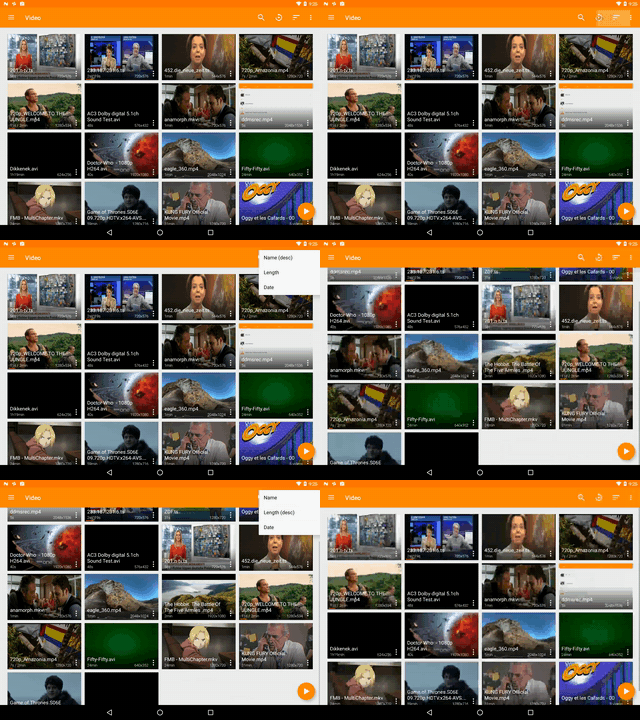
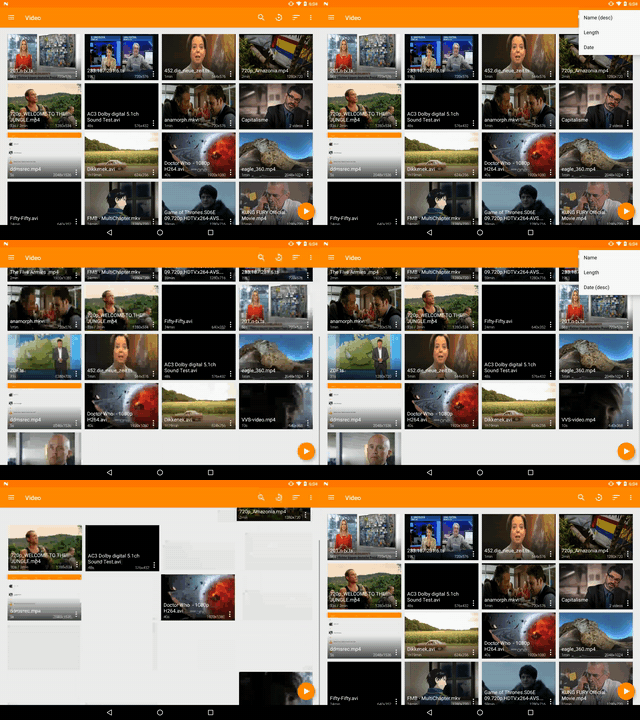
用於保存DiffUtil計算出的數據集差異,將其分配給RecyclerView.Adapter,並自動調用下列方法更新UI:
notifyItemRangeInserted(position, count);
notifyItemRangeRemoved(position, count);
notifyItemMoved(fromPosition, toPosition);
notifyItemRangeChanged(position, count, payload);
e.g.
val diffCallback = CustDiffCallback(mOldList, mNewList)
val diffResult = DiffUtil.calculateDiff(diffCallback, false)
diffResult.dispatchUpdatesTo(mAdapter)
mAdapter.setData(mNewList)class SettlementLogDiffCallback(
private val mOldList: List<LogListItem?>,
private val mNewList: List<LogListItem?>) : DiffUtil.Callback() {
override fun getOldListSize(): Int {
return mOldList.size
}
override fun getNewListSize(): Int {
return mNewList.size
}
/**
* return兩個對像是否是相同item
*/
override fun areItemsTheSame(oldItemPosition: Int, newItemPosition: Int): Boolean {
// return mOldList[oldItemPosition].javaClass == mNewList[newItemPosition].javaClass
return mOldList[oldItemPosition]?.logType == mNewList[newItemPosition]?.logType
}
/**
* return item是否同內容
*
* 當areItemsTheSame為true時才觸發
* 當areItemsTheSame返回為false時,即不管areContentsTheSame是否為true皆進行刷新
*/
override fun areContentsTheSame(oldItemPosition: Int, newItemPosition: Int): Boolean {
return if (mOldList[oldItemPosition] is SettlementLogDetail
&& mNewList[newItemPosition] is SettlementLogDetail) {
val oldCreateDate = (mOldList[oldItemPosition] as SettlementLogDetail).createDate
val newCreateDate = (mNewList[newItemPosition] as SettlementLogDetail).createDate
val oldId = (mOldList[oldItemPosition] as SettlementLogDetail).id
val newId = (mNewList[newItemPosition] as SettlementLogDetail).id
// 比較兩個內容,任一有變動及更新
oldCreateDate == newCreateDate || oldId == newId
} else {
true
}
}
/**
* areItemsTheSame() 返回 true 而 areContentsTheSame() 返回 false 時觸發
*
* 如果使用 RecyclerView 配合 DiffUtils 且調用此方法,RecyclerView 會用透過這些內容自動去執行正確的動畫
* {@link android.support.v7.widget.RecyclerView.ItemAnimator ItemAnimator}
*
* 預設return null
* @param oldItemPosition
* @param newItemPosition
* @return
*/
override fun getChangePayload(oldItemPosition: Int, newItemPosition: Int): Any? {
val diff = Bundle()
if (mNewList[newItemPosition] !is SettlementLogDetail) {
return super.getChangePayload(oldItemPosition, newItemPosition)
} else if (mNewList[newItemPosition] is SettlementLogDetail) {
val newContact = mNewList[newItemPosition] as SettlementLogDetail
val oldContact = mOldList[oldItemPosition] as SettlementLogDetail
if (newContact.icon != oldContact.icon) {
diff.putInt("icon", newContact.icon)
}
if (newContact.money != oldContact.money) {
diff.putString("money", newContact.money)
}
if (newContact.createDate != oldContact.createDate) {
diff.putLong("date", newContact.createDate)
}
}
return if (diff.size() == 0) {
null
} else {
diff
}
}
}fun updateLogList(list: MutableList<LogListItem>) {
val recyclerViewState = mRecyclerView.layoutManager.onSaveInstanceState()
val diffCallback = SettlementLogDiffCallback(mSettlementLogList, list)
// 使用rxJava or 另開thread至背景做計算,避免ANR
CompositeDisposable()
.add(Single.just(DiffUtil.calculateDiff(diffCallback, false))
.subscribeOn(Schedulers.computation())
.observeOn(AndroidSchedulers.mainThread())
.subscribe { result ->
result.dispatchUpdatesTo(this)
// mSettlementLogList.clear() 範例為loadmore時不清除
mSettlementLogList.addAll(list)
mRecyclerView.layoutManager.onRestoreInstanceState(recyclerViewState)
})
}overwrite 含 payloads 的 onBindViewHolder
/**
 * 如果payloads是空的,或不是可採用部分綁定的ViewHolder,直接採用完全綁定
 *
 * super.onBindViewHolder(holder, position, payloads) 預設完全綁定
 */
override fun onBindViewHolder(holder: RecyclerView.ViewHolder?, position: Int, payloads: MutableList<Any>?) {
        if (payloads == null || payloads.isEmpty() || holder !is ViewHolder) {
            // 完全綁定

            super.onBindViewHolder(holder, position, payloads)
        } else {
            // 部分綁定

            // 將getChangePayload()的資料依指定的型態取出
            val bundle = payloads[0] as Bundle

            // 針對有key的data才進行刷新
            for (key in bundle.keySet()) {
                if (key == "icon") {
                    holder.icon.setImageResource(bundle.getInt(key))
                }
                if (key == "money") {
                    holder.money.setText(R.string.settlement_money)
                    holder.money.text = holder.money.text.toString()
                            .plus("-")
                            .plus(Utils.moneyFormat(bundle.getString(key)))
                }
                if (key == "date") {
                    holder.date.text = DateUtils.millisecond2DateWithoutYear(bundle.getLong(key))
                }
            }
        }
}- 自定義Class繼承DiffUtil.Callback,撰寫特定規則來比較數據差異
- 另開Thread或透過rxjava等方式調用DiffUtil.calculateDiff來計算更新,得到DiffResult
- 在UI線程中調用DiffResult.dispatchUpdatesTo(RecyclerView.Adapter)
- 決定是否使用部分綁定進行更新
onBindViewHolder(holder: RecyclerView.ViewHolder?, position: Int, payloads: MutableList<Any>?)
- 將adapter的資料清空後更新
- 適合下拉更新或搜尋更新這類需要刷新列表的情境
- 若本身已經使用notifyItemRangeChanged()等等api來更新資料(已有動畫),且item不太複雜、不耗太大性能,或許反而沒有太大的更換誘因
- LoadMore(EndlessLoad)的情況下,或許反而需要做到下列事項來提升UX:
- 保留既有數據(不清空直接add)
- 更新前先暫存recyclerView的滑動狀態,並在更新adapter後回復
val recyclerViewState = mRecyclerView.layoutManager.onSaveInstanceState()
// ...calculateDiff
mRecyclerView.layoutManager.onRestoreInstanceState(recyclerViewState)
- 或許需要取消recyclerView的更新動畫來避免更新資料時的blink
mRecyclerView.itemAnimator = null
ref: