Skip to content

Instantly share code, notes, and snippets.

Show Gist options
  • Select an option

  • Save ifiokjr/14f76bc17a100d0b203c96db5bdac3ce to your computer and use it in GitHub Desktop.

Select an option

Save ifiokjr/14f76bc17a100d0b203c96db5bdac3ce to your computer and use it in GitHub Desktop.
get copilot to work with markdown-all-in-one extension

How I got GitHub copilot to coexist with markdown all in one extension

Copilot has been great.

One problem.

Markdown.

When I hit tab nothing was happening.

Searched it and couldn't find the reason a few days ago.

Today I searched again, and found a tidy solution in the github discussion forum.

It turns out the tab shortcut from markdown all in one overrides the shortcut from copilot.

image

  • Open the shortcuts menu as shown in the above image, or use the shortcut (Mac: ⌘K ⌘S)
  • Search for tab markdown
  • Select the shortcut for tab press Enter and type ⌥Tab.

And that's it. You've got github copilot and markdown all in one working together.
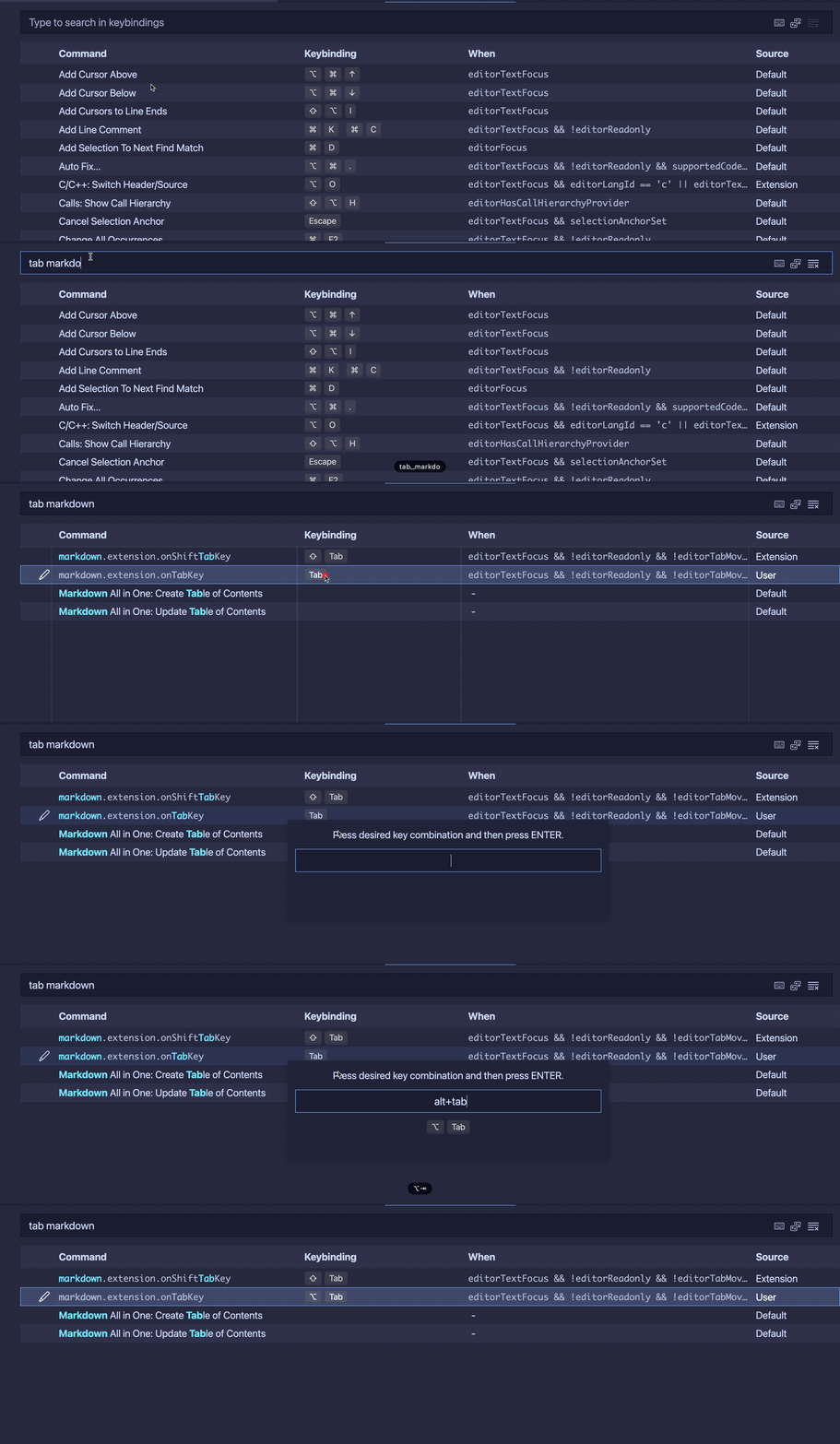
2021-11-12 05 58 50

Sign up for free to join this conversation on GitHub. Already have an account? Sign in to comment