
Gitlab AutoDevops is a great feature in Gitlab which allows us to Build,Test,Deploy our apps seamlessly to Kubernetes. This tutorial will not walk over steps to configure kubernetes integration in Gitlab as its already well documented here.
This chart is the modified form of official auto-deploy-app that is intended to achieve traffic routing in canary deployment using nginx-ingress.
Assuming you have already configured your Gitlab project with AutoDevops, next is to use the modified chart that I created here -> https://gitlab.com/hayderimran7/auto-deploy-canary-chart
AutoDevops is completely customizable, so in order to use this chart instead of official chart, all you need to do is copy the files and move under chart directory in your repo.
Next, you want to enable canary stage which can be done simply in your .gitlab-ci.yml as:
include:
— template: Auto-DevOps.gitlab-ci.yml
variables:
CANARY_ENABLED: “true”
The traffic routing in canary deployment is done based on header value while using nginx-ingress and AutoDevOps.
We used canary by header value feature of nginx-ingress annotations https://kubernetes.github.io/ingress-nginx/user-guide/nginx-configuration/annotations/#canary.
For that we had to modify official chart https://gitlab.com/gitlab-org/charts/auto-deploy-app to add two additional resources that are created during canary stage:
canary-ingresscanary-serviceThe
canary-ingresschecks for headercanary, if set, routes tocanaryservice backend that then forwards tocanary-deployment. There was a bugauto-deploy-appwhere theproductionservice was pointing to bothproductiondeployment andproduction-canarydeployment based on its selectors, which is raised here https://gitlab.com/gitlab-org/charts/auto-deploy-app/issues/51.
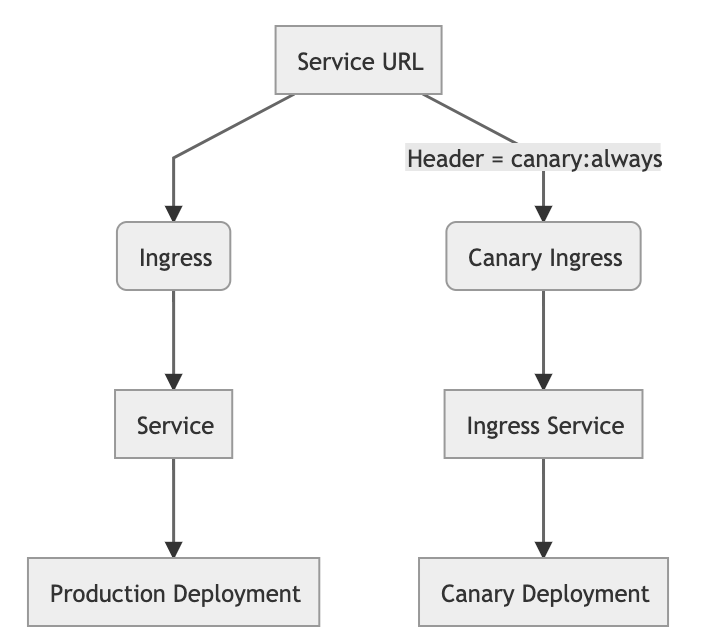
Simply set CANARY_ENABLED in your .gitlab-ci.yml when using AutoDevops. Deploy the app using this chart in productionand then tocanary`.
Now make a request to service URL as:
curl -H “canary: always” http://<service-url>
This will hit the canary-ingress that will route to canary-deployment that you can verfiy in pod logs.