
Last active
July 27, 2025 10:03
-
-
Save ipisboomz/b92b0f443531a4f92c339aa5dca41a91 to your computer and use it in GitHub Desktop.
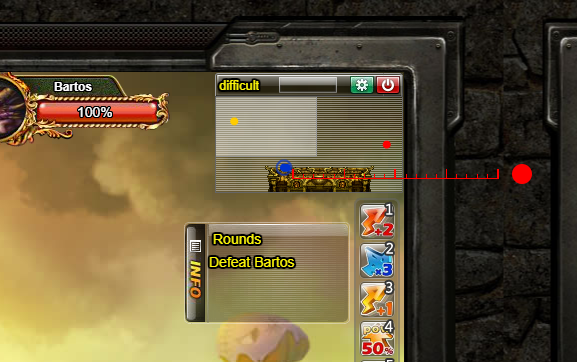
DDTank mini map ruler
This file contains hidden or bidirectional Unicode text that may be interpreted or compiled differently than what appears below. To review, open the file in an editor that reveals hidden Unicode characters.
Learn more about bidirectional Unicode characters
| var s = document.createElement("link"); | |
| s.rel = "stylesheet"; | |
| s.type = 'text/css'; | |
| s.href = "//code.jquery.com/ui/1.12.1/themes/base/jquery-ui.css"; | |
| $("head").append(s); | |
| $.getScript('//code.jquery.com/ui/1.12.1/jquery-ui.js', () => { | |
| var lines = []; | |
| for(let i = 0; i <= 20; i++){ | |
| lines.push(`<div style=" | |
| width: ${i % 10 === 0 ? "2px" : "1px"}; | |
| background: #F00; | |
| height: ${i % 5 === 0 ? "10px" : "5px"}; | |
| box-sizing: border-box; | |
| " title="${i}"></div>`); | |
| } | |
| var tool = document.createElement('div'); | |
| tool.innerHTML = ` | |
| <div id="resizable" style=" | |
| width: 200px; | |
| position: absolute; | |
| right: 100px; | |
| bottom: 5px; | |
| "> | |
| <div id="ruler" style=" | |
| display: flex; | |
| justify-content: space-between; | |
| align-items: baseline; | |
| height: 10px; | |
| width: 100%; flex-direction: row; | |
| box-sizing: border-box; | |
| border-bottom: 1px solid #F00; | |
| " | |
| > | |
| ${lines.join('')} | |
| </div> | |
| </div> | |
| <div id="handle" style="width: 20px; height: 20px; background: #F00; border-radius: 100%; cursor: move"></div>`; | |
| tool.id = "draggable"; | |
| tool.style.height = "20px"; | |
| tool.style.width = "20px"; | |
| tool.style.position = "fixed"; | |
| tool.style.transition = "none"; | |
| tool.style.top = "200px"; | |
| tool.style.left = "200px"; | |
| tool.style.zIndex = "99999"; | |
| document.body.appendChild(tool); | |
| let color = 0; | |
| $("#draggable").draggable({ | |
| handle: "#handle", | |
| }); | |
| $("#resizable").resizable({ | |
| handles: "e, w" | |
| }); | |
| $("#handle").on('dblclick', () => { | |
| color = (color + 1) % 4; | |
| if(color === 0){ | |
| $("#ruler").css({borderBottomColor: "red"}); | |
| $("#ruler > div").css({background: "red"}); | |
| }else if(color === 1){ | |
| $("#ruler").css({borderBottomColor: "blue"}); | |
| $("#ruler > div").css({background: "blue"}); | |
| }else if(color === 2){ | |
| $("#ruler").css({borderBottomColor: "white"}); | |
| $("#ruler > div").css({background: "white"}); | |
| }else if(color === 3){ | |
| $("#ruler").css({borderBottomColor: "black"}); | |
| $("#ruler > div").css({background: "black"}); | |
| } | |
| }) | |
| }); |

Author
ipisboomz
commented
Jul 13, 2020
- Right click on DDTank Logo
- Inspect Element
- When developer tools appeared, click console tab
- Paste the code
- Press enter
Author
- Resize on sides of the ruler
- Drag the red circle to move (Slowly drag because its buggy)
- Double click circle to change color
Author
Preview:
Author
Practice how to use it in firing range
This is not Aim-bot, just a ruler :)

Author

Sign up for free
to join this conversation on GitHub.
Already have an account?
Sign in to comment