
Streams are one of the most used concepts in nodejs, but also one that most people find hard to fully grasp. So with this note I aim to shed some light on their purpose and how you can you can use them in your projects. Here I'm not going to go into too much detail on the various types of streams, but rather a simple overview what they are and the way to use them.
The official definition of a stream in nodejs is as follows:
A stream is an abstract interface implemented by various objects in Node.js. Streams are readable, writable, or both. All streams are instances of EventEmitter. node.js doc
A simpler definition, is that they're basically a pattern for handling input and output.Their main advantage is that they provide a way to read or write data in small chunks, rather than having to read it all at once.
Imagine the following scenario, where you need to read a file into memory and then write it somewhere else. In node, you would probably do something like this:
var fs = require('fs');

fs.readFile('./contacts.txt', function(err, data) {
    if (err) throw err;
    console.log(data.toString());
    fs.writeFile ('./new_contacts.txt', data, function(err) {
        if (err) throw err;
         console.log('complete');
    });
});
There is nothing wrong with this approach of reading a file, it all works well. However when the file is too big(let's say 2000mb), you need to load those 2000mb into memory, which is very costly. This is where streams come into play, instead of loading the data all at once we read the data in small chunks and do with it what we want.
If you wanted to do the same as shown above you could simply create a read stream from the 'contacts.txt' file's content and then create a write stream to output the content. Fortunately, there's a method in the fs module for that. So, to achieve a similar result to the one above you would have to do something in this lines.
var stream = require('stream');
var fs = require('fs');

var streamFile = fs.createReadStream('./contacts.txt');

streamFile.on('data', (chunk) => {
  console.log(chunk.toString());
});

streamFile.pipe(fs.createWriteStream('./new_contacts.txt'));
In this simple example, there are some interesting things happening. The first being the creation of a read stream, then we're using the 'data' event to print the file's contents. For last, we're piping the read stream into the write stream, that is going to create our new file.
The difference is that in the first example, the data is loaded all at once and the written to the console, and in the second example the data is being loaded and written progressively.
In node there are several types of streams, below there's a description for their features.
- A readable stream is a source of data that can be read.
- Readable streams possess two states:
- paused/non-flowing (default)
- flowing
- To manage the state you can use
- readable.isPaused() - Returns boolean
- readable.pause() - Returns this
- readable.resume() - Returns this
- Main Events:
- {OLD} data (chunk) - This will change the state of the stream into flowing, so the data will be provided as fast as possible forcing you to read it. If you attach this event you cannot go back to using the readable event.
- {NEW} readable - After attaching this event the stream will still be in non-flowing/paused state. This event will tell you when the stream has some data that you can read, but its up to you whether to read it or not.
- end - Occurs when there is no more data to be read.
- pipe - Gets the data from a readable stream to a writable stream.
- Main method:
- read - Specifies what can be read from the stream using the push method. When we pass push(null), it means that there won't be any new data to be read.
readable.on('readable', function() {
  console.log('readable:', readable.read());
});readable.on('data', (chunk) => {
console.log('got %d bytes of data', chunk.length);
readable.pause();
console.log('there will be no more data for 1 second');
setTimeout(() => {
console.log('now data will start flowing again');
readable.resume();
}, 1000);
});- A writable stream is a stream you can use to write data. This is a stream where you can pipe to but not from.
- Main events:
- end - Notifies the stream that you've finished writing.
- finish - Called when the stream.end() method has been called, and all data has been flushed.
- Main method:
- write(chunk, encoding, callback) - The "chunk" is the data you want to write, normally a buffer or a string. The other two parameters are optional. The first consists in the encoding in which you are writing the chunk, the other is a function to be called after the data is written.
Duplex streams are a combination of readable and writable streams. So in order to use one you need to implement both _read and _write methods.
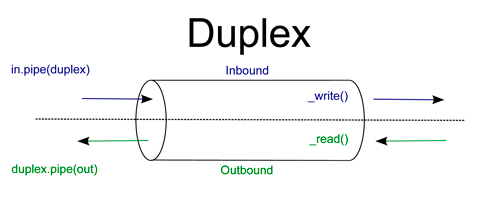
They're most commonly used in things like sockets and they serve as the base class for the Transform stream.
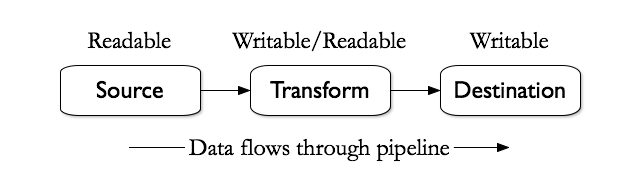
Transform streams are a type of duplex stream where their output is calculated from the input. They are used when you want to make some transformation to a stream. They implement both readable and writable interfaces.
This allows data to be piped to them and from them, because they output data as a readable stream, so it can be piped once again.
As seen before there are several types of streams in node, and many ways of creating them. In the example above we're using the fs module, but there are other ways of creating them, like using some other modules or creating your own streams. A simple way to create you own streams would be:
var stream = require('stream');

var number = 0;
var rs = stream.Readable();
var ws = stream.Writable();
var ts = stream.Transform();

rs._read = function(){

    if(number===50)
        this.push(null);
    else
        this.push((number++).toString());
}

ts._transform = function (data, encoding, next) {

  if(parseInt(data)%2!==0)
    this.push(data);
  next();
};

ws._write = function(chunk, encoding ,next){
    console.log(chunk.toString());
    next();
}

rs.pipe(ts).pipe(ws);
When creating your own stream you need to implement its methods based on their type. See the image below to know which methods to implement.
| Use-case | Class | Method(s) to implement |
|---|---|---|
| Reading Only | Readable | _read |
| Writing Only | Writable | _write, _writev |
| Reading Writing | Duplex | _read, _write, _writev |
| Open on written data, then read the result | Transform | _transform, _flush |
Here we'll be creating the same example as the one before but now we'll create classes for each of the streams that were used, and extend their type (readable, writable and transform).This example will be created both on ES5 & ES6 so you can see how it's done in both ways.
var Readable = require("stream").Readable;
var util = require("util");

function Read (number){
    Readable.call(this);

    this.number = number;
}

util.inherits(Read, Readable); //|| Read.prototype = Object.create(Readable.prototype);


Read.prototype._read = function (){
    if(this.number===50)
        this.push(null);
    else
        this.push((this.number++).toString());
}


module.exports = Read;
Read Stream (ES6):
'use strict'

var Readable = require("stream").Readable;

class Read extends Readable {
  constructor(number) {
    super();
    this.number = number;
  }


  _read(){
    if(this.number===50)
        this.push(null);
    else
        this.push((this.number++).toString());
 }

}

module.exports = Read;
Transform Stream (ES5):
var Transform = require("stream").Transform;
var util = require("util");

function OddNumber (){
    Transform.call(this);
}

util.inherits(OddNumber, Transform); // || OddNumber.prototype = Object.create(Transform.prototype);


OddNumber.prototype._transform = function (chunk, encoding, next){
  if(parseInt(chunk)%2!==0)
    this.push(chunk);
  next();
}


module.exports = OddNumber;
Transform Stream (ES6):
'use strict'

var Transform = require("stream").Transform;

class OddNumber extends Transform {
  constructor() {
    super();
  }


  _transform(chunk, encoding, next){
    if(parseInt(chunk)%2!==0)
      this.push(chunk);
    next();
  }

}

module.exports = OddNumber;
Write Stream (ES5):
var Writable = require("stream").Writable;
var util = require("util");

function Write (){
    Writable.call(this);
}

util.inherits(Write, Writable); // || Write.prototype = Object.create(Writable.prototype);


Write.prototype._write = function (chunk, encoding ,next){
    console.log(chunk.toString());
    next();
}


module.exports = Write;
Write Stream (ES6):
'use strict'

var Writable = require("stream").Writable;
var util = require("util");


class Write extends Writable {
  constructor() {
    super();
  }


  _write (chunk, encoding ,next){
    console.log(chunk.toString());
    next();
  }

}

module.exports = Write;
Main:
var Read = require('./read_s');
var Transform = require('./transform_s');
var Write = require('./write_s');

new Read(0).pipe(new Transform()).pipe(new Write());
Hopefully by now you have an idea on how streams work and you can use them, whether to make use of some modules that rely on them or to create your own.
For a more in-depth overview check the node stream documentation at: https://nodejs.org/api/stream.html#stream_class_stream_transform.
Source : webynotes