
As a part of my hands on labs.
Use case terraform here.
Official documentation about aws provider, here all providers here
The code that I used to create the a single test instance
provider "aws" {
  region = "us-east-1"
}
resource "aws_instance" "vm" {
  ami           = "ami-03e0b06f01d45a4eb"
  subnet_id     = "subnet-02a2c5fc907e73765"
  instance_type = "t3.micro"
  monitoring    = "true"
  tags = {
    name        = "aws-instance"
    Terraform   = "true"
    Environment = "dev"
  }
}Official details about terraform commands here
terraform --version
terraform init
terraform plan
terraform apply
terraform destroy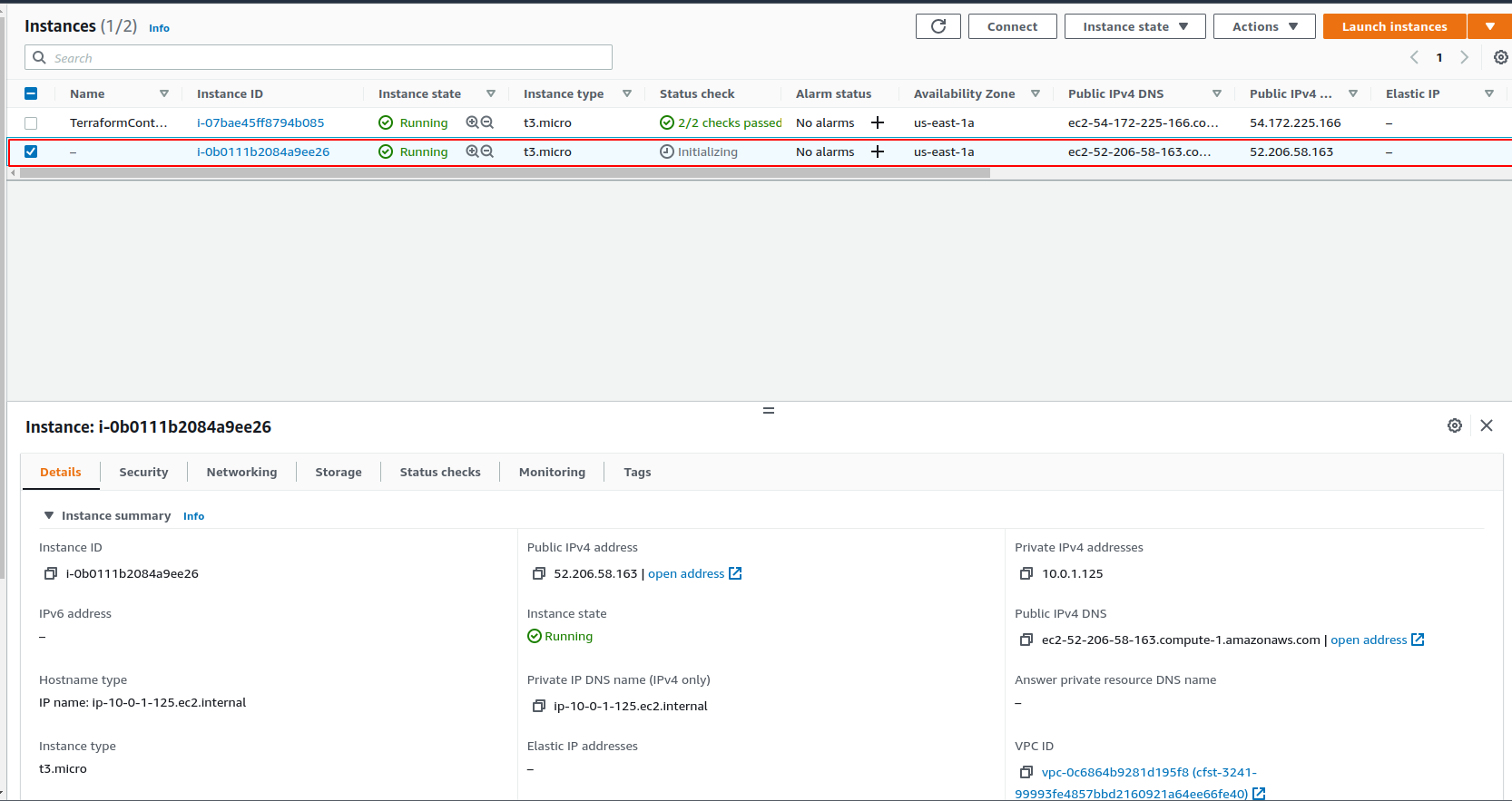
Just a quick check of the terraform version
[root@ip-10-0-1-236 terraform_aws]# terraform --version
Terraform v0.14.3
+ provider registry.terraform.io/hashicorp/aws v4.5.0

Your version of Terraform is out of date! The latest version
is 1.1.7. You can update by downloading from https://www.terraform.io/downloads.htmlTerraform init usage here
[root@ip-10-0-1-236 terraform_aws]# terraform init

Initializing the backend...

Initializing provider plugins...
- Finding latest version of hashicorp/aws...
- Installing hashicorp/aws v4.5.0...
- Installed hashicorp/aws v4.5.0 (self-signed, key ID 34365D9472D7468F)

Partner and community providers are signed by their developers.
If you'd like to know more about provider signing, you can read about it here:
https://www.terraform.io/docs/plugins/signing.html

Terraform has created a lock file .terraform.lock.hcl to record the provider
selections it made above. Include this file in your version control repository
so that Terraform can guarantee to make the same selections by default when
you run "terraform init" in the future.

Terraform has been successfully initialized!

You may now begin working with Terraform. Try running "terraform plan" to see
any changes that are required for your infrastructure. All Terraform commands
should now work.

If you ever set or change modules or backend configuration for Terraform,
rerun this command to reinitialize your working directory. If you forget, other
commands will detect it and remind you to do so if necessary.Check what will be run/executed. Terraform plan command usage here
[root@ip-10-0-1-236 terraform_aws]# terraform plan

An execution plan has been generated and is shown below.
Resource actions are indicated with the following symbols:
  + create

Terraform will perform the following actions:

  # aws_instance.vm will be created
  + resource "aws_instance" "vm" {
      + ami                                  = "ami-03e0b06f01d45a4eb"
      + arn                                  = (known after apply)
      + associate_public_ip_address          = (known after apply)
      + availability_zone                    = (known after apply)
      + cpu_core_count                       = (known after apply)
      + cpu_threads_per_core                 = (known after apply)
      + disable_api_termination              = (known after apply)
      + ebs_optimized                        = (known after apply)
      + get_password_data                    = false
      + host_id                              = (known after apply)
      + id                                   = (known after apply)
      + instance_initiated_shutdown_behavior = (known after apply)
      + instance_state                       = (known after apply)
      + instance_type                        = "t3.micro"
      + ipv6_address_count                   = (known after apply)
      + ipv6_addresses                       = (known after apply)
      + key_name                             = (known after apply)
      + monitoring                           = true
      + outpost_arn                          = (known after apply)
      + password_data                        = (known after apply)
      + placement_group                      = (known after apply)
      + placement_partition_number           = (known after apply)
      + primary_network_interface_id         = (known after apply)
      + private_dns                          = (known after apply)
      + private_ip                           = (known after apply)
      + public_dns                           = (known after apply)
      + public_ip                            = (known after apply)
      + secondary_private_ips                = (known after apply)
      + security_groups                      = (known after apply)
      + source_dest_check                    = true
      + subnet_id                            = "subnet-02a2c5fc907e73765"
      + tags                                 = {
          + "Environment" = "dev"
          + "Terraform"   = "true"
          + "name"        = "aws-instance"
        }
      + tags_all                             = {
          + "Environment" = "dev"
          + "Terraform"   = "true"
          + "name"        = "aws-instance"
        }
      + tenancy                              = (known after apply)
      + user_data                            = (known after apply)
      + user_data_base64                     = (known after apply)
      + vpc_security_group_ids               = (known after apply)

      + capacity_reservation_specification {
          + capacity_reservation_preference = (known after apply)

          + capacity_reservation_target {
              + capacity_reservation_id = (known after apply)
            }
        }

      + ebs_block_device {
          + delete_on_termination = (known after apply)
          + device_name           = (known after apply)
          + encrypted             = (known after apply)
          + iops                  = (known after apply)
          + kms_key_id            = (known after apply)
          + snapshot_id           = (known after apply)
          + tags                  = (known after apply)
          + throughput            = (known after apply)
          + volume_id             = (known after apply)
          + volume_size           = (known after apply)
          + volume_type           = (known after apply)
        }

      + enclave_options {
          + enabled = (known after apply)
        }

      + ephemeral_block_device {
          + device_name  = (known after apply)
          + no_device    = (known after apply)
          + virtual_name = (known after apply)
        }

      + metadata_options {
          + http_endpoint               = (known after apply)
          + http_put_response_hop_limit = (known after apply)
          + http_tokens                 = (known after apply)
          + instance_metadata_tags      = (known after apply)
        }

      + network_interface {
          + delete_on_termination = (known after apply)
          + device_index          = (known after apply)
          + network_interface_id  = (known after apply)
        }

      + root_block_device {
          + delete_on_termination = (known after apply)
          + device_name           = (known after apply)
          + encrypted             = (known after apply)
          + iops                  = (known after apply)
          + kms_key_id            = (known after apply)
          + tags                  = (known after apply)
          + throughput            = (known after apply)
          + volume_id             = (known after apply)
          + volume_size           = (known after apply)
          + volume_type           = (known after apply)
        }
    }

Plan: 1 to add, 0 to change, 0 to destroy.

------------------------------------------------------------------------

Note: You didn't specify an "-out" parameter to save this plan, so Terraform
can't guarantee that exactly these actions will be performed if
"terraform apply" is subsequently run.


------------------------------------------------------------------------
Terraform apply command usage here
[root@ip-10-0-1-236 terraform_aws]# terraform apply

An execution plan has been generated and is shown below.
Resource actions are indicated with the following symbols:
  + create

Terraform will perform the following actions:

  # aws_instance.vm will be created
  + resource "aws_instance" "vm" {
      + ami                                  = "ami-03e0b06f01d45a4eb"
      + arn                                  = (known after apply)
      + associate_public_ip_address          = (known after apply)
      + availability_zone                    = (known after apply)
      + cpu_core_count                       = (known after apply)
      + cpu_threads_per_core                 = (known after apply)
      + disable_api_termination              = (known after apply)
      + ebs_optimized                        = (known after apply)
      + get_password_data                    = false
      + host_id                              = (known after apply)
      + id                                   = (known after apply)
      + instance_initiated_shutdown_behavior = (known after apply)
      + instance_state                       = (known after apply)
      + instance_type                        = "t3.micro"
      + ipv6_address_count                   = (known after apply)
      + ipv6_addresses                       = (known after apply)
      + key_name                             = (known after apply)
      + monitoring                           = true
      + outpost_arn                          = (known after apply)
      + password_data                        = (known after apply)
      + placement_group                      = (known after apply)
      + placement_partition_number           = (known after apply)
      + primary_network_interface_id         = (known after apply)
      + private_dns                          = (known after apply)
      + private_ip                           = (known after apply)
      + public_dns                           = (known after apply)
      + public_ip                            = (known after apply)
      + secondary_private_ips                = (known after apply)
      + security_groups                      = (known after apply)
      + source_dest_check                    = true
      + subnet_id                            = "subnet-02a2c5fc907e73765"
      + tags                                 = {
          + "Environment" = "dev"
          + "Terraform"   = "true"
          + "name"        = "aws-instance"
        }
      + tags_all                             = {
          + "Environment" = "dev"
          + "Terraform"   = "true"
          + "name"        = "aws-instance"
        }
      + tenancy                              = (known after apply)
      + user_data                            = (known after apply)
      + user_data_base64                     = (known after apply)
      + vpc_security_group_ids               = (known after apply)

      + capacity_reservation_specification {
          + capacity_reservation_preference = (known after apply)

          + capacity_reservation_target {
              + capacity_reservation_id = (known after apply)
            }
        }

      + ebs_block_device {
          + delete_on_termination = (known after apply)
          + device_name           = (known after apply)
          + encrypted             = (known after apply)
          + iops                  = (known after apply)
          + kms_key_id            = (known after apply)
          + snapshot_id           = (known after apply)
          + tags                  = (known after apply)
          + throughput            = (known after apply)
          + volume_id             = (known after apply)
          + volume_size           = (known after apply)
          + volume_type           = (known after apply)
        }

      + enclave_options {
          + enabled = (known after apply)
        }

      + ephemeral_block_device {
          + device_name  = (known after apply)
          + no_device    = (known after apply)
          + virtual_name = (known after apply)
        }

      + metadata_options {
          + http_endpoint               = (known after apply)
          + http_put_response_hop_limit = (known after apply)
          + http_tokens                 = (known after apply)
          + instance_metadata_tags      = (known after apply)
        }

      + network_interface {
          + delete_on_termination = (known after apply)
          + device_index          = (known after apply)
          + network_interface_id  = (known after apply)
        }

      + root_block_device {
          + delete_on_termination = (known after apply)
          + device_name           = (known after apply)
          + encrypted             = (known after apply)
          + iops                  = (known after apply)
          + kms_key_id            = (known after apply)
          + tags                  = (known after apply)
          + throughput            = (known after apply)
          + volume_id             = (known after apply)
          + volume_size           = (known after apply)
          + volume_type           = (known after apply)
        }
    }

Plan: 1 to add, 0 to change, 0 to destroy.

Do you want to perform these actions?
  Terraform will perform the actions described above.
  Only 'yes' will be accepted to approve.

  Enter a value: yes

aws_instance.vm: Creating...
aws_instance.vm: Still creating... [10s elapsed]
aws_instance.vm: Creation complete after 13s [id=i-0b0111b2084a9ee26]

Apply complete! Resources: 1 added, 0 changed, 0 destroyed.Terraform destroy command usage here
[root@ip-10-0-1-236 terraform_aws]# terraform destroy

An execution plan has been generated and is shown below.
Resource actions are indicated with the following symbols:
  - destroy

Terraform will perform the following actions:

  # aws_instance.vm will be destroyed
  - resource "aws_instance" "vm" {
      - ami                                  = "ami-03e0b06f01d45a4eb" -> null
      - arn                                  = "arn:aws:ec2:us-east-1:603480687617:instance/i-0b0111b2084a9ee26" -> null
      - associate_public_ip_address          = true -> null
      - availability_zone                    = "us-east-1a" -> null
      - cpu_core_count                       = 1 -> null
      - cpu_threads_per_core                 = 2 -> null
      - disable_api_termination              = false -> null
      - ebs_optimized                        = false -> null
      - get_password_data                    = false -> null
      - hibernation                          = false -> null
      - id                                   = "i-0b0111b2084a9ee26" -> null
      - instance_initiated_shutdown_behavior = "stop" -> null
      - instance_state                       = "running" -> null
      - instance_type                        = "t3.micro" -> null
      - ipv6_address_count                   = 0 -> null
      - ipv6_addresses                       = [] -> null
      - monitoring                           = true -> null
      - primary_network_interface_id         = "eni-0c28def84e518fc33" -> null
      - private_dns                          = "ip-10-0-1-125.ec2.internal" -> null
      - private_ip                           = "10.0.1.125" -> null
      - public_dns                           = "ec2-52-206-58-163.compute-1.amazonaws.com" -> null
      - public_ip                            = "52.206.58.163" -> null
      - secondary_private_ips                = [] -> null
      - security_groups                      = [] -> null
      - source_dest_check                    = true -> null
      - subnet_id                            = "subnet-02a2c5fc907e73765" -> null
      - tags                                 = {
          - "Environment" = "dev"
          - "Terraform"   = "true"
          - "name"        = "aws-instance"
        } -> null
      - tags_all                             = {
          - "Environment" = "dev"
          - "Terraform"   = "true"
          - "name"        = "aws-instance"
        } -> null
      - tenancy                              = "default" -> null
      - vpc_security_group_ids               = [
          - "sg-0fdea8b715de27dc0",
        ] -> null

      - capacity_reservation_specification {
          - capacity_reservation_preference = "open" -> null
        }

      - credit_specification {
          - cpu_credits = "unlimited" -> null
        }

      - enclave_options {
          - enabled = false -> null
        }

      - metadata_options {
          - http_endpoint               = "enabled" -> null
          - http_put_response_hop_limit = 1 -> null
          - http_tokens                 = "optional" -> null
          - instance_metadata_tags      = "disabled" -> null
        }

      - root_block_device {
          - delete_on_termination = true -> null
          - device_name           = "/dev/xvda" -> null
          - encrypted             = false -> null
          - iops                  = 100 -> null
          - tags                  = {} -> null
          - throughput            = 0 -> null
          - volume_id             = "vol-01582c2eb291cc1c2" -> null
          - volume_size           = 8 -> null
          - volume_type           = "gp2" -> null
        }
    }

Plan: 0 to add, 0 to change, 1 to destroy.

Do you really want to destroy all resources?
  Terraform will destroy all your managed infrastructure, as shown above.
  There is no undo. Only 'yes' will be accepted to confirm.

  Enter a value: yes

aws_instance.vm: Destroying... [id=i-0b0111b2084a9ee26]
aws_instance.vm: Still destroying... [id=i-0b0111b2084a9ee26, 10s elapsed]
aws_instance.vm: Still destroying... [id=i-0b0111b2084a9ee26, 20s elapsed]
aws_instance.vm: Still destroying... [id=i-0b0111b2084a9ee26, 30s elapsed]
aws_instance.vm: Still destroying... [id=i-0b0111b2084a9ee26, 40s elapsed]
aws_instance.vm: Still destroying... [id=i-0b0111b2084a9ee26, 50s elapsed]
aws_instance.vm: Still destroying... [id=i-0b0111b2084a9ee26, 1m0s elapsed]
aws_instance.vm: Still destroying... [id=i-0b0111b2084a9ee26, 1m10s elapsed]
aws_instance.vm: Destruction complete after 1m10s

Destroy complete! Resources: 1 destroyed.