
rich_display_dataframe is a Python function that allows you to display a Pandas DataFrame as a table using the rich library.
def rich_display_dataframe(df, title="Dataframe") -> None:
    """Display dataframe as table using rich library.

    Args:
        df (pd.DataFrame): dataframe to display
        title (str, optional): title of the table. Defaults to "Dataframe".

    Raises:
        NotRenderableError: if dataframe cannot be rendered

    Returns:
        rich.table.Table: rich table
"""The rich_display_dataframe function provides a convenient way to display a Pandas DataFrame as a table with rich formatting using the rich library. It ensures that the DataFrame is rendered properly and only contains string values.
To use the rich_display_dataframe function, you need to have the rich library installed. You can install it using pip:
pip install rich
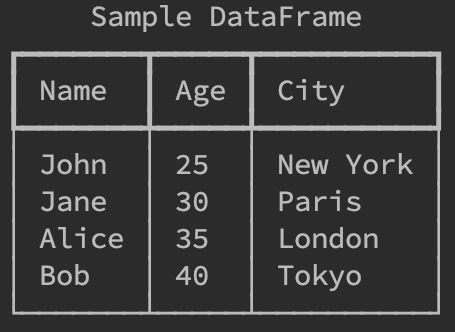
Here's an example demonstrating how to use the rich_display_dataframe function:
import pandas as pd

# Create a sample DataFrame
data = {
    "Name": ["John", "Jane", "Alice", "Bob"],
    "Age": [25, 30, 35, 40],
    "City": ["New York", "Paris", "London", "Tokyo"]
}
df = pd.DataFrame(data)

# Display the DataFrame using rich_display_dataframe
rich_display_dataframe(df, title="Sample DataFrame")
This will display the DataFrame as a table using rich formatting:
Contributions are welcome! If you find any issues or have suggestions for improvements, please feel free to open an issue or submit a pull request.
This project is licensed under the MIT License.

Would be nice to get the scientific notation working, i.e.
Expected:

Actual:
