
This blog is about how I use windows as a professional software engineer. What windows settings I customize and what tools I use to make my daily work as pleasing and productive as possible.
Some of these settings are particularly well suited for virtual machines, use common sense to judge whether is it safe (enough) to turn off these features on real machines. In embedded development and hardware integration work that I do, I often find myself in situations where the network is already restricted enough by firewalls and anti-virus measures that having these options on only gets in the way.
Developer mode - Handle With Care:
- turn off UAC (see reg file below)
- turn off Windows Defender (see reg file below)
- turn off Firewall: Win-S, Firewall, Turn Windows defined firewall on or off, private -> off, public -> off
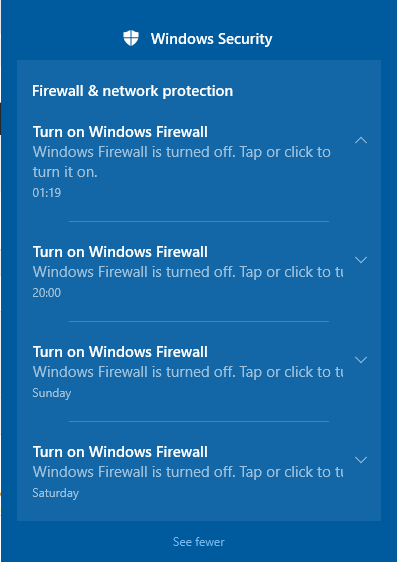
After the firewall is turned off, you will get regular reminders about it, I have not found out how to turn these off yet.
As a software engineer, my job is to be paranoid, if something changed on my system, I have to assume I have to re-test ALL my assumptions. This means that if an update is installed during my debug session I can basically start over. This is not acceptable for me, so to prevent this I turn off updates during debug sessions.
The following settings are my personal defaults, all packed into one registry patch
Responsiveness improvements / low latency HMI
- turn off UAC
- turn off Windows Defender
- lower cl.exe priority to keep machine responsive
- allow all powershell scripts
- turn of sliding, animation and transparency
- show all tray icons
Pleasing to work with:
- keep shadows under windows
- keep font optimizations
Productivity:
- show all file extensions
- write minidumps to c:\crashdumps when any program crashes
- disable phone home to microsoft when any program crashes
Windows Registry Editor Version 5.00

; -- sacrifice some safety for responsiveness / automation, use with care! --

; set to '1' to disable Windows Defender's Realtime Protection
[HKEY_LOCAL_MACHINE\SOFTWARE\Policies\Microsoft\Windows Defender]
"DisableAntiSpyware"=dword:00000001

; Disable UAC (User Account Control)
[HKEY_LOCAL_MACHINE\SOFTWARE\Microsoft\Windows\CurrentVersion\Policies\System]
"ConsentPromptBehaviorAdmin"=dword:0

; allow unsigned powershell certificates, original value: "State"=dword:00023c00
[HKEY_CURRENT_USER\Software\Microsoft\Windows\CurrentVersion\WinTrust\Trust Providers\Software Publishing]
"State"=dword:00023e00

; enable powershell script execution
[HKEY_LOCAL_MACHINE\SOFTWARE\Microsoft\PowerShell\1\ShellIds\Microsoft.PowerShell]
"ExecutionPolicy"="Bypass"

; -- developer productivity tweaks --

; Show file extentions
[HKEY_CURRENT_USER\Software\Microsoft\Windows\CurrentVersion\Explorer\Advanced]
"HideFileExt"=dword:0

; https://docs.microsoft.com/en-gb/windows/desktop/wer/collecting-user-mode-dumps
[HKEY_LOCAL_MACHINE\SOFTWARE\Microsoft\Windows\Windows Error Reporting\LocalDumps]
"DumpFolder"="C:\\CrashDumps"
"DumpType"=dword:1

; Disable WER (Windows Error Reporting)
[HKEY_LOCAL_MACHINE\SOFTWARE\Microsoft\Windows\Windows Error Reporting]
"Disabled"=dword:1

; Set cl.exe to below-normal priority so machine stays responsive
[HKEY_LOCAL_MACHINE\SOFTWARE\Microsoft\Windows NT\CurrentVersion\Image File Execution Options\cl.exe\PerfOptions]
"CpuPriorityClass"=dword:00000005

; -- pleasing to work with --

; Show all tray icons
[HKEY_CURRENT_USER\Software\Microsoft\Windows\CurrentVersion\Explorer]
"EnableAutoTray"=dword:0


; -- visual styles --

; set appearance options to "custom"
[HKEY_CURRENT_USER\Software\Microsoft\Windows\CurrentVersion\Explorer\VisualEffects]
"VisualFXSetting"=dword:3

; This set the following 8 settings:
;
; Animate controls and elements inside windows OFF
; Fade or slide menus into view OFF
; Fade or slide ToolTips into view OFF
; Fade out menu items after clicking OFF
; Show shadows under mouse pointer OFF
; Slide open combo boxes OFF
; Smooth-scroll list boxes OFF
;
; Show shadows under windows ON
[HKEY_CURRENT_USER\Control Panel\Desktop]
"UserPreferencesMask"=hex:90,12,07,80,10,00,00,00

;Animate windows when minimizing and maximizing
[HKEY_CURRENT_USER\Control Panel\Desktop\WindowMetrics]
"MinAnimate"="0"

;Animations in the taskbar
[HKEY_CURRENT_USER\Software\Microsoft\Windows\CurrentVersion\Explorer\Advanced]
"TaskbarAnimations"=dword:0

;Enable Peek
[HKEY_CURRENT_USER\Software\Microsoft\Windows\DWM]
"EnableAeroPeek"=dword:0

;Save taskbar thumbnail previews
[HKEY_CURRENT_USER\Software\Microsoft\Windows\DWM]
"AlwaysHibernateThumbnails"=dword:0

;Show thumbnails instead of icons
[HKEY_CURRENT_USER\Software\Microsoft\Windows\CurrentVersion\Explorer\Advanced]
"IconsOnly"=dword:1

;Show translucent selection rectangle
[HKEY_CURRENT_USER\Software\Microsoft\Windows\CurrentVersion\Explorer\Advanced]
"ListviewAlphaSelect"=dword:0

;Show window contents while dragging
[HKEY_CURRENT_USER\Control Panel\Desktop]
"DragFullWindows"="0"

;Smooth edges of screen fonts
[HKEY_CURRENT_USER\Control Panel\Desktop]
"FontSmoothing"="2"

;Use drop shadows for icon labels on the desktop
[HKEY_CURRENT_USER\Software\Microsoft\Windows\CurrentVersion\Explorer\Advanced]
"ListviewShadow"=dword:0
Aside from windows settings there are tools that can make you developer life easier. Lets start with installation of tools, I regularly reinstall my whole system, every few months or so. Installing all tools again can be a hassle. Fortunately, chocolatey.org can install lots of things completely unattended.
- first run this script as admin to install choco itself 1_install_chocolatey_as_admin.bat
- now open a new administrator command prompt and run update_packages.bat
The content of packages.bat is just an example, customize it to your wishes and safe it for next time.
https://www.howtogeek.com/356642/how-to-fix-all-windows-10%E2%80%99s-annoyances/
- turn off all animations / sliding
- keep shadows under windows
- keep font optimizations
- FileLocation Pro
- GNU for Windows (https://github.com/bmatzelle/gow)
- Putty
- chocolatey
- Notepad++ (Settings -> disable sessions)
- Ultraedit (paid)
- git
- tortoisegit (Settings -> Icon Overlays -> Status cache -> None)