

A simple example of a Counter to remind me the basic usage of Redux Toolkit. The Counter React component displays its value ("state") and allows to change it with three different buttons ("actions").
File structure :
- ./main.jsx
- ./App.jsx
- ./app/store.js
- ./features/counter/Counter.jsx
- ./features/counter/counterSlice.js
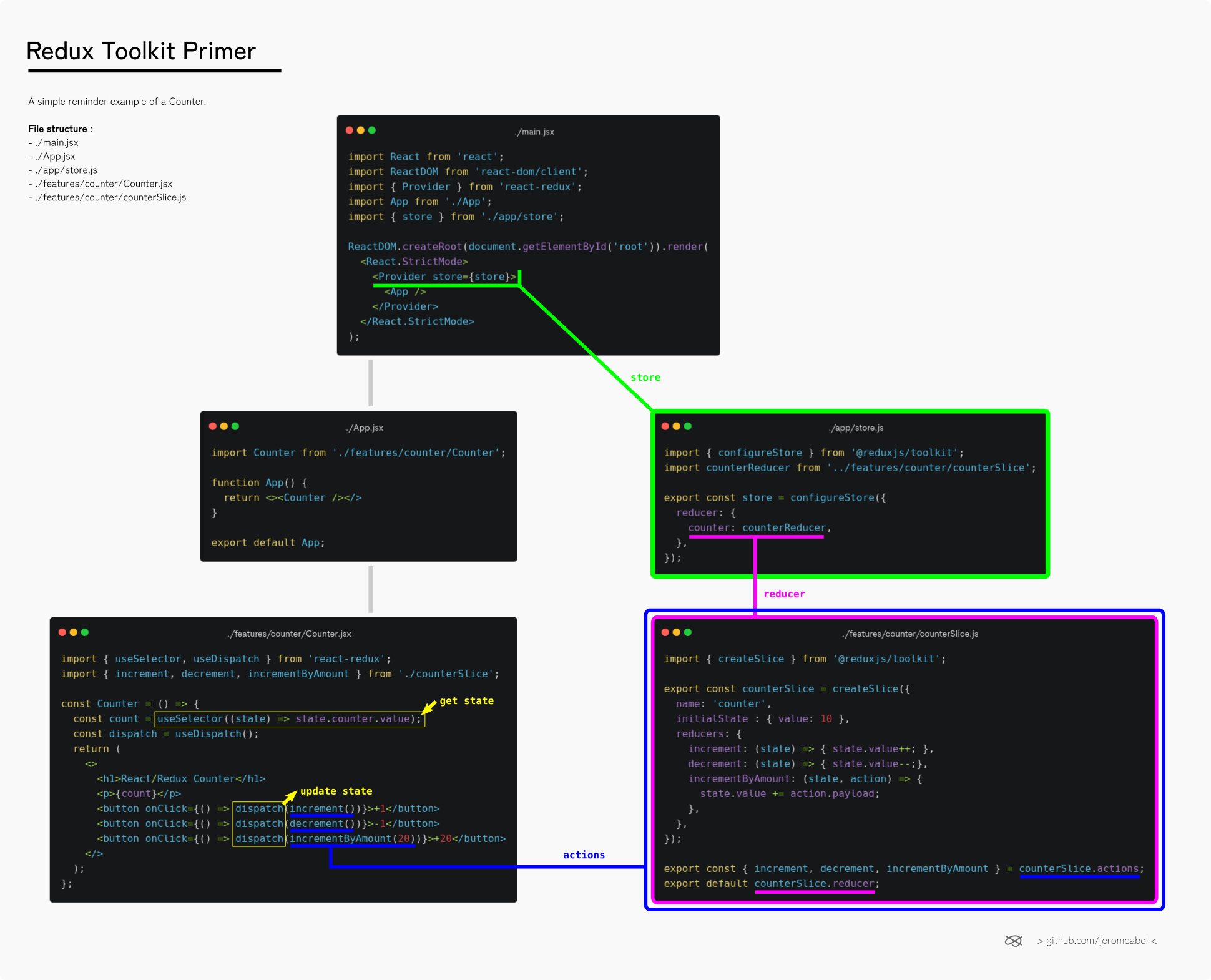
Encapsulate the App with the Provider, allowing access to the global state and actions (store) for all components. 🪄
import React from 'react';
import ReactDOM from 'react-dom/client';
import { Provider } from 'react-redux';
import App from './App';
import { store } from './app/store';

ReactDOM.createRoot(document.getElementById('root')).render(
  <React.StrictMode>
    <Provider store={store}>
      <App />
    </Provider>
  </React.StrictMode>
);Useless App file just to import the Counter component. Forget it... 🗑️
import Counter from './features/counter/Counter';
function App() { return <><Counter /></> }
export default App;Combine all reducers in a single file
import { configureStore } from '@reduxjs/toolkit';
import counterReducer from '../features/counter/counterSlice';

export const store = configureStore({
  reducer: {
    counter: counterReducer, // name of the state : state.counter
  },
});Split the global state into small featured states ("splices"). Here the specific counter state :
import { createSlice } from '@reduxjs/toolkit';

export const counterSlice = createSlice({
  name: 'counter', // prefix for actions name : counter/increment in Redux Dev Tools
  initialState : { value: 10 },
  reducers: {
    increment: (state) => { state.value++; },
    decrement: (state) => { state.value--;},
    incrementByAmount: (state, action) => {
      state.value += action.payload;
    },
  },
});

export const { increment, decrement, incrementByAmount } = counterSlice.actions;
export default counterSlice.reducer;Get the counter state (useSelector) and update it (useDispatch). Selectors are usually exported from the slice to keep them relative to their actions/reducers.
import { useSelector, useDispatch } from 'react-redux';
import { increment, decrement, incrementByAmount } from './counterSlice';

const Counter = () => {
  const count = useSelector((state) => state.counter.value);
  const dispatch = useDispatch();
  return (
    <>
      <h1>React/Redux Counter</h1>
      <p>{count}</p>
      <button onClick={() => dispatch(increment())}>+1</button>
      <button onClick={() => dispatch(decrement())}>-1</button>
      <button onClick={() => dispatch(incrementByAmount(20))}>+20</button>
    </>
  );
};

export default Counter;