
curl -L --output jfrog-rpm-installer.tar.gz "https://releases.jfrog.io/artifactory/jfrog-prox/org/artifactory/pro/rpm/jfrog-platform-trial-prox/[RELEASE]/jfrog-platform-trial-prox-[RELEASE]-rpm.tar.gz"

tar -xvzf jfrog-rpm-installer.tar.gz

cd jfrog-platform-trial-pro*

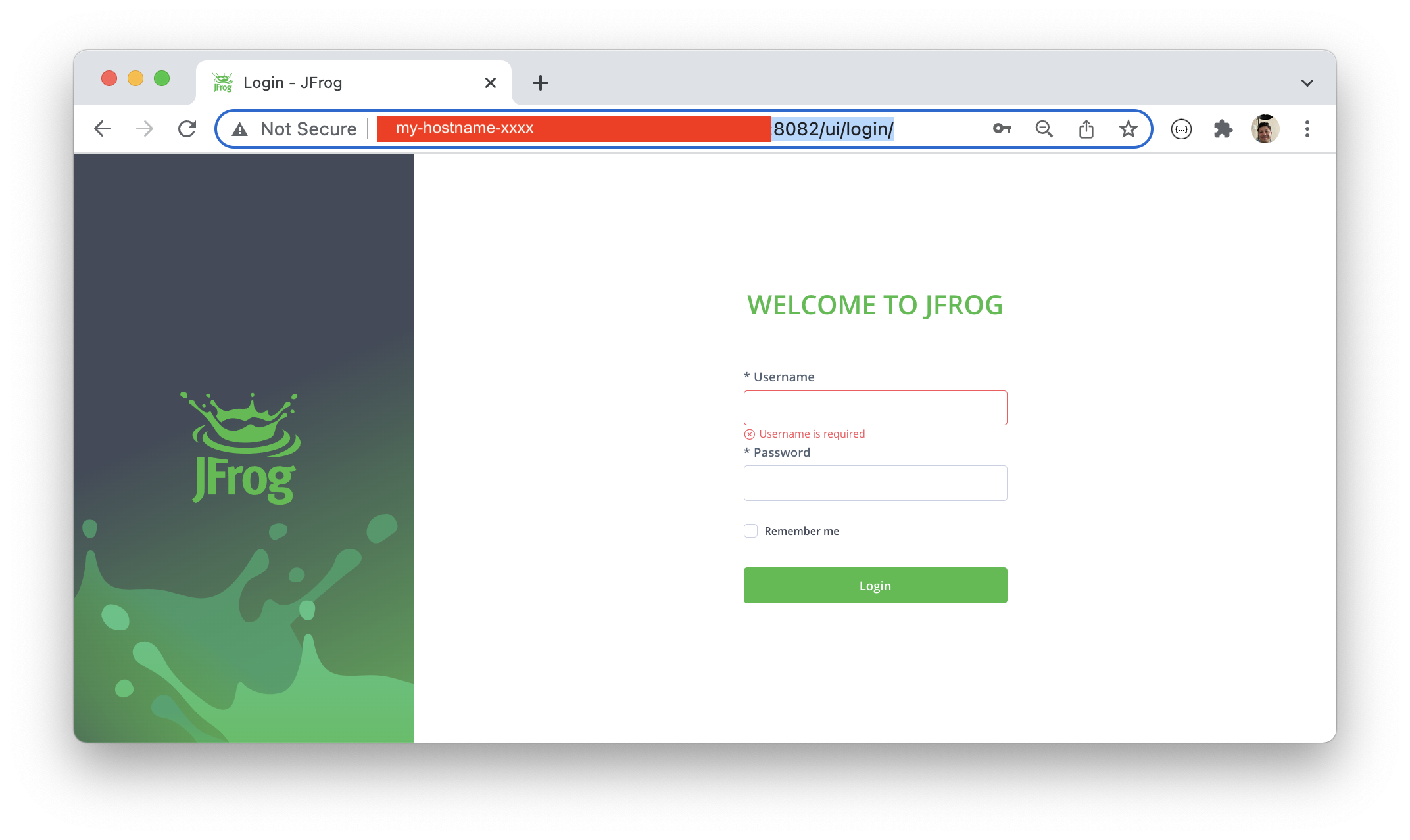
sudo ./install.shStep 1: Login to your JFrog Platform environment - http://my-hostname-xxx:8082/ui/login/
Username: admin
Password : password
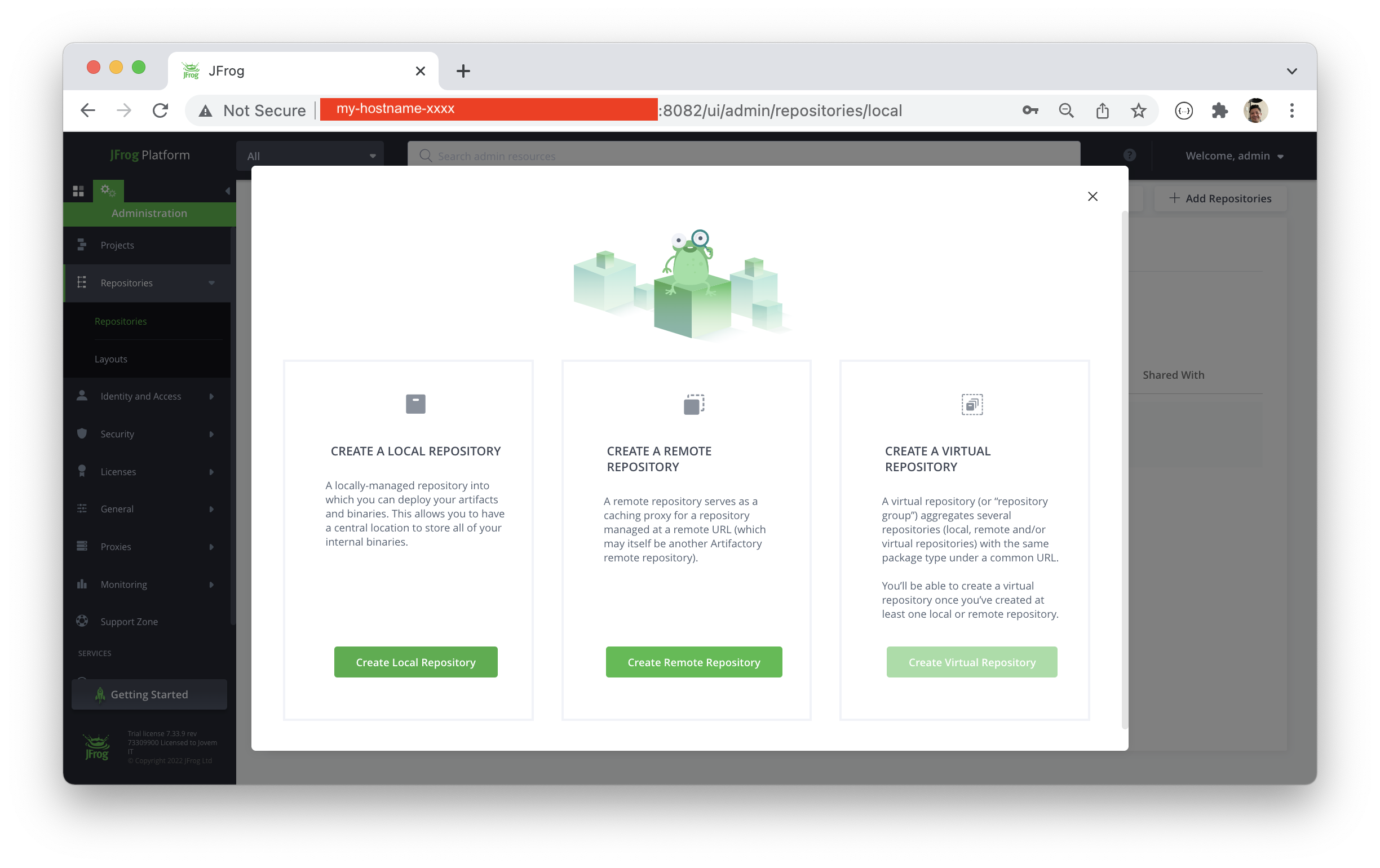
Step 2: Create repositories
-
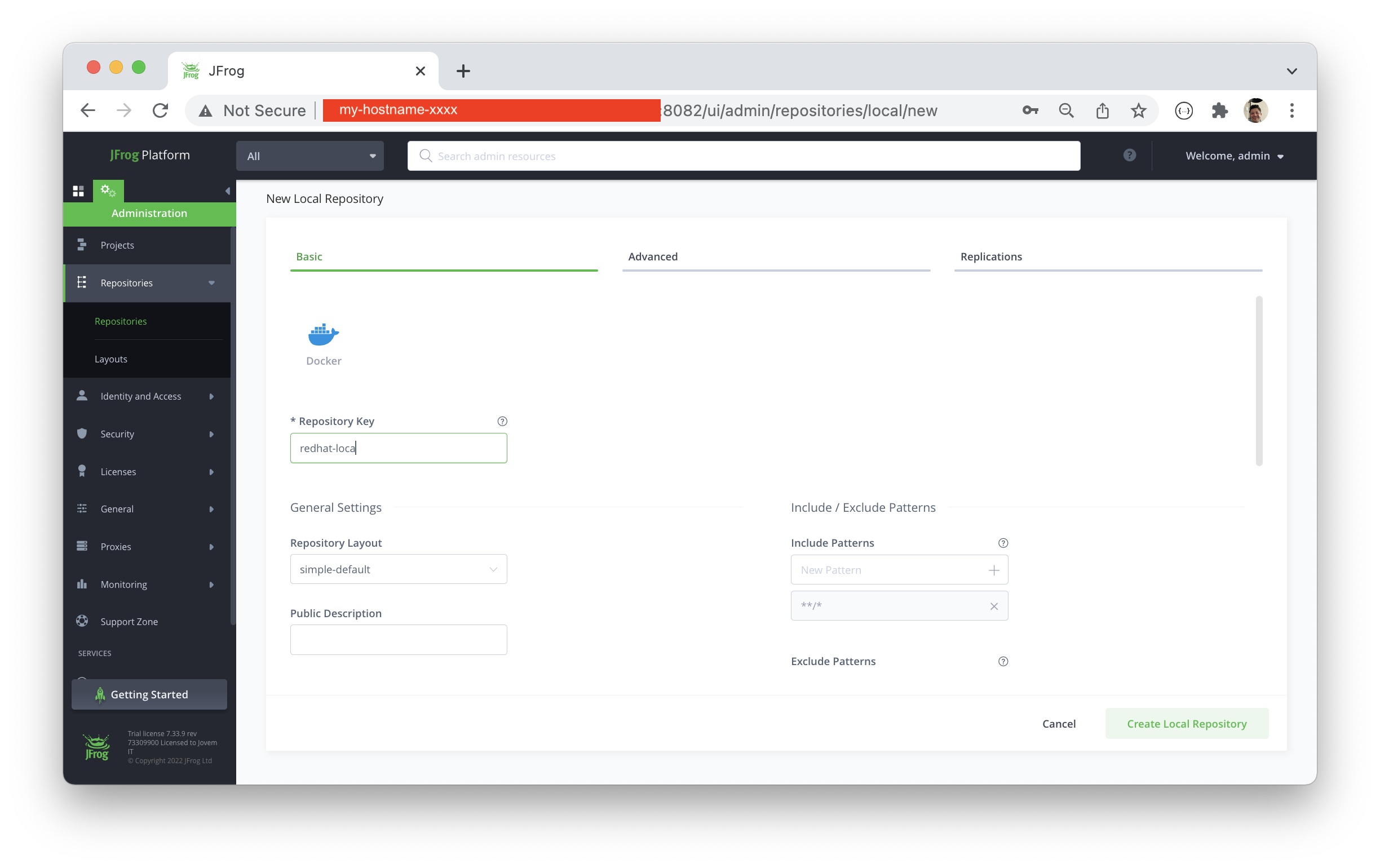
Step 2.1 - Create Local - http://my-hostname-xxx:8082/ui/admin/repositories/local/new
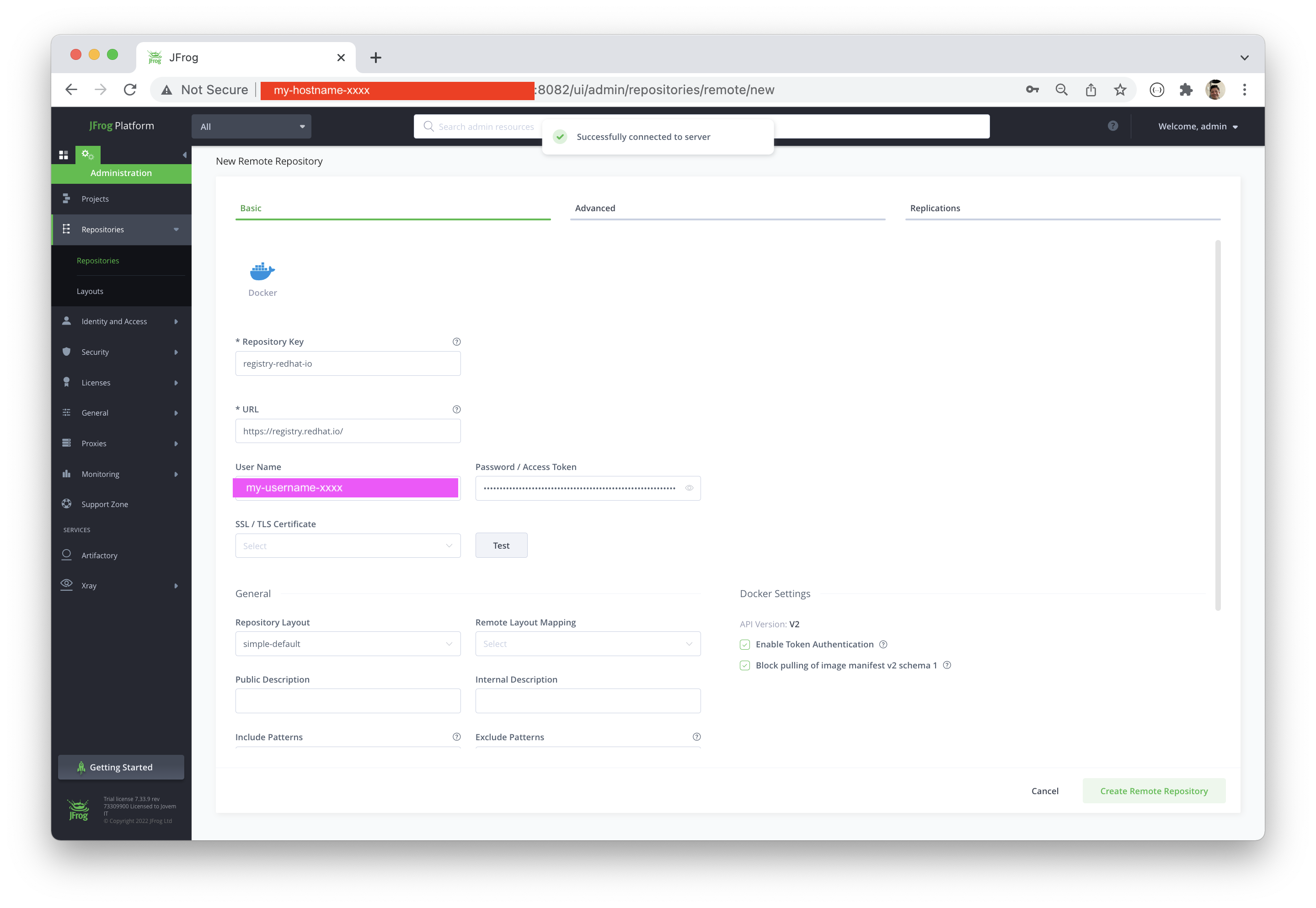
Step 2.2 - Create Remote - http://my-hostname-xxx:8082/ui/admin/repositories/remote/new
Create a service account here - https://access.redhat.com/terms-based-registry/
Username: my-username-xxx
Token: `eyJhbGciOiJSUzUxMiJ9.eyJzdWIiOiJmOGUzMzM0YWYyZDc0ZDdiOTJjOTBlNmQ3ZjI2NTYyMiJ9.MQO1cdyY3ouKUKwJF_wuuVwNX7Xt1GuIXjCrT0nOctoi92D-z1tLCn3kO4ei_j-KHvneN4b5HzoYWlX_2pbTXT-rHpOFwPuzWMbsYA0oDq33s-xxxxxxxx
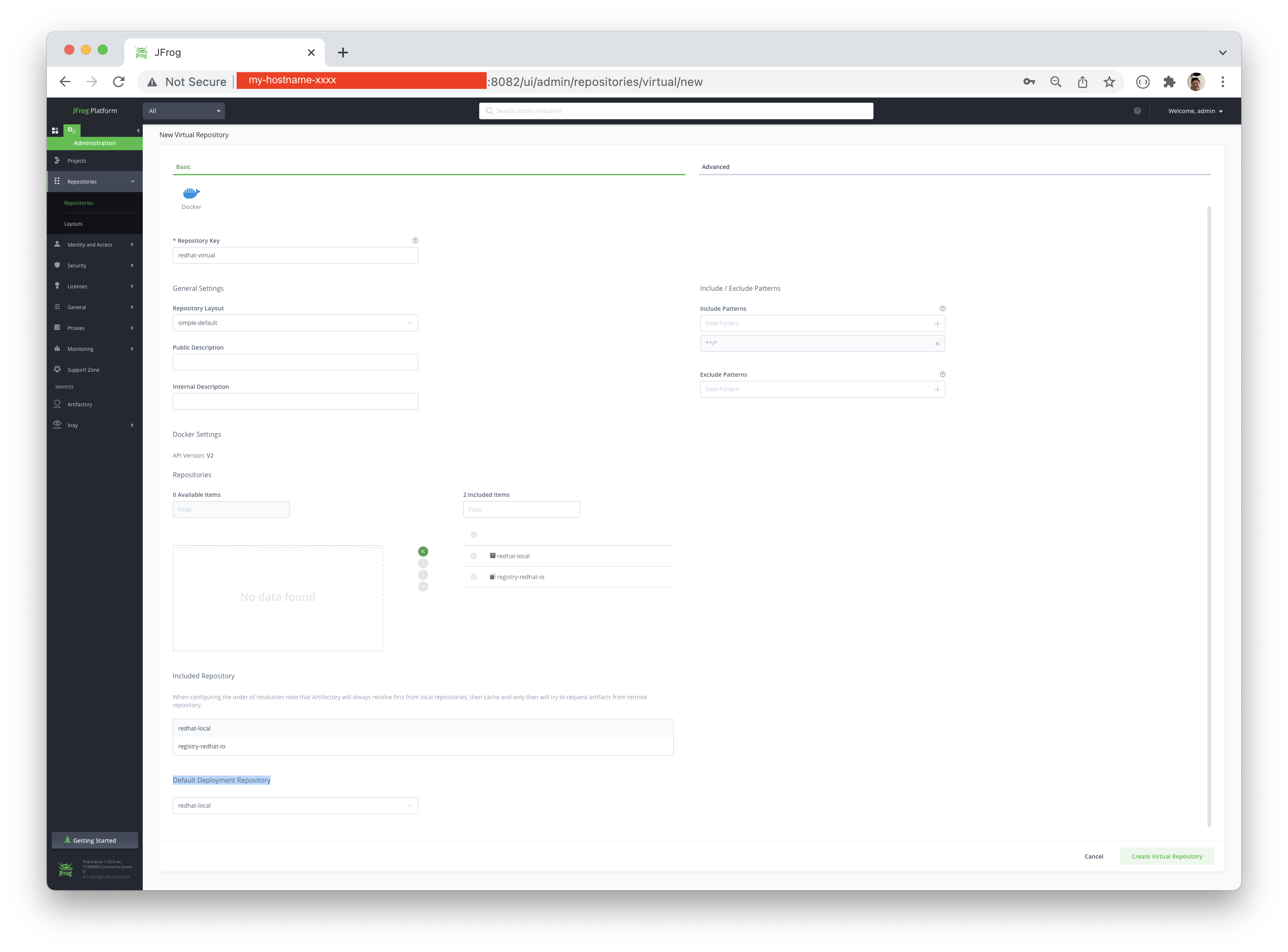
Step 2.3 - Create Virtual - http://my-hostname-xxx:8082/ui/admin/repositories/virtual/new
Step 3 - Configure the Revere Proxy -http://my-hostname-xxx:8082/ui/admin/artifactory/configuration/reverse_proxy
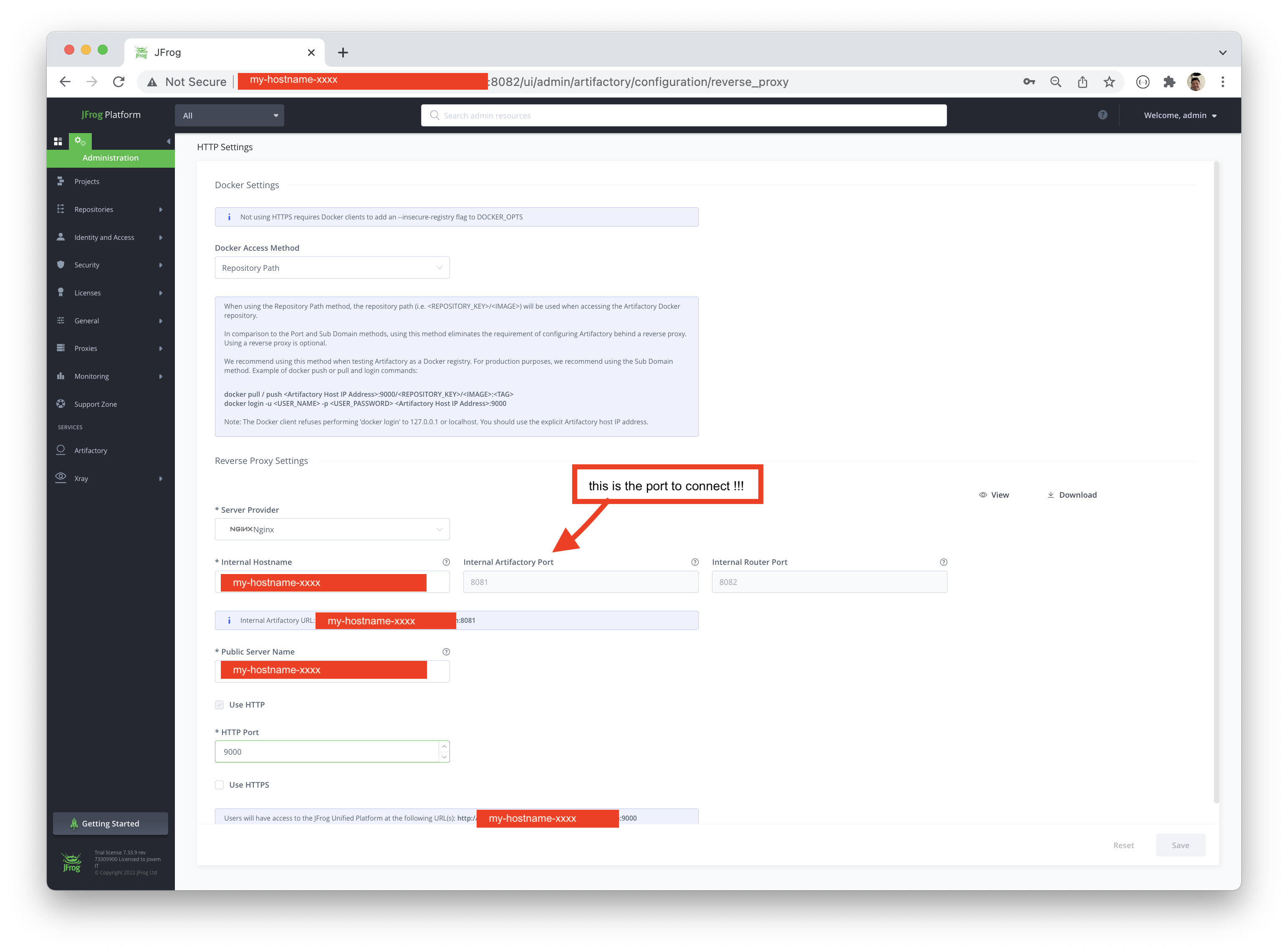
Download the configuration file
# make ssh into the host and install nginx
yum install -y nginx

# copy the artifactory.conf inside the host on nginx configuration
scp artifactory.conf root@my-host-xxx:/etc/nginx/conf.d/

systemctl restart nginxconfigure the Firewall ports
firewall-cmd --add-port 8081/tcp --permanent
firewall-cmd --add-port 8082/tcp --permanent
firewall-cmd --add-port 9000/tcp --permanent

firewall-cmd --reloadexport REPOSITORY_HOST=my-hostname-xxx
export REPOSITORY_PORT=8081
export ARTIFACTORY_URL=${REPOSITORY_HOST}:${REPOSITORY_PORT}
export USER_NAME=admin
export USER_PASSWORD='password'curl --user "${USER_NAME}:${USER_PASSWORD}" -XGET ${ARTIFACTORY_URL}/artifactory/api/system/pinghere you find the logs, like
console.log
ls -lhrt /var/opt/jfrog/artifactory/log/
total 4.2M
drwxr-xr-x. 2 artifactory artifactory    6 Feb 10 16:50 archived
drwxr-x---. 2 artifactory artifactory   83 Feb 10 16:52 tomcat
-rw-r-----. 1 artifactory artifactory    0 Feb 10 16:52 artifactory-traffic.1644522739007.log
-rw-r-----. 1 artifactory artifactory    0 Feb 10 16:52 artifactory-traffic-v2.log
-rw-r-----. 1 artifactory artifactory    0 Feb 10 16:52 artifactory-xray-traffic.1644522739029.log
-rw-r-----. 1 artifactory artifactory    0 Feb 10 16:52 artifactory-request-trace.log
-rw-r-----. 1 artifactory artifactory    0 Feb 10 16:52 artifactory-event.log
-rw-r-----. 1 artifactory artifactory    0 Feb 10 16:52 artifactory-import-export.log
-rw-r-----. 1 artifactory artifactory    0 Feb 10 16:52 artifactory-binarystore.log
-rw-r-----. 1 artifactory artifactory    0 Feb 10 16:52 artifactory-sha256-migration.log
-rw-r-----. 1 artifactory artifactory    0 Feb 10 16:52 artifactory-path-checksum-migration.log
-rw-r-----. 1 artifactory artifactory    0 Feb 10 16:52 artifactory-build-info-migration.log
-rw-r-----. 1 artifactory artifactory    0 Feb 10 16:52 artifactory-metrics.log
-rw-r-----. 1 artifactory artifactory    0 Feb 10 16:52 artifactory-metrics_events.log
-rw-r-----. 1 artifactory artifactory    0 Feb 10 16:52 access-metrics.log
-rw-r-----. 1 artifactory artifactory    0 Feb 10 16:52 access-metrics_events.log
-rw-r--r--. 1 artifactory artifactory    0 Feb 10 16:52 metadata-traffic.log
-rw-r--r--. 1 artifactory artifactory    0 Feb 10 16:52 event-metrics.log
-rw-r--r--. 1 artifactory artifactory    0 Feb 10 16:52 dummy.log
-rw-r--r--. 1 artifactory artifactory    0 Feb 10 16:52 integration-metrics.log
-rw-r--r--. 1 artifactory artifactory    0 Feb 10 16:52 frontend-metrics-events.log
-rw-r--r--. 1 artifactory artifactory 1.4K Feb 10 16:52 integration-service.log
-rw-------. 1 artifactory artifactory 1.6K Feb 10 16:52 observability-service.log
-rw-r--r--. 1 artifactory artifactory  16K Feb 10 16:52 metadata-service.log
-rw-r-----. 1 artifactory artifactory  672 Feb 10 16:52 artifactory-conan-v2-migration.log
-rw-r--r--. 1 artifactory artifactory 3.1K Feb 10 16:52 event-service.log
-rw-r-----. 1 artifactory artifactory 1.9K Feb 10 16:52 frontend-service.log
-rw-------. 1 artifactory artifactory 4.8K Feb 10 16:52 router-service.log
-rw-------. 1 artifactory artifactory 5.6K Feb 10 16:53 router-traefik.log
-rw-r-----. 1 artifactory artifactory  16K Feb 10 16:53 access-service.log
-rw-r-----. 1 artifactory artifactory  12K Feb 10 17:09 artifactory-request-out.log
-rw-r-----. 1 artifactory artifactory 101K Feb 10 17:09 console.log
-rw-r-----. 1 artifactory artifactory  95K Feb 10 17:09 artifactory-service.log
-rw-r-----. 1 artifactory artifactory  14K Feb 10 17:13 access-audit.log
-rw-r-----. 1 artifactory artifactory  23K Feb 10 17:13 access-security-audit.log
-rw-r-----. 1 artifactory artifactory  35K Feb 10 17:14 frontend-request.log
-rw-r--r--. 1 artifactory artifactory 614K Feb 10 17:14 metadata-metrics.log
-rw-r-----. 1 artifactory artifactory  40K Feb 10 17:14 artifactory-access.log
-rw-r--r--. 1 artifactory artifactory  17K Feb 10 17:14 frontend-metrics.log
-rw-------. 1 artifactory artifactory  33K Feb 10 17:14 observability-request.log
-rw-r--r--. 1 artifactory artifactory  34K Feb 10 17:14 integration-request.log
-rw-r--r--. 1 artifactory artifactory  33K Feb 10 17:14 event-request.log
-rw-r--r--. 1 artifactory artifactory  33K Feb 10 17:14 metadata-request.log
-rw-r-----. 1 artifactory artifactory 106K Feb 10 17:14 artifactory-request.log
-rw-------. 1 artifactory artifactory 964K Feb 10 17:14 router-request.log
-rw-r-----. 1 artifactory artifactory 335K Feb 10 17:14 access-request.logconfigure the insecure registry
{
  "insecure-registries": [
    "my-hostname-xxx:8081"
  ]
}docker login -u <USER_NAME> -p <USER_PASSWORD> <REPOSITORY_HOST>:<REPOSITORY_PORT>
docker login -u ${USER_NAME} -p ${USER_PASSWORD} ${ARTIFACTORY_URL}
WARNING! Using --password via the CLI is insecure. Use --password-stdin.
WARNING! Your password will be stored unencrypted in /Users/renato/.docker/config.json.
Configure a credential helper to remove this warning. See
https://docs.docker.com/engine/reference/commandline/login/#credentials-store

Login Succeededdocker pull ${ARTIFACTORY_URL}/redhat-virtual/openshift3/jenkins-2-rhel7:latest
docker pull ${ARTIFACTORY_URL}/redhat-virtual/redhat/certified-operator-index:v4.7 &
docker pull ${ARTIFACTORY_URL}/redhat-virtual/redhat/community-operator-index:v4.7 &
docker pull ${ARTIFACTORY_URL}/redhat-virtual/redhat/redhat-marketplace-index:v4.7 &
docker pull ${ARTIFACTORY_URL}/redhat-virtual/redhat/redhat-operator-index:v4.7 &
docker pull ${ARTIFACTORY_URL}/redhat-virtual/openjdk/openjdk-11-rhel7:1.11-1 &
docker pull ${ARTIFACTORY_URL}/redhat-virtual/ubi8/ubi:8.5-226 &
docker pull ${ARTIFACTORY_URL}/redhat-virtual/rhscl/httpd-24-rhel7:2.4-172.1643275509 &
docker pull ${ARTIFACTORY_URL}/redhat-virtual/rhel8/nginx-118:1-51 &
docker pull ${ARTIFACTORY_URL}/redhat-virtual/rhel8/nodejs-16:1-11 &profiling the time with cached files...
 time docker pull ${ARTIFACTORY_URL}/docker-virtual/rhel8/nodejs-16:1-11
1-11: Pulling from docker-virtual/rhel8/nodejs-16
5dcbdc60ea6b: Already exists
8671113e1c57: Already exists
79a56ba04a30: Already exists
80c709d61553: Pull complete
Digest: sha256:b2d2abf42f5464ce8b261234159b82e9e84dc55cd7ec4fdd5a5ffc5d17cc3d7c
Status: Downloaded newer image for my-hostname-xxx:8081/docker-virtual/rhel8/nodejs-16:1-11
my-hostname-xxx:8081/docker-virtual/rhel8/nodejs-16:1-11
docker pull ${ARTIFACTORY_URL}/docker-virtual/rhel8/nodejs-16:1-11  0.22s user 0.09s system 0% cpu 53.812 total

#####
docker rmi -f my-hostname-xxx:8081/docker-virtual/rhel8/nodejs-16:1-11
Untagged: my-hostname-xxx:8081/docker-virtual/rhel8/nodejs-16:1-11
Untagged: my-hostname-xxx:8081/docker-virtual/rhel8/nodejs-16@sha256:b2d2abf42f5464ce8b261234159b82e9e84dc55cd7ec4fdd5a5ffc5d17cc3d7c
Deleted: sha256:a9cf72dfdf9243ccd9aaff3c2c97bd0604d1a4e12890a5324c9a0401e591e7c7
Deleted: sha256:4a731b091c049b75261cc1ce1291412174c0ced76cf0a5610175057bf0bff9d5
❯ time docker pull ${ARTIFACTORY_URL}/docker-virtual/rhel8/nodejs-16:1-11
1-11: Pulling from docker-virtual/rhel8/nodejs-16
5dcbdc60ea6b: Already exists
8671113e1c57: Already exists
79a56ba04a30: Already exists
80c709d61553: Pull complete
Digest: sha256:b2d2abf42f5464ce8b261234159b82e9e84dc55cd7ec4fdd5a5ffc5d17cc3d7c
Status: Downloaded newer image for my-hostname-xxx:8081/docker-virtual/rhel8/nodejs-16:1-11
my-hostname-xxx:8081/docker-virtual/rhel8/nodejs-16:1-11
docker pull ${ARTIFACTORY_URL}/docker-virtual/rhel8/nodejs-16:1-11  0.22s user 0.09s system 0% cpu 46.924 total
- Jfrog
- Quick-Start - https://www.jfrog.com/confluence/display/JFROG/QuickStart+Guide%3A+JFrog+Self-Hosted
- Instalação: https://jfrog.com/xray/install/
- Docker TroubleShooting: https://jfrog.com/knowledge-base/how-to-troubleshoot-docker-problems/
- NGINX Referencias/DOC: https://www.jfrog.com/confluence/display/JFROG/Getting+Started+with+Artifactory+as+a+Docker+Registry
- Docker Insecure Registry - https://stackoverflow.com/questions/42211380/add-insecure-registry-to-docker
- https://stackoverflow.com/questions/17413526/nginx-missing-sites-available-directory
[root@jfrog ~]# curl -L --output jfrog-rpm-installer.tar.gz "https://releases.jfrog.io/artifactory/jfrog-prox/org/artifactory/pro/rpm/jfrog-platform-trial-prox/[RELEASE]/jfrog-platform-trial-prox-[RELEASE]-rpm.tar.gz"
% Total % Received % Xferd Average Speed Time Time Time Current
Dload Upload Total Spent Left Speed
0 0 0 0 0 0 0 0 --:--:-- --:--:-- --:--:-- 0
100 1045M 100 1045M 0 0 45.2M 0 0:00:23 0:00:23 --:--:-- 45.6M
[root@jfrog ~]# tar -xvzf jfrog-rpm-installer.tar.gz
jfrog-platform-trial-prox-7.33.9-rpm/bin/rpmDebHelper.sh
jfrog-platform-trial-prox-7.33.9-rpm/artifactory/artifactory.rpm
jfrog-platform-trial-prox-7.33.9-rpm/README.md
jfrog-platform-trial-prox-7.33.9-rpm/install.sh
jfrog-platform-trial-prox-7.33.9-rpm/third-party/misc/libdb-utils-5.3.21-25.el7.x86_64.rpm
jfrog-platform-trial-prox-7.33.9-rpm/third-party/postgresql/postgresql13-libs-13.4-1PGDG.sles12.x86_64.rpm
jfrog-platform-trial-prox-7.33.9-rpm/third-party/postgresql/libicu-60.3-2.el8_1.x86_64.rpm
jfrog-platform-trial-prox-7.33.9-rpm/third-party/postgresql/postgresql13-libs-13.4-1PGDG.rhel8.x86_64.rpm
jfrog-platform-trial-prox-7.33.9-rpm/third-party/postgresql/postgresql13-13.4-1PGDG.rhel7.x86_64.rpm
jfrog-platform-trial-prox-7.33.9-rpm/third-party/postgresql/postgresql13-libs-13.4-1PGDG.rhel7.x86_64.rpm
jfrog-platform-trial-prox-7.33.9-rpm/third-party/postgresql/postgresql13-13.4-1PGDG.sles12.x86_64.rpm
jfrog-platform-trial-prox-7.33.9-rpm/third-party/postgresql/postgresql13-13.4-1PGDG.rhel8.x86_64.rpm
jfrog-platform-trial-prox-7.33.9-rpm/third-party/postgresql/postgresql13-server-13.4-1PGDG.rhel7.x86_64.rpm
jfrog-platform-trial-prox-7.33.9-rpm/third-party/postgresql/libicu-50.2-4.el7_7.x86_64.rpm
jfrog-platform-trial-prox-7.33.9-rpm/third-party/postgresql/postgresql13-server-13.4-1PGDG.rhel8.x86_64.rpm
jfrog-platform-trial-prox-7.33.9-rpm/third-party/postgresql/postgresql13-server-13.4-1PGDG.sles12.x86_64.rpm
jfrog-platform-trial-prox-7.33.9-rpm/third-party/rabbitmq/erlang-23.2.3-1.el7.x86_64.rpm
jfrog-platform-trial-prox-7.33.9-rpm/third-party/rabbitmq/socat-1.7.3.3-2.el8.x86_64.rpm
jfrog-platform-trial-prox-7.33.9-rpm/third-party/rabbitmq/erlang-23.2.3-1.el8.x86_64.rpm
jfrog-platform-trial-prox-7.33.9-rpm/third-party/rabbitmq/socat-1.7.3.2-2.el7.x86_64.rpm
jfrog-platform-trial-prox-7.33.9-rpm/third-party/yq/LICENSE
jfrog-platform-trial-prox-7.33.9-rpm/third-party/yq/yq
jfrog-platform-trial-prox-7.33.9-rpm/xray/xray.rpm
jfrog-platform-trial-prox-7.33.9-rpm/third-party/postgresql/createPostgresUsers.sh
jfrog-platform-trial-prox-7.33.9-rpm/bin/systemYamlHelper.sh
[root@jfrog ~]#
[root@jfrog ~]# cd jfrog-platform-trial-pro*
[root@jfrog jfrog-platform-trial-prox-7.33.9-rpm]#
[root@jfrog jfrog-platform-trial-prox-7.33.9-rpm]# sudo ./install.sh
Beginning JFrog Platform Trial Pro X setup
This script will install JFrog Platform Trial Pro X and its dependencies.
After installation, logs can be found at /root/jfrog-platform-trial-prox-7.33.9-rpm/install.log
Installing/Verifying RabbitMQ dependencies (this may take several minutes)...
Installing /root/jfrog-platform-trial-prox-7.33.9-rpm/third-party/rabbitmq/erlang-23.2.3-1.el8.x86_64.rpm ...
JFrog Platform Trial Pro X Installation
Installing/Verifying (/root/jfrog-platform-trial-prox-7.33.9-rpm/artifactory/artifactory.rpm) (this may take several minutes)...
Installing/Verifying (/root/jfrog-platform-trial-prox-7.33.9-rpm/xray/xray.rpm) (this may take several minutes)...
PostgreSQL Installation
Creating PostgreSQL data folder on /var/opt/jfrog/postgres/data
Installing/Verifying PostgreSQL (this may take several minutes)...
Installing /root/jfrog-platform-trial-prox-7.33.9-rpm/third-party/postgresql/postgresql13-libs-13.4-1PGDG.rhel8.x86_64.rpm ...
Installing /root/jfrog-platform-trial-prox-7.33.9-rpm/third-party/postgresql/postgresql13-13.4-1PGDG.rhel8.x86_64.rpm ...
Installing /root/jfrog-platform-trial-prox-7.33.9-rpm/third-party/postgresql/postgresql13-server-13.4-1PGDG.rhel8.x86_64.rpm ...
Initializing database ... OK
Created symlink /etc/systemd/system/multi-user.target.wants/postgresql-13.service → /usr/lib/systemd/system/postgresql-13.service.
Starting postgresql-13
Redirecting to /bin/systemctl restart postgresql-13.service
Installation complete. Installation log can be found at [/root/jfrog-platform-trial-prox-7.33.9-rpm/install.log]
Start JFrog Platform Trial Pro X with:
1. systemctl start artifactory.service
2. systemctl start xray.service
Check JFrog Platform Trial Pro X status with:
1. systemctl status artifactory.service
2. systemctl status xray.service
Installation directory was set to /opt/jfrog/
You can find more Artifactory information in the log directory /opt/jfrog/artifactory/var/log
You can find more Xray information in the log directory /opt/jfrog/xray/var/log
Once the application has started, it can be accessed at [http://10.36.251.91:8082]
[root@jfrog jfrog-platform-trial-prox-7.33.9-rpm]# systemctl start artifactory.service
[root@jfrog jfrog-platform-trial-prox-7.33.9-rpm]# systemctl status artifactory.service
● artifactory.service - Artifactory service
Loaded: loaded (/usr/lib/systemd/system/artifactory.service; enabled; vendor preset: disabled)
Active: active (running) since Thu 2022-02-10 16:52:33 -03; 9s ago
Process: 8492 ExecStart=/opt/jfrog/artifactory/app/bin/artifactoryManage.sh start (code=exited, status=0/SUCCESS)
Main PID: 11274 (java)
Tasks: 0 (limit: 100946)
Memory: 444.0K
CGroup: /system.slice/artifactory.service
‣ 11274 /opt/jfrog/artifactory/app/third-party/java/bin/java -Djava.util.logging.config.file=/opt/jfrog/artifactory/app/artifactory/tomcat/conf/logging.properties -Djava.util.logging.manager=org.apache.juli.ClassLoaderLo>
Feb 10 16:52:32 jfrog.rhbr-lab.com artifactoryManage.sh[8492]: observability not running. Proceed to start it up.
Feb 10 16:52:32 jfrog.rhbr-lab.com artifactoryManage.sh[8492]: observability started. PID: 12417
Feb 10 16:52:32 jfrog.rhbr-lab.com su[12277]: pam_unix(su:session): session closed for user artifactory
Feb 10 16:52:32 jfrog.rhbr-lab.com su[12424]: (to artifactory) root on none
Feb 10 16:52:32 jfrog.rhbr-lab.com su[12424]: pam_unix(su:session): session opened for user artifactory by (uid=0)
Feb 10 16:52:32 jfrog.rhbr-lab.com artifactoryManage.sh[8492]: Starting integration...
Feb 10 16:52:32 jfrog.rhbr-lab.com artifactoryManage.sh[8492]: integration not running. Proceed to start it up.
Feb 10 16:52:33 jfrog.rhbr-lab.com artifactoryManage.sh[8492]: integration started. PID: 12557
Feb 10 16:52:33 jfrog.rhbr-lab.com su[12424]: pam_unix(su:session): session closed for user artifactory
Feb 10 16:52:33 jfrog.rhbr-lab.com systemd[1]: Started Artifactory service.
[root@jfrog jfrog-platform-trial-prox-7.33.9-rpm]# ss -ntpl | grep 80
LISTEN 0 128 127.0.0.1:8086 0.0.0.0:* users:(("jf-metadata",pid=11965,fd=12))
LISTEN 0 5 127.0.0.1:631 0.0.0.0:* users:(("cupsd",pid=1280,fd=10))
LISTEN 0 128 127.0.0.1:8061 0.0.0.0:* users:(("jf-event",pid=12131,fd=9))
LISTEN 0 128 127.0.0.1:8062 0.0.0.0:* users:(("jf-event",pid=12131,fd=10))
LISTEN 0 128 127.0.0.1:8036 0.0.0.0:* users:(("jf-observabilit",pid=12417,fd=9))
LISTEN 0 128 127.0.0.1:8070 0.0.0.0:* users:(("node",pid=12377,fd=23))
LISTEN 0 128 127.0.0.1:8071 0.0.0.0:* users:(("jf-integration",pid=12557,fd=9))
LISTEN 0 128 127.0.0.1:8072 0.0.0.0:* users:(("jf-integration",pid=12557,fd=10))
LISTEN 0 128 127.0.0.1:8046 0.0.0.0:* users:(("jf-router",pid=11771,fd=17))
LISTEN 0 128 127.0.0.1:8047 0.0.0.0:* users:(("jf-router",pid=11771,fd=11))
LISTEN 0 128 127.0.0.1:8049 0.0.0.0:* users:(("jf-router",pid=11771,fd=18))
LISTEN 0 5 [::1]:631 [::]:* users:(("cupsd",pid=1280,fd=9))
LISTEN 0 5 [::ffff:127.0.0.1]:8091 *:* users:(("java",pid=11274,fd=29))
LISTEN 0 100 [::ffff:127.0.0.1]:8040 *:* users:(("java",pid=11274,fd=33))
LISTEN 0 128 *:8045 *:* users:(("java",pid=11274,fd=842))
LISTEN 0 1 [::ffff:127.0.0.1]:8015 *:* users:(("java",pid=11274,fd=59))
LISTEN 0 100 *:8081 *:* users:(("java",pid=11274,fd=23))
LISTEN 0 128 *:8082 *:* users:(("jf-router",pid=11771,fd=19))
[root@jfrog jfrog-platform-trial-prox-7.33.9-rpm]# yum install -y nginx
Updating Subscription Management repositories.
Last metadata expiration check: 0:10:42 ago on Thu 10 Feb 2022 04:50:44 PM -03.
Dependencies resolved.
========================================================================================================================================================================================================================================
Package Architecture Version Repository Size
========================================================================================================================================================================================================================================
Installing:
nginx x86_64 1:1.14.1-9.module+el8.0.0+4108+af250afe rhel-8-for-x86_64-appstream-rpms 570 k
Installing dependencies:
nginx-all-modules noarch 1:1.14.1-9.module+el8.0.0+4108+af250afe rhel-8-for-x86_64-appstream-rpms 24 k
nginx-filesystem noarch 1:1.14.1-9.module+el8.0.0+4108+af250afe rhel-8-for-x86_64-appstream-rpms 24 k
nginx-mod-http-image-filter x86_64 1:1.14.1-9.module+el8.0.0+4108+af250afe rhel-8-for-x86_64-appstream-rpms 35 k
nginx-mod-http-perl x86_64 1:1.14.1-9.module+el8.0.0+4108+af250afe rhel-8-for-x86_64-appstream-rpms 46 k
nginx-mod-http-xslt-filter x86_64 1:1.14.1-9.module+el8.0.0+4108+af250afe rhel-8-for-x86_64-appstream-rpms 34 k
nginx-mod-mail x86_64 1:1.14.1-9.module+el8.0.0+4108+af250afe rhel-8-for-x86_64-appstream-rpms 64 k
nginx-mod-stream x86_64 1:1.14.1-9.module+el8.0.0+4108+af250afe rhel-8-for-x86_64-appstream-rpms 85 k
Enabling module streams:
nginx 1.14
Transaction Summary
========================================================================================================================================================================================================================================
Install 8 Packages
Total download size: 881 k
Installed size: 2.0 M
Downloading Packages:
(1/8): nginx-all-modules-1.14.1-9.module+el8.0.0+4108+af250afe.noarch.rpm 68 kB/s | 24 kB 00:00
(2/8): nginx-mod-stream-1.14.1-9.module+el8.0.0+4108+af250afe.x86_64.rpm 191 kB/s | 85 kB 00:00
(3/8): nginx-mod-http-image-filter-1.14.1-9.module+el8.0.0+4108+af250afe.x86_64.rpm 213 kB/s | 35 kB 00:00
(4/8): nginx-1.14.1-9.module+el8.0.0+4108+af250afe.x86_64.rpm 962 kB/s | 570 kB 00:00
(5/8): nginx-mod-http-xslt-filter-1.14.1-9.module+el8.0.0+4108+af250afe.x86_64.rpm 226 kB/s | 34 kB 00:00
(6/8): nginx-mod-http-perl-1.14.1-9.module+el8.0.0+4108+af250afe.x86_64.rpm 250 kB/s | 46 kB 00:00
(7/8): nginx-filesystem-1.14.1-9.module+el8.0.0+4108+af250afe.noarch.rpm 171 kB/s | 24 kB 00:00
(8/8): nginx-mod-mail-1.14.1-9.module+el8.0.0+4108+af250afe.x86_64.rpm 373 kB/s | 64 kB 00:00
----------------------------------------------------------------------------------------------------------------------------------------------------------------------------------------------------------------------------------------
Total 1.1 MB/s | 881 kB 00:00
Red Hat Enterprise Linux 8 for x86_64 - AppStream (RPMs) 203 kB/s | 5.0 kB 00:00
Importing GPG key 0xFD431D51:
Userid : "Red Hat, Inc. (release key 2) <security@redhat.com>"
Fingerprint: 567E 347A D004 4ADE 55BA 8A5F 199E 2F91 FD43 1D51
From : /etc/pki/rpm-gpg/RPM-GPG-KEY-redhat-release
Key imported successfully
Importing GPG key 0xD4082792:
Userid : "Red Hat, Inc. (auxiliary key) <security@redhat.com>"
Fingerprint: 6A6A A7C9 7C88 90AE C6AE BFE2 F76F 66C3 D408 2792
From : /etc/pki/rpm-gpg/RPM-GPG-KEY-redhat-release
Key imported successfully
Running transaction check
Transaction check succeeded.
Running transaction test
Transaction test succeeded.
Running transaction
Preparing : 1/1
Running scriptlet: nginx-filesystem-1:1.14.1-9.module+el8.0.0+4108+af250afe.noarch 1/8
Installing : nginx-filesystem-1:1.14.1-9.module+el8.0.0+4108+af250afe.noarch 1/8
Installing : nginx-mod-stream-1:1.14.1-9.module+el8.0.0+4108+af250afe.x86_64 2/8
Running scriptlet: nginx-mod-stream-1:1.14.1-9.module+el8.0.0+4108+af250afe.x86_64 2/8
Installing : nginx-mod-http-image-filter-1:1.14.1-9.module+el8.0.0+4108+af250afe.x86_64 3/8
Running scriptlet: nginx-mod-http-image-filter-1:1.14.1-9.module+el8.0.0+4108+af250afe.x86_64 3/8
Installing : nginx-mod-http-xslt-filter-1:1.14.1-9.module+el8.0.0+4108+af250afe.x86_64 4/8
Running scriptlet: nginx-mod-http-xslt-filter-1:1.14.1-9.module+el8.0.0+4108+af250afe.x86_64 4/8
Installing : nginx-mod-http-perl-1:1.14.1-9.module+el8.0.0+4108+af250afe.x86_64 5/8
Running scriptlet: nginx-mod-http-perl-1:1.14.1-9.module+el8.0.0+4108+af250afe.x86_64 5/8
Installing : nginx-all-modules-1:1.14.1-9.module+el8.0.0+4108+af250afe.noarch 6/8
Installing : nginx-1:1.14.1-9.module+el8.0.0+4108+af250afe.x86_64 7/8
Running scriptlet: nginx-1:1.14.1-9.module+el8.0.0+4108+af250afe.x86_64 7/8
Installing : nginx-mod-mail-1:1.14.1-9.module+el8.0.0+4108+af250afe.x86_64 8/8
Running scriptlet: nginx-mod-mail-1:1.14.1-9.module+el8.0.0+4108+af250afe.x86_64 8/8
Verifying : nginx-1:1.14.1-9.module+el8.0.0+4108+af250afe.x86_64 1/8
Verifying : nginx-all-modules-1:1.14.1-9.module+el8.0.0+4108+af250afe.noarch 2/8
Verifying : nginx-mod-stream-1:1.14.1-9.module+el8.0.0+4108+af250afe.x86_64 3/8
Verifying : nginx-mod-http-image-filter-1:1.14.1-9.module+el8.0.0+4108+af250afe.x86_64 4/8
Verifying : nginx-mod-http-xslt-filter-1:1.14.1-9.module+el8.0.0+4108+af250afe.x86_64 5/8
Verifying : nginx-mod-http-perl-1:1.14.1-9.module+el8.0.0+4108+af250afe.x86_64 6/8
Verifying : nginx-filesystem-1:1.14.1-9.module+el8.0.0+4108+af250afe.noarch 7/8
Verifying : nginx-mod-mail-1:1.14.1-9.module+el8.0.0+4108+af250afe.x86_64 8/8
Installed products updated.
Installed:
nginx-1:1.14.1-9.module+el8.0.0+4108+af250afe.x86_64 nginx-all-modules-1:1.14.1-9.module+el8.0.0+4108+af250afe.noarch nginx-filesystem-1:1.14.1-9.module+el8.0.0+4108+af250afe.noarch
nginx-mod-http-image-filter-1:1.14.1-9.module+el8.0.0+4108+af250afe.x86_64 nginx-mod-http-perl-1:1.14.1-9.module+el8.0.0+4108+af250afe.x86_64 nginx-mod-http-xslt-filter-1:1.14.1-9.module+el8.0.0+4108+af250afe.x86_64
nginx-mod-mail-1:1.14.1-9.module+el8.0.0+4108+af250afe.x86_64 nginx-mod-stream-1:1.14.1-9.module+el8.0.0+4108+af250afe.x86_64
Complete!
[root@jfrog jfrog-platform-trial-prox-7.33.9-rpm]# ls /etc/nginx/conf.d/
[root@jfrog jfrog-platform-trial-prox-7.33.9-rpm]# ls /etc/nginx/conf.d/
artifactory.conf
[root@jfrog jfrog-platform-trial-prox-7.33.9-rpm]# systemctl restart nginx