
Created
July 6, 2012 13:55
-
-
Save jpadilla/3060281 to your computer and use it in GitHub Desktop.
This file contains hidden or bidirectional Unicode text that may be interpreted or compiled differently than what appears below. To review, open the file in an editor that reveals hidden Unicode characters.
Learn more about bidirectional Unicode characters
| <html xmlns:fb="http://ogp.me/ns/fb#"> | |
| <head prefix="og: http://ogp.me/ns# fb: http://ogp.me/ns/fb# oghowto: http://ogp.me/ns/fb/oghowto#"> | |
| <title>OG Tutorial App</title> | |
| <meta property="fb:app_id" content="256521937796214" /> | |
| <meta property="og:type" content="oghowto:demo" /> | |
| <meta property="og:title" content="Open Graph HowTo" /> | |
| <meta property="og:image" content="http://placehold.it/200x200" /> | |
| <meta property="og:description" content="Minimum requirements to get Open Graph objects and actions working" /> | |
| <meta property="og:url" content="http://oghowto.herokuapp.com/test.html"> | |
| <style type="text/css"> | |
| #container { | |
| margin: 25px auto; | |
| width: 500px; | |
| } | |
| h1 { | |
| margin: 0; | |
| } | |
| </style> | |
| <script> | |
| function likeDemo() { | |
| FB.api( | |
| '/me/oghowto:like', //oghowto is the app namespace, like is the action | |
| 'post', | |
| { | |
| demo: 'http://oghowto.herokuapp.com/test.html' # demo is the object | |
| }, | |
| function(response) { | |
| console.log(response); | |
| if (!response || response.error) { | |
| alert('Error occured'); | |
| } else { | |
| alert('Demo was liked successfully! Action ID: ' + response.id); | |
| } | |
| }); | |
| } | |
| </script> | |
| </head> | |
| <body> | |
| <div id="container"> | |
| <fb:login-button show-faces="true" width="200" max-rows="1" scope="publish_actions"></fb:login-button> | |
| <br><br><br> | |
| <h1>Open Graph HowTo</h1> | |
| <a href="#" onclick="likeDemo(); return false;" title="">Like Demo!</a> | |
| <p> | |
| <img title="Open Graph HowTo" src="http://placehold.it/200x200"/> | |
| </p> | |
| </div> | |
| <div id="fb-root"></div> | |
| <script> | |
| window.fbAsyncInit = function() { | |
| FB.init({ | |
| appId : '256521937796214', // App ID | |
| status : true, // check login status | |
| cookie : true, // enable cookies to allow the server to access the session | |
| xfbml : true // parse XFBML | |
| }); | |
| }; | |
| // Load the SDK Asynchronously | |
| (function(d){ | |
| var js, id = 'facebook-jssdk'; if (d.getElementById(id)) {return;} | |
| js = d.createElement('script'); js.id = id; js.async = true; | |
| js.src = "//connect.facebook.net/en_US/all.js"; | |
| d.getElementsByTagName('head')[0].appendChild(js); | |
| }(document)); | |
| </script> | |
| </body> | |
| </html> |


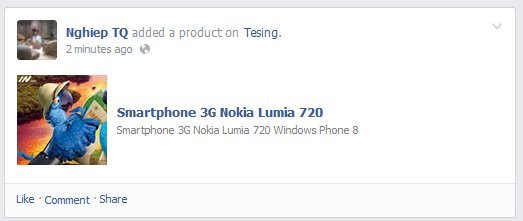
I try to publish Action link but it not appear in the post which posted on my wall.
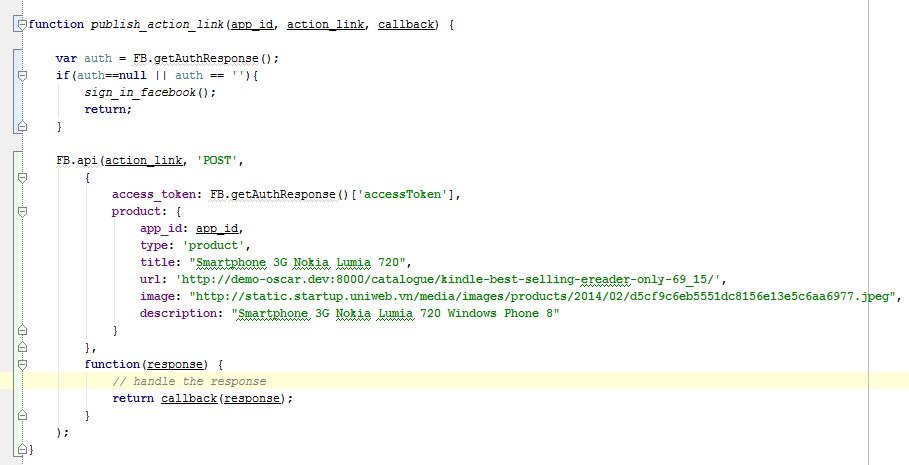
This is function i use to publish Action link:
This is the post on my wall:
but it should be such as:
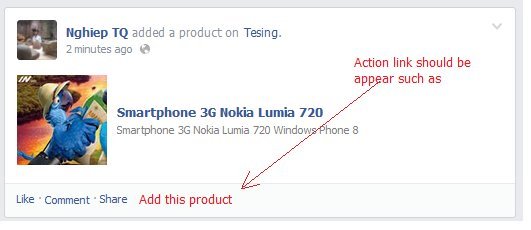
So, How to i do to Action link can display in the post ?
Thank's much

You need to add the following code:
actions: [{ name: 'Add this product', link: 'http://www.link.to.the.product/' }]

How can we add images with the demo?
Sign up for free
to join this conversation on GitHub.
Already have an account?
Sign in to comment
line 26: # is not a valid javascript comment