
Created
July 3, 2018 01:40
-
-
Save jrejaud/5427e3dc7fb32f0cd32f0e8cdf5949fa to your computer and use it in GitHub Desktop.
Connect/ Disconnect Airpods via Bluetooth. Forked from https://coderwall.com/p/fyfp0w/applescript-to-connect-bluetooth-headphones
This file contains hidden or bidirectional Unicode text that may be interpreted or compiled differently than what appears below. To review, open the file in an editor that reveals hidden Unicode characters.
Learn more about bidirectional Unicode characters
| activate application "SystemUIServer" | |
| tell application "System Events" | |
| tell process "SystemUIServer" | |
| -- Working CONNECT Script. Goes through the following: | |
| -- Clicks on Bluetooth Menu (OSX Top Menu Bar) | |
| -- => Clicks on SX-991 Item | |
| -- => Clicks on Connect Item | |
| set btMenu to (menu bar item 1 of menu bar 1 whose description contains "bluetooth") | |
| tell btMenu | |
| click | |
| tell (menu item "Airpods" of menu 1) | |
| click | |
| if exists menu item "Connect" of menu 1 then | |
| click menu item "Connect" of menu 1 | |
| return "Connecting..." | |
| else if exists menu item "Disconnect" of menu 1 then | |
| click menu item "Disconnect" of menu 1 | |
| return "Disconnecting..." | |
| else | |
| click btMenu -- Close main BT drop down if Connect wasn't present | |
| return "Connect menu was not found, are you already connected?" | |
| end if | |
| end tell | |
| end tell | |
| end tell | |
| end tell |


Hey, I am having trouble getting this to work. I replaced "AirPods" with the name of my AirPods, but it does not connect for some reason.
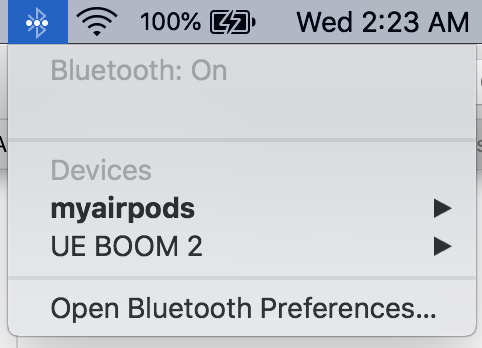
nevermind. I fixed it by ensuring that my AirPods are the first bluetooth device in the list of bluetooth devices in the menu bar.
Sign up for free
to join this conversation on GitHub.
Already have an account?
Sign in to comment
You could move AirPods Name to WF config and us it in script. With that nobody has to edit AppleScript.
unfortunately I cannot pull request on a WF repo