
- Here's the intro for Kafka
- Producers and Consumers
- Kafka Cluster
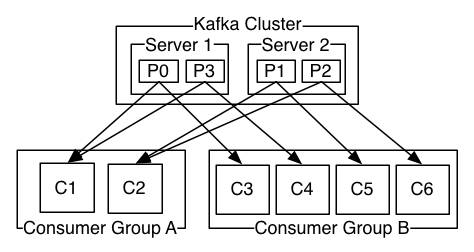
-
More research on PubSub and Message Queue
-
Cannot have a replication factor larger than the number of brokers
# Launch Kafka cluster
docker run --rm -it -p 2181:2181 -p 3030:3030 -p 8081-8083:8081-8083 \
           -p 9581-9585:9581-9585 -p 9092:9092 -e ADV_HOST=192.168.99.100 \
           landoop/fast-data-dev:latest

# Launch virtual machine with Kafka command line tools
docker run --rm -it --net=host landoop/fast-data-dev bash
# Create topic
# Why port 2181? Standard for zookeeper
kafka-topics --zookeeper 192.168.99.100:2181 --create --topic first_topic --partition 3 --replication-factor 1
kafka-topics --zookeeper 192.168.99.100:2181 --create --topic second_topic --partition 3 --replication-factor 1

# List topics
kafka-topics --zookeeper 192.168.99.100:2181 --list

# Delete topic
kafka-topics --zookeeper 192.168.99.100:2181 --topic second_topic --delete

# Describe topic
kafka-topics --zookeeper 192.168.99.100:2181 --describe --topic first_topic
# then you can keep typing messages
kafka-console-producer --broker-list 192.168.99.100:9092 --topic first_topic
# Connect to one server and you connect to everything, bootstrap-server is the same as broker list
kafka-console-consumer --bootstrap-server 192.168.99.100:9092 --topic first_topic

# Consume from beginning (default is tail)
kafka-console-consumer --bootstrap-server 192.168.99.100:9092 --topic first_topic --from-beginning

kafka-console-consumer --bootstrap-server 192.168.99.100:9092 --topic first_topic --from-beginning --partition 0

# now we cannot reconsume the same messages if the group id is used again (group id means offset is stored)
# run this twice, first time ever will have all messages, second time will only be new messages
kafka-console-consumer --bootstrap-server 192.168.99.100:9092 --topic first_topic --consumer-property group.id=mygroup1 --from-beginning
# Docker for Mac >= 1.12, Linux, Docker for Windows 10
docker run --rm -it \
           -p 2181:2181 -p 3030:3030 -p 8081:8081 \
           -p 8082:8082 -p 8083:8083 -p 9092:9092 \
           -e ADV_HOST=127.0.0.1 \
           landoop/fast-data-dev

# Docker toolbox
docker run --rm -it \
          -p 2181:2181 -p 3030:3030 -p 8081:8081 \
          -p 8082:8082 -p 8083:8083 -p 9092:9092 \
          -e ADV_HOST=192.168.99.100 \
          landoop/fast-data-dev

# Kafka command lines tools
docker run --rm -it --net=host landoop/fast-data-dev bash