
-
Star
(115)
You must be signed in to star a gist -
Fork
(28)
You must be signed in to fork a gist
-
-
Save luiscape/19d2d73a8c7b59411a2fb73a697f5ed4 to your computer and use it in GitHub Desktop.
| # | |
| # Original solution via StackOverflow: | |
| # http://stackoverflow.com/questions/35802939/install-only-available-packages-using-conda-install-yes-file-requirements-t | |
| # | |
| # | |
| # Install via `conda` directly. | |
| # This will fail to install all | |
| # dependencies. If one fails, | |
| # all dependencies will fail to install. | |
| # | |
| conda install --yes --file requirements.txt | |
| # | |
| # To go around issue above, one can | |
| # iterate over all lines in the | |
| # requirements.txt file. | |
| # | |
| while read requirement; do conda install --yes $requirement; done < requirements.txt |


This is really useful, I have recently found out about the environment.yml approach for managing dependencies with conda through a stack overflow question: here. I'm wondering if you could expand this script to create an environment yaml or write out a pip-requirements.txt file as it goes through the lines?
One suggested improvement was to catch the errors:
while read requirement; do conda install --yes $requirement; done < requirements.txt 2>error.log

This is great! Thank you!

I am in the conda env and the conda install --yes --file requirements.txt failed. Now, here you gave a solution: while read requirement; do conda install --yes $requirement; done < requirements.txt
Where is that snippet inserted? Should I change requirements.txt file or what?
I am a windows user btw

@git-sohib you just run that from your directory that contains the requirements.txt file. (If it's not named requirements.txt, you can change the filename in that command.)
Note that the command installs packages one at a time, so it's a bit slower than batch installing, but it doesn't fail if Conda encounters some errors. (For instance, if a package isn't available as a Conda package, then the install fails.) You may want to try the simpler conda install --yes --file requirements.txt if you expect the packages to be available.

I'm trying to run the command, but receive the error:
'while' is not recognized as an internal or external command, operable program or batch file
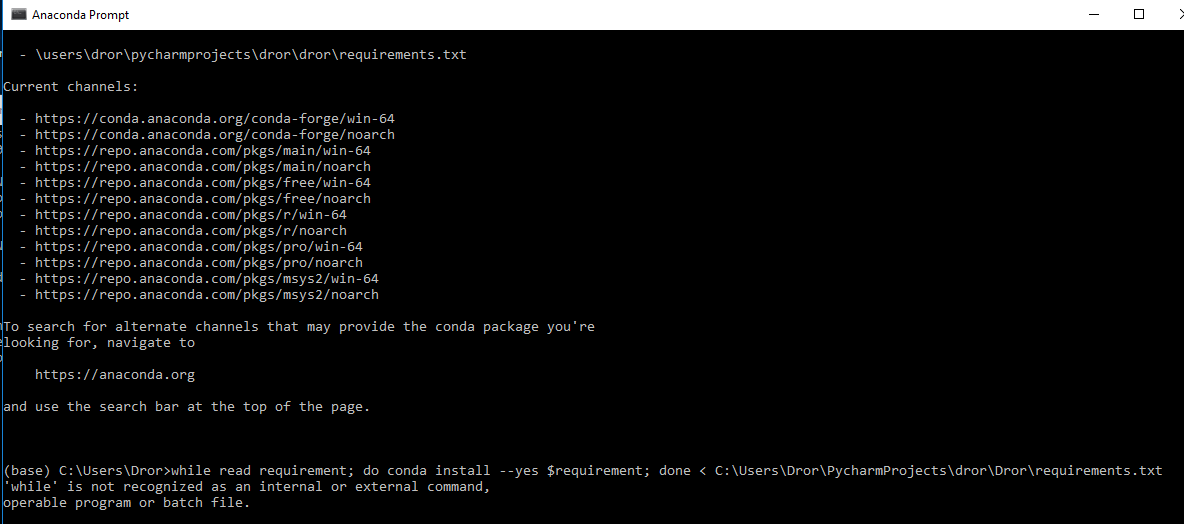
What am I missing?

@dror-kris That is a sh file meant to run on a linux as a bash script. Not on windows.

One potential issue with this is that when you install each package individually, conda won't have a unified view of what version of everything you're installing and whether their subdependencies conflict, so the later packages you install might override things that earlier packages installed (I think?)

I hope they fix this in the conda command, if this is really the case (maybe it's a problem with some packages' dependencies specification rather than conda), because conda says:
conda install --help (...) --file FILE Read package versions from the given file. Repeated file specifications can be passed (e.g. --file=file1 --file=file2). --no-deps Do not install, update, remove, or change dependencies. This WILL lead to broken environments and inconsistent behavior. Use at your own risk. --only-deps Only install dependencies.
This means, it should acually handle the deps.
BTW, the second part is a plain bash loop. In Windows it's done like this:
for /f %i in (requirements.txt) do conda install --yes %i - when run manually
for /f %%i in (requirements.txt) do conda install --yes %%i - when inside a BAT script.

Perfect .. worked for me .. thanks

This should delete comment lines firstly.

I hope they fix this in the conda command, if this is really the case (maybe it's a problem with some packages' dependencies specification rather than conda), because conda says:
conda install --help (...) --file FILE Read package versions from the given file. Repeated file specifications can be passed (e.g. --file=file1 --file=file2). --no-deps Do not install, update, remove, or change dependencies. This WILL lead to broken environments and inconsistent behavior. Use at your own risk. --only-deps Only install dependencies.This means, it should acually handle the deps.
BTW, the second part is a plain bash loop. In Windows it's done like this:
for /f %i in (requirements.txt) do conda install --yes %i- when run manually
for /f %%i in (requirements.txt) do conda install --yes %%i- when inside a BAT script.
Great

conda install --file requirements.txt

Yes @SpyderRivera seems like they've added this recently

what to do if the packages in requirement.txt are from different channel?

@pradyumnasagar append to the list of channels that conda will search for. For instance, if you want to use conda-forge:
conda config --append channels conda-forge
Thanks luiscape, for the tip on solving the requirements.txt with conda.

Thanks, an elegant way to make pip list compatible in Conda environment.

I hope they fix this in the conda command, if this is really the case (maybe it's a problem with some packages' dependencies specification rather than conda), because conda says:
conda install --help (...) --file FILE Read package versions from the given file. Repeated file specifications can be passed (e.g. --file=file1 --file=file2). --no-deps Do not install, update, remove, or change dependencies. This WILL lead to broken environments and inconsistent behavior. Use at your own risk. --only-deps Only install dependencies.This means, it should acually handle the deps.
BTW, the second part is a plain bash loop. In Windows it's done like this:
for /f %i in (requirements.txt) do conda install --yes %i- when run manually
for /f %%i in (requirements.txt) do conda install --yes %%i- when inside a BAT script.
Thanks, It worked for me

conda install --file requirements.txt
does not work
I hope they fix this in the conda command, if this is really the case (maybe it's a problem with some packages' dependencies specification rather than conda), because conda says:
conda install --help (...) --file FILE Read package versions from the given file. Repeated file specifications can be passed (e.g. --file=file1 --file=file2). --no-deps Do not install, update, remove, or change dependencies. This WILL lead to broken environments and inconsistent behavior. Use at your own risk. --only-deps Only install dependencies.
This means, it should acually handle the deps.
BTW, the second part is a plain bash loop. In Windows it's done like this:
for /f %i in (requirements.txt) do conda install --yes %i- when run manually
for /f %%i in (requirements.txt) do conda install --yes %%i- when inside a BAT script.Thanks, It worked for me
worked.
What do you mean with the "second one"? The second command? The second parameter?
Why line 19 is used is described in the comments above it.