Skip to content

Instantly share code, notes, and snippets.

@marfillaster
marfillaster / README.md
Last active September 23, 2026 17:29
MikroTik RouterOS v7 — IPv6-over-WireGuard Relay via Routed-/48 VPS

IPv6-over-WireGuard relay — VPS with a routed /48 + MikroTik

Part of a larger home-network build — full write-up with topology, VLANs, UniFi on the router, encrypted DNS, and the rationale behind every choice: https://blog.homestack.space/mikrotik-home-network/

This setup's post: https://blog.homestack.space/vps-ipv6-cgnat-mikrotik/

This is the simpler counterpart of the Vultr/on-link /64 recipe. Use this gist when your VPS provider routes a real prefix to your instance (e.g. WebHorizon SG, Hetzner, Linode-on-request, Oracle). Use the older gist when your provider only assigns on-link IPv6 (e.g. Vultr) and you have to NDP-proxy.

When the prefix is routed, ndppd disappears, the reserved-IP fee disappears, and the address plan opens up — you have 65k /64s to carve up however you want.
@marfillaster
marfillaster / 00-tldr-ipv6-over-wireguard-vultr-mikrotik.md
Last active September 23, 2026 17:29
MikroTik RouterOS v7 — IPv6-over-WireGuard Relay via Vultr Reserved /64

IPv6-over-WireGuard relay — Vultr VPS + MikroTik

This paste assumes a Vultr Ubuntu cloud-compute instance with default Vultr-issued IPv6 and a home MikroTik RouterOS v7 in roughly the standard defconf state (LAN bridge, IPv6 firewall defconf rules). It gives the home LAN a globally routable IPv6 /64 over a WireGuard tunnel without NAT66 and without DHCPv6-PD.

If your VPS is on a different cloud, your home router is not MikroTik, or the LAN is not behind a single bridge, read the full guide and substitute. The validation report shows the actual end-to-end captures.

Simpler variant available. If your VPS provider routes a prefix (a /48 or /56) to your instance instead of putting IPv6 on-link, you can skip ndppd and the reserved-IP fee entirely. WebHorizon SG was the reference setup for this — ~$3/mo with a routed /48 — and the recipe is in the [routed-/48 variant gist](ht

cert-info.sh

cert-info.sh is a lightweight Bash utility for fetching and displaying SSL/TLS certificate details for one or more domains.
It supports both human-readable CSV output and structured JSON output, with options to override IP resolution globally or per-domain.


Features

  • Retrieve SSL/TLS certificate details including:
@marfillaster
marfillaster / unifi_container_rb5009.md
Last active September 23, 2026 17:29
UniFi Network Application + standalone MongoDB as RouterOS containers on a MikroTik RB5009 (1 GiB RAM, ARMv8.0-A Cortex-A72), with USB partitioned into swap + ext4
@marfillaster
marfillaster / Converge-F670L.md
Last active September 23, 2026 17:29
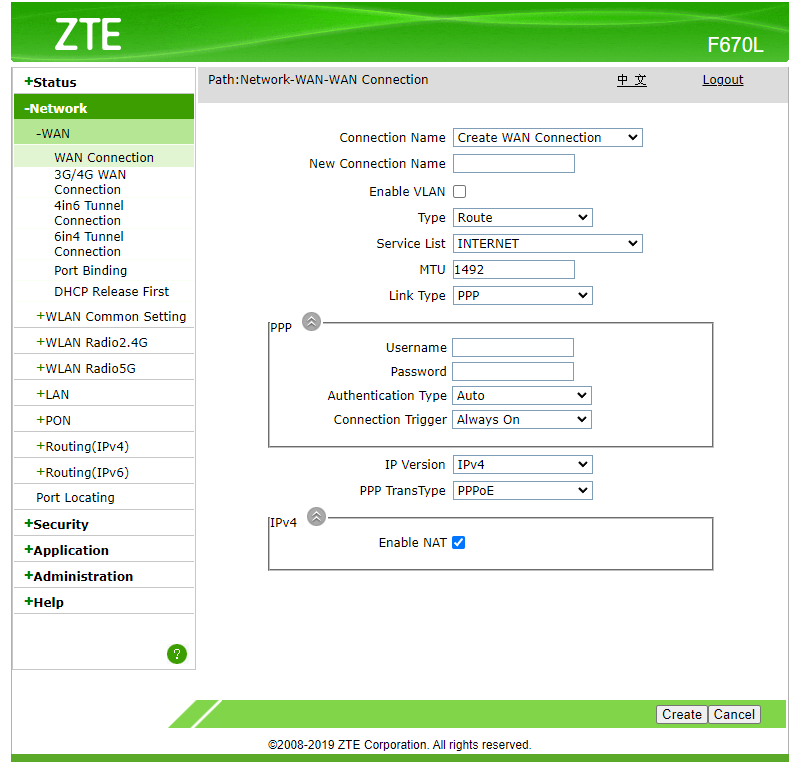
Converge F670L Bridge mode

Related: replacing the Converge ONT entirely with a GPON SFP stick on a MikroTik RB5009: https://blog.homestack.space/converge-gpon-sfp-stick-mikrotik/

  1. Go to Network - WAN - WAN Connection WAN Connection
  2. Right click Type Route dropdown select and click "Inspect" in the context menu.
    In console, run the code below:
    document.getElementById('Frm_mode').options[document.getElementById('Frm_mode').options.selectedIndex].setAttribute('value', 'BRIDGE');
    Change_mode();
    
@marfillaster
marfillaster / guide.md
Last active September 23, 2026 17:29
Ubiquiti UniFi Guest SSID on VLAN using MikroTik router hybrid port

Ubiquiti UniFi Guest SSID on a VLAN via a MikroTik hybrid port

A guest SSID isolated on its own VLAN, where the UniFi AP rides a single hybrid trunk port: untagged frames are the main LAN (AP management + adoption), tagged frames carry the Guest SSID. One cable, no second management VLAN to onboard.

Part of a larger home-network build — full write-up with topology, IoT/Guest segmentation, IPv6-over-WireGuard, DoH, and the rationale behind every choice below: https://blog.homestack.space/mikrotik-home-network/

@marfillaster
marfillaster / 00-tldr-default-config-dual-wan-pcc-recursive-failover.md
Last active October 1, 2026 22:34
MikroTik RouterOS v7 dual DHCP WAN recursive failover w/ PCC load-balancing; and recursive ECMP

TL;DR: Default-Config Dual WAN PCC + Recursive Failover

Related: IPv6 multi-homing over CGNAT with BGP on RouterOS: https://blog.homestack.space/multi-homed-ipv6-cgnat-mikrotik/

This paste assumes a hardware MikroTik RouterBOARD with the standard MikroTik default config — hAP, hEX, RB5009-class, etc. — where ether1 is the WAN port and ether2 through etherN are LAN bridge ports. The paste removes ether2 from the LAN bridge and turns it into WAN2.

If your router is not in that default state — CHR, multi-WAN appliances, anything reconfigured, or anything where ether1 is not your WAN — read the full guide and substitute interface names. The lab report's §8.7 TL;DR validation shows the kind of remap CHR needs before this paste is safe.

Resulting layout after the paste:

@marfillaster
marfillaster / guide.md
Last active March 17, 2025 13:26
yubikey ssh ykcs11 in osx

Generate key

brew install ykman yubico-piv-tool

# Generate key
ykman piv keys generate -aRSA2048 --pin-policy ONCE --touch-policy CACHED 9a public.pem


# Generate self signed key
ykman piv certificates generate -s "CN=yubi-1 ssh" -aSHA256 9a public.pem
@marfillaster
marfillaster / bridge-mode.md
Last active August 18, 2026 05:23
PLDT VDSL HG180U notes

Bridge mode

This guide will enable bridge mode in ethernet port 3 only. Wifi and ethernet ports 1 and 2 will remain in route mode.

Use cases:

  • Avoid double NAT.
  • Improve WiFi performance by using dedicated and/or more modern equipment.
@marfillaster
marfillaster / README.md
Last active September 23, 2026 17:29
MikroTik RouterOS v7: DoH + ULA DNS via IPv6 RA RDNSS

MikroTik RouterOS v7: DoH + IPv6 RA RDNSS with ULA DNS

Self-contained paste for a RouterOS v7 LAN that already has IPv6 SLAAC working. It makes the router the LAN DNS resolver, sends upstream DNS through Cloudflare DoH, advertises the router's own ULA as DNS via RA RDNSS, and stops DHCPv4 from advertising 192.168.88.1 as DNS while keeping admin@192.168.88.1 management working.

Full write-up with topology, rationale, and the rest of the build: https://blog.homestack.space/mikrotik-home-network/

This setup's post: https://blog.homestack.space/encrypted-dns-stable-resolver-mikrotik/

DNS companion/update for: