ZPL II, ZBI 2, Set-Get-Do, Mirror, WML Programming Guide, P1099958-005 Rev A https://docs.zebra.com/content/tcm/us/en/printers/software/zebra-zpl-ii,-zbi-2,-set-get-do,-mirror,-wml-programming-guide/c-zpl-zpl-commands.html

Melcior markgodiy

markgodiy
/ DblClick-Execute-Powershell-UAC.vbs
Created
January 13, 2023 23:00
Execute Powershell Script using VBA, with UAC for Security. To use this script as-is, .vbs file must be in the same folder as .ps1 file, then create shortcut to .vbs file as needed.
This file contains hidden or bidirectional Unicode text that may be interpreted or compiled differently than what appears below. To review, open the file in an editor that reveals hidden Unicode characters.
Learn more about bidirectional Unicode characters
| Function RunAsAdmin() | |
| Dim objAPP | |
| If WScript.Arguments.length = 0 Then | |
| Set objAPP = CreateObject("Shell.Application") | |
| objAPP.ShellExecute "wscript.exe", """" & _ | |
| WScript.ScriptFullName & """" & " RunAsAdministrator",,"runas", 1 | |
| WScript.Quit | |
| End If | |
| End Function |
markgodiy
/ DblClick-Execute-Powershell.wsf
Last active
January 13, 2023 23:03
Write PowerShell code within a windows scripting file (.wsf) script. Useful for PowerShell GUI, and scripts that do not require elevated privileges.
This file contains hidden or bidirectional Unicode text that may be interpreted or compiled differently than what appears below. To review, open the file in an editor that reveals hidden Unicode characters.
Learn more about bidirectional Unicode characters
| <script language="VBScript"> | |
| '<).job.powershell | Invoke-Expression""" | |
| If CreateObject("WScript.Shell").Run("powershell -noexit -command ""([xml](Get-Content '" & WScript.ScriptFullName & "')).job.powershell.'#cdata-section' | Invoke-Expression""",2, False) Then | |
| MsgBox "Script failed to run." | |
| End If |
markgodiy
/ Set-Lab-RemoteHostsFile.ps1
Created
February 2, 2023 14:06
This file contains hidden or bidirectional Unicode text that may be interpreted or compiled differently than what appears below. To review, open the file in an editor that reveals hidden Unicode characters.
Learn more about bidirectional Unicode characters
| function Set-Lab-RemoteHostsFile { | |
| <# | |
| .EXAMPLE | |
| Set-Lab-RemoteHostsFile -ComputerName <RemoteHostname> -InsertIP "214.47.x.x" -InsertDescription "RemoteServer" | |
| #> | |
| param( | |
| [string]$ComputerName, |
markgodiy
/ TcpStreamReaderWriter.ps1
Last active
April 3, 2023 11:45
This file contains hidden or bidirectional Unicode text that may be interpreted or compiled differently than what appears below. To review, open the file in an editor that reveals hidden Unicode characters.
Learn more about bidirectional Unicode characters
| Function ZebraTCPClient { | |
| <# | |
| Source/Crecit: Sven Sperner, https://github.com/sperner | |
| Original Code Permalink: | |
| https://github.com/sperner/PowerShell/blob/8c661ec4d0914b02095ffabb7c9dcbd8b1f0185a/TcpClient.ps1 | |
| .DESCRIPTION | |
| -To use, load function into a powershell session console. | |
| -Default port is 9100. Zebra printers also uses port 6101. |
This file contains hidden or bidirectional Unicode text that may be interpreted or compiled differently than what appears below. To review, open the file in an editor that reveals hidden Unicode characters.
Learn more about bidirectional Unicode characters
| Add-Type -AssemblyName System.Windows.Forms | |
| $Form = New-Object System.Windows.Forms.Form | |
| $Form.Size = New-Object System.Drawing.Size(600, 400) | |
| ############################################## Start functions | |
| # Function to return the name of the selected snaphsot from the second DropDown box | |
| $Global:PrintServer = "" | |
| function FetchPrinters { | |
| $printerTxtFileLocation = 'C:\Temp\PrinterList.txt' | |
| # $Global:PrintServer = $Global:DropDownBox1.SelectedItem.ToString() | |
| Get-Printer -ComputerName "bamcpsvip" | where {$_.Name -like "bamc_h_lab*"} | Select-Object -ExpandProperty Name | Sort-Object -CaseSensitive | Out-File "$printerTxtFileLocation" -Force |
markgodiy
/ PsGUI_xaml_datagrid_tutorial.md
Last active
April 22, 2023 16:16
Powershell XAML GUI tutorial with Datagrid, Textbox, Button, Labels
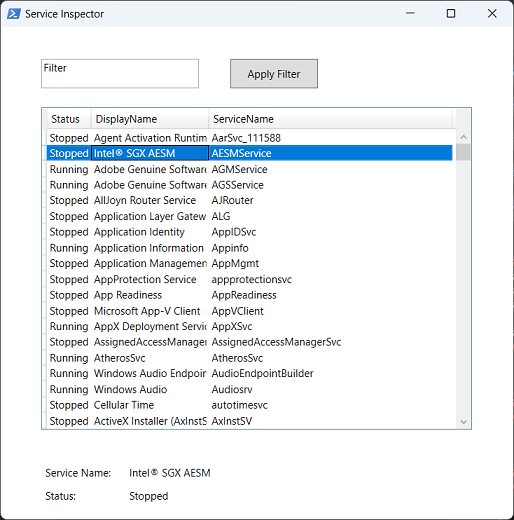
Credited Source: JackedProgrammer
https://www.youtube.com/@jackedprogrammer
markgodiy
/ gist:7f30f97b4c2da4d3354632652b7caa05
Created
July 14, 2023 18:36
WIP-Test-HP-HTTPWebRequest.ps1
This file contains hidden or bidirectional Unicode text that may be interpreted or compiled differently than what appears below. To review, open the file in an editor that reveals hidden Unicode characters.
Learn more about bidirectional Unicode characters
| $printerIP = <IPaddrr> | |
| # $firmwareFilePath = "C:\path\to\ljM506_fs3.9.12_fw_2309088_001464.bdl" | |
| $policyType = [System.AppDomain]::CurrentDomain.GetAssemblies() | | |
| ForEach-Object { $_.GetTypes() } | | |
| Where-Object { $_.Name -eq 'TrustAllCertsPolicy' } | |
| if (-not $policyType) { | |
| $code = @" | |
| using System.Net; |
This file contains hidden or bidirectional Unicode text that may be interpreted or compiled differently than what appears below. To review, open the file in an editor that reveals hidden Unicode characters.
Learn more about bidirectional Unicode characters
| <# | |
| .DESCRIPTION | |
| Author: Mark Go | |
| PowerShell script designed to check for pending patches available via SCCM (System Center Configuration Manager). It provides the ability to retrieve pending patch information for specified remote computers and can be used to identify patches that need to be installed. The script also includes the option to automatically start the WinRM service on target hosts if necessary. | |
| .EXAMPLE | |
| Get-SCCMPendingPatches SERVER01 -Verbose | |
| Get pending patches for a specific computer |
This file contains hidden or bidirectional Unicode text that may be interpreted or compiled differently than what appears below. To review, open the file in an editor that reveals hidden Unicode characters.
Learn more about bidirectional Unicode characters
| $WingetCommonID = @{ | |
| "Google Chrome" = "Google.Chrome" | |
| "Microsoft Edge" = "Microsoft.Edge" | |
| "Mozilla Firefox" = "Mozilla.Firefox" | |
| "Adobe Acrobat Reader DC x64" = "Adobe.Acrobat.Reader.64-bit" | |
| "Adobe Acrobat Reader DC x32" = "Adobe.Acrobat.Reader.32-bit" | |
| "Visual Studio Code" = "Microsoft.VisualStudioCode" | |
| "Microsoft SQL Server" = "Microsoft.SQLServer" | |
| } |
OlderNewer