Last active
February 28, 2021 11:39
-
-
Save markshust/90d94762a633b2b275110fd4434b7080 to your computer and use it in GitHub Desktop.
macOS Automator script to turn on and off LiveChat every day on schedule
This file contains hidden or bidirectional Unicode text that may be interpreted or compiled differently than what appears below. To review, open the file in an editor that reveals hidden Unicode characters.
Learn more about bidirectional Unicode characters
| tell application "Google Chrome" | |
| tell window 1 | |
| tell active tab | |
| delay 7 | |
| set str to execute javascript "if (!document.querySelector('#notifications-bar button')) document.querySelector('span.lc-switch.lc-switch--compact.addition > input').click();" | |
| delay 3 | |
| tell application "System Events" to keystroke "w" using command down | |
| end tell | |
| end tell | |
| end tell |
This file contains hidden or bidirectional Unicode text that may be interpreted or compiled differently than what appears below. To review, open the file in an editor that reveals hidden Unicode characters.
Learn more about bidirectional Unicode characters
| tell application "Google Chrome" | |
| tell window 1 | |
| tell active tab | |
| delay 7 | |
| set str to execute javascript "document.querySelector('#notifications-bar button.lc-btn').click()" | |
| delay 3 | |
| tell application "System Events" to keystroke "w" using command down | |
| end tell | |
| end tell | |
| end tell |

Author
Sign up for free
to join this conversation on GitHub.
Already have an account?
Sign in to comment
Turn off Live Chat:
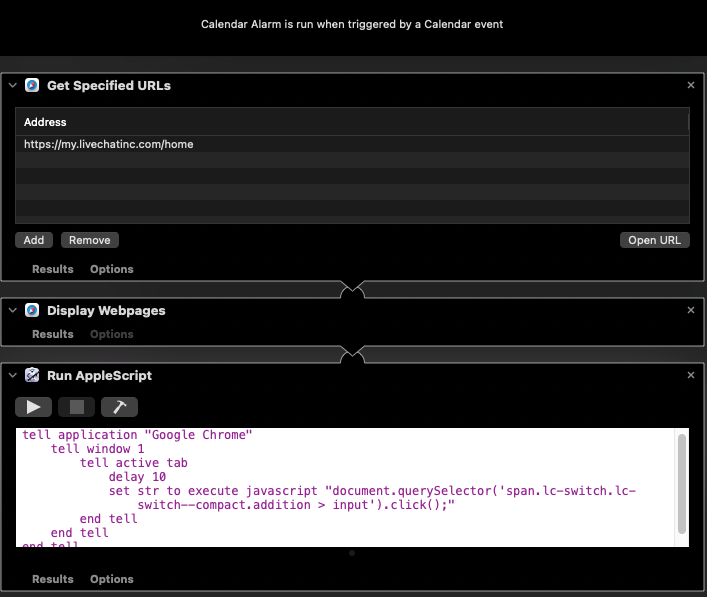
Turn on Live Chat:
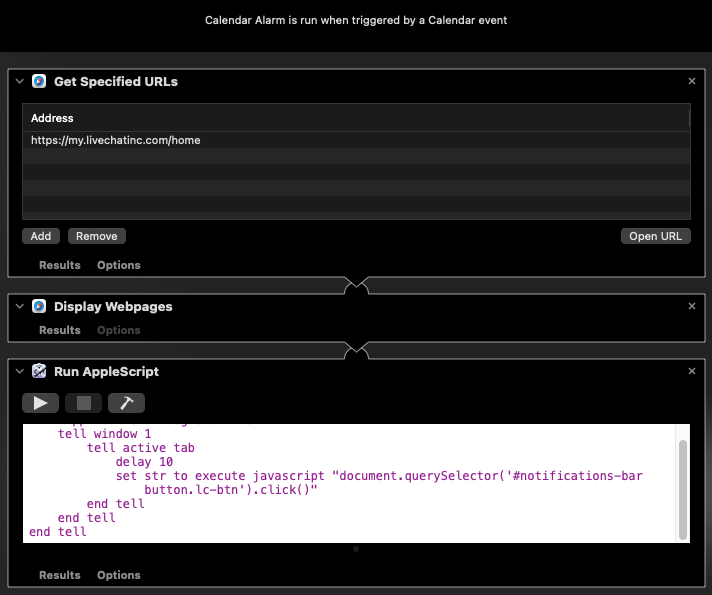
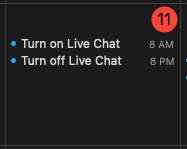
Then create a recurring Apple Calendar event for each on your schedule: