
- Explain what OAuth is and what it is used for
- Generate access tokens from client keys and secrets
- Explain the benefits of using OAuth and limiting an Application's scope
- Diagram the OAuth flow between user, client, and server
- Register a new application with a 3rd party like Facebook or Instagram
- Add support for 3rd party logins in an application
- Request resources using an access token
API's allow two different software components/applications to communicate with each other
- Review what an API is and why it's important
- Allows us to access 3rd party site data on behalf of a user
- Access internals of the operating system without touching low level code
- Mobile apps, with no API everything would be local
- Access multiple services on one page
- Instead of rewriting the same code across applications for a company, create a language agnostic API that can be used across multiple applications
- Ajax/Single Page Applications
- Pros of using 3rd party API's
- Save a lot of development time (e.g. With FB login, you don't have to implement user auth yourself)
- Access to vast social network instantly
- Access to vast amount of data already collected out there, you aren't starting from scratch
- Complex functionality abstracted (e.g. accessing the camera on an iPhone)
- Multiple apps by same company with the same logic, update business rules in one area updates every app using the API
- Cons of using 3rd party API's
- All the data is ultimately stored by the 3rd party. Data is king
- Playing in someone else's playground, follow their rules
- 3rd party could introduce breaking changes at any time
- 3rd party could shut down the API completely
- What are some problems with having an open API?
- Users/applications might abuse it
- We often need to make calls on behalf of users, but need to prove who that user is
- Restrict apps from accessing too much data, privacy
- Rate limiting
OAuth is an agreed-upon set of standards for logging in through a third party service. OAuth is a framework that enables applications to obtain limited access to user accounts on an external service like Facebook, GitHub, etc. It delegates user authentication to the service that hosts the account and authorizes third-party applications limited access to that user account.
You see many sites with buttons that allow for users to sign up with their Facebook or Twitter credentials. OAuth makes all this possible.
It involves:
- Leaving a website
- Authenticating with the third party
- Then the third party will redirect the user back to the original website with, among other things, an authentication token that can be persisted and used to request more information later.
At a high level, the standard lays out the overall protocol of login: you have to have this route in your application, with these parameters in your request/response, and after that, you need to be directed to these pages. And because it's a set of standards that are universally accepted, there's a whole bunch of libraries we can use to make this happen - like Passport for Node.js!

You probably know this as "Login with Facebook": you click on "Login with Facebook", you're redirected to Facebook's application, and then you get back to your site. As a developer, one benefit is that you don't have to worry about developing your own authentication system. The other benefit is your application gets a whole bunch of information it can use - or persist - later on, from Facebook. A downside for the users is that in order to login, they're giving a lot of of their data to the requesting application. Developers and companies love this, though, because they can use all this data from the OAuth provider (Facebook/Twitter etc).
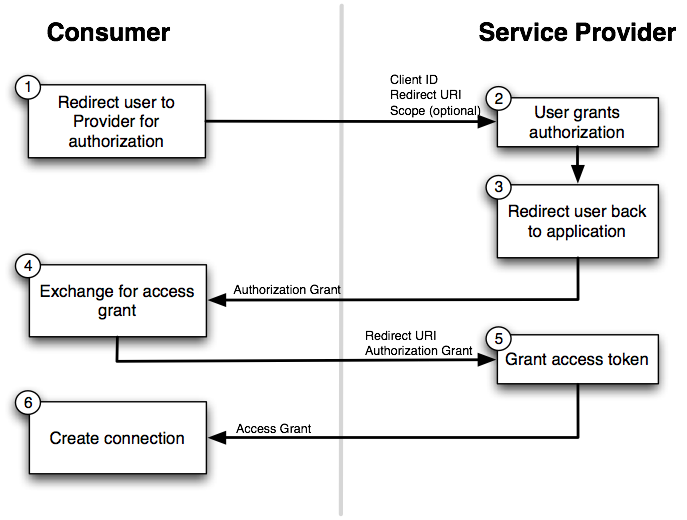
OAuth 1 Reference: http://marktrapp.com/blog/2009/09/17/oauth-dummies/
- Authorization Code Grant
- Most popular and widely used
- Standard parameters expected: http://tutorials.jenkov.com/oauth2/authorization-code-request-response.html
- If you've signed in with Facebook, Twitter, Instagram account then you've experienced it
- User clicks on "Sign on with Facebook"
- Redirected from the client to the authorization server
- User signs in with their credentials, then authorize certain actions (scope)
- User is redirected back to the application/website with an authorization code in the query string
- The client captures the code and makes another request (along with the client secret) to the authorization server to exchange for an access token
- Implicit Grant
- The access token is sent in the hash fragment, middle men are not able to obtain the access token that way
- Why use the "Authorization Code" flow when "Implicit" is simpler?
- http://stackoverflow.com/questions/13387698/why-is-there-an-authorization-code-flow-in-oauth2-when-implicit-flow-works-s
- Mostly used for mobile and client side apps where the client secret can't be safely hidden
- Resource Owner Credentials Grant
- The client itself asks for the user's username and password as opposed to a redirect
- Should only use for trusted apps. For example, the official Spotify/Facebook app, etc. Doesn't make sense to go through an authorization flow
- Client Credentials Grant
- Server to server access token (e.g. cron job). Both the client id and secret are securely transferred
- Refresh Token Grant
- A "refresh" token and expiration time is returned along with the access token
- Instead of sending the user back through the authorization flow, the refresh token can be exchanged for a new access token
With the Authorization code flow, the authorization code allows us to send a user to a third party without embedding the client secret. When we receive the code, we request the actual token behind the scenes with the client secret, transparent to the user.
http://alexbilbie.com/2013/02/a-guide-to-oauth-2-grants/
https://www.digitalocean.com/community/tutorials/an-introduction-to-oauth-2
- client_id - The identifier for the application accessing the API
- client_secret - The application password, should be hidden and only the app knows about it
- response_type - Must be set to
codeif requesting auth code - redirect_uri - Callback URL after authorization (Must match what was set up in the app in some cases)
- scope - Permissions requested
- code - The authorization code
- access_token - Used to access protected resources on behalf of a user
- refresh_token - Used to obtain another access token when the current one expired or is about to expire
Only ask for the permissions your app needs to run, don't ask for additional information you "may" need down the road.
Do NOT embed the client secret in a mobile app or in the JavaScript!
without refresh token
- send API request with access token
- if access token is invalid, fail and ask user to re-authenticate
with refresh token
- send API request with access token
- if access token is invalid, try to update it using refresh token
- if refresh request passes, update the access token and re-send the initial API request
- if refresh request fails, ask user to re-authenticate
Source: http://stackoverflow.com/a/12885823
To make any of our apps work, we need to first declare our app as a Facebook application using Facebook's developer interface. Ultimately, we'll be defining the set of permissions / information we are requesting from the user.
A visitor of our website clicks Login with Facebook, and leaves our original application and are brought to Facebook - as a developer, you lose everything you had (params from a form, for example).
As a Facebook user, when you login, you pass in two important pieces of information to Facebook: the app ID and the app secret that identifies the application requesting the information.
After our app is given the okay, Facebook sends back an access token. With that access token, Facebook can identify users of our application as real Facebook users. These access tokens only last so long, usually expiring after a week or so, but with this access token we can call out to Facebook, if we want, and get Facebook data associated with that Facebook user.
https://gist.github.com/mdang/16127f8ef9f836069f8d
https://instagram.com/developer/
https://github.com/Instagram/instagram-ruby-gem
- Create a new Instagram application
- Read the docs
- Log in with Instagram
- Get the most recent photos for the current user
- Get the most popular photos on the service
https://dev.twitter.com/overview/documentation
https://github.com/sferik/twitter
- Create a new Twitter application
- Read the docs
- Environment variables
- Log in with Twitter
- get all followers
- get their bios