
API's (Application Programming Interface) govern how software programs talk to each other. API's expose internal programming functions (e.g. features) to the outside world in a limited/controlled fashion. It makes it possible for applications to share data and allow users to take action even on different services.
- Logging in with Facebook
- Yelp displaying nearby restaurants on Google Maps
- Mobile apps accessing the phone's camera, contacts, etc
- Storing photos on Amazon Web Services
- Sending emails to users with MailChimp
- Share article on Facebook, pin a photo to Pinterest, tweet on Twitter
- Save development time
- No need to write complex functionality yourself that could take months to develop
- Save resources
- Not having to store large files or pay for bandwidth could save a signficant amount of money
- Access to a wealth of data that has already been collected for you
- Friend relationships
- Photos uploaded by other users
- Points of interest, etc
- Instant access to large user bases
- Playing in someone else's playground, follow their rules
- Twitter notoriously started limiting access to 3rd party Twitter clients. They said it was to "unify" the Twitter experience
- LinkedIn has also done something similar shut down their open API's to all but 4 official partners. Going forward, you have to be a partner to access their API's
- Sometimes the company or entity could shut down themselves, like Google Reader
- If another 3rd party holds all of your application data, you're at their mercy. They have significant leverage over you, what if they approached you about a buy out and you refuse?
- Instagram kills newly launched ‘Being’ app, which saw 50K downloads its first week
- Apple going away from Google Maps and developing their own mapping service
- Uber going away from Google Maps and buying mapping startup
- If you encounter a major breaking error or the service is down, you're out of luck. You just have to hope they resolve the error on their end in a timely manner
- Rate limiting - Your app can only make a certain number of requests within any given timeframe. This doesn't matter when you receive low traffic but if you get popular it's something that could be a problem for you
- Twitter rate limits - https://dev.twitter.com/rest/public/rate-limits
- Instagram rate limits - https://instagram.com/developer/limits
https://github.com/jnunemaker/httparty
gem install httparty
- Weather API - http://openweathermap.org/current
- GitHub API - https://github.com/github
- Facebook Graph API - https://graph.facebook.com/[USERNAME_or_FACEBOOK_ID]
require 'httparty'
require 'json'

# Use the class methods to get down to business quickly
#response = HTTParty.get('https://api.stackexchange.com/2.2/questions?site=stackoverflow')
#response = HTTParty.get('http://api.openweathermap.org/data/2.5/weather?zip=78701')
response = HTTParty.get('http://api.openweathermap.org/data/2.5/weather?q=austin,us&units=imperial')

#puts response.body, response.code, response.message, response.headers.inspect
buffer = response.body
result = JSON.parse(buffer)

puts result['main']['temp_max']

# Or wrap things up in your own class
# class OpenWeatherMap
#   include HTTParty
#   base_uri 'api.openweathermap.org'

#   def initialize()
#   end

#   def get_by_city(city_name, country_code)
#     options = { query: { q: city_name + ',' + country_code, units: 'imperial' } }
#     self.class.get('/data/2.5/weather', options)
#   end

#   def get_by_zip(zip_code, country_code)
#     options = { query: { zip: zip_code + ',' + country_code, units: 'imperial' } }
#     self.class.get('/data/2.5/weather', options)
#   end
# end

# weather = OpenWeatherMap.new
# puts weather.get_by_zip '78701', 'us'
# puts weather.get_by_city 'Austin', 'us'20 min
What's OAuth 2?
OAuth is a framework that enables applications to obtain limited access to user accounts on an external service like Facebook, GitHub, etc. It delegates user authentication to the service that hosts the account and authorizes third-party applications access to that user account.
OAuth 1 Reference: http://marktrapp.com/blog/2009/09/17/oauth-dummies/
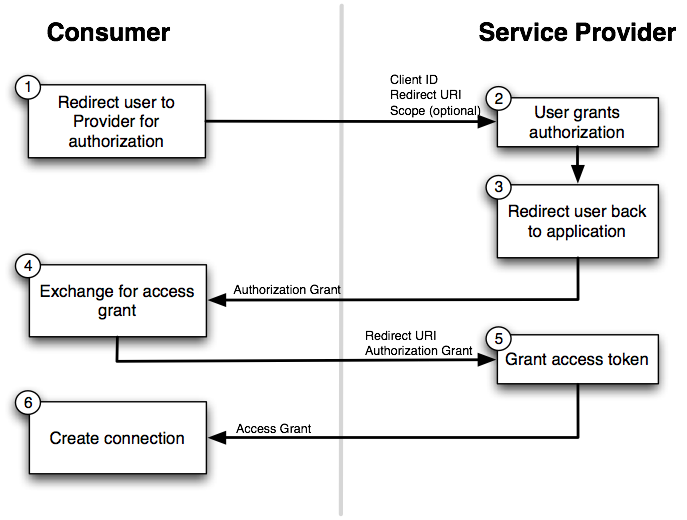
- Authorization Code Grant
- Most popular and widely used
- If you've signed in with Facebook, Twitter, Instagram account then you've experienced it
- User clicks on "Sign on with Facebook"
- Redirected from the client to the authorization server
- User signs in with their credentials, then authorize certain actions (scope)
- User is redirected back to the application/website with an authorization code in the query string
- The client captures the code and makes another request (along with the client secret) to the authorization server to exchange for an access token
- Implicit Grant
- The access token is sent in the hash fragment, middle men are not able to obtain the access token that way
- Why use the "Authorization Code" flow when "Implicit" is simpler?
- http://stackoverflow.com/questions/13387698/why-is-there-an-authorization-code-flow-in-oauth2-when-implicit-flow-works-s
- Mostly used for mobile and client side apps where the client secret can't be safely hidden
- Resource Owner Credentials Grant
- The client itself asks for the user's username and password as opposed to a redirect
- Should only use for trusted apps. For example, the official Spotify/Facebook app, etc. Doesn't make sense to go through an authorization flow
- Client Credentials Grant
- Server to server access token (e.g. cron job). Both the client id and secret are securely transferred
- Refresh Token Grant
- A "refresh" token and expiration time is returned along with the access token
- Instead of sending the user back through the authorization flow, the refresh token can be exchanged for a new access token
http://alexbilbie.com/2013/02/a-guide-to-oauth-2-grants/
https://www.digitalocean.com/community/tutorials/an-introduction-to-oauth-2
https://instagram.com/developer/
https://github.com/Instagram/instagram-ruby-gem
- Create a new Instagram application
- Read the docs
- Log in with Instagram
- Get the most recent photos for the current user
- Get the most popular photos on the service
https://dev.twitter.com/overview/documentation
https://github.com/sferik/twitter
- Create a new Twitter application
- Read the docs
- Environment variables
- Log in with Twitter
- get all followers
- get their bios