
This guide is based on the following sources:
- https://github.com/0xe2d0/Flask-Reverse-Proxy
- https://medium.com/customorchestrator/simple-reverse-proxy-server-using-flask-936087ce0afb
It expands the original concepts into a modern, production-oriented implementation.
- Introduction
- Reverse Proxy Fundamentals
- Reverse Proxy vs Forward Proxy
- Architecture Overview
- Basic Flask Reverse Proxy
- Full HTTP Method Support
- Query String Forwarding
- Header Forwarding
- Timeout Handling
- Error Handling
- Logging
- Streaming Responses
- Security Best Practices
- HTTPS / TLS
- Production Deployment
- Docker Deployment
- Gunicorn Deployment
- Nginx Integration
- WebSocket Limitations
- Performance Considerations
- Async Alternatives
- Complete Production-Ready Example
- Testing Examples
- Troubleshooting
- Conclusion
A reverse proxy is a server that sits between clients and backend services.
Instead of clients communicating directly with the upstream application, requests first reach the proxy server, which then forwards the requests to the target service.
Common use cases include:
- Load balancing
- Security filtering
- Authentication
- Request logging
- API gateways
- Caching
- SSL termination
- Microservices routing
Flask can be used to create lightweight reverse proxy applications for development, testing, internal tools, and lightweight API routing.
A proxy server acts as an intermediary between two systems.
Depending on where the proxy is positioned, it can behave as:
- a Forward Proxy
- a Reverse Proxy
Understanding the difference is fundamental when designing network architectures, API gateways, or security layers.
A forward proxy sits in front of the client.
The client sends requests to the proxy, and the proxy forwards them to external servers.
Typical use cases:
- privacy
- anonymity
- bypassing geographic restrictions
- enterprise internet filtering
- caching external resources
Client → Forward Proxy → Internet → Target Server
- Corporate proxies
- VPN services
- Anonymous browsing systems
A reverse proxy sits in front of backend servers.
Clients communicate with the reverse proxy instead of directly communicating with application servers.
Typical use cases:
- load balancing
- TLS termination
- API routing
- authentication
- DDoS protection
- caching
- traffic inspection
Client → Reverse Proxy → Backend Servers
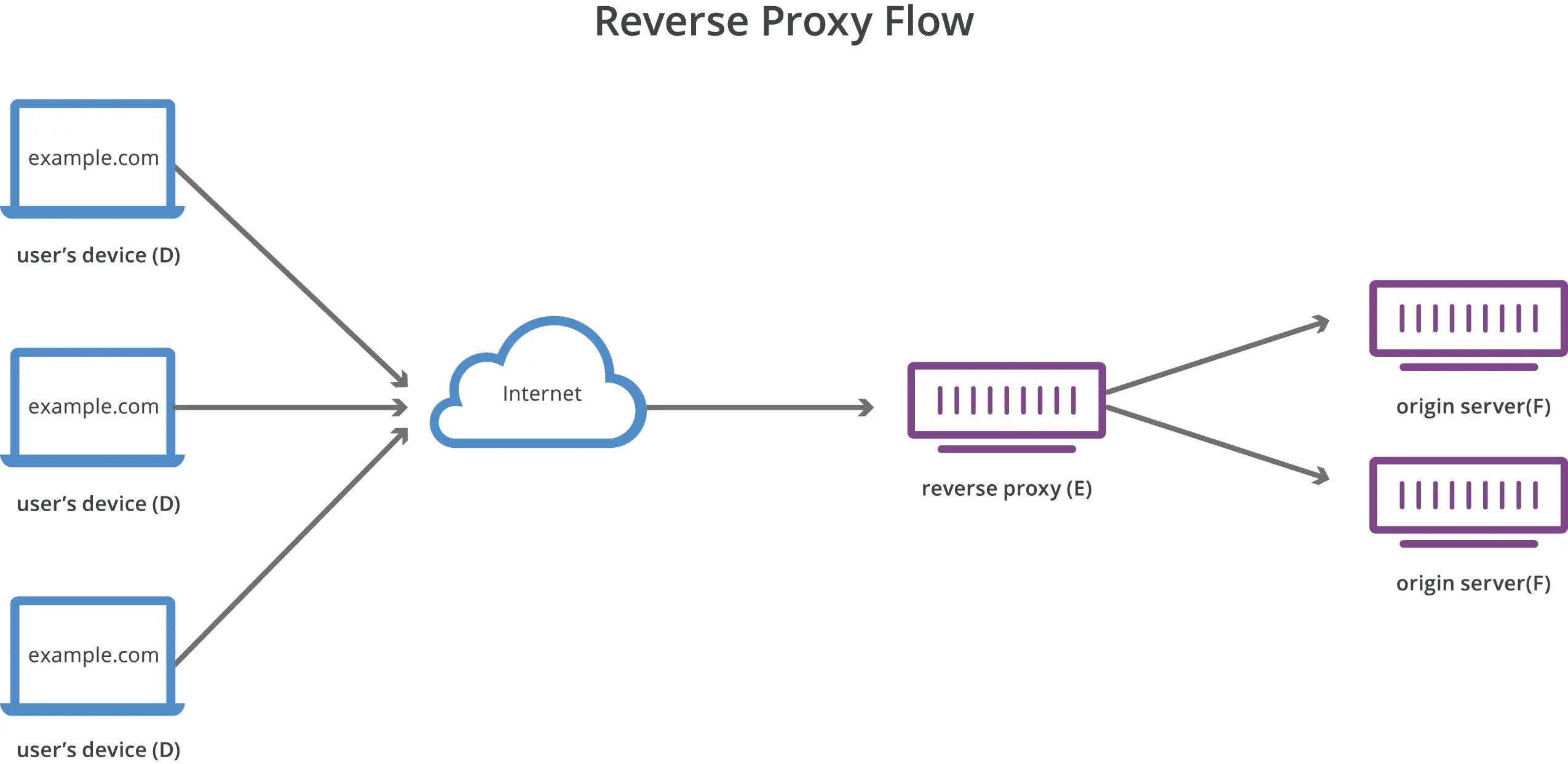
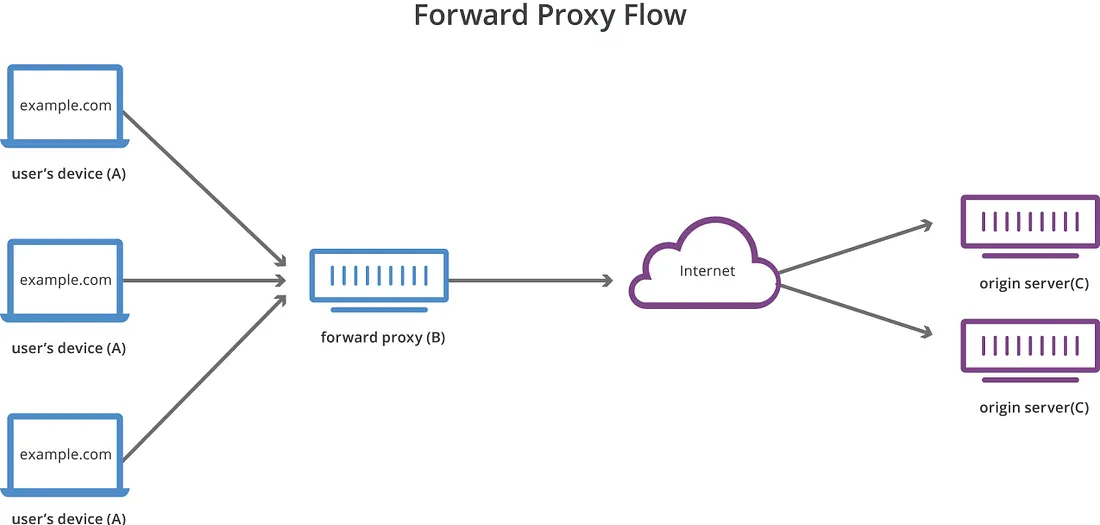
| Reverse Proxy | Forward Proxy |
|---|---|
| Protects servers | Protects clients |
| Server-side | Client-side |
| Used by websites and APIs | Used by users or organizations |
| Hides backend infrastructure | Hides client identity |
| Common in cloud architectures | Common in enterprise networks |
Modern infrastructures rely heavily on reverse proxies because they:
- centralize traffic management
- improve security
- simplify scaling
- reduce backend exposure
- enable observability and monitoring
- support zero-trust architectures
Popular reverse proxy technologies include:
- Nginx
- HAProxy
- Envoy
- Traefik
- Cloudflare Edge
- API Gateways
Flask-based reverse proxies are typically used for:
- custom routing logic
- API middleware
- authentication layers
- development environments
- lightweight internal tooling
┌─────────────┐
│   Client    │
└──────┬──────┘
       │ HTTP Request
       ▼
┌────────────────────┐
│ Flask ReverseProxy │
│     proxy.py       │
└─────────┬──────────┘
          │ Forward Request
          ▼
┌────────────────────┐
│  Upstream Service  │
│ localhost:8000/api │
└────────────────────┘
from flask import Flask, request, Response
import requests

app = Flask(__name__)

UPSTREAM = "http://localhost:8000"

@app.route("/", defaults={"path": ""})
@app.route("/<path:path>")
def proxy(path):
    url = f"{UPSTREAM}/{path}"

    response = requests.get(url)

    return Response(
        response.content,
        status=response.status_code,
        content_type=response.headers.get("content-type")
    )

if __name__ == "__main__":
app.run(port=1337)Production proxies should support all major HTTP methods.
methods = [
    "GET",
    "POST",
    "PUT",
    "PATCH",
    "DELETE",
    "OPTIONS",
    "HEAD"
]response = requests.request(
method=request.method,
url=url,
params=request.args
)headers = {
key: value
for key, value in request.headers
if key.lower() != "host"
}timeout=(5, 30)try:
response = requests.request(...)
except requests.exceptions.RequestException as e:
return {
"error": str(e)
}, 502import logging
logging.basicConfig(level=logging.INFO)stream=TrueNever allow arbitrary upstream URLs without validation.
Dangerous example:
target = request.args.get("url")Recommended production stack:
Client
↓
Nginx / Caddy
↓
Gunicorn
↓
Flask Proxy
Recommended components:
- Flask
- Gunicorn
- Nginx
- Redis
- Docker
FROM python:3.12-slim
WORKDIR /app
COPY requirements.txt .
RUN pip install -r requirements.txt
COPY . .
CMD ["gunicorn", "-w", "4", "-b", "0.0.0.0:1337", "proxy:app"]gunicorn -w 4 -b 0.0.0.0:1337 proxy:appserver {
listen 80;
server_name example.com;
location / {
proxy_pass http://127.0.0.1:1337;
}
}Flask + requests does not support native WebSocket proxying.
Flask proxies are slower than:
- Nginx
- HAProxy
- Envoy
because of:
- Python overhead
- synchronous I/O
- WSGI limitations
Example:
async with httpx.AsyncClient() as client:import os
import logging
import requests
from flask import Flask
from flask import request
from flask import Response
app = Flask(__name__)
logging.basicConfig(level=logging.INFO)
UPSTREAM = os.getenv(
"UPSTREAM_URL",
"http://localhost:8000"
)
METHODS = [
"GET",
"POST",
"PUT",
"PATCH",
"DELETE",
"OPTIONS",
"HEAD"
]
@app.route("/", defaults={"path": ""}, methods=METHODS)
@app.route("/<path:path>", methods=METHODS)
def proxy(path):
url = f"{UPSTREAM}/{path}"
headers = {
    key: value
    for key, value in request.headers
    if key.lower() != "host"
}
try:
response = requests.request(
method=request.method,
url=url,
headers=headers,
params=request.args,
data=request.get_data(),
timeout=(5, 30)
)
return Response(
response.content,
status=response.status_code
)
except requests.exceptions.RequestException as e:
return {
"error": str(e)
}, 502
if __name__ == "__main__":
app.run(host="0.0.0.0", port=1337)curl http://127.0.0.1:1337/api/usersUsually caused by:
- upstream offline
- timeout
- invalid upstream URL
Flask reverse proxies are excellent for:
- development
- internal APIs
- authentication middleware
- lightweight routing
For high-performance production environments, prefer:
- Nginx
- HAProxy
- Envoy
- Traefik

S/4HANA Cloud Local Reverse Proxy — Flask HTTPS Testing Guide
Overview
This guide documents a local Flask reverse proxy named
MinimalProxy.py, designed for authorized testing and debugging of SAP S/4HANA Cloud-style flows in a local HTTPS environment.The script keeps the same route naming convention used in the working example:
All tenant names, hostnames, and identifiers have been anonymized.
Use cases
Security and privacy notes
Do not publish real values such as:
This example uses placeholder domains such as:
Complete script:
MinimalProxy.pyInstallation
Create a virtual environment:
Activate it.
Windows PowerShell:
Linux/macOS:
source .venv/bin/activateInstall dependencies:
Run
From the folder containing
MinimalProxy.py:The proxy listens on:
Browser access
Open:
The browser may show a certificate warning because the script uses:
This creates a temporary self-signed certificate for local testing.
Routes
/s4/https://tenant-example.s4hana.cloud.sap//idp/https://tenant-example.accounts.cloud.sap//idp_od/https://tenant-example.accounts.ondemand.com//universalui/...idp/ui/...idpQuick test with curl
Expected behavior: a local response or redirect from the proxy.
Browser console test
Open DevTools on the local proxy page and run:
Troubleshooting
ERR_CONNECTION_RESETUsually indicates that the upstream reset the connection, or that an authentication flow does not tolerate path-based reverse proxying.
Check the Flask logs for lines like:
Blank page after authentication redirect
Check browser DevTools → Network. Missing CSS/JS assets often indicate that asset paths need route mapping, such as:
CORS error
CORS is enforced by the browser, not by
curlor Postman. Test CORS from a browser page, not from command-line tools.Production note
This Flask proxy is intended for local testing only.
For production-grade reverse proxying, use:
Disclaimer
Use only in environments where you have explicit authorization. This guide is for local development, debugging, and interoperability testing.