
Nous allons apprendre à créer en à peine quelques minutes, à créer un petite application GraphQL dans un environnement nodejs.
Il sera très simple et tiendra dans un seul fichier. Commençons donc par créer un dossier pour notre API et le fichier server.js
mkdir graphql-api
cd graphql-api
touch server.js
Notre appli utisera les packages
- express : Framework web pour nodejs
- express-graphql : Middleware qui permet de créer le serveur GraphQL
- graphql : Librairie JS qui implémente la spécification GraphQL
npm install --save express express-graphql graphqlPour avoir un API GraphQL avec nodejs il faut :
- Importer les dépendances
var express = require('express');
var graphqlHTTP = require('express-graphql');
var { buildSchema } = require('graphql');- Créer un schéma qui définit les opération possibles avec les types de retour. GraphQL possède sont propolanguage de description de schéma qui est assez simple à comprendre.
var schema = buildSchema(`
  type Query {
    hello(name: String): String
    quote: String
    random: Float!
    roll(numDice: Int!, numSides: Int): [Int]
  }
`);- Créer l'implémentation des opérations ci-dessus déclarée
var root = {
  hello: (args) => {
    return `Hello ${args.name || 'world'} !`;
  },
  quote: () => {
    return Math.random() < 0.5 ? 'Take it easy' : 'Salvation lies within';
  },
  random: () => {
    return Math.random();
  },
  roll: (args) => {
    var output = [];
    for (var i = 0; i < args.numDice; i++) {
      output.push(1 + Math.floor(Math.random() * (args.numSides || 6)));
    }
    return output;
  }
};- Créer le serveur express HTTP GraphQL
var app = express();
app.use('/graphql', graphqlHTTP({
  schema: schema,
  rootValue: root,
  graphiql: true,
}));- Lancer le serveur : Ici on le met à l'écoute sur le port 4000
app.listen(4000, '0.0.0.0');
console.log('Running a GraphQL API server at 0.0.0.0:4000/graphql');node server.jsRetouvez le script complet du server.js ici.
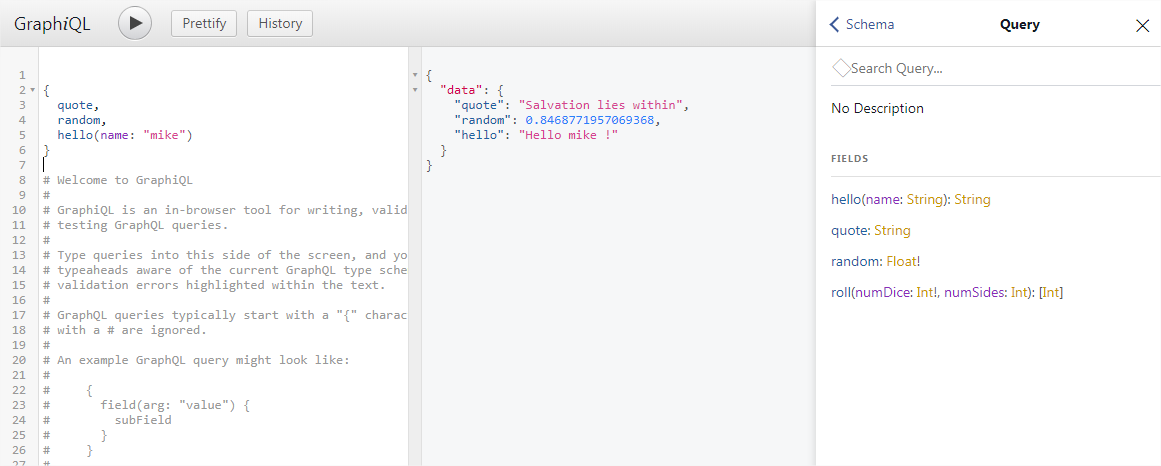
Dans la configuratino du server GraphQL nous avons activé graphiql qui est un puissant utilisatire qui permet de faire des requêtes graphql depuis un navigateur.
Pour accéder à l'interface de l'outil faut pour se rendre à l'adresse : http://localhost:4000/graphql.
Uh oh!
There was an error while loading. Please reload this page.