

Built-in functions (e.g., dates, times, math, and encryption). Any functionality provided across storage engines lives at this level: stored procedures, triggers, and views
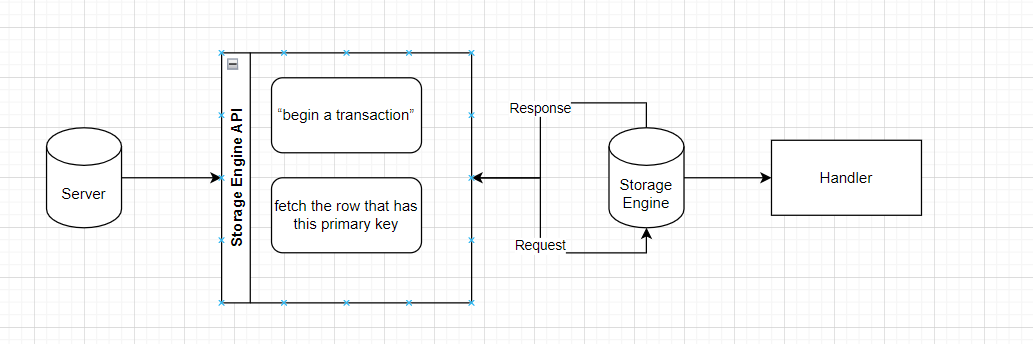
Storage engines are responsible for storing and retrieving all data stored “in” MySQL. each storage engine has its own benefits and drawbacks
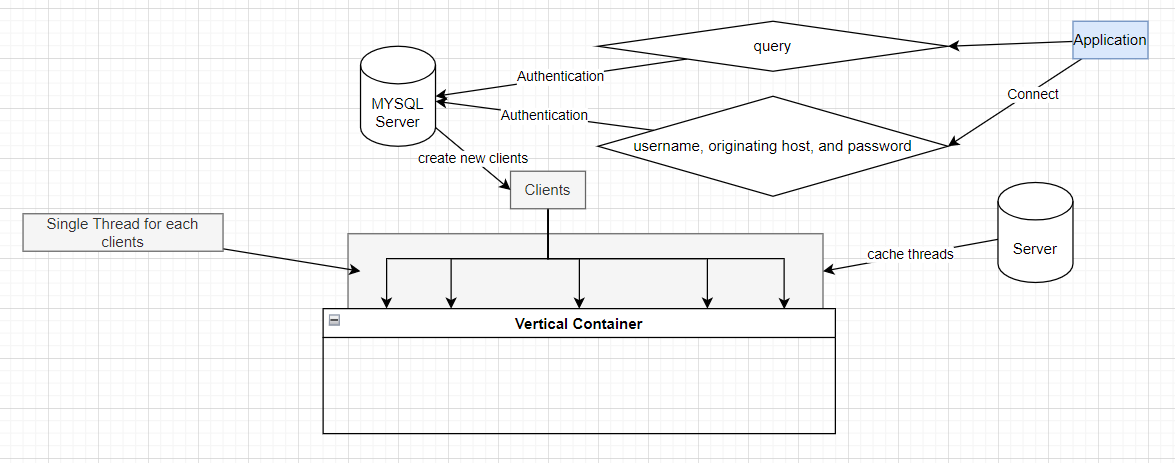
That's why DB Server can be in a problem if there are too many connections.
MySQL parses queries to create an internal structure (the parse tree), and then applies a variety of optimizations. These can include rewriting the query, determining the order in which it will read tables, choosing which indexes to use
- Queries
- Schema
- Settings
- DB Engines
- Index Types
- Query Cache
- Parse Query
MySQL has to do this at two levels: the server level and the storage engine level
Story: **Mailbox**
What happens when two processes try to deliver messages at the same time to the same mailbox?
Well-behaved mail delivery systems use locking to prevent corruption. If a client attempts a second delivery while the mailbox is locked, it must wait to acquire the lock itself before delivering its message.

This scheme works reasonably well in practice, but it gives no support for concurrency.
Because only a single process can change the mailbox at any given time, this approach becomes problematic with a high-volume mailbox.
Read/Write Locks
Reading from the mailbox isn’t as troublesome. There’s nothing wrong with multiple
clients reading the same mailbox simultaneously; because they aren’t making changes,
nothing is likely to go wrong. But what happens if someone tries to delete message
number 25 while programs are reading the mailbox
Systems that deal with concurrent read/write access typically implement a locking system that consists of two lock types. These locks are usually known as shared locks and exclusive locks, or read locks and write locks
Locks on a resource are shared, or mutually nonblocking: many clients can read from a resource at the same time and not interfere with each other
On the other hand, are exclusive—i.e., they block both read locks and other write locks—because the only safe policy is to have a single client writing to the resource at a given time and to prevent all reads when a client is writing
MySQL has to prevent one client from reading a piece of data while another is changing it. This happens internally.
One way to improve the concurrency of a shared resource is to be more selective about what you lock. Rather than locking the entire resource, lock only the part that contains the data you need to change
If the system spends too much time managing locks instead of storing and retrieving data, perfor�mance can suffer.
A locking strategy is a compromise between lock overhead and data safety, and that compromise affects performance
- It locks the entire table
- When a client wishes to write to a table (insert, delete, update, etc.), it acquires a write lock. This keeps all other read and write operations at bay.
- Write locks also have a higher priority than read locks, so a request for a write lock will advance to the front of the lock queue even if readers are already in the queue.
- Write locks can advance past read locks in the queue, but read locks cannot advance past write locks).
- Storage engines can manage their own locks
For instance, the server uses a table-level lock for statements such as ALTER TABLE, regardless of the storage engine.
- The locking style that offers the greatest concurrency (and carries the greatest overhead) is the use of row locks
- Row-level locking, as this strategy is commonly known, is available in the InnoDB and XtraDB storage engines, among others.
- Row locks are implemented in the storage engine, not the server.
- The server is completely unaware of locks implemented in the storage engines
- A transaction is a group of SQL queries that are treated atomically, as a single unit of work
It’s all or nothing
1 START TRANSACTION;
2 SELECT balance FROM checking WHERE customer_id = 10233276;
3 UPDATE checking SET balance = balance - 200.00 WHERE customer_id = 10233276;
4 UPDATE savings SET balance = balance + 200.00 WHERE customer_id = 10233276;
5 COMMIT;
But transactions alone aren’t the whole story. What happens if the database server crashes while performing line 4? Who knows? The customer probably just lost $200. And what if another process comes along between lines 3 and 4 and removes the entire checking account balance? The bank has given the customer a $200 credit without even knowing it.
Transactions aren’t enough unless the system passes the ACID test.
ACID stands for Atomicity, Consistency, Isolation, and Durability.
A transaction must function as a single indivisible unit of work so that the entire transaction is either applied or rolled back. When transactions are atomic, there is no such thing as a partially completed transaction: it’s all or nothing
The database should always move from one consistent state to the next. In our example, consistency ensures that a crash between lines 3 and 4 doesn’t result in $200 disappearing from the checking account. Because the transaction is never committed, none of the transaction’s changes are ever reflected in the database
The results of a transaction are usually invisible to other transactions until the transaction is complete. This ensures that if a bank account summary runs after line 3 but before line 4 in our example, it will still see the $200 in the checking account. When we discuss isolation levels, you’ll understand why we said usually invisible
Once committed, a transaction’s changes are permanent. This means the changes must be recorded such that data won’t be lost in a system crash. Durability is a slightly fuzzy concept, however, because there are actually many levels. Some du�rability strategies provide a stronger safety guarantee than others, and nothing is ever 100% durable (if the database itself were truly durable, then how could back�ups increase durability?). We discuss what durability really means in MySQL in later chapters.
A database server with ACID transactions also generally requires more CPU power, memory, and disk space than one without them
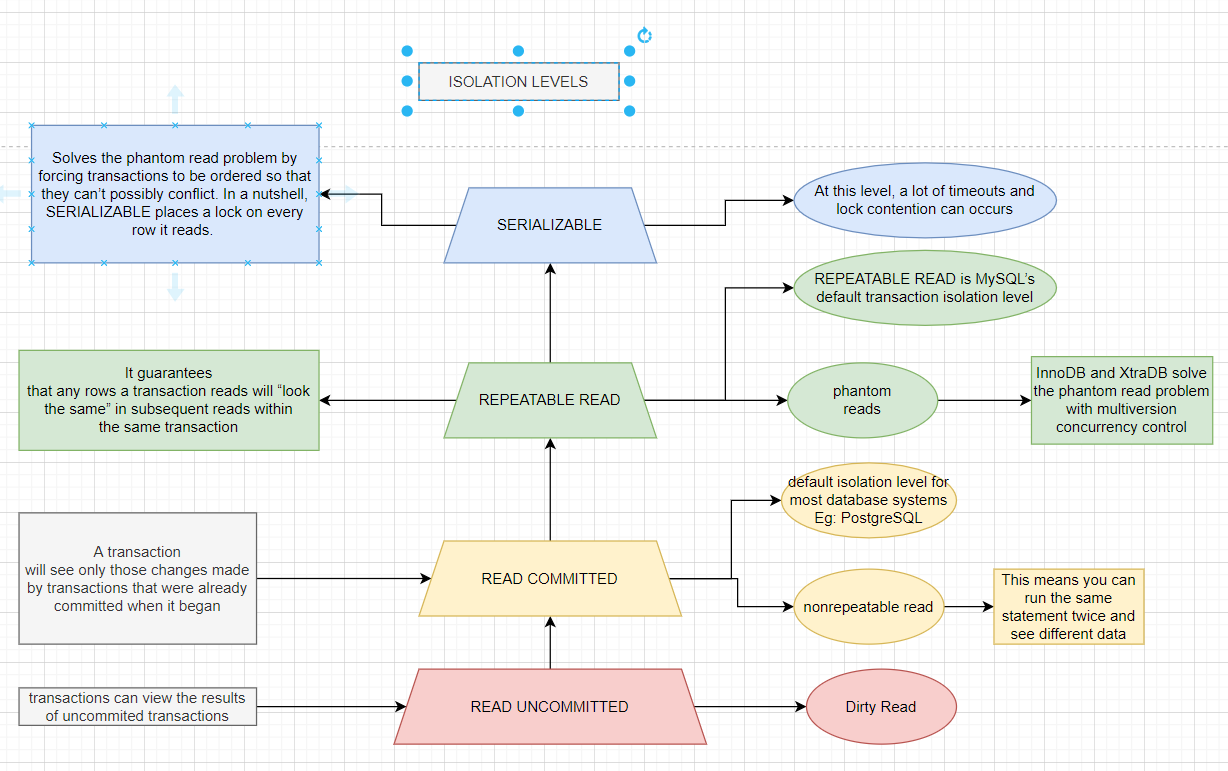
Lower isolation levels typically allow higher concurrency and have lower overhead.

- READ UNCOMMITTED - break isolation
- READ COMMITTED ( PostgreSQL ) - solve isolation issue but have non-repeatable read issue
- REPEATABLE READ ( MYSQL ) - solve non-repeatable read have phantom issue
- SERIALIZE - solve phantom but timeout issue occurs
InnoDB and XtraDB solve the phantom read problem with multiversion concurrency control
This means you can run the same statement twice and see different data in a transaction :))
A phantom read can happen when you select some range of rows, another transaction inserts a new row into the range, and then you select the same range again; you will then see the new “phantom” row.
A deadlock is when two or more transactions are mutually holding and requesting locks on the same resources, creating a cycle of dependencies.
# trans 1
START TRANSACTION;
UPDATE StockPrice SET close = 45.50 WHERE stock_id = 4 and date = '2002-05-01';
UPDATE StockPrice SET close = 19.80 WHERE stock_id = 3 and date = '2002-05-02';
COMMIT;
# trans 2
START TRANSACTION;
UPDATE StockPrice SET high = 20.12 WHERE stock_id = 3 and date = '2002-05-02';
UPDATE StockPrice SET high = 47.20 WHERE stock_id = 4 and date = '2002-05-01';
COMMIT;
If you’re lucky enough, each transaction will execute its first query and update a row of data, locking it in the process. Each transaction will then attempt to update its second row, only to find that it is already locked. The two transactions will wait forever for each other to complete, unless something intervenes to break the deadlock.
InnoDB storage engine, will notice circular dependencies and return an error instantly The way InnoDB currently handles deadlocks is to roll back the transaction that has the fewest exclusive row locks.
Lock behavior and order are storage engine–specific, so some storage engines might deadlock on a certain sequence of statements even though others won’t
Deadlocks have a dual nature: some are unavoidable because of true data conflicts, and some are caused by how a storage engine works
Deadlocks cannot be broken without rolling back one of the transactions, either par�tially or wholly. They are a fact of life in transactional systems, and your applications should be designed to handle them. Many applications can simply retry their transac�tions from the beginning.
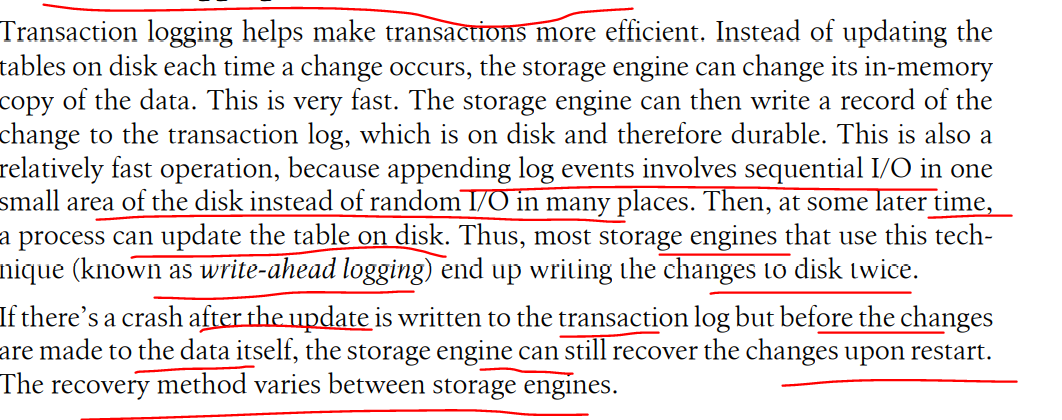
MySQL provides two transactional storage engines: InnoDB and NDB Cluster. Several third-party engines are also available; the best-known engines right now are XtraDB and PBXT. We discuss some specific properties of each engine in the next section
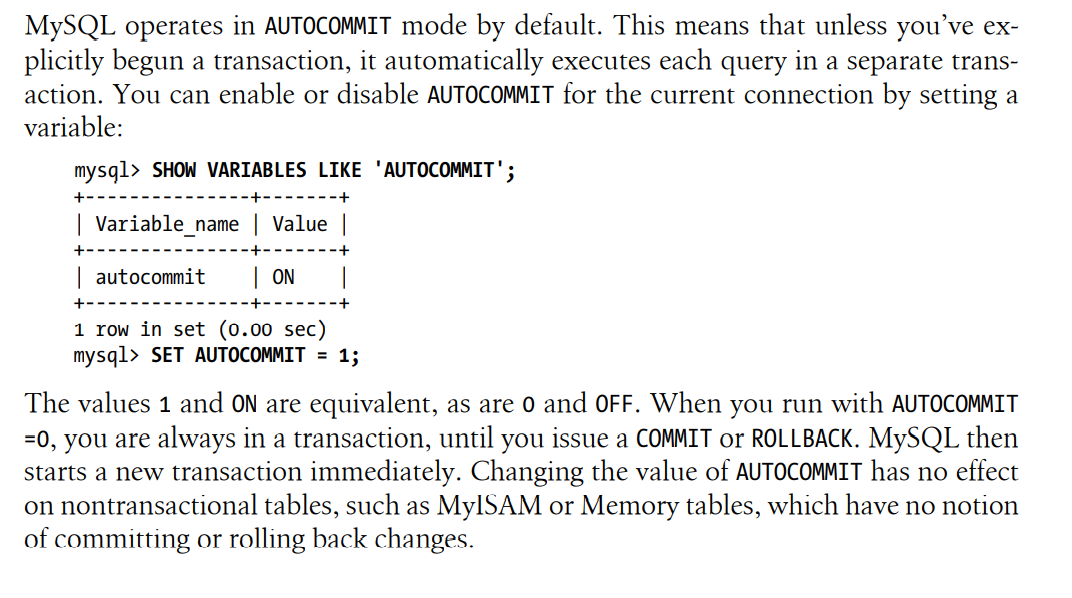
mysql> SHOW VARIABLES LIKE 'AUTOCOMMIT';
mysql> SET SESSION TRANSACTION ISOLATION LEVEL READ COMMITTEDIf you mix transactional and nontransactional tables (for instance, InnoDB and MyISAM tables) in a transaction, the transaction will work properly if all goes well.
However, if a rollback is required, the changes to the nontransactional table can’t be undone
The locking mechanisms described earlier are all implicit. InnoDB handles locks automatically, according to your isolation level.
InnoDB uses a two-phase locking protocol. It can acquire locks at any time during a transaction, but it does not release them until a COMMIT or ROLLBACK.
InnoDB also supports explicit locking, which the SQL standard does not mention at all
START TRANSACTION;
SELECT ... LOCK IN SHARE MODE
SELECT ... FOR UPDATE
COMMIT;
MySQL also supports the LOCK TABLES and UNLOCK TABLES commands, which are im�plemented in the server, not in the storage engines. These have their uses, but they are not a substitute for transactions.
You should never use LOCK TABLES unless you are in a trans�action and AUTOCOMMIT is disabled, no matter what storage engine you are using
MVCC is not unique to MySQL: Oracle, PostgreSQL, and some other database systems use it too
MVCC works by keeping a snapshot of the data as it existed at some point in time.
This means transactions can see a consistent view of the data, no matter how long they run. It also means different transactions can see different data in the same tables at the same time.
Each storage engine implements MVCC differently.Some of the variations include optimistic and pessimistic concurrency control.
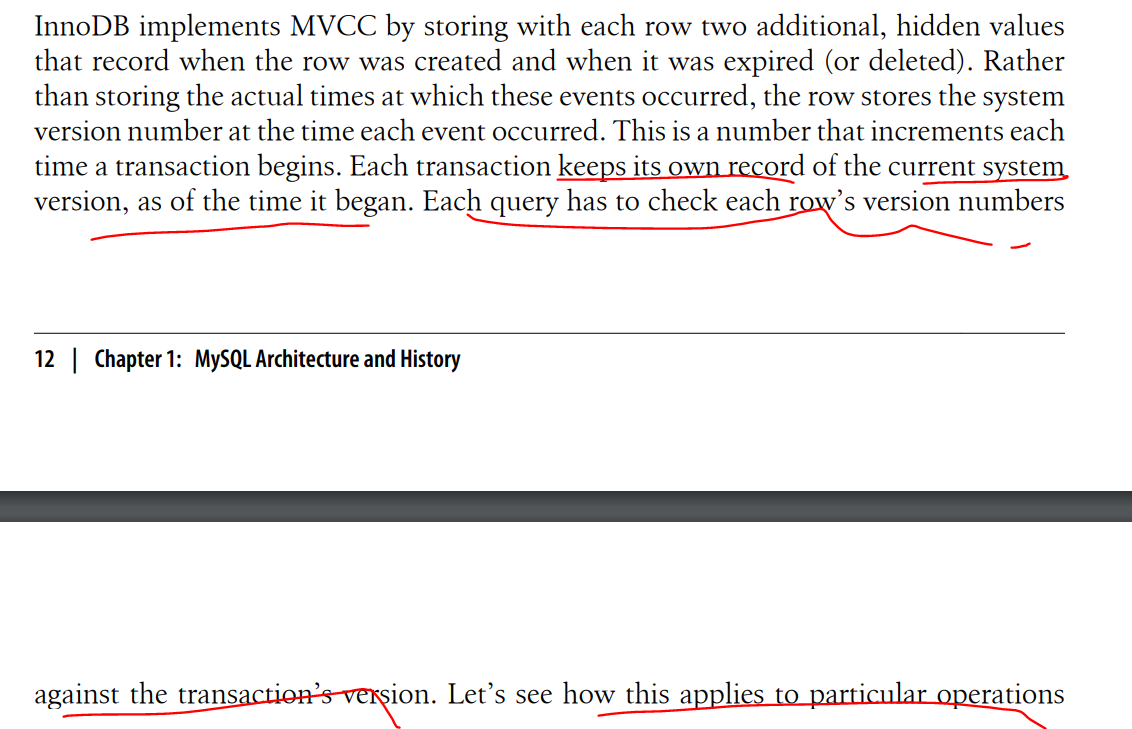
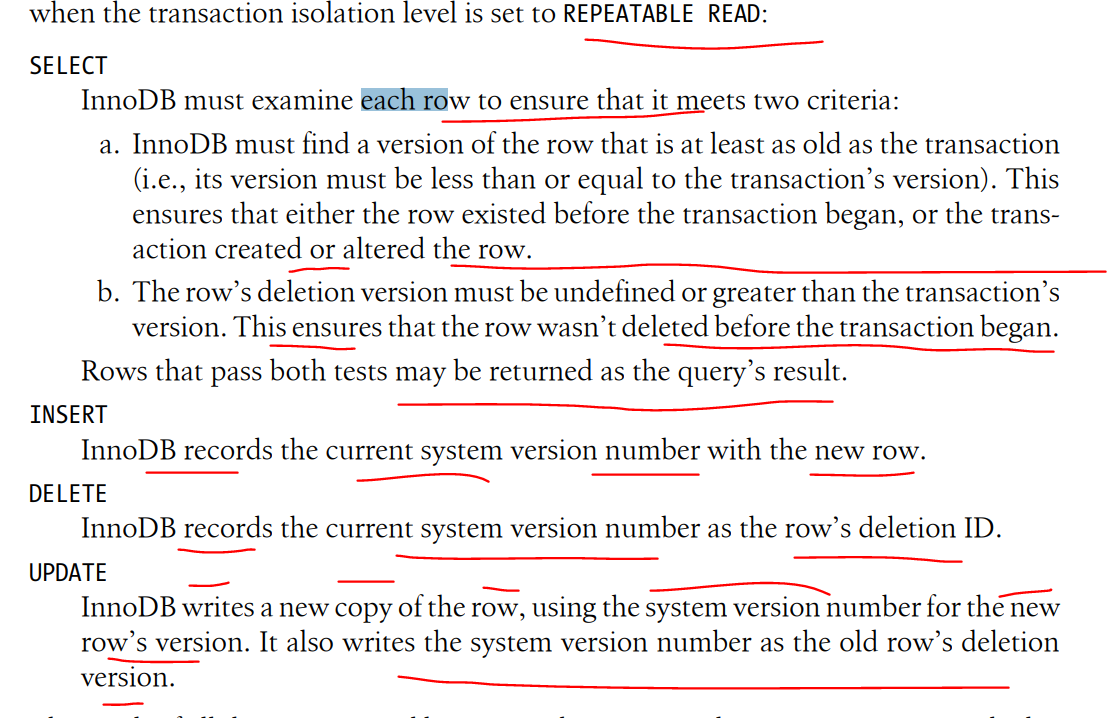
The result of all this extra record keeping is that most read queries never acquire locks. They simply read data as fast as they can, making sure to select only rows that meet the criteria. The drawbacks are that the storage engine has to store more data with each row, do more work when examining rows, and handle some additional housekeeping operations.

Eg: PostgreSQL ( READ COMMITTED ), MYSQL (INNODB - REPEATABLE READ )
SHOW TABLE STATUS LIKE 'customers' \G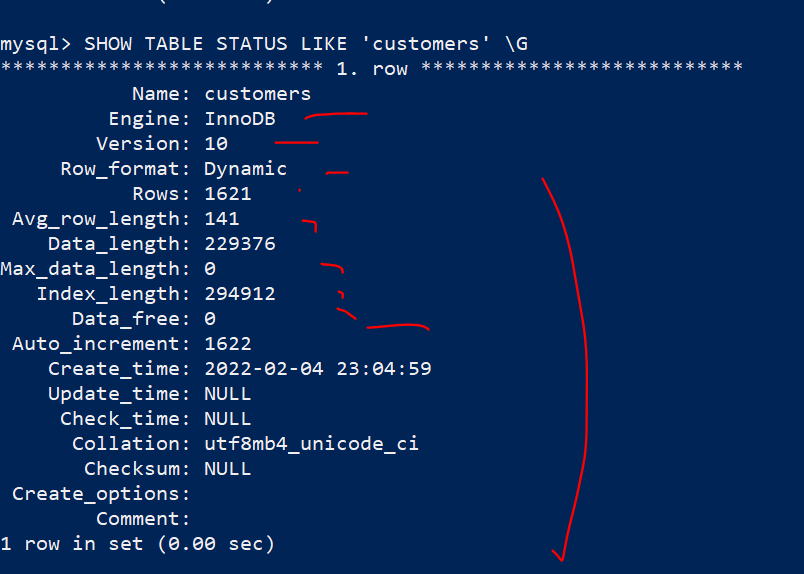
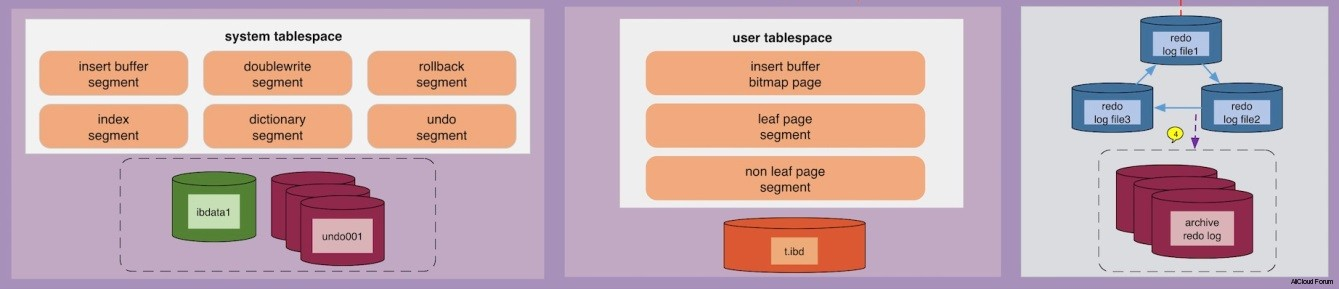
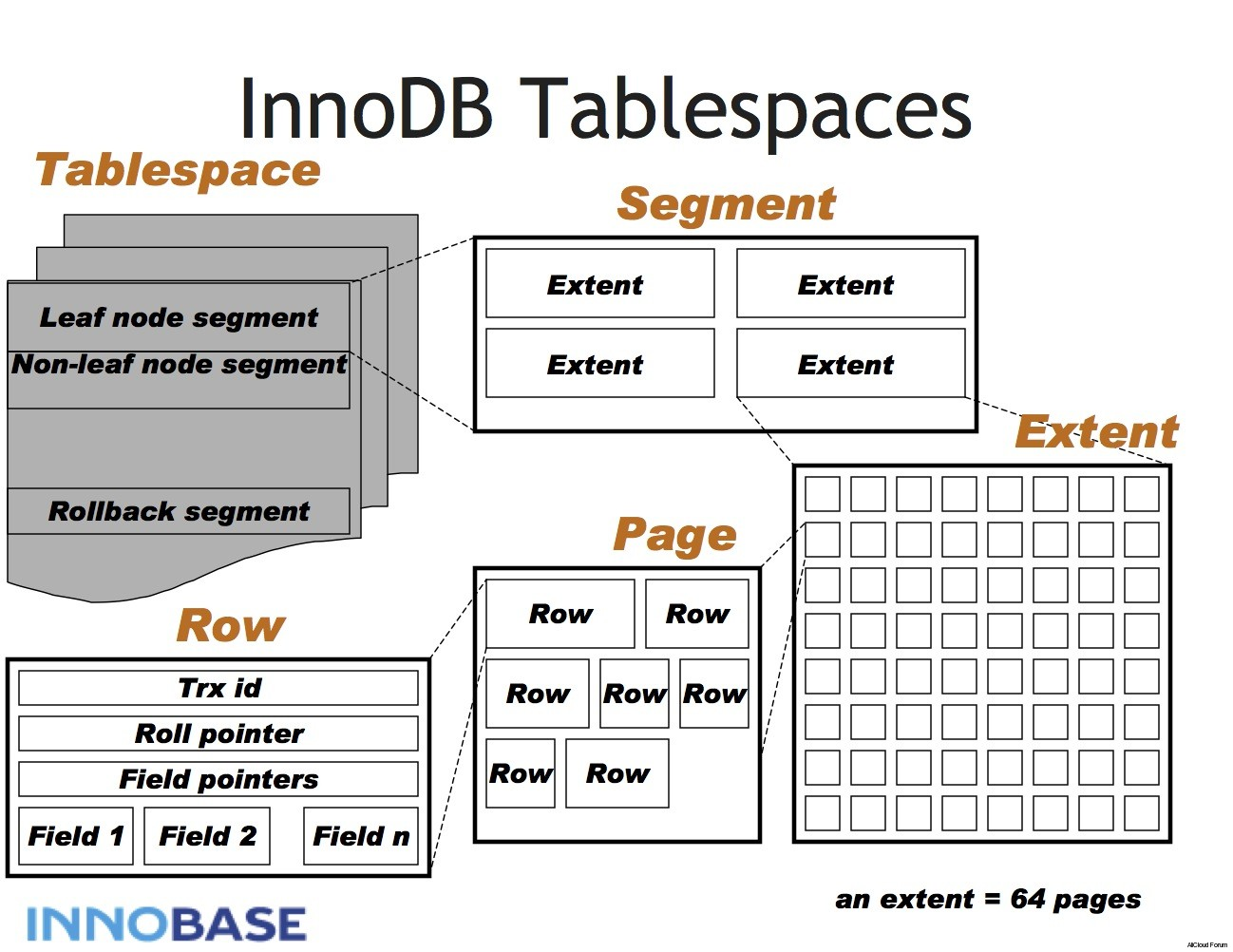
- Defaults to the REPEATABLE READ isolation level, and it has a next-key locking strategy that prevents phantom reads in this isolation level: rather than locking only the rows you’ve touched in a query, InnoDB locks gaps in the index struc�ture as well, preventing phantoms from being inserted
- InnoDB tables are built on a clustered index
- Provides very fast primary key lookups
- Secondary indexes( indexes that aren't the primary key) contain primary key columns => so if primary key is large, other indexes will also be larged
- Platform neutral: can copy the data and index files from an Intel-based server to PowerPC or Sun SPARC without any trouble
You should strive for small primary key if you will have many indexes on a table
- Transactions?
- Backups ( hot backup )
- Crash recover
- Special features
- Logging? Which kind of DB Engines? Can be Archive/MyISAM
- Read-only or read-mostly tables?
- Order processing => InnoDB
- Bulletin boards and threaded discussion forums =>
- Large data volumes
- Many InnoDB databases in the 3 TB to 5 TB range, or even large
- The easiest way to move a table from one engine to another is with an ALTER TABLE statement. The following command converts mytable to InnoDB
ALTER TABLE mytable ENGINE = InnoDB;This syntax works for all storage engines, but there’s a catch: it can take a lot of time. MySQL will perform a row-by-row copy of your old table into a new table. During that time, you’ll probably be using all of the server’s disk I/O capacity, and the original table will be read-locked while the conversion runs
- Dump and import
- CREATE and SELECT
CREATE TABLE innodb_table LIKE myisam_table;
ALTER TABLE innodb_table ENGINE=InnoDB;
INSERT INTO innodb_table SELECT * FROM myisam_table;
# which large data
START TRANSACTION;
INSERT INTO innodb_table SELECT * FROM myisam_table
 -> WHERE id BETWEEN x AND y;
COMMIT;- Validate your assumptions about the system, and see whether your assumptions are realistic
- Reproduce a bad behavior you’re trying to eliminate in the system
- Measure how your application currently performs
- Simulate a higher load than your production systems handle, to identify the scal�ability bottleneck that you’ll encounter first with growth
- Plan for growth. Benchmarks can help you estimate how much hardware, network capacity, and other resources you’ll need for your projected future load
- Test your application’s ability to tolerate a changing environment
- Test different hardware, software, and operating system configurations. Is RAID 5 or RAID 10 better for your system
- Prove that your newly purchased hardware is correctly configured
- You can also use benchmarks for other purposes, such as to create a unit test suite for your application
There are two primary benchmarking strategies: you can benchmark the application as a whole, or isolate MySQL
Fullstack vs Single Component Benchmarking
- You’re testing the entire application, including the web server, the application code, the network, and the database. This is useful because you don’t care about MySQL’s performance in particular; you care about the whole application
- MySQL is not always the application bottleneck, and a full-stack benchmark can reveal this
- MySQL is not always the application bottleneck, and a full-stack benchmark can reveal this
- Benchmarks are good only to the extent that they reflect your actual application’s behavior, which is hard to do when you’re testing only part of it
MySQL benchmark:
- You want to compare different schemas or queries.
- You want to benchmark a specific problem you see in the application
- You want to avoid a long benchmark in favor of a shorter one that gives you a faster “cycle time” for making and measuring changes
- Throughput: number of transactions per unit of time. Tools : https://www.tpc.org/ - OLTP - suitable for interactive multiuser applications. The usual unit is transactions per second, although it is sometimes transactions per minute
- Response time or latency: This measures the total time a task requires, t’s common to use percentile response times instead
- Concurrency: the working concurrency, or the number of threads or connections doing work simultaneously
- Scalability: measurements are useful for systems that need to maintain performance under a changing workload. System should get twice as much work done (twice as much throughput) when you double the number of workers trying to complete tasks.
Eg: Concurrency
A website with “50,000 users at a time” might require only 10 or 15 simultaneously running quer�ies on the MySQL server!
Concurrency is completely different from other metrics such as response time and throughput: it’s usually not an outcome, but rather a property of how you set up the benchmark
- Using a subset of the real data size, such as using only one gigabyte of data when the application will need to handle hundreds of gigabytes, or using the current dataset when you plan for the application to grow much larger
- Using incorrectly distributed data, such as uniformly distributed data when the real system’s data will have “hot spots.” (Randomly generated data is almost always unrealistically distributed.)
- Using unrealistically distributed parameters, such as pretending that all user pro�files are equally likely to be viewed.
- Using a single-user scenario for a multiuser application
- Benchmarking a distributed application on a single server.
- Failing to match real user behavior, such as “think time” on a web page. Real users request a page and then read it; they don’t click on links one after another without pausing.
- Running identical queries in a loop. Real queries aren’t identical, so they cause cache misses. Identical queries will be fully or partially cached at some level.
- Failing to check for errors. If a benchmark’s results don’t make sense—e.g., if a slow operation suddenly completes very quickly—check for errors.Always check error logs after benchmarks, as a matter of principle.
- Ignoring how the system performs when it’s not warmed up, such as right after a restart
- Sometimes you need to know how long it’ll take your server to reach capacity after restart
- Using default server settings
- Benchmarking too quickly. Your benchmark needs to last a while
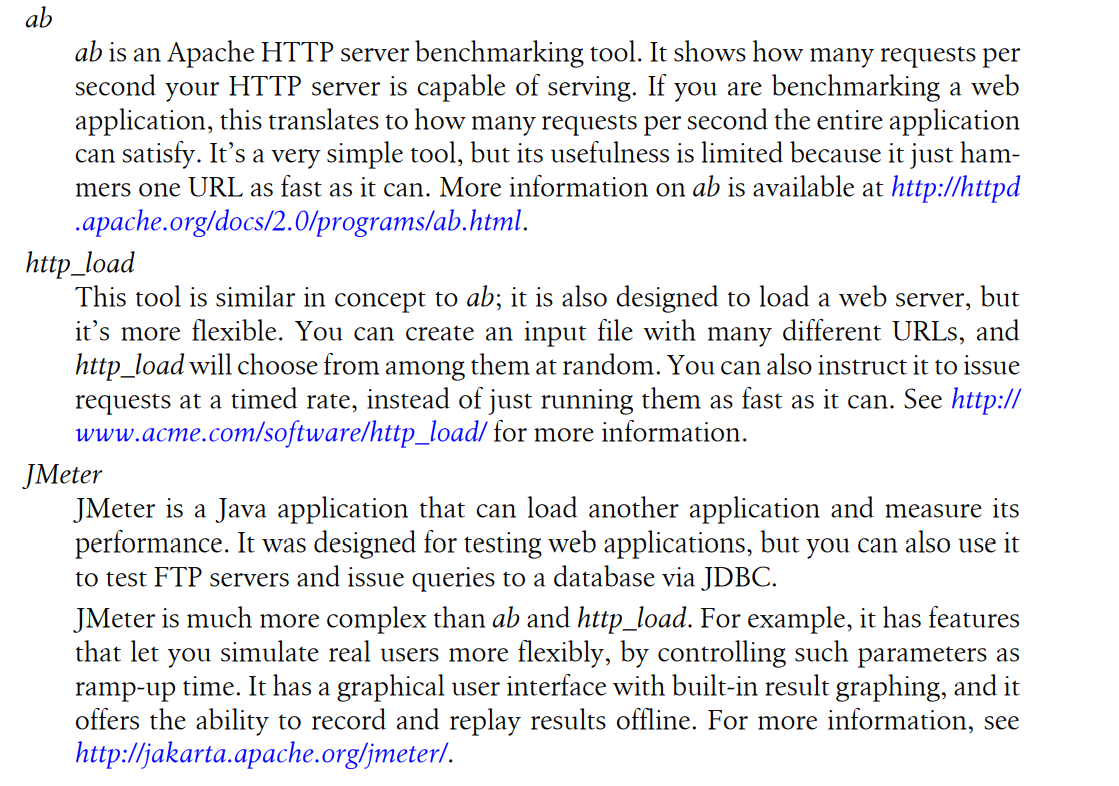
- mysqlslap (http://dev.mysql.com/doc/refman/5.1/en/mysqlslap.html) simulates load on the server and reports timing information
- MySQL Benchmark Suite (sql-bench)
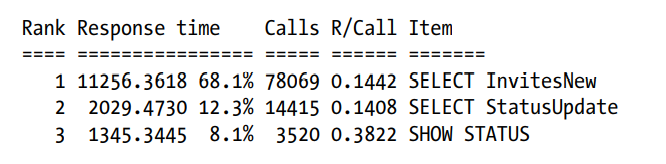
Profiling is the primary means of measuring and analyzing where time is consumed. Profiling entails two steps: measuring tasks and the time elapsed, and aggregating and sorting the results so that the important tasks bubble to the top
Report
Tools:
- https://severalnines.com/database-blog/pt-query-digest-alternatives-mysql-query-management-monitoring-clustercontrol
- https://www.percona.com/doc/percona-toolkit/LATEST/pt-query-digest.html
- https://github.com/devops-works/dw-query-digest
- Worthwhile queries
- Outliers : Tasks might need to be optimized even if they don’t sort to the top of the profile
- Unknown unknowns: A good profiling tool will show you the “lost time,” if possible
- Buried details: Averages are dangerous because they hide information from you, and the average isn’t a good indication of the whole. So it's better if we can have a histograms, percentiles, standard deviation, and the index of dispersion
The computer's resources that you need to optimize: space on disk, in memory, CPU cache, CPU cycles to process
- Smaller data types are usually better
- Fewer CPU cycles are typically required to process operations on simpler data types.
- Eg: Integers are cheaper to compare than characters, because character sets and collations ( sorting rules ) make character comparions complicated.
- For instance: you should store dates and times in MYSQL's built-in types instead of strings, integers for IP addresses
- A lot of tables include nullable columns even the application does not need to store NULL ( the absent of value ),merely because it's the default. It's usually best to specify columns as NOT NULL unless you intend to store NULL in them
- It's harder for MYSQL to optimize queries that refer to nullable columns, because they make indexes, index statistics, value comparisons more complicated. A nullable column uses more storage space and requires special processing inside MYSQL.
- When nullable column is indexed, it requires an extra byte per entry and can even cause a fixed-size index( such as index on a single integer column) to be converted to variable-sized one in MYISAM
- The performance improvement from changing NULL columns to NOT NULL is usually small, so don't they make it a priority to find and change them in an existing schema unless you known they are causing problems. However, if you're planning to index columns, avoid making them nullable if possible.
- There's exception, of course. InnoDB stores NULL with a single bit
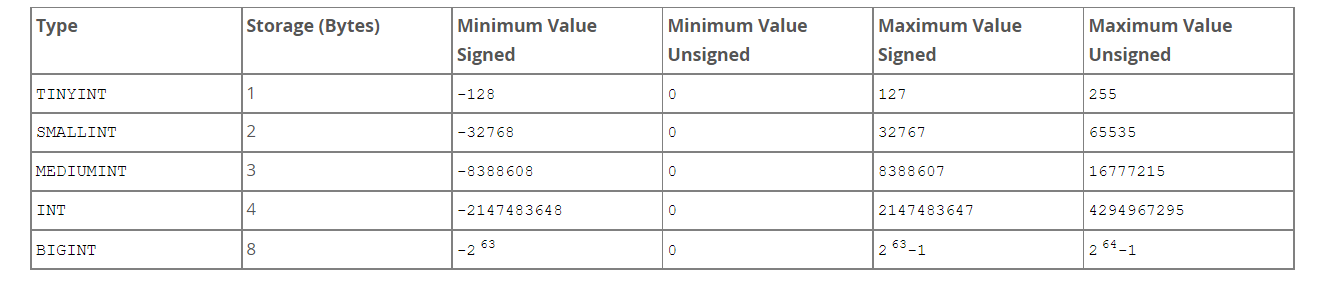
Integer
- Smallest one: TINYINT
- Biggest one: BIGINT
−2(N–1) to 2(N–1)–1
Your choice determines how MySQL stores the data, in memory and on disk. However, integer computations generally use 64-bit BIGINT integers, even on 32-bit architectures.
For storage and computational purposes, INT(1) is identical to INT(20).
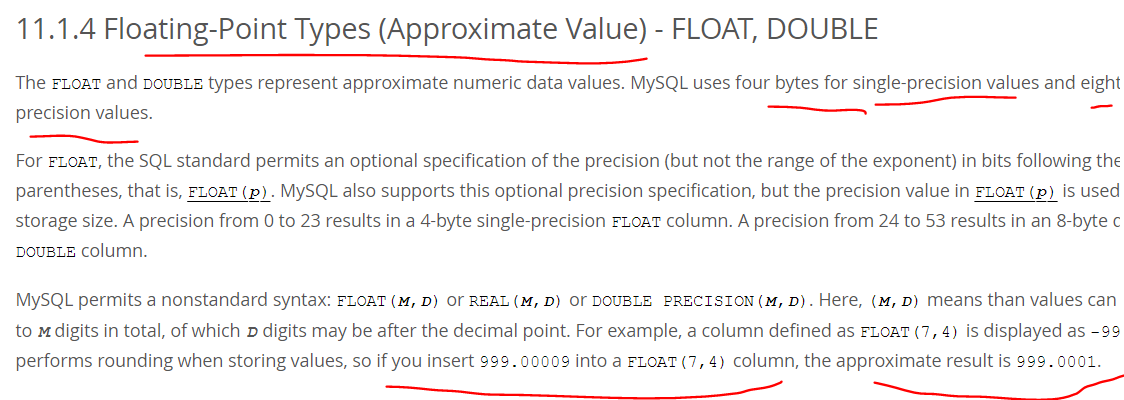
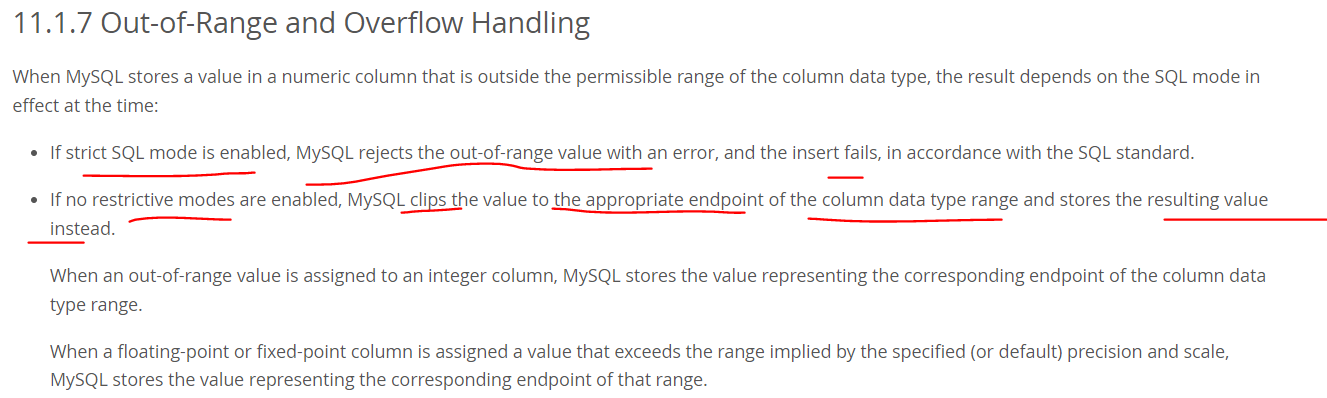
Real Numbers
Real numbers are numbers that have a fractional part
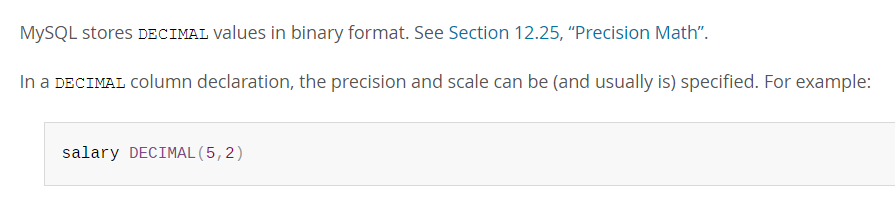
- DECIMAL type is for storing exact fraction numbers, can also store integers that are so large they don't fit in BIGINT
References: https://dev.mysql.com/doc/refman/8.0/en/integer-types.html
The date and time data types for representing temporal values are DATE, TIME, DATETIME, TIMESTAMP, and YEAR
TIMESTAMP and DATETIME columns can be automatically initialized and updated to the current date and time (that is, the current timestamp).
- An auto-initialized column is set to the current timestamp for inserted rows that specify no value for the column.
- An auto-updated column is automatically updated to the current timestamp when the value of any other column in the row is changed from its current value. An auto-updated column remains unchanged if all other columns are set to their current values
MySQL retrieves values for a given date or time type in a standard output format, but it attempts to interpret a variety of formats for input values that you supply
https://dev.mysql.com/doc/refman/8.0/en/date-and-time-literals.html
- MySQL permits you to store a “zero” value of '0000-00-00'
- “Zero” date or time values used through Connector/ODBC are converted automatically to NULL because ODBC cannot handle such values.


MYSQL High Performance Day 5 - Indexing for High Performance
Index Basic
Types of Indexes
B-Tree indexes
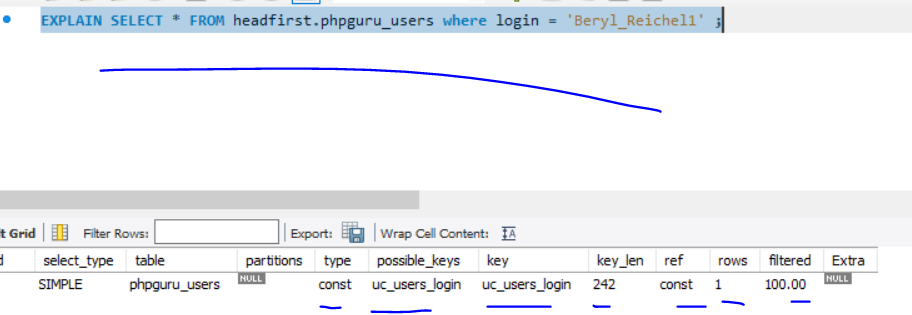
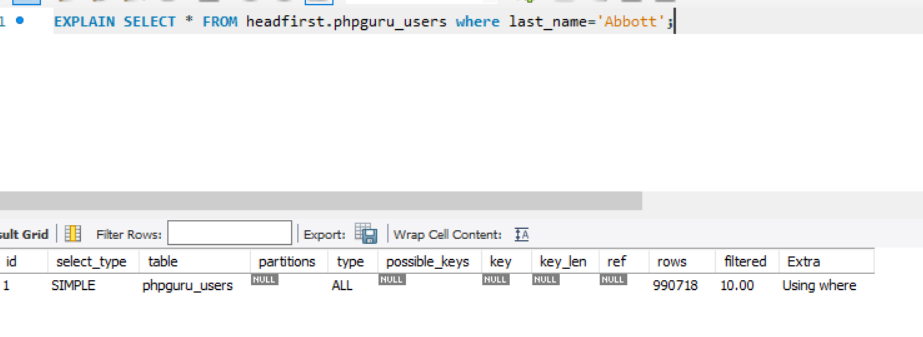
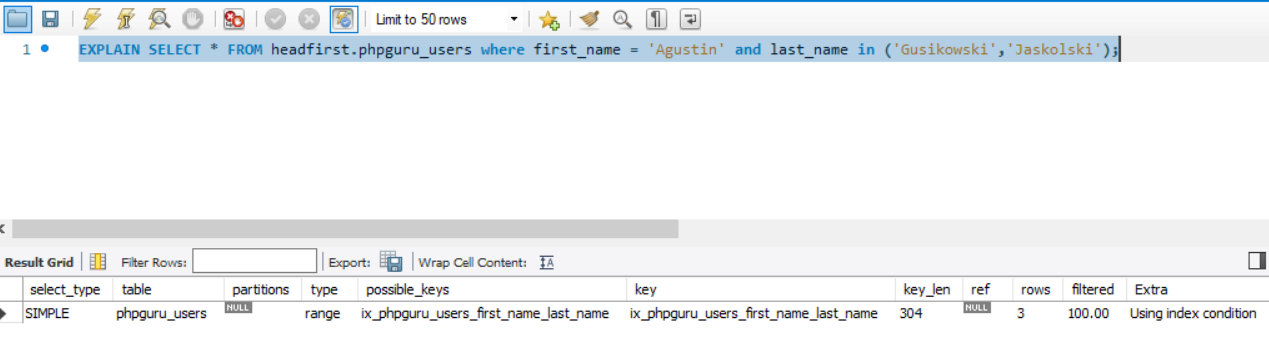
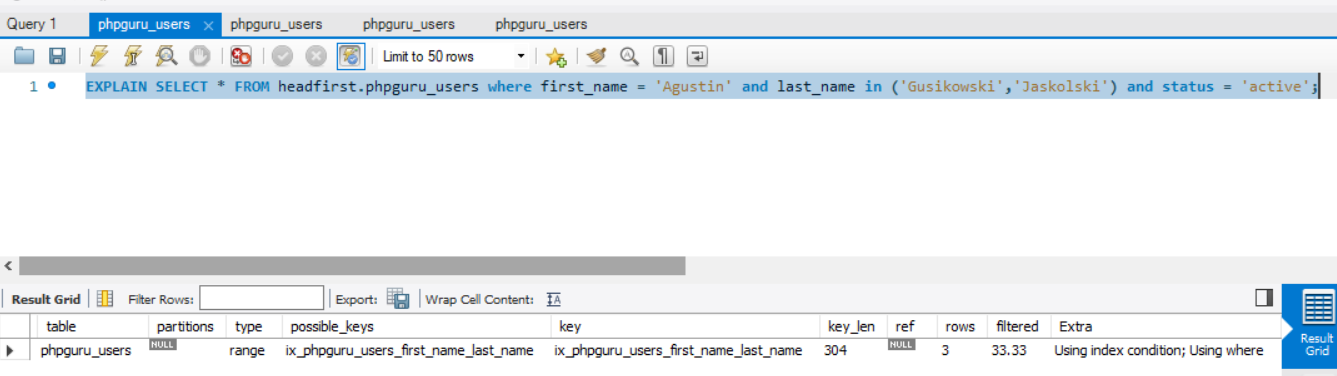
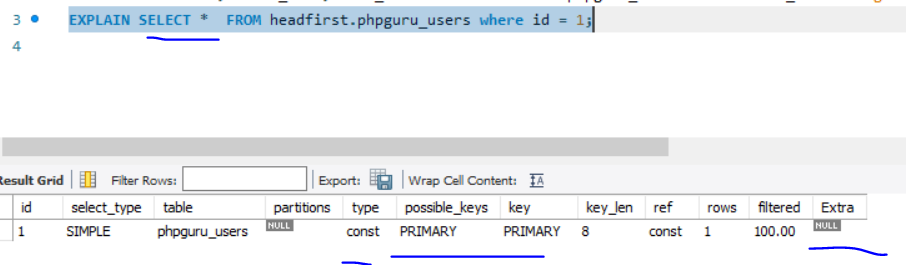
Examples
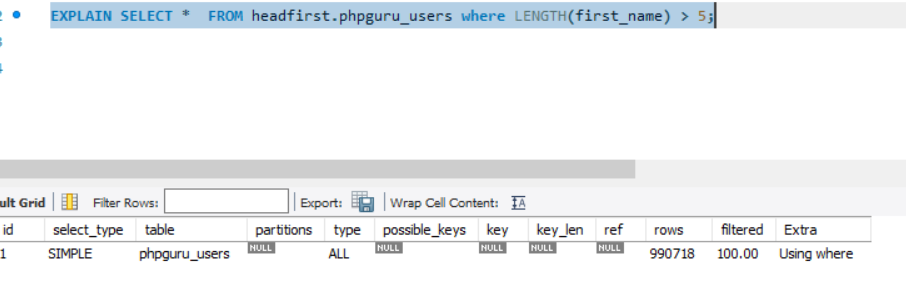
It tooks ~ 0.5s if we have 1M records
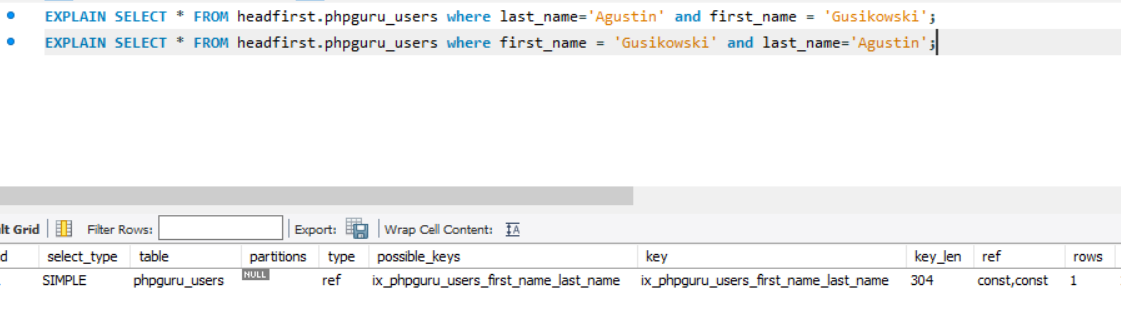
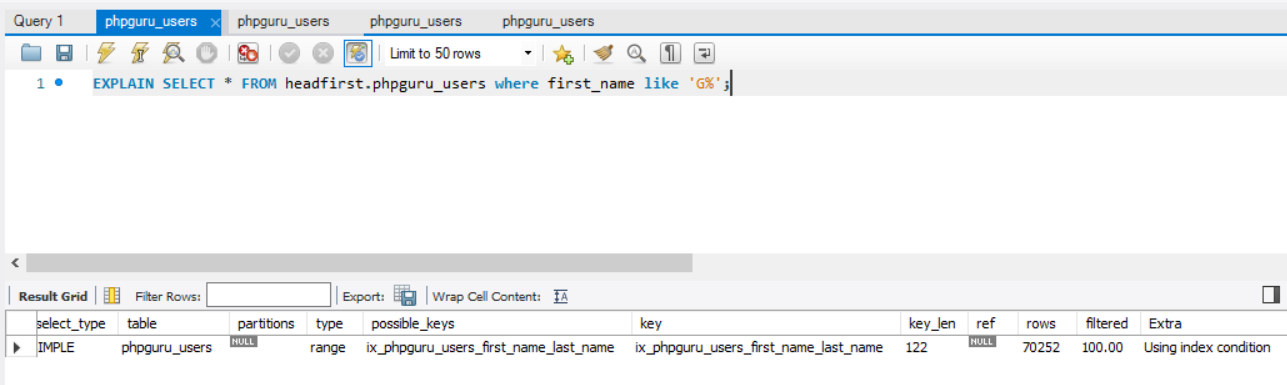
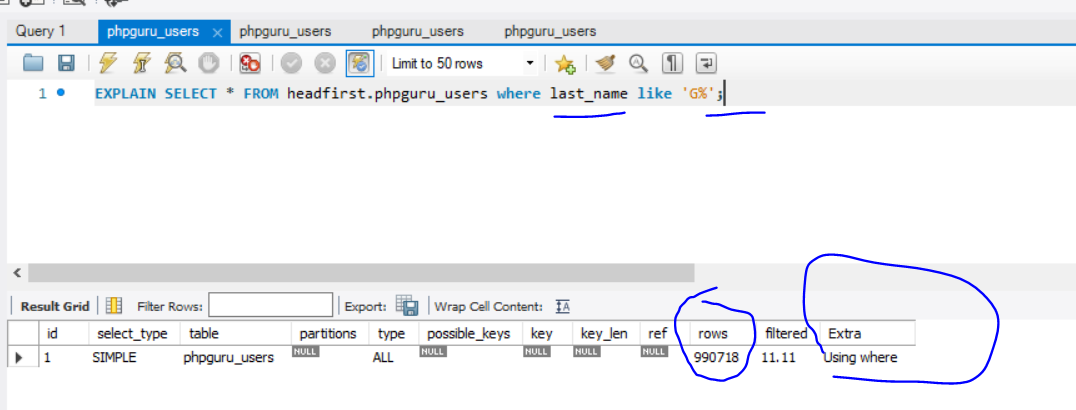
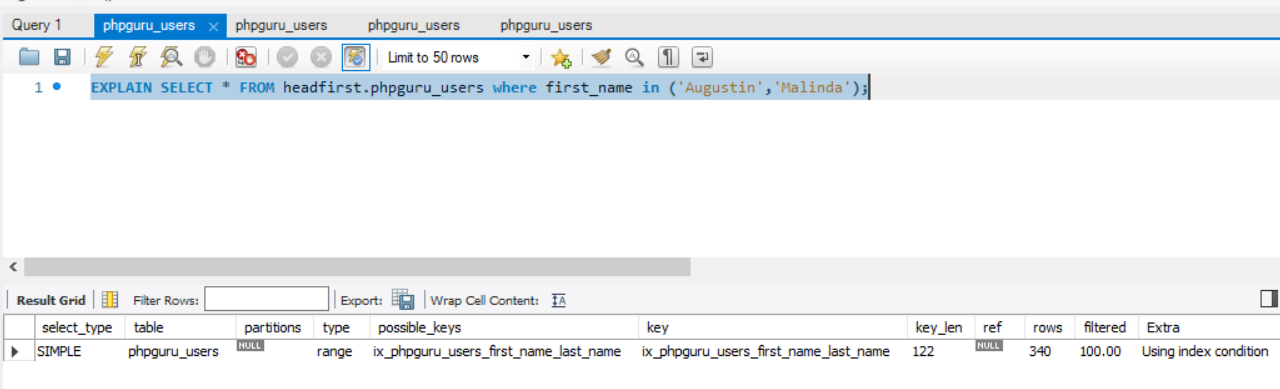
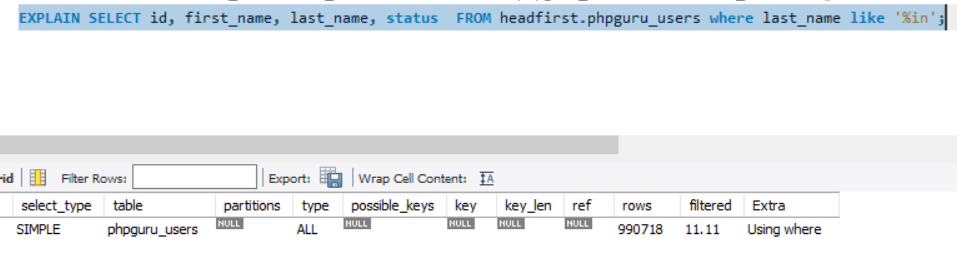
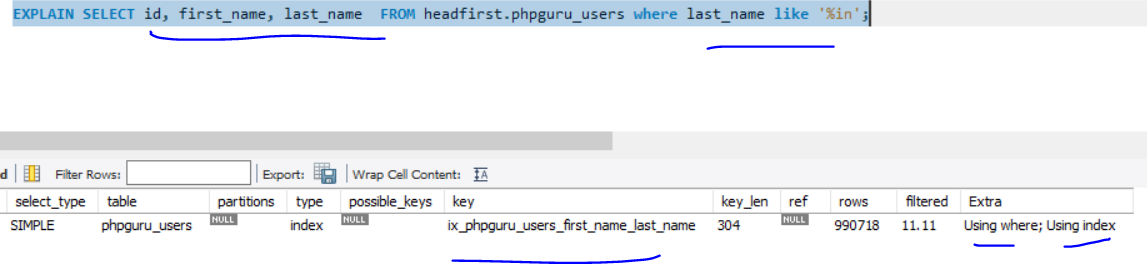
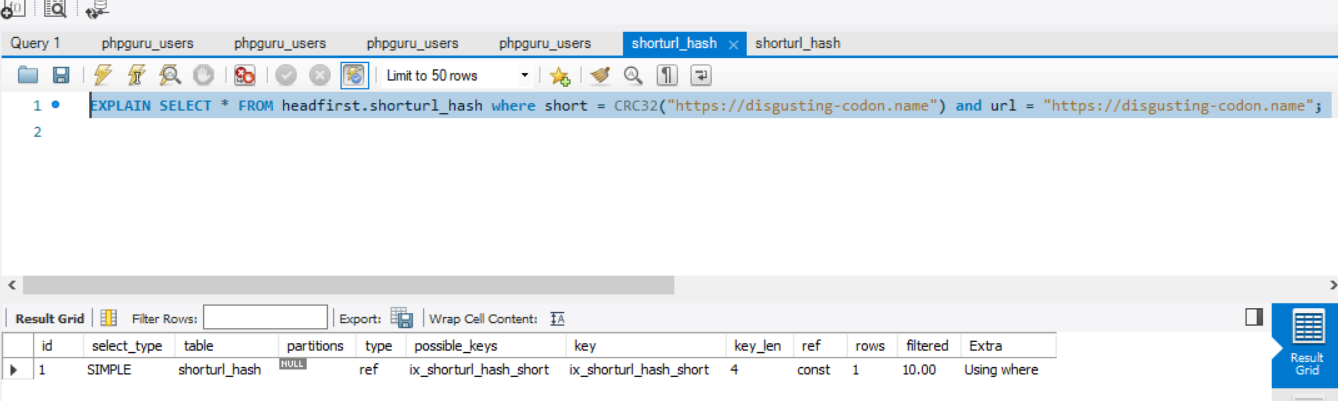
Another Example
With Non-Clustered Indexes