
Update: a problem happened, a large amount of the content was removed by accident. Most has been restored since, but still todo: fix up the text further.
This is a wee guide to mixing with module music, i.e. music files that contain a set of audio samples, along with a set of sequences of those samples, with those sequences forming a song.
There are two FLOSS software options for this task:
- Mixxx, the best open source DJing software available out there.
- Snags: Only recent versions of the Linux version of Mixxx have this feature enabled by default. Stereo only; no individual track muting/soloing/fx.
- Chipdisco, a Java app with beatmatch, pitch shift and mute track features.
- Snags: Mono (one channel for cue, one for live), no multiple soundcard support, development is dead (the source is now available online; do you code Java? :)
- Wikipedia: Module file / MOD (file format)
- YouTube: Amiga Music: Jungle / Drum & Bass Compilation #1
- YouTube: Amiga Music: Daxx - Thunderdome Megamix Compilation
- YouTube: Tribute To Tracker Hardcore Mix
- YouTube: Tracker music playlist from ~1999
- YouTube: Amiga Music: Random / Mixed Compilation #1
- YouTube: Amiga Music: Jogeir Liljedahl Compilation #1
Collections of module files are available to download for free from:
- Mod Archive - one of the world's largest collections of music modules
- Available Genres
- Discogs Groups » Hardcore / Gabber / Speedcore / Doomcore / Terror » Looking for old mods (module files) - various dance music labels
- Synthpop MOD-files
- https://www.exotica.org.uk/wiki/Modland
- Commodore Amiga MOD download
- AMIGA Dance Remixes
- AmigaRemix.com
- Aminet modules (wikipedia)
- Janeway Amiga Demo Database: Search (nee Kestra)
- MODs bySLC / Slice
- ModP3 - Amiga Mods as Mp3s!
For Mod Archive;
- moddownloaderr (raw) - a Bash script that downloads mod files from modarchive.org.
If you have multiple compressed archive files containing collections of modules (with each collection archive itselg containing multiple compressed archives for individual tracks), here is a method (which requires dtrx to be installed) to unpack everything into it's own subdirectory.
Mixxx has has modplug support since 2013, but it is not enabled by default in the build of the software available for download from their website. It works by rendering the module to a two channel track in memory, after which it is treated like general music data.
To compile a build of Mixxx with this it, install libmodplug, compile Mixxx from source (Arch Linux AUR mixxx-git has this enabled, as does the Fedore RPM Fusion package) using the modplug=1 switch, then see the Mixxx Preferences -> Modplug for module playback options, including stereo separation.
https://blueprints.launchpad.net/mixxx/+spec/mod-music-playback
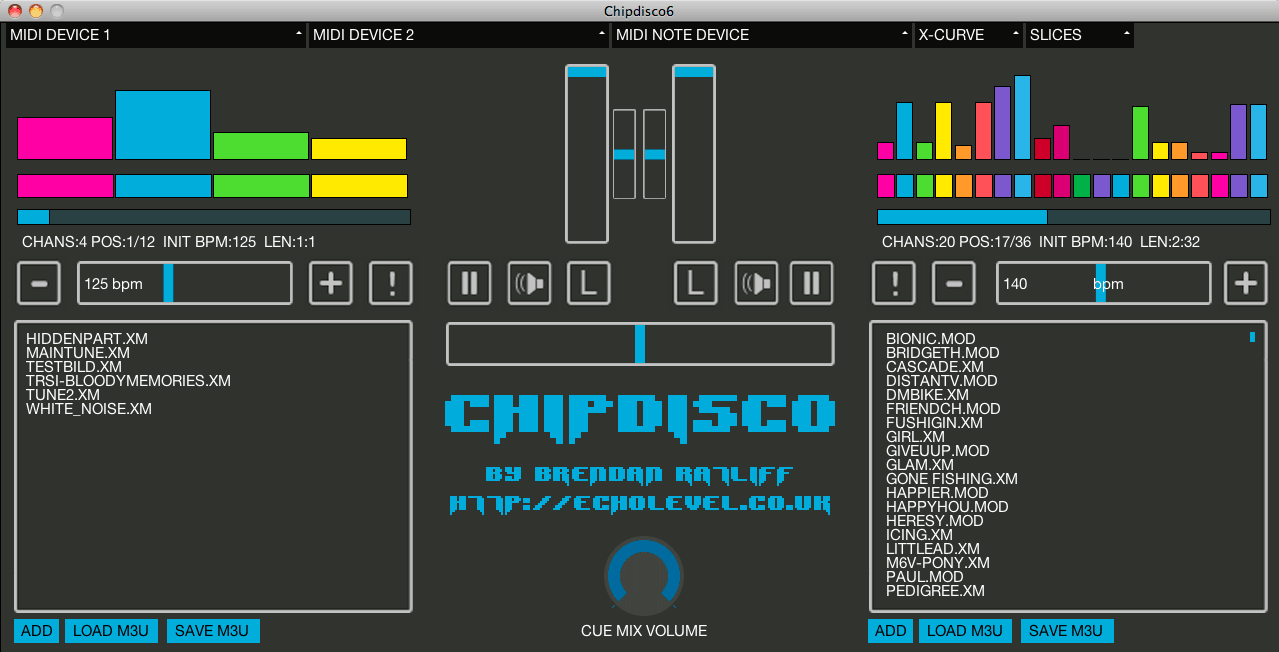
Chipdisco - a dual-deck DJ app for tracker modules (.MOD/.XM/.S3M). Arch Linux AUR.
Bash script to create a m3u playlist to quick load modules in Chipdisco:
# if you're using bash command-line shell (the default), this turn globbing ("**", recursive wildcard) on:
shopt -s globstar
# if you're using zsh: using ** already works, skip the above
# the below will find all .mod/.xm/.s3m files in the current directory and it's subdirectories
# and add their absolute path to a .m3u file to open in Chipdisco
playlist='play.m3u' ; if [ -f $playlist ]; then rm $playlist ; fi ; for f in **/*.(mod|xm|s3m); do echo "$(pwd)/$f" >> "$playlist"; done`
Then open the m3u playlist in Chipdisco and play around.
Checkout the README. Some essentials:
"SETUP: No installation is needed, but to start Chipdisco with your chosen preferences preloaded, just copy the file chipdisco_config.txt to your home directory:
~/username or /home/username on Linux, ~/username or /Users/username on OS X, <root>\Documents and Settings\username on Windows XP and <root>\Users\username on Windows Vista and 7
"QUICK START GUIDE: load modules into either deck with with ADD or by dragging/dropping them onto the decks from your computer. Both decks default to CUE MIX mode (see below) and will play out of your right speaker or headphone when you double-click the file in the playlist. CUE MIX VOLUME adjusts the overall listening volume. The BPM slider adjusts the module's tempo while the small slider in the centre of the app transposes the pitch of the module up or down by 12 semitones each way. The '+' and '-' buttons are for fine adjustments of the BPM. The '!' button on each deck forces the other deck's BPM to match the first deck's BPM. Hitting spacebar will force both modules to jump to pattern 0 - if the BPMs are the same, this should theoretically synchronise them. Use with care :)
"Once you're ready to send a deck to main playout (the left audio channel - in a live situation you'd plug this into the PA from a DJ splitter cable or similar), hit the button with the speaker icon to exit CUE MIX mode for that deck. Once a deck is in PLAYOUT or FOH (front of house) mode, the crossfader will affect its volume in the normal way. The big volume faders in the centre set overall maximum levels for each deck's playout."
Config files:
[chipdisco_config.txt](https://firebasestorage.googleapis.com/v0/b/echolevel-b069e.appspot.com/o/files%2Fchipdisco_docs%2Fchipdisco_config.txt?alt=media&token=2db18974-5ad0-4696-9daf-97d08eed9ff2)
[chipdisco_midimap.txt files.](https://firebasestorage.googleapis.com/v0/b/echolevel-b069e.appspot.com/o/files%2Fchipdisco_docs%2Fchipdisco_midimap.txt?alt=media&token=6930089c-9d3c-4009-9229-2584fdc1b089)
And the CHANGELOG.
- YouTube: [8Bit Mixshow ](https://www.youtube.com/playlist?list=PLjeRZQcFZ8i-7p1OAvqC2COPHuTJiEMLo] - with two Amigas
Just a small number of links;
- YouTube: Mod Trackers In 2019 - overview by DJ Kutski
- YouTube: Protracking With Syphus (aka Echolevel)
- YouTube: MUSIC TRACKERS XOR NERDSEQ AND LSDJ - LOOK MUM NO COMPUTER