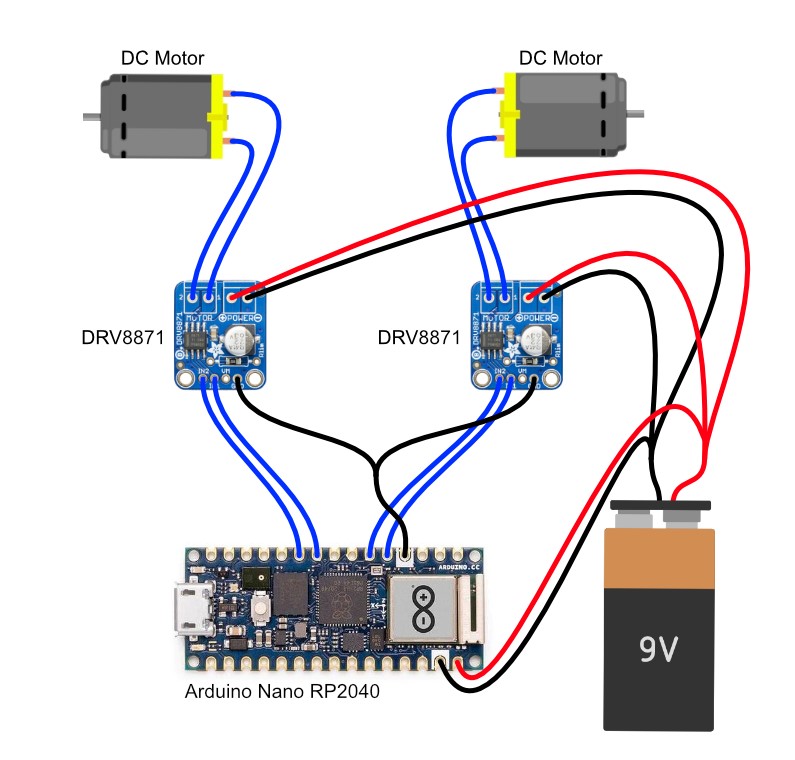
Furthermore I'm using the ArduinoBLE package to provide a BLE Server that let's you control the motor.
- motorControlService:
c10e3e56-fdd3-11eb-9a03-0242ac130003 - motorCharacteristic:
35a1022c-fdd3-11eb-9a03-0242ac130003


| function loadFont(t, e, n) { | |
| return new Promise(resolve => { | |
| const a = navigator.userAgent; | |
| if (window.addEventListener && (!a.match(/(Android (2|3|4.0|4.1|4.2|4.3))|(Opera (Mini|Mobi))/) || a.match(/Chrome/))) { | |
| let o = {}; | |
| try { | |
| o = localStorage || {} | |
| } catch (t) {} | |
| const r = t, i = r + "url", s = r + "css", d = o[i], c = o[s], l = document.createElement("style"); | |
| if (l.rel = "stylesheet", document.head.appendChild(l), !c || d !== e && d !== n) { |
| <ifModule mod_headers.c> | |
| # One year for image and video files | |
| <filesMatch ".(flv|gif|ico|jpg|jpeg|mp4|mpeg|png|svg|swf|webp)$"> | |
| Header set Cache-Control "max-age=31536000, public" | |
| </filesMatch> | |
| # One month for JavaScript and PDF files | |
| <filesMatch ".(js|pdf)$"> | |
| Header set Cache-Control "max-age=2592000, public" | |
| </filesMatch> |
| const {ServerSideRender} = wp.components; | |
| wp.blocks.registerBlockType('test/ssr', { | |
| title: 'Post Archiv', | |
| icon: 'grid-view', | |
| category: 'my-category', | |
| edit(props) { | |
| return <ServerSideRender block="test/ssr"/> | |
| }, | |
| save() { |
| (function (blocks, components, element) { | |
| blocks.registerBlockType('test/ssr', { | |
| title: 'Server Side Rendered Block', | |
| icon: 'admin-site-alt3', | |
| category: 'test', | |
| edit: function (props) { | |
| return element.createElement(components.ServerSideRender, {block: 'test/ssr'}); | |
| }, | |
| save: function () { | |
| return null; |
| const {TextControl, IconButton} = wp.components; | |
| const {InnerBlocks} = wp.editor; | |
| const {__} = wp.i18n; | |
| const {dispatch} = wp.data; | |
| const {createBlock, registerBlockType} = wp.blocks; | |
| registerBlockType('prefix/container', { | |
| title: 'Container', | |
| icon: 'category', | |
| category: 'category', |
| <?php | |
| namespace SayHello\Theme\Package; | |
| /** | |
| * @author Nico Martin <[email protected]> | |
| */ | |
| class Polylang | |
| { | |
| public $translatedNames = []; |
| // ./PostList.jsx | |
| import React from 'react'; | |
| import {apiStates, useApi} from './useApi.jsx' | |
| const PostList = () => { | |
| const { state, error, data, reload } = useApi('https://api.mysite.com'); | |
| switch (state) { | |
| case apiStates.ERROR: | |
| return ( |
| import React from 'react'; | |
| import { MyContextProvider, useMyContext } from './myContext'; | |
| const CompOne = () => { | |
| const [myState, setMyState] = useMyContext(); | |
| return ( | |
| <div> | |
| <p> | |
| CompOne update:{' '} | |
| <button onClick={() => setMyState({ ...myState, foo: 'baz' })}> |
| import React from 'react'; | |
| import ReactDOM from 'react-dom'; | |
| import { | |
| SharedStorageProvider, | |
| useSharedStorage, | |
| } from './sharedStateContext.tsx'; | |
| const App = () => { | |
| const [sharedState, setSharedState] = useSharedStorage(); |
Furthermore I'm using the ArduinoBLE package to provide a BLE Server that let's you control the motor.
c10e3e56-fdd3-11eb-9a03-0242ac13000335a1022c-fdd3-11eb-9a03-0242ac130003