
Last active
July 17, 2019 05:20
-
-
Save niket-agrawal/aa6ddbf3f8bf8b7f344325a916a02d81 to your computer and use it in GitHub Desktop.
[Python]__ Access all file types of particular extension from any directory path
This file contains hidden or bidirectional Unicode text that may be interpreted or compiled differently than what appears below. To review, open the file in an editor that reveals hidden Unicode characters.
Learn more about bidirectional Unicode characters
| import os | |
| #used for accessing the particular folders | |
| folders = ['Patient1', 'Patient2','Patient3'] | |
| #uncomment the following line to access all folders present in the directory | |
| #folders = os.listdir("C:\\Users\\niket\\Desktop\\Download Dustbin\\main_folder") | |
| def load_from_folder(folder): | |
| images = [] | |
| sub_path = "C:\\Users\\niket\\Desktop\\Download Dustbin\\main_folder\\" + folder | |
| for filename in os.listdir(sub_path): | |
| if any([filename.endswith(x) for x in ['.jpg', '.jpeg']]): | |
| tple = (folder, os.path.splitext(filename)[0]) | |
| images.append(tple) | |
| return images | |
| all_images = [] | |
| for folder in folders: | |
| images = load_from_folder(folder) | |
| for single_img in images: | |
| all_images.append(single_img) | |
| for file_img in all_images: | |
| print(file_img) | |
| print("Image",file_img[1]+'.jpg is in folder',file_img[0]) | |
| print("\nTotal images :",len(all_images)) |

Author
Sign up for free
to join this conversation on GitHub.
Already have an account?
Sign in to comment
[Python] - To access all files inside any particular directory
(Dependencies - os)
This code is mainly written for access of specific extension file type/s (.jpg in this case) inside any specific folder. The folder path must be supplied in
sub_pathvariable, and list of folders to be accessed is to be supplied manually infoldersvariable.Alternatively, you can also access all folders by un-commenting the
foldersvariable access below.How to Run -
os.listdir('path_to_be_supplied' )to make list of all folders automatically inside the main folder.Example of output
Input folder is
main_folderDirectory tree
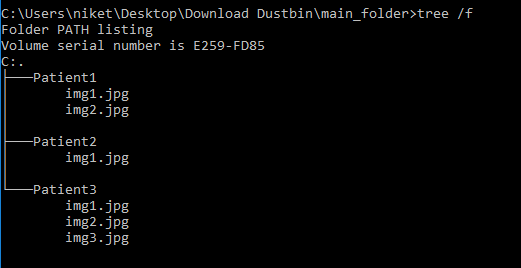
Output is :