Skip to content

Instantly share code, notes, and snippets.

@pavankjadda
Last active December 17, 2025 04:20
Show Gist options
  • Select an option

  • Save pavankjadda/2bb6fbdd8786e1f57fd7bcbcc666b51d to your computer and use it in GitHub Desktop.

Select an option

Save pavankjadda/2bb6fbdd8786e1f57fd7bcbcc666b51d to your computer and use it in GitHub Desktop.
How to fix "gitignore not working" issue

FYI: Created blog post with more details

How to fix ".gitignore not working" issue?

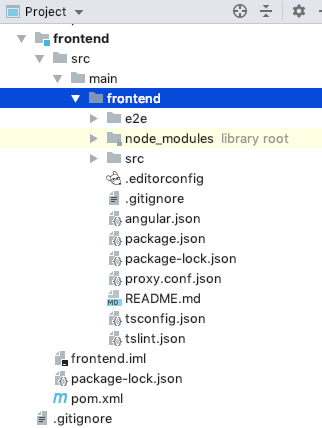
Sometimes git does not exclude files/folders added .gitignore especially if you had commited them before. Here is how to fix it. I am ignoring node_modules from Angular project as an example

  1. Update .gitignore with the folder/file name you want to ignore. You can use anyone of the formats mentioned below (prefer format1)
### Format1  ###
node_modules/
node/

### Format2  ###
**/frontend/node_modules/**
**/frontend/node/**

  1. Commit all the changes to git. Exclude the folder/files you don't want commit, in my case node_modules
  2. Execute the following command to clear the cache
git rm -r --cached .
  1. Execute git status command and it should output node_modules and sub directories marked for deletion
  2. Now execute
git add .
git commit -m "fixed untracked files" 
  1. That's it. Comment if you any questions.

Update: Windows users make sure your .gitignore uses UTF-8 rather than UTF-16. See comment for details

@jwyglendowski-precisionlender

Copy link
Copy Markdown

Thanks you. This saved a ton of time. I only wasted an hour before finding this.

@MazdaX

MazdaX commented Jun 22, 2022

Copy link
Copy Markdown

Amazing solution to such an annoying issue. Specially with the git lens plugin of the VS code this had been bugging for months. Thanks a million !

@topstarwebking

Copy link
Copy Markdown

Thanks. It works for me very well

@ErnestCodes

Copy link
Copy Markdown

Thanks. It really helped

@tonyvich

Copy link
Copy Markdown

Thanks, saved my day

@taboradeyvi

Copy link
Copy Markdown

Thank you!

@raelshark

raelshark commented Aug 20, 2022

Copy link
Copy Markdown

For anyone adding any new file path or pattern to .gitignore, be sure to add a newline after the new entry at the bottom of the file if your editor doesn't automatically add it. This had me kicking myself for a while.

src\myFile.js
  <-- You need an empty line here

This is a best practice anyway and required by some languages.

@caleblent

Copy link
Copy Markdown

Thank you for this, it helped a lot!

@BradKwon

Copy link
Copy Markdown

This solved my issue. Thanks! 👍

@julortiz

julortiz commented Sep 7, 2022

Copy link
Copy Markdown

Thanks!!! You are the man.

@paladinic

Copy link
Copy Markdown

Superhero 🦸

@littlewhitedragonIN

Copy link
Copy Markdown

Perfect!!!

@iaheck

iaheck commented Oct 23, 2022

Copy link
Copy Markdown

thank you!!

@jamedkh

jamedkh commented Nov 10, 2022

Copy link
Copy Markdown

this is very helpful!

@fredrickwampamba

Copy link
Copy Markdown

Thank you so much

@MartinMarkov-QA

Copy link
Copy Markdown

Thanks for the help!

@prabhakar9885

Copy link
Copy Markdown

Thanks a lot for sharing it :)

@BPowell76

Copy link
Copy Markdown

The UTF-8 type seemed to be the issue. Ended up having to commit to delete, roll back, copy the file and make a new one once everything was synced back up. Git seems to be ignoring the file now.

@xucian

xucian commented Feb 25, 2023

Copy link
Copy Markdown

⚠️⚠️⚠️⚠️⚠️⚠️⚠️⚠️⚠️⚠️⚠️⚠️⚠️

Before doing possibly unnecessary commits to your project, check encoding of your .gitignore file

.gitignore should be in UTF-8

If it's not (happens for example in Powershell 5; install v.7 to fix it) then change it to UTF-8 and it should work properly.

⚠️⚠️⚠️⚠️⚠️⚠️⚠️⚠️⚠️⚠️⚠️⚠️⚠️

life savior!

@Aloysius999

Copy link
Copy Markdown

Thanks! Worked a treat - saved the midnight oil :-)

@sdancer75

Copy link
Copy Markdown

Thanks !!!

@clockwiser

Copy link
Copy Markdown

Amazing! You are a hero.

@shoaibkhan404

Copy link
Copy Markdown

Easiest way

  • Delete node_modules folder
  • Add node_modules in your .gitignore file
  • Run git status it will show files to be deleted from git repo and modified .gitignore
  • Run git add .
  • Commit new changes git commit -m "Removed node_modules folder and added to .gitignore"
  • Now check repository it will not contain node_modules anymore

@Elllias

Elllias commented Jul 25, 2023

Copy link
Copy Markdown

Very bad advice for large repositories.

@fresonn

fresonn commented Aug 14, 2023

Copy link
Copy Markdown

Very bad advice for large repositories.

How else to solve the problem then?

@hope22

hope22 commented Aug 23, 2023

Copy link
Copy Markdown

Thanks dude

@nyxee

nyxee commented Aug 30, 2023

Copy link
Copy Markdown

perfect

@kchxng

kchxng commented Sep 13, 2023

Copy link
Copy Markdown

Perfect and thank you

@cflmarques

Copy link
Copy Markdown

Perfect, solved the exact same problem. Thanks

@AdriaPm

AdriaPm commented Oct 18, 2023

Copy link
Copy Markdown

Thank you a lot!

Sign up for free to join this conversation on GitHub. Already have an account? Sign in to comment