
- Counties (polygons)
- Roads (polylines)
- Fires (points)
- Parks (polygons)
-
How many fires have occured within state parks and nearby state parks, aka 1 to 5 miles away?
-
How many fires occured within .25 mile, .5 mile, 1 mile, 2 miles of a road?
-
What is the human population density where the wildfire occured?
-
What wildland urban interface have been subject to the most fires?
-
What counties have the most fires?
Statewide spatial datasets have been collected from various authoritative sources.
| Dataset | Source |
|---|---|
| Roads | USGS National Transportation Dataset (NTD) for California |
| Wildland Urban Interface | California Department of Forestry and Fire Protection's Fire and Resource Assessment Program (FRAP) (*) |
| County boundaries | California's Open Data Portal (*) |
| Wildfire ignition sites | United States Geological Survey (*) |
*link attribution is incorrect. actual data provided by team members
Additional processing was done on the statewide datasets to organize fire ignitions, roads and WUI's by county. Two processes were used:
- A field calc was done to replace spaces with underscores ( whitespace() script)
- A clip analysis was done inside an iterative model to clip out data from each county boundary.
Once processing was complete 4 databases were created to support research efforts:
Fires.gdb
- Alameda_County_Fires
- Alpine_County_Fires
- Amador_County_Fires
- Butte_County_Fires ...
Roads.gdb
- Alameda_County_Roads
- Alpine_County_Roads
- Amador_County_Roads
- Butte_County_Roads ...
Wildlands.gdb
- Alameda_County_WUI
- Alpine_County_WUI
- Amador_County_WUI
- Butte_County_WUI ...
Parks.gdb
- Alameda_County_Parks
- Alpine_County_Parks
- Amador_County_Parks
- Butte_County_Parks ...
The fire science data originally came from 4 statewide data files. These files were then subdivided by county. What are the advantages and disadvantages of splitting a large statewide dataset into smaller county datasets? Might changing the shape and size of the data hide patterns, relationships and connections that may reveal underlying causes of wildfires? Will the analytical methods used to explore fire in one county be the same for another county?
Use these methods to quantify your hypothesis and find answers to questions related to fire behavior.
- Create a new map
- Add Napa_County_Parks layer to the map
- Click Analysis -> Buffer
- Apply these Buffer tool values
| Key | Value |
|---|---|
| Input Features | Parks.gdb\Napa_County_Parks |
| Output Feature Class | Parks.gdb\Napa_County_Parks_1_Miles |
| Linear Unit | use default setting |
| Distance | 1 choose miles |
| Side Type | use default setting |
| Method | use default setting |
| Dissolve Type | use default setting |
- Run
Next repeate steps 1-5 again creating a 5 mile buffer. When done there will be 3 layers in the Content Pane. Toggle on and off the layers. Make a mental note that park boundries overlap with buffers applied.
Next perform a spatial join analysis using the park layers and wildfire ignition sites to obtain counts of fires in parks.
- Add Napa_County_Fires layer to the map
- Click Analysis -> Spatial Join
- Apply these Spatial Join tool values
| Key | Value |
|---|---|
| Target Features | Parks.gdb\Napa_County_Parks |
| Join Features | Fires.gdb\Napa_County_Fires |
| Output Feature Class | Parks.gdb\Napa_County_Parks_Fire_Cnt |
| Join Operation | use default setting |
| Keep All Target Features | use default setting |
| Field Map of Join Features | From bottom upward, delete all fields including GlobalID field using red x button |
| Match option | Completely contains |
- Run
Next repeate steps 1-4 again using the 1 mile and 5 mile park buffer layers.
When done right click on the Napa_County_Parks_Fire_Cnt layer in the Contents Pane. Then open the attribute table. The total number of fires for each park will be listed under the column named Join_Count.
Try using the above parks analysis, as your guide. The process should be the same but with different datasets, aka roads not parks and different buffer distances.
In order to explore fire incidents and human population density a missing demographic measure is needed. This measure needs to be assocated with each fire ignition point, but is actually assocated with each WUI boundary. One method to connect fire ignitions with WUI population densities might be SQL table joining. This might involve some form of primary and foreign key matching. However, in the case of spatial data we can use location to connect different layers of information together. Follow the next few step to see how location can be used to join layers of information together.
- Create a new map
- Add Napa_County_Fires layer to the map
- Add Napa_County_WUI layer to the map
- Click Analysis -> Intersect
- Apply these Intersect tool values
| Key | Value |
|---|---|
| Input Features | Fires.gdb\Napa_County_Fires (leave ranks empty) |
| Input Features | Wildlands.gdb\Napa_County_WUI (leave ranks empty) |
| Output Feature Class | Fires.gdb\Napa_County_Fires_Intersect |
| Attributes to Join | use default setting |
| XY Tolerance | use default setting |
| Output Type | use default setting |
- Run
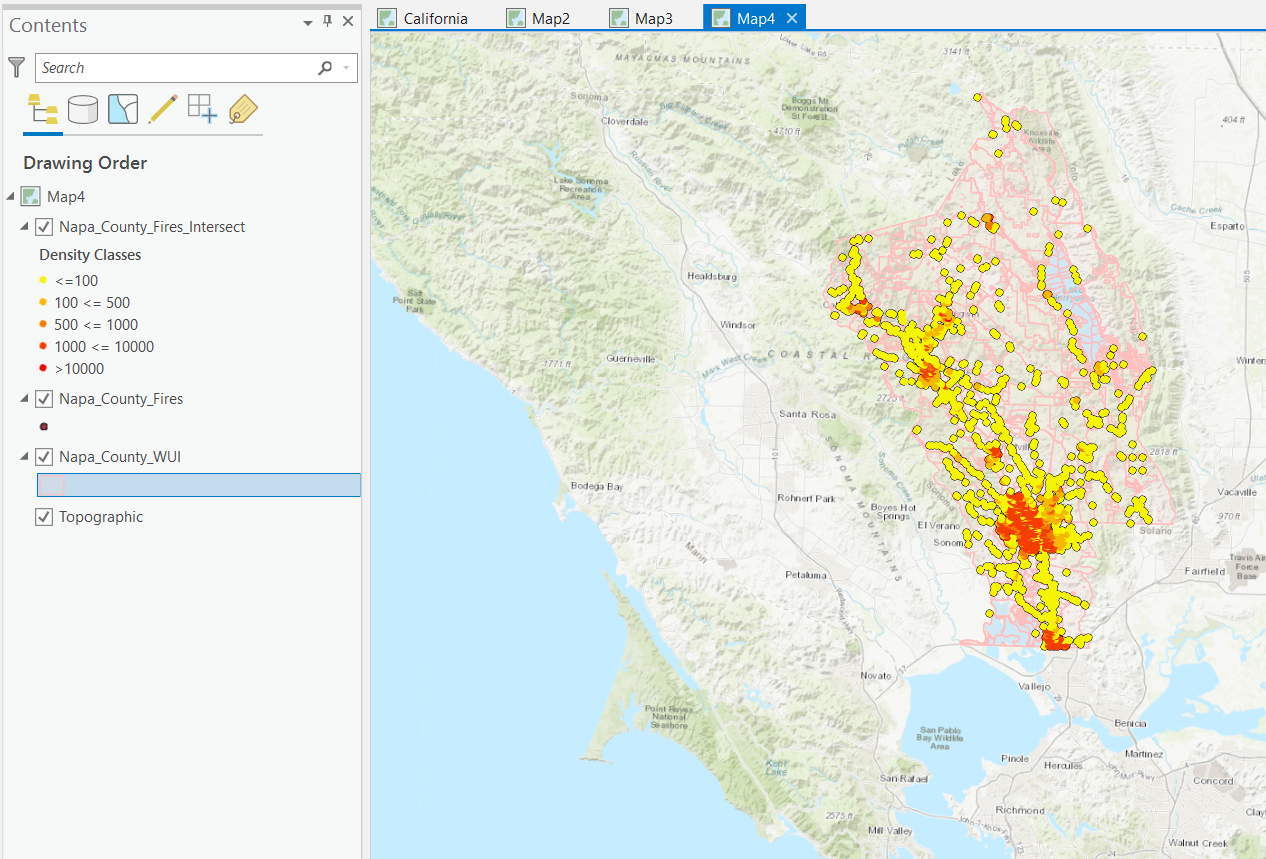
When done right click on the Napa_County_Parks_Fires_Intersect layer in the Contents Pane. Then open the attribute table and observe the POPDEN2010 column alongside the wildfire ignition site data. Next right click on the layer again and select Symbology. From the symbology panel choose graduated color, select the field POPDEN2010, choose number of classes and pick a color ramp. The map should now illustrate wildfires according to population density.
def whitespace(fld):
    return fld.replace(" ", "_")


@aqitrade - Thanks for giving me access. I've uploaded the data. It's a total of 5 zips.
Correct roads is a USGS National Transportation Dataset (NTD) for California.