
Last active
February 20, 2023 12:09
-
-
Save rabidgadfly/66f3358c2ffc7a47c89f to your computer and use it in GitHub Desktop.
Examples of how to dynamically populate an ACF select list
This file contains hidden or bidirectional Unicode text that may be interpreted or compiled differently than what appears below. To review, open the file in an editor that reveals hidden Unicode characters.
Learn more about bidirectional Unicode characters
| <?php | |
| /* | |
| * In this example, we will load a textarea field from the options page (textarea field is called my_select_values) | |
| * and use the text on each line as a option for the select field’s choices. The select field in this example has a name of “color”. | |
| * Note: This is example 1 of 2 | |
| * | |
| * Source: http://www.advancedcustomfields.com/resources/dynamically-populate-a-select-fields-choices/ | |
| * | |
| * Add to your functions.php | |
| */ | |
| function acf_load_color_field_choices( $field ) { | |
| // reset choices | |
| $field['choices'] = array(); | |
| // get the textarea value from options page without any formatting | |
| $choices = get_field('my_select_values', 'option', false); | |
| // explode the value so that each line is a new array piece | |
| $choices = explode("\n", $choices); | |
| // remove any unwanted white space | |
| $choices = array_map('trim', $choices); | |
| // loop through array and add to field 'choices' | |
| if( is_array($choices) ) { | |
| foreach( $choices as $choice ) { | |
| $field['choices'][ $choice ] = $choice; | |
| } | |
| } | |
| // return the field | |
| return $field; | |
| } | |
| add_filter('acf/load_field/name=color', 'acf_load_color_field_choices'); | |
| ?> |
This file contains hidden or bidirectional Unicode text that may be interpreted or compiled differently than what appears below. To review, open the file in an editor that reveals hidden Unicode characters.
Learn more about bidirectional Unicode characters
| <?php | |
| /* | |
| * In this example, we will load a repeater field from the options page (repeater field is called my_select_values) | |
| * and use the sub fields value and label as the options for the select field’s choices. The select field in this | |
| * example has a name of “color”. | |
| * | |
| * Note: This is example 2 of 2 | |
| * | |
| * Source: http://www.advancedcustomfields.com/resources/dynamically-populate-a-select-fields-choices/ | |
| * | |
| * Add to your functions.php | |
| */ | |
| function acf_load_color_field_choices( $field ) { | |
| // reset choices | |
| $field['choices'] = array(); | |
| // if has rows | |
| if( have_rows('my_select_values', 'option') ) { | |
| // while has rows | |
| while( have_rows('my_select_values', 'option') ) { | |
| // instantiate row | |
| the_row(); | |
| // vars | |
| $value = get_sub_field('value'); | |
| $label = get_sub_field('label'); | |
| // append to choices | |
| $field['choices'][ $value ] = $label; | |
| } | |
| } | |
| // return the field | |
| return $field; | |
| } | |
| add_filter('acf/load_field/name=color', 'acf_load_color_field_choices'); | |
| ?> |
This file contains hidden or bidirectional Unicode text that may be interpreted or compiled differently than what appears below. To review, open the file in an editor that reveals hidden Unicode characters.
Learn more about bidirectional Unicode characters
| <?php | |
| /* | |
| * In this example, we populate an acf field (sample_field) with post types (sample_post_type) | |
| * | |
| * Source: https://www.weareconvoy.com/2014/01/populating-acf-select-fields-with-post-type-values/ | |
| * | |
| * Add to your functions.php | |
| */ | |
| // populate acf field (sample_field) with post types (sample_post_type) | |
| function acf_load_sample_field( $field ) { | |
| $field['choices'] = get_post_type_values( 'sample_post_type' ); | |
| return $field; | |
| } | |
| add_filter( 'acf/load_field/name=sample_field', 'acf_load_sample_field' ); | |
| function get_post_type_values( $post_type ) { | |
| $values = array(); | |
| $defaults = array( | |
| 'post_type' => $post_type, | |
| 'post_status' => 'publish', | |
| 'posts_per_page' => -1, | |
| 'orderby' => 'title', | |
| 'order' => 'ASC' | |
| ); | |
| $query = new WP_Query( $defaults ); | |
| if ( $query->found_posts > 0 ) { | |
| foreach ( $query->posts as $post ) { | |
| $values[get_the_title( $post->ID )] = get_the_title( $post->ID ); | |
| } | |
| } | |
| return $values; | |
| } | |
| ?> |


add_filter is not working
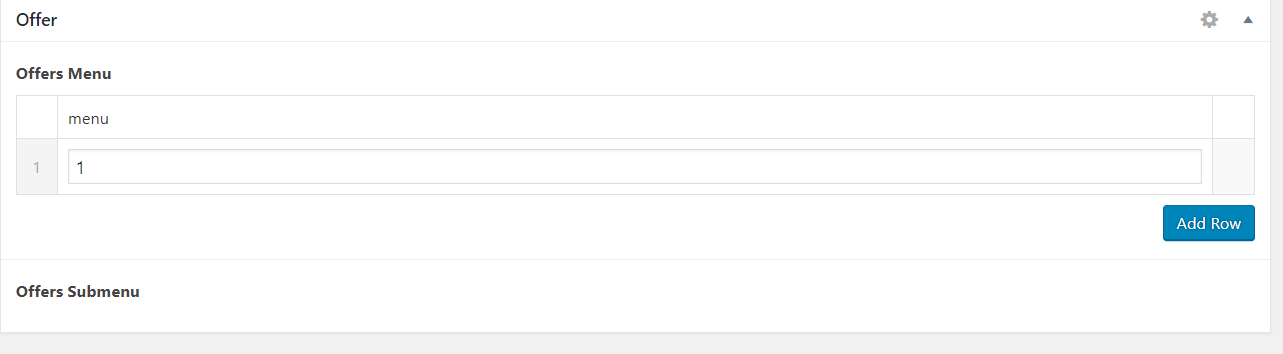
offers_menu is a repeater text field and offers_submenu is radio button. values in the text field are not showing in the radio button choice field.
``function submenu_choices( $field ) {
// reset choices
$field['choices'] = array();

// $field->add_setting(  array(
//     'default'   => '',
//     'transport' => 'refresh',
// ) );
// if has rows
if( have_rows('offers_menu', 'option') ) {

    // while has rows
    while( have_rows('offers_menu', 'option') ) {

        // instantiate row
        the_row();


        // vars
        $value = get_sub_field('menu');
        // $label = get_sub_field('label');


        // append to choices

        $field['choices'][ $value ] = $value;

    }

}


// return the field
return $field;
}
add_filter('acf/load_field/key=field_5d9c5ebdf4383', 'submenu_choices');

Hello this is a nice example but I have a question.
How will you make it if you have a repeater and within it a select and another repeater each ?
Sign up for free
to join this conversation on GitHub.
Already have an account?
Sign in to comment
How do you do this is a standard template? I don't want to do this from the functions.php or plugin.
Any help would be greatly appreciated.