Skip to content

Instantly share code, notes, and snippets.

@renestalder
Last active May 11, 2026 09:28
Show Gist options
  • Select an option

  • Save renestalder/c5b77635bfbec8f94d28 to your computer and use it in GitHub Desktop.

Select an option

Save renestalder/c5b77635bfbec8f94d28 to your computer and use it in GitHub Desktop.
Unfollow all on Facebook

Facebook: Unfollow people and pages

See comments section for more up-to-date versions of the script. The original script is from 2014 and will not work as is.

  1. Open news feed preferences on your Facebook menu (browser)
  2. Click people or pages
  3. Scroll down (or click see more) until your full list is loaded
  4. Run the script in your browser console

Facebook will block this feature for you while you use it, depending on how much entities you try to unfollow. It automatically unblocks in a couple of hours and you will be able to continue.

var unfollowButtons = document.querySelectorAll('[data-followed="1"]'); for(var i=0;i<unfollowButtons.length;i++){ unfollowButtons[i].click(); } alert(unfollowButtons.length+' people are now unfollowed! ');
@boc-github-user
Copy link
Copy Markdown

boc-github-user commented Sep 18, 2022

@zeeatsh I'm glad the script worked for you. However, unfortunately, I see no way to unfollow/unfriend friends from the activity log. It may be possible from public profile page, but it would be a pain to create and maintain considering how Facebook CSS classes are minified. I mean, what is this?

Untitled

There's no gaurentee these classes will remain consistent for more than two days. I wrote a script for me that worked that day, two days later, everything is broken. Point being, this sort of task may have to be done with an application made by C# that uses Facebook APIs. Hopefully, someone creates that soon.

@COFFEEHOLIC47
Copy link
Copy Markdown

COFFEEHOLIC47 commented Sep 18, 2022

Hi BookOfCooks,

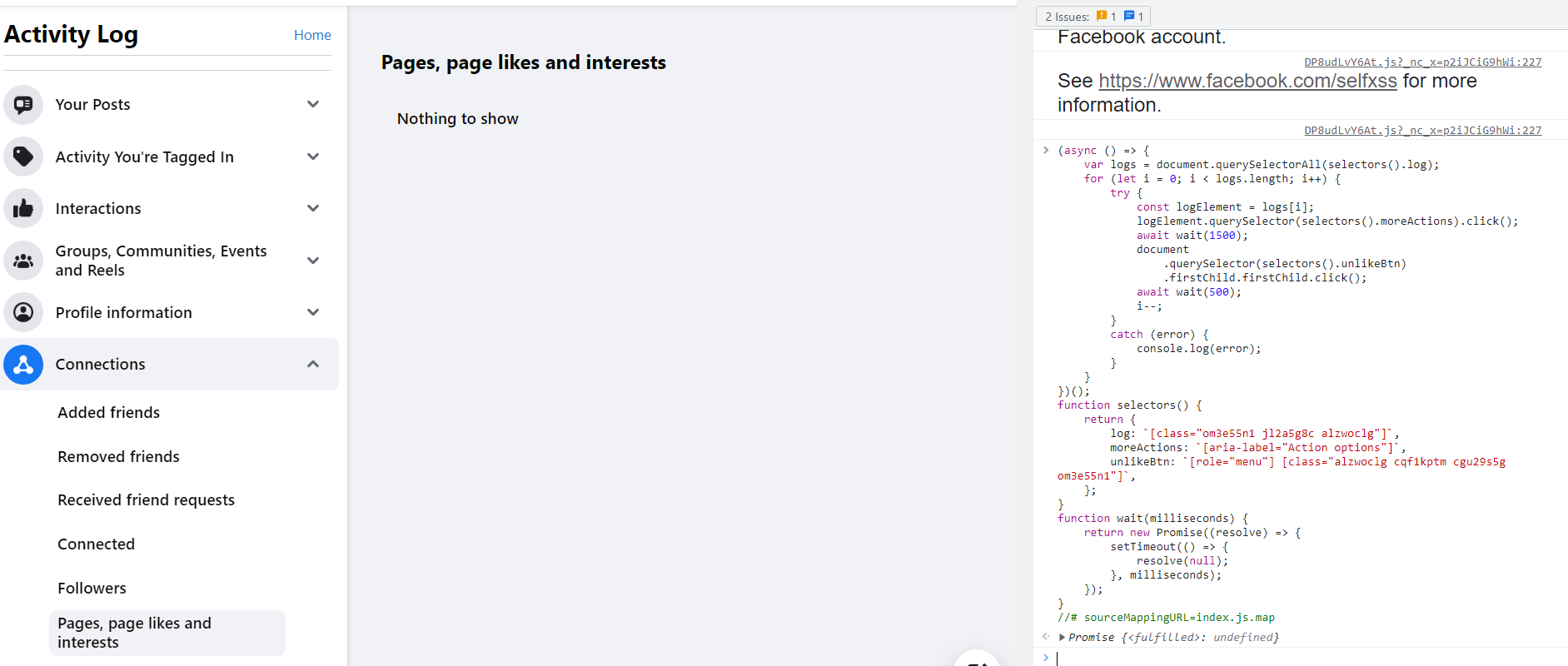
I did what your advice and it popped up "Promise {: undefined}", also appears as follows (read at the bottom on the right-hand corner):-

image

After I entered,

const promise1 = new Promise((resolve, reject) => {
resolve('Success!');
});

promise1.then((value) => {
console.log(value);
// expected output: "Success!"
});

it then became

Success!
Promise {: undefined}

But when I entered again what you provided to us, it came back same message, appears as follow:-

Promise {: undefined}

@boc-github-user
Copy link
Copy Markdown

@COFFEEHOLIC47 It's because you have no liked pages ("Nothing to show" is said in the screenshot). In other words, the script worked, it just didn't do anything because there's nothing to do. If you're trying to unfriend/unfollow friends (not pages), I don't have a working script for that, and as I told [zeeatsh] in my latest reply, I have no possible way of doing it with Javascript (at least, as far as I am aware of).

@cosmoshiki
Copy link
Copy Markdown

i run the script today, not working anymore, hope there will be updates soon

@boc-github-user
Copy link
Copy Markdown

@cosmoshiki did you try the latest solution in this thread?

@busonolsun
Copy link
Copy Markdown

busonolsun commented Nov 30, 2022

@cosmoshiki did you try the latest solution in this thread?

@boc-github-user
Is there a ready-made script that can currently unfollow all the "https://www.facebook.com/{username}/following" page?
I don't understand what the final solution is. For this reason, I cannot apply the last solution step.

@cosmoshiki
Copy link
Copy Markdown

cosmoshiki commented Dec 1, 2022 via email

@boc-github-user
Copy link
Copy Markdown

boc-github-user commented Dec 2, 2022

@busonolsun No there isn't. You have to use the activity log, here's the steps: (this can also work for you @cosmoshiki )

  1. Open Facebook > Open your profile (https://www.facebook.com/{username})
  2. On the right-hand side, click the "..." button > Activity Log
  3. Go to Connections > Pages, page likes and interests
  4. Scroll down as far down as you can (this ensures the script unlikes everything)

The benefit of using the Activity Log is you can unlike deleted/inactive pages, which you can't do in https://www.facebook.com/{username}/following because Facebook ciphers the css classes.

Then run this script (I can make it much more performant later):

(async () => {
    var logs = document.querySelectorAll(selectors().log);
    for (let i = 0; i < logs.length; i++) {
        try {
            const logElement = logs[i];
            logElement.querySelector(selectors().moreActions).click();
            await wait(1500);
            document
                .querySelector(selectors().unlikeBtn)
                .firstChild.firstChild.click();
            await wait(500);
            i--;
        }
        catch (error) {
            console.log(error);
        }
    }
})();
function selectors() {
    return {
        log: `[class="om3e55n1 jl2a5g8c alzwoclg"]`,
        moreActions: `[aria-label="Action options"]`,
        unlikeBtn: `[role="menu"] [class="alzwoclg cqf1kptm cgu29s5g om3e55n1"]`,
    };
}
function wait(milliseconds) {
    return new Promise((resolve) => {
        setTimeout(() => {
            resolve(null);
        }, milliseconds);
    });
}
//# sourceMappingURL=index.js.map

@busonolsun
Copy link
Copy Markdown

@busonolsun No there isn't. You have to use the activity log, here's the steps: (this can also work for you @cosmoshiki )

1. Open Facebook > Open your profile ([https://www.facebook.com/{username}](https://www.facebook.com/%7Busername%7D))

2. On the right-hand side, click the "..." button > Activity Log

3. Go to Connections > Pages, page likes and interests

4. Scroll down as far down as you can (this ensures the script unlikes everything)

The benefit of using the Activity Log is you can unlike deleted/inactive pages, which you can't do in https://www.facebook.com/{username}/following because Facebook ciphers the css classes.

Then run this script (I can make it much more performant later):

(async () => {
    var logs = document.querySelectorAll(selectors().log);
    for (let i = 0; i < logs.length; i++) {
        try {
            const logElement = logs[i];
            logElement.querySelector(selectors().moreActions).click();
            await wait(1500);
            document
                .querySelector(selectors().unlikeBtn)
                .firstChild.firstChild.click();
            await wait(500);
            i--;
        }
        catch (error) {
            console.log(error);
        }
    }
})();
function selectors() {
    return {
        log: `[class="om3e55n1 jl2a5g8c alzwoclg"]`,
        moreActions: `[aria-label="Action options"]`,
        unlikeBtn: `[role="menu"] [class="alzwoclg cqf1kptm cgu29s5g om3e55n1"]`,
    };
}
function wait(milliseconds) {
    return new Promise((resolve) => {
        setTimeout(() => {
            resolve(null);
        }, milliseconds);
    });
}
//# sourceMappingURL=index.js.map

the following error message occurred:

Promise {: undefined}
DevTools failed to load source map: Could not load content for https://www.facebook.com/672527969/index.js.map: HTTP error: status code 404, net::ERR_HTTP_RESPONSE_CODE_FAILURE

@boc-github-user
Copy link
Copy Markdown

@busonolsun remove the last line: //# sourceMappingURL=index.js.map

@dawnarius
Copy link
Copy Markdown

Great script
in https://www.facebook.com/{username}/following there are a list of people and pages
a person has an "add friend" button in front it's name
Can someone tune this script so that it only unfollow the persons in that following list?

@mdnayemhossain
Copy link
Copy Markdown

mdnayemhossain commented May 15, 2023

Can anyone give me the updated script that will unfollow all the following people from Facebook? Cause all the above scripts don't work anymore.

Copy link
Copy Markdown

ghost commented Jun 15, 2023

+1

@kevindashgit
Copy link
Copy Markdown

The script I posted a while back still works, just run it from within chrome/firefox dev tools console.

document.querySelectorAll('[aria-label="Toggle to follow"]').forEach(i=>i.click())

This script assumes that you are using a web browser to access the social media platform, specifically revealing the list of people you wanna unfollow. You can execute this script by opening the developer console in your browser while on the social media website, and then pasting and running the code.

@arrio3107
Copy link
Copy Markdown

arrio3107 commented Jun 20, 2023

**Hello, this script is completely functional; also added auto scroll after every unfollow. the code isn't perfect, but it gets the job done. ❤️
1 - Goto https://www.facebook.com/YourUserName/following
2 - Scroll down a bit and you'll be able to see all your followings.
3 - press CMND + OPTION + C to open console(for macbook), paste the code. and see magic.

**

`

let intervalId = setInterval(function () {
let manageButtons = document.querySelectorAll('div[aria-label="Manage"]');
let manageButton = manageButtons[0];
if (manageButton) {

    setTimeout(() => {

        manageButton.click();
    }, 800);
    let unfollowInterval = setInterval(function () {

        setTimeout(() => {

            var unfollowButtons = document.querySelector('div[role="menuitem"]');
            unfollowButtons.click();
            window.scrollBy(0, 60);
        }, 500);
        clearInterval(unfollowInterval);
    }, 500);
    setTimeout(() => {

        manageButton.remove();
        unfollowButtons.click();
    }, 1000);
} else {
}
}, 500);

`

@mdnayemhossain
Copy link
Copy Markdown

@arrio3107 Here I am getting no response while I wad trying the code you provided earlier. Put the screen shot for your attention...

ddip

@arrio3107
Copy link
Copy Markdown

arrio3107 commented Jun 20, 2023

@mdnayemhossain Which browser you are using?. Check that you are on the right page, as I mentioned earlier, you should be doing this on your following page where all your followings are showing.

@mdnayemhossain
Copy link
Copy Markdown

mdnayemhossain commented Jun 20, 2023

@arrio3107 I'm using the google chrome browser and yeah I was on the following page that you've mentioned but it showed me the above-mentioned error, unfortunately. Thanks in advance...

@fettou
Copy link
Copy Markdown

fettou commented Jul 14, 2023

any working way to unfollow all list in this page https://www.facebook.com/YourUserName/following i tried everything in thread and non worked with me please any new way ?

@fettou
Copy link
Copy Markdown

fettou commented Jul 14, 2023

**Hello, this script is completely functional; also added auto scroll after every unfollow. the code isn't perfect, but it gets the job done. ❤️ 1 - Goto https://www.facebook.com/YourUserName/following 2 - Scroll down a bit and you'll be able to see all your followings. 3 - press CMND + OPTION + C to open console(for macbook), paste the code. and see magic.

**

`

let intervalId = setInterval(function () {
let manageButtons = document.querySelectorAll('div[aria-label="Manage"]');
let manageButton = manageButtons[0];
if (manageButton) {

    setTimeout(() => {

        manageButton.click();
    }, 800);
    let unfollowInterval = setInterval(function () {

        setTimeout(() => {

            var unfollowButtons = document.querySelector('div[role="menuitem"]');
            unfollowButtons.click();
            window.scrollBy(0, 60);
        }, 500);
        clearInterval(unfollowInterval);
    }, 500);
    setTimeout(() => {

        manageButton.remove();
        unfollowButtons.click();
    }, 1000);
} else {
}
}, 500);

`

doesn't work for me

@jcarroll
Copy link
Copy Markdown

jcarroll commented Aug 6, 2023

Thank you so much! I was able to modify the above code; I created a fork with code that worked for me:

https://gist.github.com/jcarroll/cc3e0880316e0dfad6f2dd37fdc25cc8

Note you'll need to update the class for the unlikeBtn

@fettou
Copy link
Copy Markdown

fettou commented Aug 14, 2023

Thank you so much! I was able to modify the above code; I created a fork with code that worked for me:

https://gist.github.com/jcarroll/cc3e0880316e0dfad6f2dd37fdc25cc8

Note you'll need to update the class for the unlikeBtn

good job can u make a working method to unfollow all people on following list ?

@jcarroll
Copy link
Copy Markdown

can u make a working method to unfollow all people on following list ?

Are you asking about "unfollowing" a "friend"? Or, are you asking about "unfriending" a "friend"?

For the latter, I used L.O.C. browser extension with good results, which includes a "Friends Remover: find and remove friends with ease."

It gave me a list of all my friends, and I was able to check one box to mark 100 at a time and then click once to remove all 100. I had 400-600 friends, so it only took about 15 clicks to "unfriend" all of them. Note it did take a few minutes to process each batch of 100, so total time was several minutes, but effort was very low.

For the former (un_following_ other people), no, that I'm not familiar with.

@farukborann
Copy link
Copy Markdown

farukborann commented Sep 18, 2023

@COFFEEHOLIC47 @pgbnguyen @kevindashgit I wrote a new script that unlike pages/users (unfollow will take another script, hopefully someone else does it). To use it:

  1. Open Facebook > Open your profile (https://www.facebook.com/{username})
  2. On the right-hand side, click the "..." button > Activity Log
  3. Go to Connections > Pages, page likes and interests
  4. Scroll down as far down as you can (this ensures the script unlikes everything)

The benefit of using the Activity Log is you can unlike deleted/inactive pages, which you can't do in https://www.facebook.com/{username}/following

Then run this script (I can make it much more performant later):

(async () => {
    var logs = document.querySelectorAll(selectors().log);
    for (let i = 0; i < logs.length; i++) {
        try {
            const logElement = logs[i];
            logElement.querySelector(selectors().moreActions).click();
            await wait(1500);
            document
                .querySelector(selectors().unlikeBtn)
                .firstChild.firstChild.click();
            await wait(500);
            i--;
        }
        catch (error) {
            console.log(error);
        }
    }
})();
function selectors() {
    return {
        log: `[class="om3e55n1 jl2a5g8c alzwoclg"]`,
        moreActions: `[aria-label="Action options"]`,
        unlikeBtn: `[role="menu"] [class="alzwoclg cqf1kptm cgu29s5g om3e55n1"]`,
    };
}
function wait(milliseconds) {
    return new Promise((resolve) => {
        setTimeout(() => {
            resolve(null);
        }, milliseconds);
    });
}
//# sourceMappingURL=index.js.map

Happy Coding!

I just updated the selectors :

function selectors() {
    return {
        log: '[class="xdj266r x2bj2ny x1lq5wgf xgqcy7u x30kzoy x9jhf4c x1yztbdb xwib8y2"]',
        moreActions: '[aria-label="Action options"]',
        unlikeBtn: '[role="menu"] [class*="x1i10hfl xjbqb8w x6umtig"]',
    };
}

Its working for me, thanks.

@COFFEEHOLIC47
Copy link
Copy Markdown

Thank you so much! I was able to modify the above code; I created a fork with code that worked for me:
https://gist.github.com/jcarroll/cc3e0880316e0dfad6f2dd37fdc25cc8
Note you'll need to update the class for the unlikeBtn

good job can u make a working method to unfollow all people on following list ?

Hi fettou,

Firstly, Thank you for your work.
It works for jcarroll

As you read below, # kept rolling to '19453' after I entered the code you provided on July 14, which also indicated 'Promise {; undefined}.

Turns out that the long list of "Following" I am following is still there.

image

@muhammadwaqasmbd
Copy link
Copy Markdown

muhammadwaqasmbd commented Oct 5, 2023

I have modified this script to handle errors. It is working perfectly fine now.
Just go to your following page https://www.facebook.com/YourUserName/following and run the script.

let intervalId = setInterval(function () {
let manageButtons = document.querySelectorAll('div[aria-label="Manage"]');
let manageButton = manageButtons[0];
if (manageButton) {

    setTimeout(() => {

        manageButton.click();
    }, 800);
    var unfollowButtons = null;
    let unfollowInterval = setInterval(function () {

        setTimeout(() => {

            unfollowButtons = document.querySelector('div[role="menuitem"]');
            if(unfollowButtons){
                unfollowButtons.click();
                window.scrollBy(0, 60);
            }
        }, 500);
        clearInterval(unfollowInterval);
    }, 500);
    setTimeout(() => {

        manageButton.remove();
        if(unfollowButtons){
            unfollowButtons.click();
        }
    }, 1000);
} else {
}
}, 500);

@jcarroll
Copy link
Copy Markdown

good job can u make a working method to unfollow all people on following list ?
Turns out that the long list of "Following" I am following is still there.

@COFFEEHOLIC47 and @fettou, others:

The following code worked for me to "unfollow" all Friends, Groups, and Pages:
https://gist.github.com/jcarroll/1b97f5f81c4668bf3dfdb97b0ac0eb02

@n8tbyte
Copy link
Copy Markdown

n8tbyte commented Dec 20, 2023

I have modified this script to handle errors. It is working perfectly fine now. Just go to your following page https://www.facebook.com/YourUserName/following and run the script.

let intervalId = setInterval(function () {
let manageButtons = document.querySelectorAll('div[aria-label="Manage"]');
let manageButton = manageButtons[0];
if (manageButton) {

    setTimeout(() => {

        manageButton.click();
    }, 800);
    var unfollowButtons = null;
    let unfollowInterval = setInterval(function () {

        setTimeout(() => {

            unfollowButtons = document.querySelector('div[role="menuitem"]');
            if(unfollowButtons){
                unfollowButtons.click();
                window.scrollBy(0, 60);
            }
        }, 500);
        clearInterval(unfollowInterval);
    }, 500);
    setTimeout(() => {

        manageButton.remove();
        if(unfollowButtons){
            unfollowButtons.click();
        }
    }, 1000);
} else {
}
}, 500);

20 Dec 2023 is working.

@Mahmoud-Wagihh
Copy link
Copy Markdown

Mahmoud-Wagihh commented Dec 21, 2023

I have modified this script to handle errors. It is working perfectly fine now. Just go to your following page https://www.facebook.com/YourUserName/following and run the script.

let intervalId = setInterval(function () {
let manageButtons = document.querySelectorAll('div[aria-label="Manage"]');
let manageButton = manageButtons[0];
if (manageButton) {

    setTimeout(() => {

        manageButton.click();
    }, 800);
    var unfollowButtons = null;
    let unfollowInterval = setInterval(function () {

        setTimeout(() => {

            unfollowButtons = document.querySelector('div[role="menuitem"]');
            if(unfollowButtons){
                unfollowButtons.click();
                window.scrollBy(0, 60);
            }
        }, 500);
        clearInterval(unfollowInterval);
    }, 500);
    setTimeout(() => {

        manageButton.remove();
        if(unfollowButtons){
            unfollowButtons.click();
        }
    }, 1000);
} else {
}
}, 500);

20 Dec 2023 is working.

Untitled

hi, i tried this code and it's not working, it takes sometime and then gives me this error messages, i can't reach the bottom of the following page because because i have 5k followings i'am frustrated :(

@arefinani
Copy link
Copy Markdown

21 march 2024

Its not working for me. Hope there will be some solution soon.

Sign up for free to join this conversation on GitHub. Already have an account? Sign in to comment