
-
LANケーブル(ブルー)をPCに差し込む
-
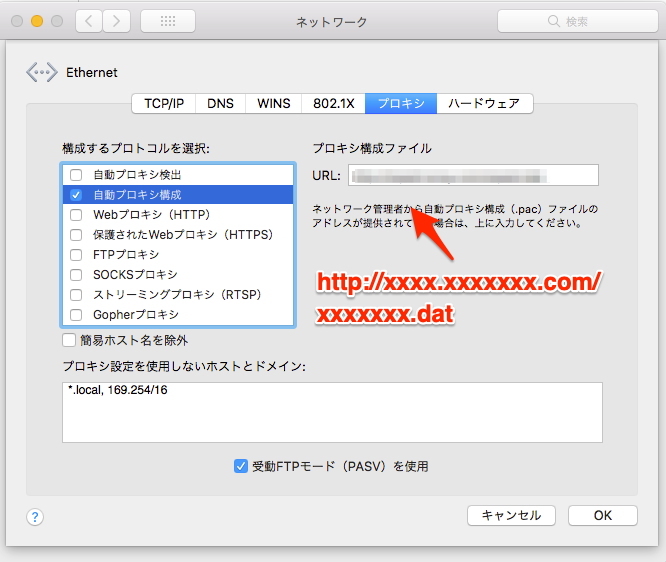
ネットワーク環境設定 > Ethernet > 詳細 > プロキシ
-
自動プロキシ構成にチェック
-
プロキシ構成ファイルのURLに
http://xxxx.xxxxxxx.com/xxxxxxx.datを設定する
-
~/.bashrcや、~/.bash_profileに以下を追記するexport http_proxy=http://proxy.xxxxxx.co.jp:10080 export https_proxy=$http_proxy export HTTP_PROXY=$http_proxy export HTTPS_PROXY=$http_proxy -
確認
$ wget https://yahoo.co.jp
$ rm index.html
$ wget https://yahoo.co.jp
$ rm index.html
-
~/.curlrcを作成する$ cd ~ $ touch .curlrc -
~/.curlrcに以下を追記するproxy = "http://proxy.xxxxxx.co.jp:10080"¬ -
確認
$ curl https://yahoo.co.jp
$ curl http://yahoo.co.jp
-
~/.gitconfigに以下を追記する[http] proxy = http://proxy.xxxxx.co.jp:10080 [https] proxy = http://proxy.xxxxx.co.jp:10080