
Last active
June 5, 2022 19:05
-
-
Save sayhicoelho/5e95689de08da54894a5eb8fbb754e6c to your computer and use it in GitHub Desktop.
A Laravel pagination for Vue.js
This file contains hidden or bidirectional Unicode text that may be interpreted or compiled differently than what appears below. To review, open the file in an editor that reveals hidden Unicode characters.
Learn more about bidirectional Unicode characters
| <template> | |
| <nav aria-label="Page navigation" v-if="paginationTotal > 1"> | |
| <ul :class="{ 'pagination': true, 'flex-wrap': true, 'justify-content-center': centered }"> | |
| <li :class="{ 'page-item': true, 'disabled' : currentPage <= 1 }"> | |
| <a class="page-link" href="#" @click.prevent="pageChanged(currentPage - 1)" aria-label="Previous"> | |
| <span aria-hidden="true">«</span> | |
| </a> | |
| </li> | |
| <template v-if="needLeftDots"> | |
| <li v-for="n in 2" :key="n" :class="activePage(n)"> | |
| <a class="page-link" href="#" @click.prevent="pageChanged(n)">{{ n }}</a> | |
| </li> | |
| <li class="page-item disabled"> | |
| <span class="page-link">...</span> | |
| </li> | |
| </template> | |
| <li v-for="n in paginationRange" :key="n" :class="activePage(n)"> | |
| <a class="page-link" href="#" @click.prevent="pageChanged(n)">{{ n }}</a> | |
| </li> | |
| <template v-if="needRightDots"> | |
| <li class="page-item disabled"> | |
| <span class="page-link">...</span> | |
| </li> | |
| <li v-for="n in [paginationTotal-1, paginationTotal]" :key="n" :class="activePage(n)"> | |
| <a class="page-link" href="#" @click.prevent="pageChanged(n)">{{ n }}</a> | |
| </li> | |
| </template> | |
| <li :class="{ 'page-item': true, 'disabled' : currentPage >= paginationTotal }"> | |
| <a class="page-link" href="#" @click.prevent="pageChanged(currentPage + 1)" aria-label="Next"> | |
| <span aria-hidden="true">»</span> | |
| </a> | |
| </li> | |
| </ul> | |
| </nav> | |
| </template> | |
| <script> | |
| import { range } from 'lodash' | |
| export default { | |
| name: 'Paginator', | |
| props: { | |
| total: { | |
| type: Number, | |
| required: true | |
| }, | |
| perPage: { | |
| type: Number, | |
| required: false, | |
| default: 5 | |
| }, | |
| currentPage: { | |
| type: Number, | |
| required: true, | |
| }, | |
| centered: { | |
| type: Boolean, | |
| default: false, | |
| }, | |
| }, | |
| computed: { | |
| maxRange() { | |
| return 11 | |
| }, | |
| hasMoreThanMaxRange() { | |
| return this.paginationTotal > this.maxRange | |
| }, | |
| needLeftDots() { | |
| return this.hasMoreThanMaxRange && (this.currentPage - 4) >= 3 | |
| }, | |
| needRightDots() { | |
| return this.hasMoreThanMaxRange && (this.currentPage + 4) <= (this.paginationTotal - 2) | |
| }, | |
| paginationTotal() { | |
| return Math.ceil(this.total / this.perPage) | |
| }, | |
| paginationRange() { | |
| if (this.hasMoreThanMaxRange) { | |
| let start, end | |
| if (!this.needLeftDots) { | |
| start = 1 | |
| end = 9 | |
| } else if (!this.needRightDots) { | |
| start = this.paginationTotal - 8 | |
| end = this.paginationTotal + 1 | |
| } else { | |
| start = this.currentPage - 3 | |
| end = this.currentPage + 4 | |
| start = (start < 1) ? 1 : start | |
| end = (end > this.paginationTotal) | |
| ? this.paginationTotal + 1 | |
| : end | |
| } | |
| return range(start, end) | |
| } | |
| return this.paginationTotal | |
| } | |
| }, | |
| methods: { | |
| pageChanged(pageNum) { | |
| this.$emit('pageChanged', pageNum) | |
| }, | |
| activePage(pageNum) { | |
| return this.currentPage === pageNum ? | |
| 'page-item active' : | |
| 'page-item' | |
| } | |
| }, | |
| } | |
| </script> | |
| <style scoped> | |
| li.disabled, | |
| li.active { | |
| pointer-events: none; | |
| } | |
| </style> |


Author
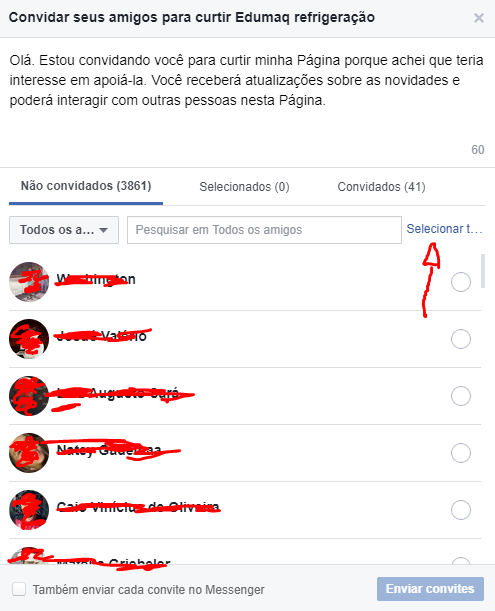
O Facebook atualizou a forma de convidar amigos pra sua página. Se não me engano, agora vc já pode convidar todos os seus amigos sem necessitar de um script como esse, mas esse processo demora um pouco.
Basta clicar em "Selecionar tudo".
Screenshot:
Sign up for free
to join this conversation on GitHub.
Already have an account?
Sign in to comment
how to invite friends to enjoy facebook page now that you updated? Any tips?