
React components are synchronous, long-lived and can sometimes re-render very frequently.
How do React components written in a sychronous programming style read values from remote resources only available asynchronously?
- Where is the cache?
- When is the cache initialized and/or refreshed?
- Is there more than one cache? How are the caches acccessed?
- How and when are caches busted or destroyed?
import { useState, useEffect } from 'react';

function Items() {
  const [{ status, value }, setGetItemsState] = useState({ status: 'initialized', value: [] });
  useEffect(() => {
    let aborted = false;
    async function getItems() {
      try {
        setGetItemsState(state => ({ ...state, status: 'loading' }));
        const items = await api.fetchItems();
        if (aborted) return;
        setGetItemsState({ status: 'hasValue', value: items });
      } catch (error) {
        if (aborted) return;
        setGetItemsState({ status: 'hasError', value: error });
      }
    }

    getItems();

    return () => {
      aborted = true;
    };
  }, []);

  if (status === 'hasError') {
    return (
      <div className="items items-status:hasError">
         {value.message}
      </div>
    );
  }

  const items = value;

  return (
    <div className={['items', item.status ? `items-status:${item.status}` : undefined].filter(Boolean).join(' ')}>
      {items.map(item => <Item key={item.id} contents={item} />)}
    </div>
  );
}- The cache is the
React.useStatevalue. - It is accessed directly using this
valuevariable. - The cache is initialized on mounting the component and destroyed on unmount. It is updated via its
setStatefunction.
import { useEffect } from 'react';
import { useSelector, useDispatch } from 'react-redux';
import { call, put, takeLatest } from 'redux-saga/effects';

function getItems() {
  return {
    type: 'GET_ITEMS'
  };
}

function getItemsSucceeded(items) {
  return {
    type: 'GET_ITEMS_SUCCEEDED',
    payload: { items }
  };
}

function getItemsFailed(error) {
  return {
    type: 'GET_ITEMS_FAILED',
    payload: { error }
  };
}

function* itemsSaga(action) {
  try {
    const items = yield call(api.fetchItems);
    yield put(getItemsSucceeded(items));
  } catch (error) {
    yield put(getItemsFailed(error));
  }
}

function* rootSaga() {
  yield takeLatest('GET_ITEMS', itemsSaga);
}

function itemsReducer(state = { status: 'initialized', value: [] }, action) {
  switch (action.type) {
    case 'GET_ITEMS': {
      return {
        ...state,
        status: 'loading',
      };
    }
    case 'GET_ITEMS_SUCCEEDED': {
      return {
        status: 'hasValue',
        value: action.payload.items
      };
    }
    case 'GET_ITEMS_FAILED': {
      return {
        status: 'hasError',
        value: action.payload.error
      };
    }
    default:
      return state
  }
}

// Etc...
// Either a lot of boilerplate/wiring or very clever abstractions...

function Items() {
  const { status, value } = useSelector(state => state.items);
  const dispatch = useDispatch();

  useEffect(() => {
    dispatch(getItems());
  }, []);

  function handleItemsRefresh() {
    dispatch(getItems());
  }

  if (status === 'hasError') {
    return (
      <div className="items items-status:hasError">
         <button onClick={handleItemsRefresh}>Refresh!</button>
         {value.message}
      </div>
    );
  }

  const items = value;

  return (
    <div className={['items', item.status ? `items-status:${item.status}` : undefined].filter(Boolean).join(' ')}>
      <button onClick={handleItemsRefresh}>Refresh!</button>
      {items.map(item => <Item key={item.id} contents={item} />)}
    </div>
  );
}- The cache is stored in the Redux store controlled by the
itemsReducer. The mechanism of how to update the cache is hand-written. - It is accessed by reading it with the cache key
'items'and call ofuseSelector. - By default, there is only one cache for
items, and if we wanted more caches (e.g. multiple<Items query={query} />on one page), we'd need to rewrite both the reducer and the selectors. - The cache is initialized on mounting the component but never destroyed. It is always automatically refreshed on mount and if we unmount and remount the
<Items />component it'll be able to read the previousstate.itemswhile the data is being refreshed. (Unless we decide to wipe the current value on a loading state.) - It's easy to refresh
state.itemssince all you need to do is to calldispatch(getItems()).
import { Suspense } from 'react';
import { ErrorBoundary } from 'react-error-boundary';
import { atom, selector, useRecoilValue, useRecoilCallback } from 'recoil';

const itemsRequestId = atom({
  key: 'api/items/requestId',
  default: 0
})

const itemsSelector = selector({
  key: 'api/items/value',
  get: async ({ get }) => {
    get(itemsRequestId);
    return api.fetchItems();
  }
});

function ItemsContent() {
  const items = useRecoilValue(itemsSelector);
  const handleItemsRefresh = useRecoilCallback(({ set }) => () => {
    set(itemsRequestId, id => id + 1);
  });
  return (
    <>
      <button onClick={handleItemsRefresh}>Refresh!</button>
      {items.map(item => <Item key={item.id} contents={item} />)}
    </>
  );
}

function ItemsError({ error }) {
  return (
    <div className="items items-status:hasError">
      {error.message}
    </div>
  );
}

function Items() {
  return (
    <ErrorBoundary fallback={ItemsError}>
      <Suspense fallback={<div className="items items-status:loading"></div>}>
        <ItemsContent />
      </Suspense>
    </ErrorBoundary>
  );
}- The cache is stored in a Recoil selector called
itemsSelector. - It is accessed by reading the selector with
useRecoilValue(itemsSelector)instead of via the internal cache key. - It is easy to add multiple caches for
items, if we switch to usingselectorFamilyandatomFamilywhich take params. - The cache is initialized on reading the selector. The cache is neither destroyed or garbage collected on unmount, nor is it automatically refreshed if we remount. By default, Recoil caches are permanent and immutable.
- The pattern recommended to refresh
itemsSelectoris to make it depend on aitemsRequestIdand mutate this to a different value. - It is difficult to refresh a selector from an
ErrorBoundarywithout jumping through hoops.
- Initialized on read.
- Re-reading does not refresh. Caches are immutable.
- Caches are stores of derived values. All logic related to each cache is colocated.
- Caches are accessed through selectors and atoms. Internally these data types point at caches with an internally controlled cache key.
- Cache keys are constructed from the user-defined
keyand a serialization of the keys of the cache's dependencies as well as any query parameters passed in viaselectorFamilyoratomFamily. - When the internal cache key of a
SelectororAtomchanges, this will cause new values to be derived within eachSelectororAtomdownwards through the dependency chain (DAG), eventually causing React components subscribed to the values with Recoil's hooks to re-render.
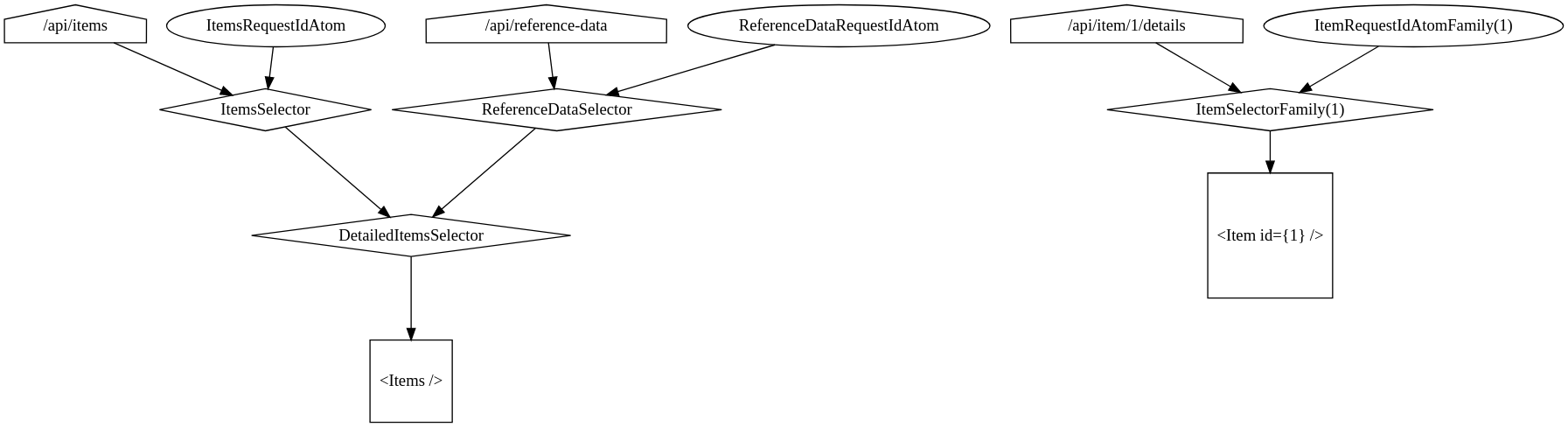
digraph G {
  "/api/items" -> "ItemsSelector";
  "ItemsRequestIdAtom" -> "ItemsSelector";
  "/api/reference-data" -> "ReferenceDataSelector";
  "ReferenceDataRequestIdAtom" -> "ReferenceDataSelector";
  "ItemsSelector" -> "DetailedItemsSelector";
  "ReferenceDataSelector" -> "DetailedItemsSelector";
  "DetailedItemsSelector" -> "<Items />";

  "/api/item/1/details" -> "ItemSelectorFamily(1)";
  "ItemRequestIdAtomFamily(1)" -> "ItemSelectorFamily(1)";
  "ItemSelectorFamily(1)" -> "<Item id={1} />";

  "/api/items"  [shape=house];
  "/api/reference-data"  [shape=house];
  "/api/item/1/details" [shape=house];

  "ItemsSelector" [shape=diamond];
  "ReferenceDataSelector" [shape=diamond];
  "DetailedItemsSelector" [shape=diamond];
  "ItemSelectorFamily(1)" [shape=diamond];

  "<Items />" [shape=square];
  "<Item id={1} />" [shape=square];
}
How do we know to update the correct caches if the remote state of a single item has been mutated by us or somebody else?
...??!
client vs back-end DAG mismatches? collaborative data? merge conflicts?
Taking a step back...
- Redux (2015 - )
- Use boilerplate and ceremony to make caches that are very debuggable.
- Recoil (2020 - )
- Model your caches as a DAG. Contains low-level APIs to manage caches.
- SWR (2019 - )
- Introduces
stale-while-revalidateconcept to automatically manage caches. Contains high-level APIs that help to create user-friendly applications.
- Introduces
- React Query (2019 - )
- Takes
stale-while-revalidateconcept and improves the DX further.
- Takes
The name “SWR” is derived from
stale-while-revalidate, a HTTP cache invalidation strategy popularized byHTTP RFC 5861. SWR is a strategy to first return the data from cache (stale), then send the fetch request (revalidate), and finally come with the up-to-date data.
- Fast page navigation
- Stale-while-revalidate refreshing strategy updating "out of date" data in the background
- Refresh on component mount / load of page
- Refresh on window/tab focus
- Refresh on connection reconnect
- Refresh on fixed interval
- Refresh/invalidate cache on mutation
- Background fetching indicators
- Optimistic UI updates
- Deduping multiple requests into a single request
- Smart error retries
- Garbage collection
import { useQuery, useQueryClient, useMutation } from 'react-query';

function useItems() {
  return useQuery('items', () => api.fetchItems());
}

function useAddItem() {
  const queryClient = useQueryClient();
  return useMutation(api.addItem, {
    onSuccess: () => {
      queryClient.invalidateQueries('items');
    },
  });
}

function Items() {
  const { data: items, isLoading, error } = useItems();
  const addItem = useAddItem();

  if (error) {
    return (
      <div className="items items-status:hasError">
         {error.message}
      </div>
    );
  }

  return (
    <div className={['items', isLoading ? `items-status:loading` : undefined].filter(Boolean).join(' ')}>
      <button onClick={() => addItem({ name: '', description: '' })}>Add empty item</button>
      {items.map(item => <Item key={item.id} contents={item} />)}
    </div>
  );
}- The cache is stored in a query cache.
- It is accessed by reading the cache with
useQuery(cacheKey, fetcher). - The cache is initialized on reading the query. The cache is neither destroyed or garbage collected on unmount, but it is automatically revalidated if we remount. It can also be revalidated after a particular period of time, on a network reconnect, on an interval, etc.
- If you need to mutate the data provided by the backend API you still need to manually invalidate the cache.
const itemsQuery = selectorFamily({
  key: 'api/items/value',
  get: (params) => () => api.fetchItems(params),
});

function ItemsContent({ params }) {
  const items = useRecoilValue(itemsQuery(params));
  const handleItemsRefresh = useRecoilRefresher_UNSTABLE(itemsQuery(params));

  return (
    <>
      <button onClick={handleItemsRefresh}>Refresh!</button>
      {items.map(item => <Item key={item.id} contents={item} />)}
    </>
  );
}
You can also configure the refresh logic within useRecoilCallback or a selectorFamily.
This can make logic a little simpler.
And, we can also use Recoil without <Suspense /> and still get loading indicators and errors by using Loadable
import { selector, useRecoilValueLoadable, useRecoilRefresher_UNSTABLE } from 'recoil';

const itemsSelector = selector({
  key: 'api/items/value',
  get: async ({ get }) => {
    return api.fetchItems();
  }
});

function Items() {
  const { state, contents } = useRecoilValueLoadable(itemsSelector);
  const handleItemsRefresh = useRecoilRefresher_UNSTABLE(itemsSelector);

  if (state === 'hasError') {
    return (
      <div className="items items-status:hasError">
         {contents.message}
      </div>
    );
  }

  const items = contents;

  return (
    <div className={['items', state ? `items-status:${state}` : undefined].filter(Boolean).join(' ')}>
      <button onClick={handleItemsRefresh}>Refresh!</button>
      {items.map(item => <Item key={item.id} contents={item} />)}
    </div>
  );
}- A big issue is that, if you cause a cache key to change in order to invalidate a selector, then neither
useRecoilValueoruseRecoilValueLoadablecan give you the previous value while revalidating, so you'll end up constantly seeing loading indicators and lose the value provided by a SPA. However, as a solution, it is possible that we could create a custom hook that stores the latest value in auseRefand then returns this while the underlying selector is in a loading state. - Another issue is that (re-)mounting does not cause a selector to be refreshed. That particular behaviour could potentially be added with
useEffect(() => refresh(), []). - Other refetch behaviours could potentially be added by using Atom effects to automatically increment a
requestIdAtomwhen an asynchronous event occurs. In this case, we'd opt-in to these behaviours as if they are mixins by using global atoms, likeget(networkReconnectAtom)(and so on). - For garbage collection, we need to manually configure the
cachePolicy_UNSTABLEof our selectors, as the default policy within Recoil is to never evict cache entries.
...is this a good idea though?
import { useEffect, useRef } from 'react';
import { useRecoilValueLoadable } from 'recoil';

function useCache(recoilValue) {
  const loadable = useRecoilValueLoadable(recoilValue);
  const revalidate = useRecoilRefresher_UNSTABLE(recoilValue);
  const hasValueOrErrorOnMount = useRef(
    () => loadable.state === 'hasValue' || loadable.state === 'hasError'
  );
  const latest = useRef(() =>
    loadable.state === 'hasValue' ? { contents: loadable.contents } : {}
  );

  useEffect(() => {
    if (hasValueOrErrorOnMount.current) {
      revalidate();
    }
  }, [revalidate]);

  useEffect(() => {
    if (loadable.state === 'hasValue') {
      latest.current = { contents: loadable.contents };
    }
  }, [loadable.state, loadable.contents]);

  if (loadable.state === 'loading' && 'contents' in latest.current) {
    const { contents, ...otherLoadable } = loadable;
    return {
      ...otherLoadable,
      contents: latest.current.contents,
    };
  }

  return loadable;
}
psuedo-code. probably broken. ymmv 🙏
- React 18+ will eventually give us
useTransition,useSyncExternalSourceandusewhich solve these problems upstream.
function Items() {
  const items = use(getItems());

  return (
    <>
      {items.map(item => <Item key={item.id} contents={item} />)}
    </>
  );
}

// Error boundaries and suspense boundaries...
However, these are in flux and they still haven't published their caching RFC yet. In general, the React team tend to produce low-level APIs while more user-friendly solutions end up upstream.