
Datadog's reserved log attributes are confusing as heck. It's not clear what each attribute does, so you can’t predict or understand what will happen when you create a mapping. Allow me to demonstrate.
I got this logline from my Datadog S3 archive bucket. It gives you a sense of what logs look like after going through Datadog's opaque transformations.
{
    "_id": "AW5Hc8y8FxIBf2udiA1a", // Log ID generated by Datadog
    "attributes": { // Key-values from the original JSON logline are moved under "attributes"
        "@timestamp": "2019-11-07T19:59:59.804Z",
        "@version": "1",
        "application": "redacted",
        "bogger": true,
        "dd": {}, // This key does not show up in the UI
        "erlang_pid": "#PID<0.16535.0>",
        "file": "redacted",
        "function": "redacted",
        "host": "i-05a9f3fd98a173123",
        "level": "info",
        "line": 294,
        "module": "redacted",
        "service": "redacted",
        "span_id": "425918271640450770",
        "timestamp": "2019-11-07T19:59:59.804Z",
        "trace_id": "1008221678123776104"
    },
    "date": "2019-11-07T19:59:59.804Z", // Copied from the original JSON logline
    "host": "i-05a9f3fd98a173123", // Copied from the original JSON logline
    "message": "redacted", // Hoisted - not copied - from the original JSON logline
    "service": "redacted", // Copied from the original JSON logline
    "source": "docker",
    "status": "info" // Copied from the original JSON logline
}
Some things to note:
- The top-level keys are Datadog's "reserved attributes".
- The keys from the original JSON logline have been moved under "attributes"...
- Except the "message" key from the original JSON is hoisted to the top-level.
- Other reserved attributes are copied - not hoisted - to the top-level.
- For example: "level" -> "status", "host" -> "host", "service" -> "service"
- Where is the "trace_id" reserved attribute? I was expecting there to be a "trace_id" key at the top-level, since this is supposedly a reserved attribute.
- The original JSON logline contained a "dd.trace_id" key that is just completely gone.
- I was able to get "dd.trace_id" to re-appear in the UI by removing it from the "reserved attributes mapping" menu. So it looks like Datadog removes keys when they are mapped to trace ID. This is similar to what happens with the "message" key.
- Keys whose value is an empty map do not show up in the Datadog UI.

Yes! This! It really is so confusing.
I'll add that, as of this moment (4 years later), the distinction you make in your comment is not entirely pointless:
I find that, at least with some of the "reserved" or "standard" attributes (namely
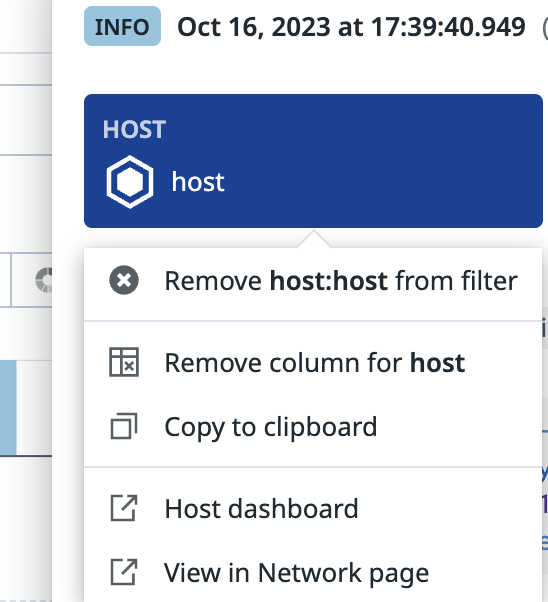
host), I can produce different results usinghost:foovs@host:foo-- in fact, it is possible to use both search terms in tandem within my environment. In my case I see that thehost:term refers to the "Host ✔️" built-in facet (under Core section by default) and is the one highlighted in the log entry details view (see screenshot). I see that I have an attributehostalso which is searchable by defining that facet separately using path =@hostwhich is then searchable using the@host:*term. 😵