Skip to content

Instantly share code, notes, and snippets.

@shodty
Last active January 15, 2022 17:34
Show Gist options
  • Select an option

  • Save shodty/e4f718108b401a830b272da62ba6cfc3 to your computer and use it in GitHub Desktop.

Select an option

Save shodty/e4f718108b401a830b272da62ba6cfc3 to your computer and use it in GitHub Desktop.
Create a Toggle button for the right sidebar in Roam.

Move the right sidebar toggle to a button in the upper right icon tray.

Demo

You can add this to Roam using {{[[roam/js]]}}

Grab the code in roam-sidebar-toggle.js and drop it in a javascript code block, nested underneath a {{[[roam/js]]}} block:

  ```javascript```

Example

Additionally, grab the code in roam-sidebar-toggle.css and add it to a CSS code block on a Roam page titled roam/css. This will remove the standard sidebar toggle button inside the right sidebar, freeing up some crucial real estate:

  ```css```

CSS

/* Optionally add this to your roam/css to kill right sidebar top gap and toggle button within the sidebar as it's no longer necessary */
#right-sidebar div[style*="padding: 8px;"] {
padding: 0px !important;
}
#right-sidebar > div.flex-h-box > button {
display: none;
}
const sidebarPress = new KeyboardEvent("keydown", {
bubbles: true, cancelable: true, keyCode: 220, ctrlKey: true, shiftKey: true
});
const sidebarPressMac = new KeyboardEvent("keydown", {
bubbles: true, cancelable: true, keyCode: 220, metaKey: true, shiftKey: true
});
const sidebarPressUp = new KeyboardEvent("keyup", {
bubbles: true, cancelable: true, keyCode: 220, ctrlKey: true, shiftKey: true
});
const sidebarPressMacUp = new KeyboardEvent("keyup", {
bubbles: true, cancelable: true, keyCode: 220, metaKey: true, shiftKey: true
});
setTimeout(createButton, 1000);
function createButton() {
if (!document.getElementById('sideBarDiv')) {
var spanOne = document.createElement('span');
spanOne.classList.add('bp3-popover-wrapper');
var spanTwo = document.createElement('span');
spanTwo.classList.add('bp3-popover-target');
spanOne.appendChild(spanTwo);
var toggleSideBar = document.createElement('span');
toggleSideBar.id = 'sideBarDiv';
toggleSideBar.classList.add('bp3-icon-menu-open', 'bp3-button', 'bp3-minimal');
spanTwo.appendChild(toggleSideBar);
var roamTopbar = document.getElementsByClassName("rm-files-dropzone");
roamTopbar[0].childNodes[0].appendChild(spanOne);
toggleSideBar.onclick = toggleTheSideBar;
}
}
function toggleTheSideBar() {
document.activeElement.dispatchEvent(sidebarPress);
document.activeElement.dispatchEvent(sidebarPressMac);
document.activeElement.dispatchEvent(sidebarPressUp);
document.activeElement.dispatchEvent(sidebarPressMacUp);
}
@orkhan10

Copy link
Copy Markdown

Thank you @abhayprasanna for sharing a fix. It does not seem to have done the trick.

Maybe you could make this js dynamic and share the github link for import (like roam42 in the screen
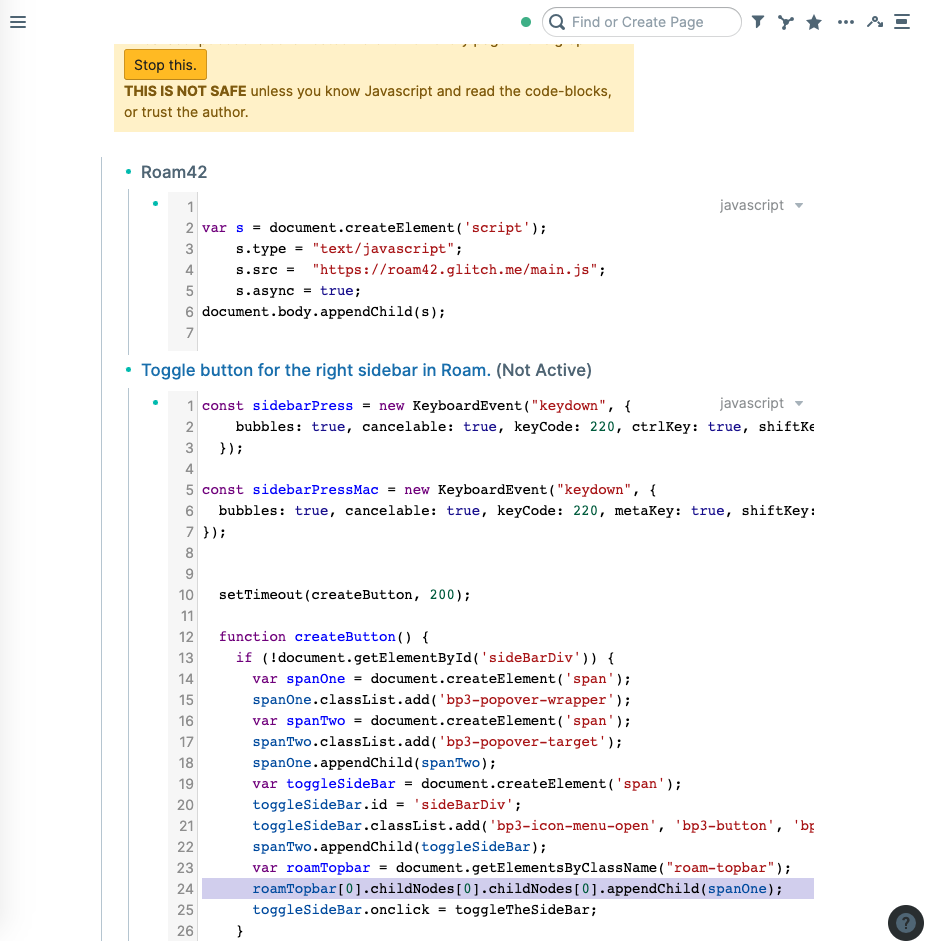
Screenshot 2021-01-31 at 16 02 13
shot)? As you are using and updating this with new roam updates which break this.

@abhayprasanna

Copy link
Copy Markdown

Unfortunately the latest Roam update changed the topbar again and this time there are issues with the DOM being ephemeral and buttons moving all over the place. I have it fixed as far as it can be but will share once it's more stable.

I prefer not to share JS imports because I'm not a coder and would like folks to fully see what they are copying in. Too much responsibility.

@orkhan10

Copy link
Copy Markdown

Understood. Thank you!

@shodty

shodty commented Jan 31, 2021

Copy link
Copy Markdown
Author

hey guys! @abhayprasanna's fix seems to work for me but i also updated the js above in roam-sidebar-toggle.js to wait 1 second before trying to append the button to the topbar so it gives the page some time to load. It's definitely a bandaid fix. @orkhan10, let me know if that works. I'll keep an eye on things here in case it doesn't!

sidenote: you can try changing the value in setTimeout(createButton, 1000); to wait longer/shorter to create the button. 1000 = 1000ms = 1 second. so if you changed 1000 to 5000 it would wait 5 seconds after load until trying to insert the button into your DOM. I have tried using some common listener events like 'DOMContentLoaded' to insert the button but haven't had any luck, so for now, I'm just hardcoding the timeout to wait 😂

@JasperGeh

Copy link
Copy Markdown

Works again, great!
Just a very weird behaviour I noticed (and I'm pretty sure that only appeared after one of the updates last week) is that I can't scroll after using the button to open or close the sidebar. Only after pressing any key, scrolling works again.

@shodty

shodty commented Feb 4, 2021

Copy link
Copy Markdown
Author

Hey @JasperGeh I'm not experiencing the same issue but I have a hunch that it thinks the key is still being held down, so I just updated the code in roam-sidebar-toggle.js to also fire a keyup event. Give it a shot and let me know if it works!

@abhayprasanna

Copy link
Copy Markdown

@shodty Are you also noticing that the topbar icons move around when the left sidebar is opened and closed? Any potential fixes?

@shodty

shodty commented Feb 4, 2021

Copy link
Copy Markdown
Author

@abhayprasanna I think it's something that changed in Roam overall right? I can think of a work around, lemme test it out

@abhayprasanna

Copy link
Copy Markdown

@shodty Exactly - I wouldn't bother, we'll report it and get them to fix it.

@abhayprasanna

Copy link
Copy Markdown

Sigh... they just changed up the shortcuts to Ctrl/Cmd + \

 const sidebarPress = new KeyboardEvent("keydown", {
    bubbles: true, cancelable: true, keyCode: 191, ctrlKey: true
  });
  
const sidebarPressMac = new KeyboardEvent("keydown", {
  bubbles: true, cancelable: true, keyCode: 191, metaKey: true
});

const sidebarPressUp = new KeyboardEvent("keyup", {
    bubbles: true, cancelable: true, keyCode: 191, ctrlKey: true
  });
  
const sidebarPressMacUp = new KeyboardEvent("keyup", {
  bubbles: true, cancelable: true, keyCode: 191, metaKey: true
});

@abhayprasanna

Copy link
Copy Markdown

Roam has now implemented this amazing feature natively - thanks to Robbie for supporting all this while!

Sign up for free to join this conversation on GitHub. Already have an account? Sign in to comment