
-
-
Save sveinungkb/affa21bbcb84658594a9 to your computer and use it in GitHub Desktop.
| # By Sveinung Kval Bakken @ iHeartRadio | |
| # http://tech.iheart.com | |
| # | |
| # This script will parse any HP Unified Functional Testing reports and generate ANT JUnit XML reports | |
| # for use with Team City / Jenkins | |
| import sys | |
| from xml.dom import minidom | |
| from xml.dom.minidom import Document, Element | |
| if len(sys.argv) < 2: | |
| print("Pass HP XML results as parameters, like this: python generate-report.py Results.xml OtherResults.xml, passed arguments: %s"% sys.argv[1:]) | |
| files = sys.argv[1:] | |
| def printChildren(element, depth, indent): | |
| if depth == 0: | |
| return | |
| for i in range(0, indent): | |
| print('.'), | |
| if element.nodeType == element.TEXT_NODE: | |
| print("Text: %s"% element.wholeText), | |
| elif element.nodeType == element.CDATA_SECTION_NODE: | |
| print("Cdata: %s"% element.wholeText), | |
| else: | |
| print("Element: %s"% element.tagName), | |
| print("") | |
| for child in element.childNodes: | |
| printChildren(child, depth -1, indent +1) | |
| def valueForCdata(cdataElement): | |
| return cdataElement.firstChild.wholeText | |
| class Step: | |
| def __init__(self, stepElement): | |
| self.name = valueForCdata(stepElement.getElementsByTagName("Obj")[0]) | |
| nodeArgsElement = stepElement.getElementsByTagName("NodeArgs")[0] | |
| self.status = nodeArgsElement.getAttribute("status") | |
| self.passed = self.status == "Passed" | |
| self.details = stepElement.getElementsByTagName("Details")[0] | |
| self.time = float(stepElement.getElementsByTagName("TimeTick")[0].firstChild.nodeValue) | |
| self.duration = 0 | |
| def asElement(self): | |
| testcase = Element("testcase", "") | |
| testcase.setAttribute("name", self.name) | |
| testcase.setAttribute("time", str(self.duration)) | |
| if not self.passed: | |
| failureMessageElement = Element("failure") | |
| failureMessageElement.setAttribute("message", valueForCdata(self.details)) | |
| testcase.appendChild(failureMessageElement) | |
| return testcase | |
| class Action: | |
| def __init__(self, actionElement): | |
| actionNameElement = actionElement.getElementsByTagName("AName")[0] | |
| self.name = valueForCdata(actionNameElement) | |
| print("Processing action: %s" % self.name) | |
| self.steps = [] | |
| self.total = 0 | |
| self.failures = 0 | |
| stepElements = actionElement.getElementsByTagName("Step") | |
| lastTime = 0 | |
| for stepElement in stepElements: | |
| step = Step(stepElement) | |
| if (lastTime != 0): | |
| step.duration = step.time - lastTime | |
| lastTime = step.time | |
| self.steps.append(step) | |
| self.total = self.total +1 | |
| if not step.passed: | |
| self.failures = self.failures + 1 | |
| def asElement(self): | |
| testsuiteElement = Element("testsuite", "") | |
| testsuiteElement.setAttribute("name", self.name) | |
| for step in self.steps: | |
| testsuiteElement.appendChild(step.asElement()) | |
| testsuiteElement.setAttribute("tests", str(self.total)) | |
| testsuiteElement.setAttribute("failures", str(self.failures)) | |
| return testsuiteElement | |
| def processStep(stepElement): | |
| print("procesing step: %s" % stepElement.getAttribute("rID")) | |
| testcase = Element("testcase", "") | |
| obj = stepElement.getElementsByTagName("Obj")[0] | |
| testcase.setAttribute("name", valueForCdata(obj)) | |
| return testcase | |
| def parseReport(reportFile): | |
| print("Processing: %s"% reportFile) | |
| reportDoc = minidom.parse(reportFile) | |
| # printChildren(reportDoc.documentElement, 3, 0) | |
| # Setup report | |
| reportName = valueForCdata(reportDoc.getElementsByTagName("DName")[0]) | |
| junitReport = Document() | |
| testsuitesElement = junitReport.createElement("testsuites") | |
| testsuitesElement.setAttribute("name", reportName) | |
| junitReport.appendChild(testsuitesElement) | |
| total = 0 | |
| failures = 0 | |
| actionElements = reportDoc.getElementsByTagName("Action") | |
| for actionElement in actionElements: | |
| action = Action(actionElement) | |
| total = total + action.total | |
| failures = failures + action.failures | |
| testsuitesElement.appendChild(action.asElement()) | |
| testsuitesElement.setAttribute("failures", str(failures)) | |
| testsuitesElement.setAttribute("tests", str(total)) | |
| reportName = format("%s-report.xml" % reportFile.replace(".xml", "")) | |
| testsuitesElement.writexml( open(reportName, 'w'), indent=" ", addindent=" ", newl='\n') | |
| testsuitesElement.unlink() | |
| print("Wrote JUnit report to: %s" % reportName) | |
| #print(junitReport.toprettyxml()) | |
| for file in files: | |
| parseReport(file) |


Hey @bitcoder! Afraid I don't have any at the time, been a few years since I had access to the HP UFT reports. Maybe ask on stack overflow in a relevant group?
ok thanks, no worries

Hi sveinungkb,
getting following error while compiling it
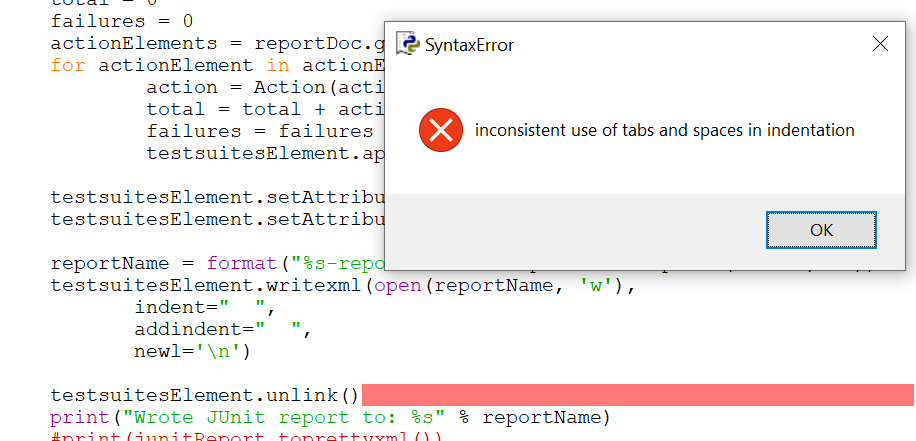
any leads on this?
Does it give you a line for the error? You can usually automatically format a file to use the same indentation style. I'm sure there's an online tool for it too!
Hi sveinungkb,
Thanks for the response,
was it running in your local system? could you please probably attach the file which i can reuse directly.
I tried running this in my local machine and it threw again the same error as

I am basically trying to convert run_results.xml generated by UFT to JUnit report format with your script.
Many thanks in advance

Hello @sveinungkb,
I am also getting the same issue. I am trying to conver run_results.xml generated by UFT to JUnit format using your script.

I inputted the indent formatted xml file. But still it is throwing the error. Could you please help here?
Thanks in advance,
TJ Waseem
There you go, it should be uniformly indented now using spaces. Also fixed some other python3 issues. Let me know if that did the trick @TJWaseem511 and @mgmkamran.
It seems to have fixed the previous issue of indention, but giving following error:
Processing: run_results_formatted.xml Traceback (most recent call last): File "F:\UFT Softwares\UFT Plugin\generate-junit.py", line 133, in <module> parseReport(file) File "F:\UFT Softwares\UFT Plugin\generate-junit.py", line 106, in parseReport reportName = valueForCdata(reportDoc.getElementsByTagName("DName")[0]) IndexError: list index out of range
When I checked for text "DName" in my report.xml file, I get 0 results. Not sure If am missing something or doing something in incorrect manner. Would be very thankful to you..
my run_result.xml file:
==========================================================================================
SystemUtil.Run "iexplore.exe",3 2020-10-26 12:07:48 Done 47689b34c3df4b14a2346afcb55d344f True "Bing"- Smart Identification <P><span class="text">The smart identification mechanism was invoked.</span></P><P><SPAN class=text>Reason: object not unique (9 objects found)</SPAN></P> <SPAN class=text><b>Original description:</b></SPAN><br>micclass=Browser<br><P><FONT face=Verdana size=2><SPAN class=text><B>Smart Identification Alternative Description: </B></SPAN></FONT></P><FONT face=Verdana size=2><u>Base filter properties (9 objects found) </FONT></u><br> micclass=Browser<br><br><FONT face=Verdana size=2><u>Optional filter properties</FONT></u><br> name=Bing<SPAN class=passed> (Used</SPAN>, 1 matches)</SPAN><br>title=Bing<SPAN class=warning> (Ignored)<FONT color=#000000></FONT></SPAN><br>openurl=https://www.bing.com<SPAN class=warning> (Ignored)<FONT color=#000000></FONT></SPAN><br>opentitle=Bing<SPAN class=warning> (Ignored)<FONT color=#000000></FONT></SPAN><br>hasstatusbar=0<SPAN class=warning> (Ignored)<FONT color=#000000></FONT></SPAN><br>hasmenubar=-1<SPAN class=warning> (Ignored)<FONT color=#000000></FONT></SPAN><br>hastoolbar=-1<SPAN class=warning> (Ignored)<FONT color=#000000></FONT></SPAN><br>openedbytestingtool=0<SPAN class=warning> (Ignored)<FONT color=#000000></FONT></SPAN><br>number of tabs=1<SPAN class=warning> (Ignored)<FONT color=#000000></FONT></SPAN><br> 2020-10-26 12:08:03 Done 9 1 0 0 0 0 0 0 0 0 Local Browser The smart identification mechanism was invoked.Reason: object not unique (9 objects found)
Original description:micclass=Browser
Smart Identification Alternative Description:
Base filter properties (9 objects found)micclass=Browser
Optional filter properties
name=Bing (Used, 1 matches)
title=Bing (Ignored)
openurl=https://www.bing.com (Ignored)
opentitle=Bing (Ignored)
hasstatusbar=0 (Ignored)
hasmenubar=-1 (Ignored)
hastoolbar=-1 (Ignored)
openedbytestingtool=0 (Ignored)
number of tabs=1 (Ignored)
]]> 9151034bb011494cbe21efa71ca4d169 True TxtBox_Search.Exist "Object exists" 2020-10-26 12:08:03 Done Local Browser Page WebEdit Exist 3aac3ca9ffba48dea8dbee3babb07ad5 True Bing Page 2020-10-26 12:08:03 0 Done Local Browser Page 57ee03dc1c0e4cd687e7184c48658d4e True Bing <table><tr><td><span style="text-align : left; font-size : 12px; ">Local Browser</span></td></tr></table> 2020-10-26 12:08:03 0 Done Local Browser Local Browser]]> 325555f3b113426a80a0555d56d7f14a True Launch Bing Bing launched 2020-10-26 12:08:03 Passed 358f8b7716244d03afb6b1e3bb1e65eb True True TxtBox_Search.Set "UFT" 2020-10-26 12:08:04 Done Local Browser Page WebEdit Set 3aac3ca9ffba48dea8dbee3babb07ad5 True Btn_Search.Click 2020-10-26 12:08:04 Done Local Browser Page WebElement Click 31b68a75a666462d8131071e5528573c True Bing Page 2020-10-26 12:08:04 15 Done Local Browser Page 57ee03dc1c0e4cd687e7184c48658d4e True Bing <table><tr><td><span style="text-align : left; font-size : 12px; ">Local Browser</span></td></tr></table> 2020-10-26 12:08:04 15 Done Local Browser Local Browser]]> 325555f3b113426a80a0555d56d7f14a True "UFT-Bing"- Smart Identification <P><span class="text">The smart identification mechanism was invoked.</span></P><P><SPAN class=text>Reason: object not unique (9 objects found)</SPAN></P> <SPAN class=text><b>Original description:</b></SPAN><br>micclass=Browser<br><P><FONT face=Verdana size=2><SPAN class=text><B>Smart Identification Alternative Description: </B></SPAN></FONT></P><FONT face=Verdana size=2><u>Base filter properties (9 objects found) </FONT></u><br> micclass=Browser<br><br><FONT face=Verdana size=2><u>Optional filter properties</FONT></u><br> name=UFT - Bing<SPAN class=passed> (Used</SPAN>, 1 matches)</SPAN><br>title=UFT - Bing<SPAN class=warning> (Ignored)<FONT color=#000000></FONT></SPAN><br>openurl=https://www.bing.com<SPAN class=warning> (Ignored)<FONT color=#000000></FONT></SPAN><br>opentitle=Bing<SPAN class=warning> (Ignored)<FONT color=#000000></FONT></SPAN><br>hasstatusbar=0<SPAN class=warning> (Ignored)<FONT color=#000000></FONT></SPAN><br>hasmenubar=-1<SPAN class=warning> (Ignored)<FONT color=#000000></FONT></SPAN><br>hastoolbar=-1<SPAN class=warning> (Ignored)<FONT color=#000000></FONT></SPAN><br>openedbytestingtool=0<SPAN class=warning> (Ignored)<FONT color=#000000></FONT></SPAN><br>number of tabs=1<SPAN class=warning> (Ignored)<FONT color=#000000></FONT></SPAN><br> 2020-10-26 12:08:19 Done 9 1 0 0 0 0 0 0 0 0 Local Browser The smart identification mechanism was invoked.
Reason: object not unique (9 objects found)
Original description:micclass=Browser
Smart Identification Alternative Description:
Base filter properties (9 objects found)micclass=Browser
Optional filter properties
name=UFT - Bing (Used, 1 matches)
title=UFT - Bing (Ignored)
openurl=https://www.bing.com (Ignored)
opentitle=Bing (Ignored)
hasstatusbar=0 (Ignored)
hasmenubar=-1 (Ignored)
hastoolbar=-1 (Ignored)
openedbytestingtool=0 (Ignored)
number of tabs=1 (Ignored)
]]> 9151034bb011494cbe21efa71ca4d169 True UFT_Link.Exist "Object exists" 2020-10-26 12:08:19 Done Local Browser Page Link Exist bbd13bb89dd34cf9a40f838ff8e5fdba True UFT - Bing Page 2020-10-26 12:08:19 0 Done Local Browser Page 57ee03dc1c0e4cd687e7184c48658d4e True UFT-Bing <table><tr><td><span style="text-align : left; font-size : 12px; ">Local Browser</span></td></tr></table> 2020-10-26 12:08:19 0 Done Local Browser Local Browser]]> 325555f3b113426a80a0555d56d7f14a True Search in Bing Search for UFT in bing, UFT link found 2020-10-26 12:08:19 Passed 358f8b7716244d03afb6b1e3bb1e65eb True True UFT_Link.Click 2020-10-26 12:08:19 Done Local Browser Page Link Click bbd13bb89dd34cf9a40f838ff8e5fdba True UFT - Bing Page 2020-10-26 12:08:19 1 Done Local Browser Page 57ee03dc1c0e4cd687e7184c48658d4e True Request a demo.Exist "Object exists" 2020-10-26 12:08:20 Done Local Browser Page Link Exist bbd13bb89dd34cf9a40f838ff8e5fdba True UFT Page 2020-10-26 12:08:20 0 Done Local Browser Page 57ee03dc1c0e4cd687e7184c48658d4e True UFT-Bing <table><tr><td><span style="text-align : left; font-size : 12px; ">Local Browser</span></td></tr></table> 2020-10-26 12:08:19 1 Done Local Browser Local Browser]]> 325555f3b113426a80a0555d56d7f14a True Click Demo button Goto UFT homepage and request for UFT demo, Button found 2020-10-26 12:08:20 Passed 358f8b7716244d03afb6b1e3bb1e65eb True True Request a demo.Click 2020-10-26 12:08:20 Done Local Browser Page Link Click bbd13bb89dd34cf9a40f838ff8e5fdba True UFT Page 2020-10-26 12:08:20 3 Done Local Browser Page 57ee03dc1c0e4cd687e7184c48658d4e True UFT-Bing.Close 2020-10-26 12:08:23 Done Local Browser Close 325555f3b113426a80a0555d56d7f14a True UFT-Bing <table><tr><td><span style="text-align : left; font-size : 12px; ">Local Browser</span></td></tr></table> 2020-10-26 12:08:20 3 Done Local Browser Local Browser]]> 325555f3b113426a80a0555d56d7f14a True Action1 2020-10-26 12:07:48 35 Passed 3ccf9ce35cb54fd8bcc857d7b62a3692 True Action0 2020-10-26 12:07:48 35 Passed 6d89612eb3284986811b71f315fb8437 True 1 SampleGUITest Micro Focus Unified Functional Testing 0 15.0.1 2020-10-26 12:07:31 52 Passed 98d9f6746fa14ff19a2fd3df7cf91640 True 00:00:00 English (United States) cicdadmin Intel(R) Xeon(R) CPU E5-2673 v3 @ 2.40GHz 2 7168 AZWEUMW0568 Windows Server 2016 Res23 2020-10-26 12:07:31 00:00:00 Micro Focus Unified Functional Testing 0 15.0.1 ==========================================================================================
Thanks @sveinungkb, for your support. I will give a shot & try to tweak the script for me.
Any how, thanks for your support. Have a good day!
Hi @sveinungkb, thanks for sharing!
Btw, do you have some sample HP UFT report files that you can share? I'd like to have a look at their structure in more detail.
Thanks