Skip to content

Instantly share code, notes, and snippets.

@tbranyen
Last active February 15, 2026 08:56
Show Gist options
  • Select an option

  • Save tbranyen/62d974681dea8ee0caa1 to your computer and use it in GitHub Desktop.

Select an option

Save tbranyen/62d974681dea8ee0caa1 to your computer and use it in GitHub Desktop.
OpenWeatherMap / Weather Icons integration
  1. Include Weather Icons in your app: https://github.com/erikflowers/weather-icons

  2. Include the below JSON in your application, for example purposes, lets assume it's a global named weatherIcons.

  3. Make a request to OpenWeatherMap:

req = $.getJSON('http://api.openweathermap.org/data/2.5/weather?q=London,uk&callback=?');
  1. Inspect the code and pair with the data above.

Note: 7xx and 9xx do not get prefixed w/ day/night

req.then(function(resp) {
  var prefix = 'wi wi-';
  var code = resp.weather[0].id;
  var icon = weatherIcons[code].icon;

  // If we are not in the ranges mentioned above, add a day/night prefix.
  if (!(code > 699 && code < 800) && !(code > 899 && code < 1000)) {
    icon = 'day-' + icon;
  }

  // Finally tack on the prefix.
  icon = prefix + icon;
});
{
"200": {
"label": "thunderstorm with light rain",
"icon": "storm-showers"
},
"201": {
"label": "thunderstorm with rain",
"icon": "storm-showers"
},
"202": {
"label": "thunderstorm with heavy rain",
"icon": "storm-showers"
},
"210": {
"label": "light thunderstorm",
"icon": "storm-showers"
},
"211": {
"label": "thunderstorm",
"icon": "thunderstorm"
},
"212": {
"label": "heavy thunderstorm",
"icon": "thunderstorm"
},
"221": {
"label": "ragged thunderstorm",
"icon": "thunderstorm"
},
"230": {
"label": "thunderstorm with light drizzle",
"icon": "storm-showers"
},
"231": {
"label": "thunderstorm with drizzle",
"icon": "storm-showers"
},
"232": {
"label": "thunderstorm with heavy drizzle",
"icon": "storm-showers"
},
"300": {
"label": "light intensity drizzle",
"icon": "sprinkle"
},
"301": {
"label": "drizzle",
"icon": "sprinkle"
},
"302": {
"label": "heavy intensity drizzle",
"icon": "sprinkle"
},
"310": {
"label": "light intensity drizzle rain",
"icon": "sprinkle"
},
"311": {
"label": "drizzle rain",
"icon": "sprinkle"
},
"312": {
"label": "heavy intensity drizzle rain",
"icon": "sprinkle"
},
"313": {
"label": "shower rain and drizzle",
"icon": "sprinkle"
},
"314": {
"label": "heavy shower rain and drizzle",
"icon": "sprinkle"
},
"321": {
"label": "shower drizzle",
"icon": "sprinkle"
},
"500": {
"label": "light rain",
"icon": "rain"
},
"501": {
"label": "moderate rain",
"icon": "rain"
},
"502": {
"label": "heavy intensity rain",
"icon": "rain"
},
"503": {
"label": "very heavy rain",
"icon": "rain"
},
"504": {
"label": "extreme rain",
"icon": "rain"
},
"511": {
"label": "freezing rain",
"icon": "rain-mix"
},
"520": {
"label": "light intensity shower rain",
"icon": "showers"
},
"521": {
"label": "shower rain",
"icon": "showers"
},
"522": {
"label": "heavy intensity shower rain",
"icon": "showers"
},
"531": {
"label": "ragged shower rain",
"icon": "showers"
},
"600": {
"label": "light snow",
"icon": "snow"
},
"601": {
"label": "snow",
"icon": "snow"
},
"602": {
"label": "heavy snow",
"icon": "snow"
},
"611": {
"label": "sleet",
"icon": "sleet"
},
"612": {
"label": "shower sleet",
"icon": "sleet"
},
"615": {
"label": "light rain and snow",
"icon": "rain-mix"
},
"616": {
"label": "rain and snow",
"icon": "rain-mix"
},
"620": {
"label": "light shower snow",
"icon": "rain-mix"
},
"621": {
"label": "shower snow",
"icon": "rain-mix"
},
"622": {
"label": "heavy shower snow",
"icon": "rain-mix"
},
"701": {
"label": "mist",
"icon": "sprinkle"
},
"711": {
"label": "smoke",
"icon": "smoke"
},
"721": {
"label": "haze",
"icon": "day-haze"
},
"731": {
"label": "sand, dust whirls",
"icon": "cloudy-gusts"
},
"741": {
"label": "fog",
"icon": "fog"
},
"751": {
"label": "sand",
"icon": "cloudy-gusts"
},
"761": {
"label": "dust",
"icon": "dust"
},
"762": {
"label": "volcanic ash",
"icon": "smog"
},
"771": {
"label": "squalls",
"icon": "day-windy"
},
"781": {
"label": "tornado",
"icon": "tornado"
},
"800": {
"label": "clear sky",
"icon": "sunny"
},
"801": {
"label": "few clouds",
"icon": "cloudy"
},
"802": {
"label": "scattered clouds",
"icon": "cloudy"
},
"803": {
"label": "broken clouds",
"icon": "cloudy"
},
"804": {
"label": "overcast clouds",
"icon": "cloudy"
},
"900": {
"label": "tornado",
"icon": "tornado"
},
"901": {
"label": "tropical storm",
"icon": "hurricane"
},
"902": {
"label": "hurricane",
"icon": "hurricane"
},
"903": {
"label": "cold",
"icon": "snowflake-cold"
},
"904": {
"label": "hot",
"icon": "hot"
},
"905": {
"label": "windy",
"icon": "windy"
},
"906": {
"label": "hail",
"icon": "hail"
},
"951": {
"label": "calm",
"icon": "sunny"
},
"952": {
"label": "light breeze",
"icon": "cloudy-gusts"
},
"953": {
"label": "gentle breeze",
"icon": "cloudy-gusts"
},
"954": {
"label": "moderate breeze",
"icon": "cloudy-gusts"
},
"955": {
"label": "fresh breeze",
"icon": "cloudy-gusts"
},
"956": {
"label": "strong breeze",
"icon": "cloudy-gusts"
},
"957": {
"label": "high wind, near gale",
"icon": "cloudy-gusts"
},
"958": {
"label": "gale",
"icon": "cloudy-gusts"
},
"959": {
"label": "severe gale",
"icon": "cloudy-gusts"
},
"960": {
"label": "storm",
"icon": "thunderstorm"
},
"961": {
"label": "violent storm",
"icon": "thunderstorm"
},
"962": {
"label": "hurricane",
"icon": "cloudy-gusts"
}
}
@zivce
Copy link
Copy Markdown

zivce commented Mar 5, 2016

var dorn= "";

rq =$.getJSON(queryTxt);

rq.then(function(rsp){
   var prefix = "wi wi-";

   var today = new Date();
var hour = today.getHours();

if (hour > 6 && hour < 20) {
    //Day time
   dorn = "day-";

} else {
    //Night time
   dorn ="night-";
}
   console.log(dorn);
   var code = rsp.weather[0].id;
   iconD = prefix + "owm-" +dorn+ code;

I did it like this 👍 you gave me an awesome idea to start from thank you!

@mwordpress
Copy link
Copy Markdown

why i get this error "weatherIcons[code] is undefined"

@Itsdenty
Copy link
Copy Markdown

Because you didn't declare ur json variable as weatherIcons

@mav1283
Copy link
Copy Markdown

mav1283 commented Jun 17, 2016

Hi how do i get this working on codepen?
and i also get this error: ReferenceError: weatherIcons is not defined

@devloe
Copy link
Copy Markdown

devloe commented Jul 11, 2016

If I include the dorn prefix, I get thinks like "night-sunny", which is incorrect.
Any toughts?

@codercodingthecode
Copy link
Copy Markdown

This below works like a champ for me. In which "weatherDataIn" is the api callback.

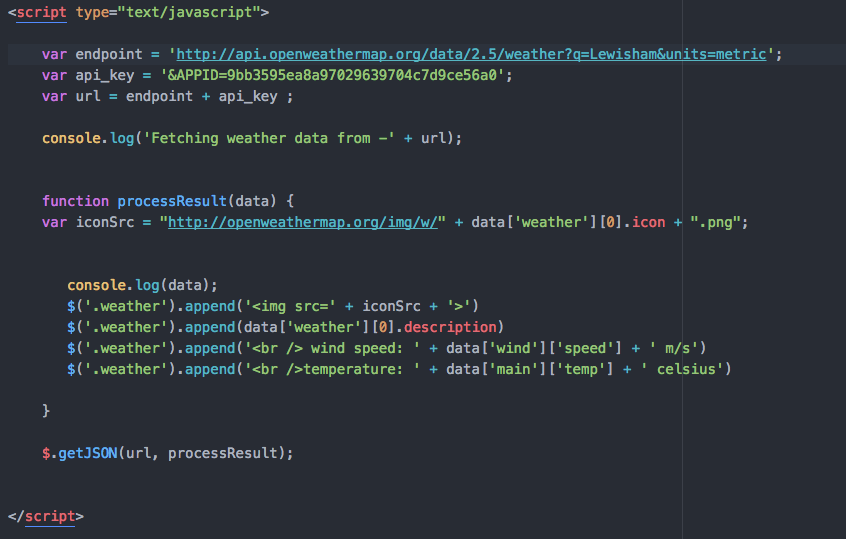
var icon = ("<img src='http://openweathermap.org/img/w/" + weatherDataIn.weather[0].icon + ".png'>");

then

$('#display').html( icon );

@Sliqric7053
Copy link
Copy Markdown

Sliqric7053 commented Aug 24, 2016

Hi Andythedandyone

Great approach to the problem.

What html tag is #display?

Rich

@evanwike
Copy link
Copy Markdown

I'm getting 'wi wi-night-sunny' with a code of 800 using your method and that doesn't exist in the JSON. Any ideas?

@KEXUJIAN
Copy link
Copy Markdown

Thx @Andythedandyone
I've tried to figure out the usage of weather.icon before finding your comment.

@davidtowoju
Copy link
Copy Markdown

Thanks.
I am concerned about performance, how can I remove icons Open Weather Map is not using

@papajon0s1
Copy link
Copy Markdown

@Andytheandyone, thanks! I've been bashing my head trying to figure out how to get the images; makes so much more sense now.

@luptilu
Copy link
Copy Markdown

luptilu commented Dec 7, 2017

Hi there!
I have included the pre-set weather icons from OpenWeatherMaps in my code. However, I can't seem to replace them with these pretty ones. Could you give me a more detailed description on how to proceed?
Here is my code so far:
screen shot 2017-12-07 at 13 27 16

Thank you so much.

Sincerely,

Luisa

@olluz
Copy link
Copy Markdown

olluz commented Jan 3, 2018

you could use OpenWeather API's sunrise and sunset values to differentiate between night and day icons instead of hardcoding it to 6-20

@mohamedabusrea
Copy link
Copy Markdown

mohamedabusrea commented Jan 12, 2018

I think you can depend on the sunrise&sunset values to determine the day/night better than the weather-id

const date = new Date();
const sunrise = new Date(result.data.sys.sunrise * 1000); //Convert a Unix timestamp to time
const sunset = new Date(result.data.sys.sunset * 1000);

/* Get suitable icon for weather */
if (date.getHours() >= sunrise.getHours() && date.getHours() < sunset.getHours()) {
    var weatherIconID = `wi wi-owm-day-${result.data.weather[0].id}`;
}
else if (date.getHours() >= sunset.getHours()) {
    var weatherIconID = `wi wi-owm-night-${result.data.weather[0].id}`;
}

@pixelart7
Copy link
Copy Markdown

Code from @mohamedabusrea is working great! But the else if do needs improvement since it cannot detect like 2am in the morning (ie. before sunrise) as night.

It should change into this:

...
else if (date.getHours() >= sunset.getHours()  || date.getHours() < sunrise.getHours()) {
    var weatherIconID = `wi wi-owm-night-${result.data.weather[0].id}`;
}

or just change to a simple else

@williamsb
Copy link
Copy Markdown

Why are the codes for these in a different format than the ones in the API list ?

For example : "wi wi-owm-500" & "wi wi-sprinkle"

https://erikflowers.github.io/weather-icons/api-list.html

@raulcarlomagno
Copy link
Copy Markdown

raulcarlomagno commented Apr 24, 2018

simpler
using openweathermap weathericons' mapping integration

        var nowTimestamp = Math.floor(Date.now() / 1000);
        var weatherClass = 'wi wi-owm-';
        weatherClass += (nowTimestamp >= data.sunrise && nowTimestamp <= data.sunset ? 'day' : 'night');
        weatherClass += ('-' + data.code);

        $(".weather-widget .icon-now").addClass(weatherClass);

@fabiosoft
Copy link
Copy Markdown

Unfortunately only few icons are correctly mapped.

@josegomes123
Copy link
Copy Markdown

I think you can depend on the sunrise&sunset values to determine the day/night better than the weather-id

const date = new Date();
const sunrise = new Date(result.data.sys.sunrise * 1000); //Convert a Unix timestamp to time
const sunset = new Date(result.data.sys.sunset * 1000);

/* Get suitable icon for weather */
if (date.getHours() >= sunrise.getHours() && date.getHours() < sunset.getHours()) {
    var weatherIconID = `wi wi-owm-day-${result.data.weather[0].id}`;
}
else if (date.getHours() >= sunset.getHours()) {
    var weatherIconID = `wi wi-owm-night-${result.data.weather[0].id}`;
}

Won't this work incorrectly for different timezones? Because you are testing against the sunrise and sunset time of a given timezone with a date created in another timezone.

@josegomes123
Copy link
Copy Markdown

josegomes123 commented Dec 6, 2020

Ok, I finally managed to get everything to work perfectly using weather font and OpenWeatherMap API, I tried using the icons.json file provided here but it didn't work properly for me, I think most are outdated. Anyway I adapted some of the code of @mohamedabusrea, also created a new date with local time if you need to use it. It might be a little contrived but it works.

// Get weatherData from API
let weatherData = await response.json();
/* Get suitable icon for weather */
// Create new date representing the local Time
const now = new Date();
// Converto to UTC Date
const date = new Date(now.getTime() + now.getTimezoneOffset() * 60000);
// timezone returns shift in seconds from UTC, convert to miliseconds and add to the date epoch time to get localTime
const millisecondsOffsetUTC = date.getTime() + weatherData.timezone * 1000;
const localTime = new Date(millisecondsOffsetUTC);
// Get local sun phases and convert a unix timestamp to time
const sunrise = new Date(weatherData.sys.sunrise * 1000);
const sunset = new Date(weatherData.sys.sunset * 1000);
// Get correct weather icon for day/night periods
if (date > sunrise && date < sunset) {
    let weatherIconID = `wi wi-owm-day-${weatherData.weather[0].id}`;
    weatherIcon.className = weatherIconID;
} else {
    let weatherIconID = `wi wi-owm-night-${weatherData.weather[0].id}`;
    weatherIcon.className = weatherIconID;
}

@moinabyssinia
Copy link
Copy Markdown

how can I enlarge the size of the weather icons?

@davidkiss96
Copy link
Copy Markdown

This below works like a champ for me. In which "weatherDataIn" is the api callback.

var icon = ("<img src='http://openweathermap.org/img/w/" + weatherDataIn.weather[0].icon + ".png'>");

then

$('#display').html( icon );

This just gave me the right direction dude! Thanks.
I am working with classes so here is my snippet:
paint(weather) {
this.icon.setAttribute("src", http://openweathermap.org/img/w/${weather.weather[0].icon}.png);
}

Sign up for free to join this conversation on GitHub. Already have an account? Sign in to comment