Skip to content

Instantly share code, notes, and snippets.

@thiagosf
Last active May 19, 2018 22:36
Show Gist options
  • Select an option

  • Save thiagosf/0c316800c372d3c432bd1a2eeb27d60e to your computer and use it in GitHub Desktop.

Select an option

Save thiagosf/0c316800c372d3c432bd1a2eeb27d60e to your computer and use it in GitHub Desktop.
Converte png para jpg com linha de comando no mac os

Convertendo com linha de comando

sips -s format jpeg -s formatOptions 80 image.png --out image.jpg

Criando service com automator

  1. Crie um novo arquivo no Automator do tipo Service
  2. Selecione em Library o tipo Run Shell Script
  3. Em Service receive selected deixe selecionado files or folders e ao lado escolha Finder
  4. Em Shell deixe selecionado /bin/bash
  5. Em Pass input: deixe selecionado as arguments
  6. Cole o script abaixo
sips -s format jpeg -s formatOptions 85 "$1" --out "${1%png}jpg"
exit 0

Screenshot:
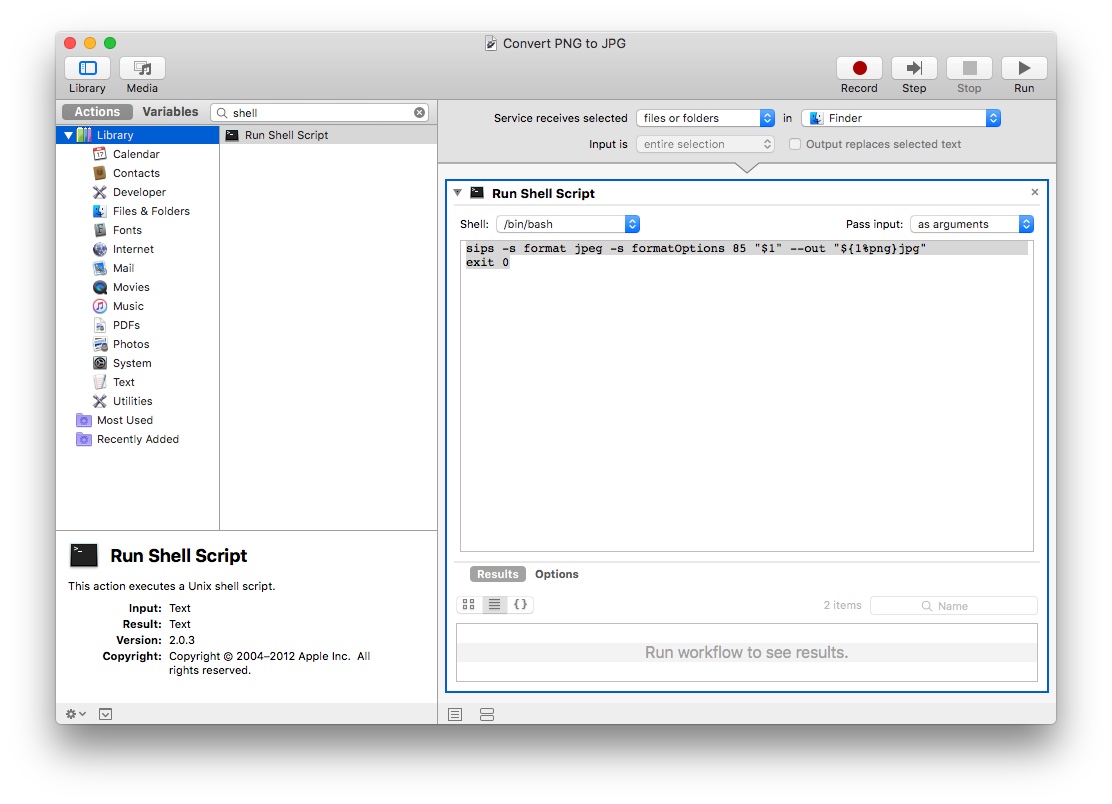
automator-example

Sign up for free to join this conversation on GitHub. Already have an account? Sign in to comment