Skip to content

Instantly share code, notes, and snippets.

@tikg
Last active December 19, 2023 03:27
Show Gist options
  • Select an option

  • Save tikg/aeb0e241ef37ee28f989dcdc3e6de4d8 to your computer and use it in GitHub Desktop.

Select an option

Save tikg/aeb0e241ef37ee28f989dcdc3e6de4d8 to your computer and use it in GitHub Desktop.
Linux

Linux Cheatsheet

deleting a file with a weird name

Prompts you before deleting any file
rm -i -- *

using the next variable to connect to a server and appending domain suffix

#!/bin/sh

STG=".local.staging.server"

echo "#"
echo "# Note: This Script is for STG devices"
echo "# Establishing connection to ${1}${STG}"
echo "#"
ssh -i ~/.ssh/private_key user-in-the-cloud@${1}${STG}

find biggest directories and sorting them

sudo du -aBm / 2>/dev/null | sort -nr | head -n10  

Samba related

Add user, delete user

smbpasswd -a tik
smbpasswd -x tik

View users in Samba and identify the Home and path to use in Windows sudo pbdedit -L -v
Access Windows Share
smbclient -U username '\\IPADDR\FOLDERNAME\' Make sure to add user in Start > Run > compmgmt.msc

Ping Windows Machine hostname from Ubuntu

sudo apt-get install winbind  
sudo apt-get install libnss-winbind  
sudo apt-get install libpam-winbind

Add wins in host line in nsswitch.conf
sudo vim /etc/nsswitch.conf
Ping windows machine
$ ping WINDOWS-MACHINE-DESKTOP

Untar a tar.gz file

tar -xvf foo.tar.gz  

Secrets of the tee

tee --help  
rsync --update -raz --progress /var/www 10.1.1.1:/var  
rsync --dry-run --update -raz --progress /var/www 10.1.1.1:/var

more rsync

commands  
Ctrl+R
or
command #useful

List all sources list on ubuntu

grep ^ /etc/apt/sources.list /etc/apt/sources.list.d/*

tmux out of session without closing

inside a tmux session: $ ctrl+b, d

Template

commands  

Linux NW

Start job running for wait network to be configured

Add optional to /etc/netplan/00-xxx.yaml file below (after your eth port):

optional: true

After changes apply it

$ sudo netplan apply
$ shutdown -r now

Or set the IP to static: here

NCat

  845  nc -zv 240b:c0e0:102:5de0:1c01:2:0:10 88
  846  nc -zv 240b:c0e0:102:5de0:1c01:2:0:10 135
  847  nc -zv 240b:c0e0:102:5de0:1c01:2:0:10 389
  848  nc -zv 240b:c0e0:102:5de0:1c01:2:0:10 445
  849  nc -zv 240b:c0e0:102:5de0:1c01:2:0:10 464
  850  nc -zv 240b:c0e0:102:5de0:1c01:2:0:10 636
  851  nc -zv 240b:c0e0:102:5de0:1c01:2:0:10 3268
  852  nc -zv 240b:c0e0:102:5de0:1c01:2:0:10 3269
  853  nc -zv 240b:c0e0:101:5571:1c01:2:0:601 88
  854  nc -zv 240b:c0e0:101:5571:1c01:2:0:601 135
  855  nc -zv 240b:c0e0:101:5571:1c01:2:0:601 389
  856  nc -zv 240b:c0e0:101:5571:1c01:2:0:601 445
  857  nc -zv 240b:c0e0:101:5571:1c01:2:0:601 464
  858  nc -zv 240b:c0e0:101:5571:1c01:2:0:601 636
  859  nc -zv 240b:c0e0:101:5571:1c01:2:0:601 3268
  860  nc -zv 240b:c0e0:101:5571:1c01:2:0:601 3269

@tikg
Copy link
Author

tikg commented Feb 16, 2023

split file

split -l 100 testfile.txt testfile

@tikg
Copy link
Author

tikg commented Feb 16, 2023

specific size file created by truncate https://ostechnix.com/create-files-certain-size-linux/

truncate -s 1G nicefile.tmp 

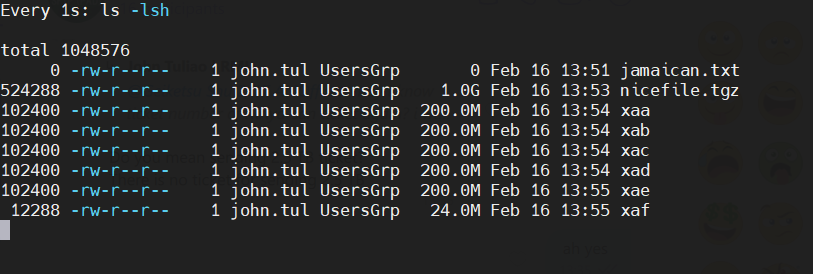
split files into 200M separations

split -b 200M nicefile.tmp

results:
image

place the files back to one

cat x* > nicefile.tmp

@tikg
Copy link
Author

tikg commented May 19, 2023

@tikg
Copy link
Author

tikg commented Jul 13, 2023

tar then gzip

gzip max is
gzip -9 {file or dir}

cool way to tar then gzip Documents folder would be

tar cvf Docszip Documents/ | gzip -9 Docszip > file.tar.gz

@tikg
Copy link
Author

tikg commented Dec 19, 2023

matching the file with the output

[john.tuliao@uhn5klbjhmgmt-s ostack]$ cat tmp-svr-name.list
63d0779e-b504-439f-b1c9-7978adcb7ac4 stg-frktn201zc
fd92c376-3f54-48c8-98b8-77d701fcc505 stg-frktn502zc
82cef2dd-c208-4c1b-bab9-5b05289c8810 stg-frktn202zc
62f05b9c-fe62-440c-86c7-ffd2cedeb9aa stg-frktn102zc
3ede7907-a434-4d63-99a8-41f6c151cdd4 preprod-frktn102zc
fa667188-a8d8-4b33-b172-9c3b4b1669a5 preprod-frktn101zc
c4c3289d-404b-4ff6-987c-669e273c0a45 preprod-frktn202zc
24d2a05f-98f3-4f51-8772-ac609231b61b preprod-frktn201zc

[john.tuliao@uhn5klbjhmgmt-s ostack]$ paste sruthi-list.results <(grep -Ff sruthi-list.results tmp-svr-name.list)
63d0779e-b504-439f-b1c9-7978adcb7ac4 has Volume: 50 and RAM: 16384      63d0779e-b504-439f-b1c9-7978adcb7ac4 stg-frktn201zc
fd92c376-3f54-48c8-98b8-77d701fcc505 has Volume: 50 and RAM: 16384      fd92c376-3f54-48c8-98b8-77d701fcc505 stg-frktn502zc
82cef2dd-c208-4c1b-bab9-5b05289c8810 has Volume: 50 and RAM: 16384      82cef2dd-c208-4c1b-bab9-5b05289c8810 stg-frktn202zc
        62f05b9c-fe62-440c-86c7-ffd2cedeb9aa stg-frktn102zc
62f05b9c-fe62-440c-86c7-ffd2cedeb9aa has Volume: 50 and RAM: 16384      3ede7907-a434-4d63-99a8-41f6c151cdd4 preprod-frktn102zc
3ede7907-a434-4d63-99a8-41f6c151cdd4 has Volume: 50 and RAM: 8192       fa667188-a8d8-4b33-b172-9c3b4b1669a5 preprod-frktn101zc
fa667188-a8d8-4b33-b172-9c3b4b1669a5 has Volume: 50 and RAM: 8192       c4c3289d-404b-4ff6-987c-669e273c0a45 preprod-frktn202zc
        24d2a05f-98f3-4f51-8772-ac609231b61b preprod-frktn201zc
c4c3289d-404b-4ff6-987c-669e273c0a45 has Volume: 50 and RAM: 16384
24d2a05f-98f3-4f51-8772-ac609231b61b has Volume: 50 and RAM: 16384


@tikg
Copy link
Author

tikg commented Dec 19, 2023

error handling redirecting results to null

command 2>/dev/null

@tikg
Copy link
Author

tikg commented Dec 19, 2023

figuring out ssh connection

[john.tuliao-a@tmp-login101b ~]$ echo $SSH_CONNECTION
240b:c020:102:5478:b463:2:2:0 37194 240b:c020:101:53e9:2801:2:0:101 22

Sign up for free to join this conversation on GitHub. Already have an account? Sign in to comment