
Created
May 21, 2020 20:25
-
-
Save tommymaynard/ed7254c62645abd63cfc107e84cc70e3 to your computer and use it in GitHub Desktop.
The 1 to 100 Game
This file contains hidden or bidirectional Unicode text that may be interpreted or compiled differently than what appears below. To review, open the file in an editor that reveals hidden Unicode characters.
Learn more about bidirectional Unicode characters
| <# | |
| TechNet Contribution: The 1 to 100 Game | |
| Previous link: https://gallery.technet.microsoft.com/The-1-to-100-Game-5288e279 | |
| Downloaded: 749 times (as of 05/21/2020) | |
| Update: The newest version of this function (3.0), has been posted on the PowerShell Gallery at | |
| https://www.powershellgallery.com/packages/Start-1to100Game3.0/3.0/DisplayScript. Read the newest write up here: | |
| http://tommymaynard.com/the-1-to-100-game-updated-2016. | |
| While this advanced function isn't as useful as many in the TechNet Gallery, it does show a great example of nested | |
| Do-Until loops (three of them!). | |
| There was a recent post on the TechNet Forum about needing help with a game that was being written in Windows PowerShell. | |
| This has since inspired me to come up with a game that I could write. This the 1 to 100 game and you might've played it | |
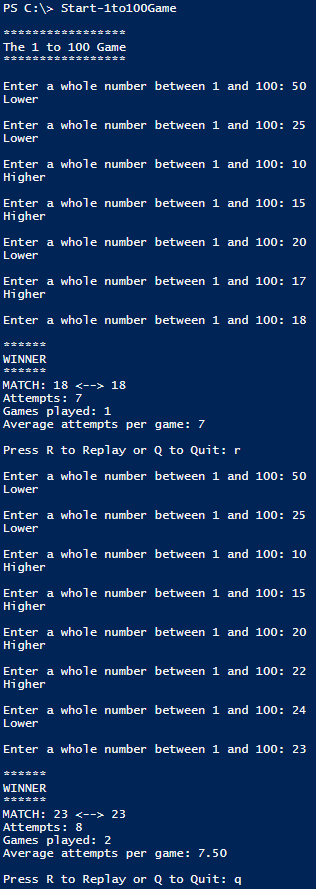
| as a child. The function randomly chooses a number between 1 and 100 and you have to try and guess it. When you're | |
| incorrect, the function will tell you if you should guess higher or lower on your next guess. It will record how many | |
| attempts it took you to guess the number, the number of games played, and your average attempts per game. | |
| Enjoy and let me know if there are any problems as I wrote this out very quickly! While it was only tested on Windows 7 | |
| and 8.1, it should work on other platforms that are running, at minimum, Windows Powershell 2.0, due to the need for the | |
| Get-Random cmdlet. | |
| Tommy Maynard | |
| Updated to version 2.0 on 8/1/2014 | |
| #> | |
| Function Start-1to100Game { | |
| ##### ** THIS SCRIPT IS PROVIDED WITHOUT WARRANTY, USE AT YOUR OWN RISK ** | |
| <# | |
| .SYNOPSIS | |
| This game is between a user and the computer. The user tries to determine the number the computer has choosen by using clues. | |
| .DESCRIPTION | |
| This is a game between a user and the computer. The computer chooses a random number between 1 and 100 and the user has to guess the number. After each guess, the computer will indicate whether the user should choose a higher lower number. | |
| .NOTES | |
| NAME: Start-1to100Game | |
| AUTHOR: Tommy Maynard | |
| VERSION: 2.0 | |
| -Made script an advanced function | |
| -Removed clearing of variables (unneeded since it's a function) | |
| -Changed how to quit: Yes and No vs. Replay and Quit (Y and N vs. R and Q) | |
| -Added 3rd nested Do-While so that only R and Q can be entered (in the past, if something else was entered the game would start again) | |
| -Added average number of attempts per game (uses formatting to only return 2 decimal places) | |
| LASTEDIT: 08/01/2014 | |
| VERSION 1.1: | |
| -Added replay option (Version 1.1 is first version uploaded to TechNet Gallery) | |
| LASTEDIT: 07/03/2014 | |
| #> | |
| Begin { | |
| ##### Welcome to Game; Set Plays | |
| Write-Output -Verbose "`r`n*****************" | |
| Write-Output -Verbose "The 1 to 100 Game" | |
| Write-Output -Verbose "*****************" | |
| $Plays = 0 | |
| } # End Begin | |
| Process { | |
| Do { | |
| ##### Get Computer's Number; Set Attempts | |
| $CompNumber = Get-Random -Minimum 1 -Maximum 100 | |
| $Attempts = 0 | |
| ##### Run Game | |
| Do { | |
| try { | |
| [Int]$UserNumber = Read-Host -Prompt "`r`nEnter a whole number between 1 and 100" | |
| If ($UserNumber -gt 0 -and $UserNumber -lt 101) { | |
| If ($UserNumber -gt $CompNumber) { | |
| Write-Output -Verbose 'Lower' | |
| } ElseIf ($UserNumber -lt $CompNumber) { | |
| Write-Output -Verbose 'Higher' | |
| } Else { | |
| $Winner = $True | |
| } | |
| } ElseIf ($UserNumber -gt 100) { | |
| Write-Output -Verbose 'ERROR: Number is greater than 100' | |
| } ElseIf ($UserNumber -lt 1) { | |
| Write-Output -Verbose 'ERROR: Number is less than than 1' | |
| } | |
| } | |
| catch { | |
| Write-Output -Verbose 'ERROR: Letters, special characters, and/or spaces are not allowed.' | |
| } | |
| $Attempts += 1 | |
| } | |
| Until ($UserNumber -eq $CompNumber) | |
| ##### Display Winning Results | |
| If ($Winner) { | |
| $Plays += 1 | |
| $TotalAttempts += $Attempts | |
| If ($TotalAttempts % $Plays -eq 0) { | |
| $AveragePerAttempt = $TotalAttempts / $Plays | |
| } Else { | |
| $AveragePerAttempt = '{0:N2}' -f ($TotalAttempts / $Plays) | |
| } | |
| Write-Output -Verbose "`r`n******" | |
| Write-Output -Verbose "WINNER" | |
| Write-Output -Verbose "******" | |
| Write-Output -Verbose "MATCH: $CompNumber <--> $UserNumber" | |
| Write-Output -Verbose "Attempts: $Attempts" | |
| Write-Output -Verbose "Games played: $Plays" | |
| Write-Output -Verbose "Average attempts per game: $AveragePerAttempt`r`n" | |
| Do { | |
| $Replay = Read-Host -Prompt "Press R to Replay or Q to Quit" | |
| } | |
| Until ( | |
| $Replay -eq 'R' -or $Replay -eq 'Q' | |
| ) | |
| } | |
| } | |
| Until ( | |
| $Replay -eq 'Q' | |
| ) | |
| } # End Process | |
| } # End Function |

tommymaynard
commented
May 21, 2020
Author
Sign up for free
to join this conversation on GitHub.
Already have an account?
Sign in to comment