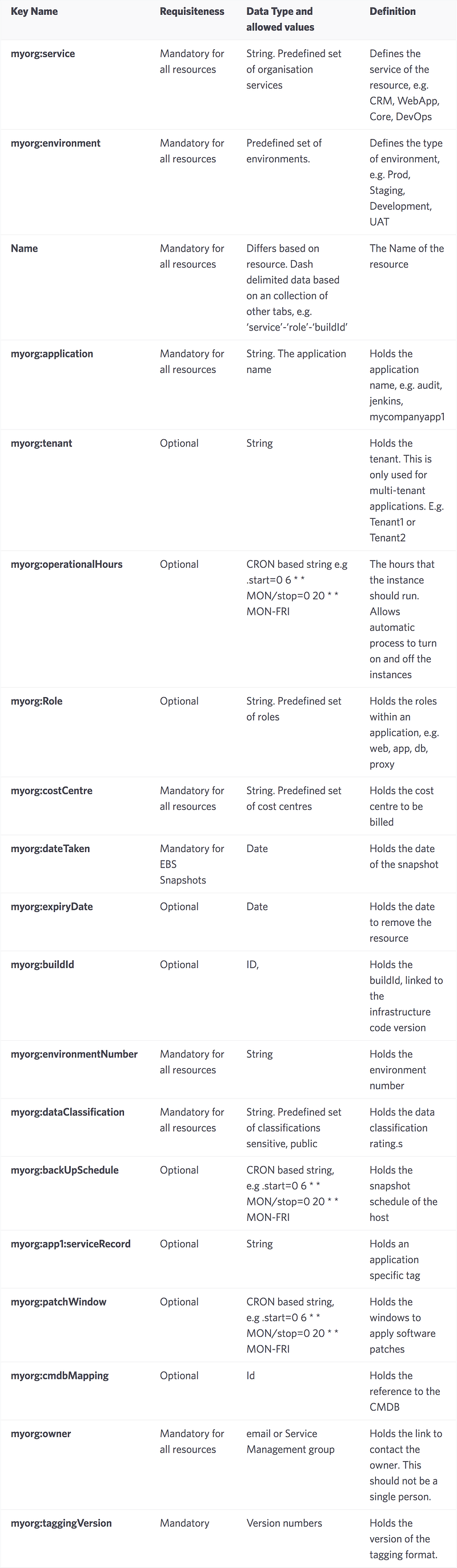
Tag is metadata of a resource; allow up to 50 tag per resource.
Why tagging resource
- Reporting: in AWS console or billing reports
- Management: tools like
Staxuse tags to group and classify your cloud data - Permissions: can restrict permission based on tag data
- Filtering: AWS Resource Groups allow the console to be filtered based on tag
- Automated Processes: used to drive scheduled shutdowns, backup policies, or AWS config policies
Build your own tagging policy based on practices, publish it within your organisation and then enforce it.
Tips
- store it in your own DB
- AWS Tag as foreign key to point to it
- store a limited amount of redundant data in AWS Tags, e.g. app name, owner email, to avoid cross system look up
- non-human-readable tag + human-readable tag, e.g. ApplicationGUID, ApplicationName
- Do not duplicate AWS data which is avaiable through AWS APIs
- use
Nametag for redunant data, it's frequently used in AWS console to identify resource by you. If yourNameisPROD-app101, add another two:info:env=PRODandinfo:appId:101 - Tag should be static (almost)
- use Tag to reflect environment, e.g. load testing
- use colon-separated namespace, e.g.
aws:,myorg: - use camelCase for key name. kebab-case, e.g. stack-id, is not supported by all AWS resource types.
- use a version number, e.g.
info:taggingVersionfor future - multi-value:
tagName=value:value2ortagName=value1-value2 - multi-attribute:
tagName=att1=v1/att2=v2 - combination:
tagName=att1=v1:v2/att2=v2:v3 - Each tag should be defined with its scope, e.g. enterprise wide, team wide, or department wide and its compliance level, e.g. mandatory or optional. Your tagging policy should be defined and enforced.
- define a time format and use it consistently, e.g. ISO6801
buildIDfor the infrastructure code- security tag, IAM Policy allows you to restrict access based on tag values
Eample