
https://kubernetes.io/docs/tutorials
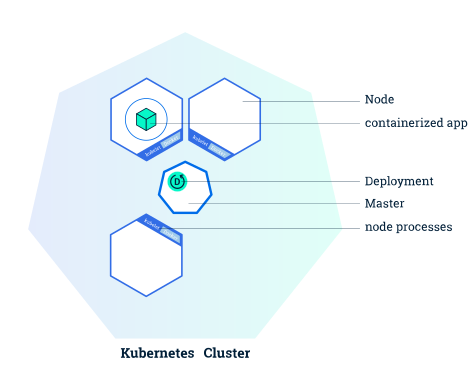
K8S master node(single in the cluster) has three processes kube-apiserver, kube-controller-manager and kube-scheduler.
K8S non-master nodes have two processes kubelet(talks to master), kube-proxy(access cluster)
Basic Objects
-
Pod
-
Service
-
Volume
-
Namespace
-
Controllers
- ReplicaSet
- Deployment
- StatefulSet
- DaemonSet
- Job
-
Create a cluster
-
Deploy an app
-
Expore your app
-
Expose your app publicly (traffic from cluster)
-
Scale up your appp
K8S cluster has a master and multiple nodes.
To deploy the containerised application, we need a Deployment configuration. Deployment instructs Kubernetes how to create and update instances of your application.
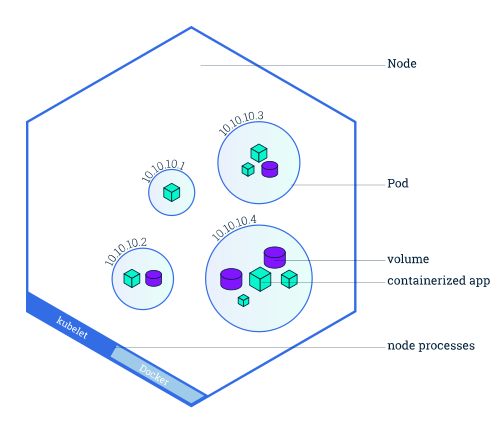
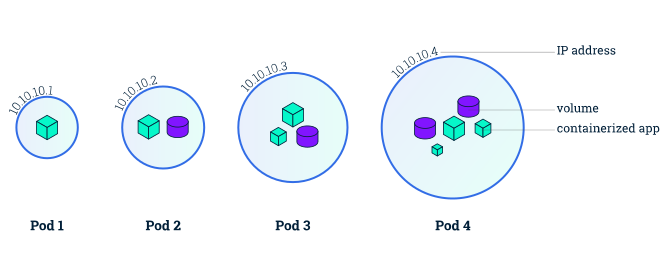
A Pod is a Kubernetes abstraction that represents a group of one or more application containers (such as Docker or rkt), and some shared resources for those containers.
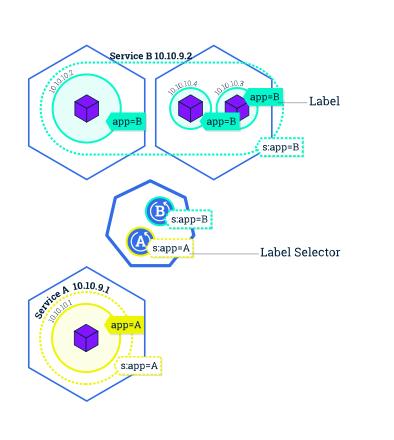
Pods that are running inside Kubernetes are running on a private, isolated network. By default they are visible from other pods and services within the same kubernetes cluster, but not outside that network.
Pod has a unique IP, which is not exposed outside the cluster without a service.
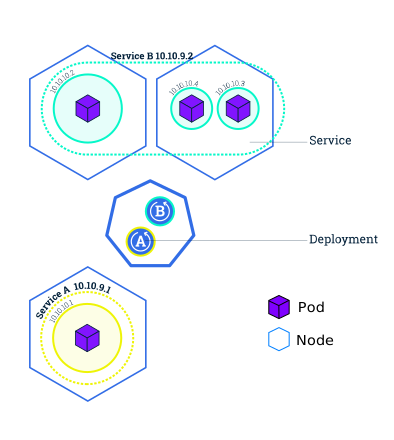
Service type:
- ClusterIP (default): internal IP in cluster, reachable inside cluster
- NodePort: Service accessible from outside the cluster using
<NodeIP>:<NodePort>. Superset of ClusterIP. - LoadBalancer: Creates an external load balancer in the current cloud (if supported) and assigns a fixed, external IP to the Service. Superset of NodePort.
- ExternalName: Exposes the Service using an arbitrary name (specified by
externalNamein the spec) by returning aCNAMErecord with the name. No proxy is used. This type requires v1.7 or higher ofkube-dns
kubectl get- list resourceskubectl describe- show detailed information about a resourcekubectl logs- print the logs from a container in a podkubectl exec- execute a command on a container in a pod
# minicube is a local k8s impl
minicube version
minicube start

kubectl version
kubectl cluster-info	// master
kubectl get nodes		// all nodes

# run an app
kubectl run kubernetes-bootcamp --image=gcr.io/google-samples/kubernetes-bootcamp:v1--port=8080

# list
kubectl get pods
kubectl get pods -l myLblName=myLblVal	# Filter by label
kubectl get services
kubectl get deployments


# start a local proxy so to talks to k8s cluster via http api
kubectl proxy
curl http://localhost:8001/version
export POD_NAME=$(kubectl get pods -o go-template --template '{{range .items}}{{.metadata.name}}{{"\n"}}{{end}}')
echo Name of the Pod: $POD_NAME
curl http://localhost:8001/api/v1/namespaces/default/pods/$POD_NAME/proxy/

# view log
kubectl logs $POD_NAME

# exec a command on pod
kubectl exec $POD_NAME env
kubectl exec -ti $POD_NAME bash

#
# Create a new service, and expose it to external traffic (NodePort type)
kubectl expose deployment/kubernetes-bootcamp --type="NodePort" --port 8080
# More details about the service
kubectl describe services/kubernetes-bootcamp
# Grab the NodePort IP
export NODE_PORT=$(kubectl get services/kubernetes-bootcamp -o go-template='{{(index.spec.ports 0).nodePort}}')
# Try access application
curl $(minikube ip):$NODE_PORT

#
# Add a label to pod
#
# Grap pod name
export POD_NAME=$(kubectl get pods -o go-template --template '{{range .items}}{{.metadata.name}}{{"\n"}}{{end}}')
# Add label
kubectl label pod $POD_NAME app=v1
# Check label is added
kubectl describe pods $POD_NAME
# List pods by label
kubectl get pods -l app=v1


#
# Delete a service
#
# By label
kubectl delete service -l run=kubernetes-bootcamp

#
# Scale up & down
#
kubectl scale deployments/kubernetes-bootcamp --replicas=4 #up
kubectl get deployments
kubectl scale deployments/kubernetes-bootcamp --replicas=2 #down
kubectl get deployments

#
# Update image
#
# Trigger update to V2
kubectl set image deployments/kubernetes-bootcamp kubernetes-bootcamp=jocatalin/kubernetes-bootcamp:v2
# Verify
kubectl describe services/kubernetes-bootcamp
# Or
kubectl rollout status deployments/kubernetes-bootcamp


#
# Rollback
#
kubectl rollout undo deployments/kubernetes-bootcamp