
간단한 포스트를 추가하는 기능을 구현해 볼거에요. 기능을 구현하면서 State Binding ObservedObject StateObject EnvironmentObject까지 다 한번씩 써보겠습니다.
먼저 포스트 모델이랑 mock list 구성해주고
struct Post: Identifiable {
    let id = UUID()
    let username: String
    let content: String
}

extension Post {
    static var lists: [Post] = [
        Post(username: "프렘", content: "스크럼 스터디 할 사람"),
        Post(username: "민디고", content: "저요저요"),
        Post(username: "천원", content: "저는 Swift 별로 안 좋아해요"),
        Post(username: "쵸비", content: "저도 할래요"),
        Post(username: "라쿤", content: "탈주각"),
        Post(username: "스티브", content: "저도 하고 싶어요"),
    ]
}
다음은 각각의 Row가 될 View를 구성해줄게요
struct PostRow: View {
    let post: Post
    let colors: [Color] = [
        Color.orange, Color.green, Color.purple, Color.pink, Color.blue, Color.yellow, Color.brown,
        Color.cyan, Color.mint, Color.indigo, Color.teal
    ]

    var body: some View {
        HStack {
            Circle()
                .fill(colors.randomElement() ?? .brown)
                .frame(width: 30)
            VStack(alignment: .leading) {
                Text(post.username)
                Text(post.content)
                    .font(.title)
            }
            Spacer()
        }
        .padding()
        .background{
            RoundedRectangle(cornerRadius: 10)
                .strokeBorder()
        }
        .padding()
    }
}
그리고 PostRow가 선택되면 Navigation이 될 view도 구성해주겠습니다.
struct PostDetail: View {
    let post: Post
    var body: some View {
        VStack(spacing: 20) {
            Text(post.username)
            Text(post.content)
	            .font(.largeTitle)
            Button {

            } label: {
                Image(systemName: "pencil")
                Text("수정")
            }

        }
    }
}
Post를 등록할 수 있는 view도 구성해 주고 "게시" 버튼이 눌러질 때 action 클로져를 통해서 새로운 post를 외부에서 사용할 수 있게 해줄게요.
struct PostAdd: View {
    @FocusState private var focused: Bool
    @Environment(\.dismiss) private var dismiss
    @State private var text: String = ""

    let action: (_ post: Post) -> ()

    var body: some View {
        NavigationView {
            VStack {
                TextField("포스트를 입력해주세요...", text: $text)
                    .font(.title)
                    .padding()
                    .padding(.top)
                    .focused($focused)
                    .onAppear { focused = true }
                Spacer()
            }
            .navigationTitle("포스트 게시")
            .navigationBarTitleDisplayMode(.inline)
            .toolbar {
                ToolbarItem(placement: .navigationBarLeading) {
                    Button("취소") { dismiss() }
                }

                ToolbarItem(placement: .navigationBarTrailing) {
                    Button("게시") {
                        let newPost = Post(username: "유저 이름", content: text)
                        action(newPost)
                        dismiss()
                    }
                }
            }
        }
    }
}
그리고 지금까지 구성한 View들을 모두 가지게 되는 View를 구성해주겠습니다.
struct Forum: View {
    @State private var list: [Post] = Post.list
    @State private var showAddView: Bool = false
    var body: some View {
        ScrollView {
            LazyVStack {
                ForEach(list) { post in
                    NavigationLink {
                        PostDetail(post: post)
                    } label: {
                        PostRow(post: post)
                    }
                    .tint(.primary)
                }
            }
        }
        .refreshable { }
        .safeAreaInset(edge: .bottom, alignment: .trailing) {
            Button {
                showAddView.toggle()
            } label: {
                Image(systemName: "plus")
                    .font(.largeTitle)
                    .padding()
                    .background(Circle().fill(.white).shadow(radius: 4))
            }
            .padding()
        }
        .sheet(isPresented: $showAddView) {
            PostAdd { post in
                list.insert(post, at: 0)
            }
        }
    }
}
다음엔 Forum View가 하나의 탭이 되도록 구성해줬습니다.
struct ContentView: View {
    var body: some View {
        NavigationView {
            TabView {
                Forum()
                    .tabItem {
                        Image(systemName: "bubble.right")
                    }

                Text("두번째 탭")
                    .tabItem {
                        Image(systemName: "house")
                    }
            }
            .navigationTitle("Scrum 스터디 방")
        }
    }
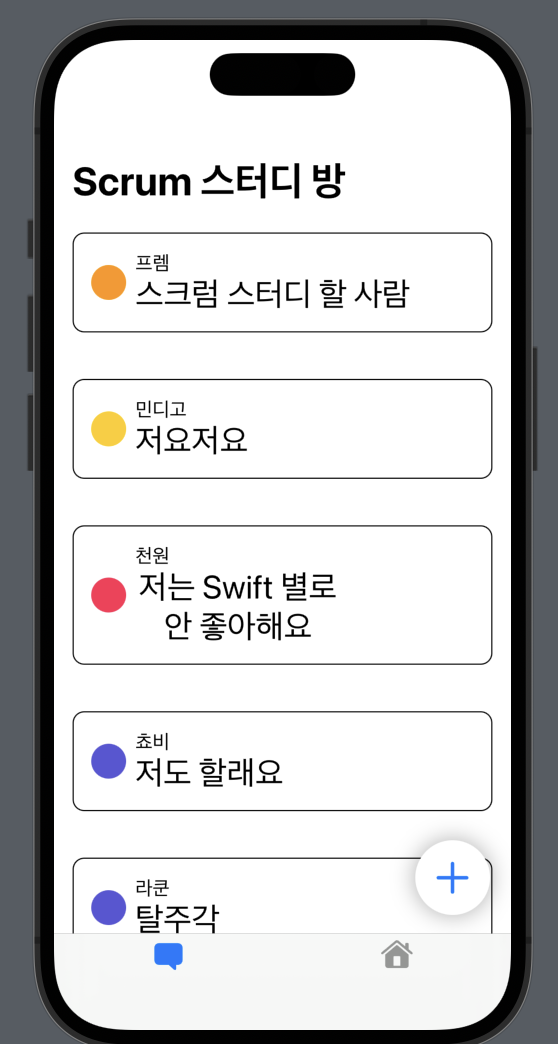
}
![[Simulator Screen Recording - iPhone 14 Pro - 2023-09-30 at 12.36.46.gif]]
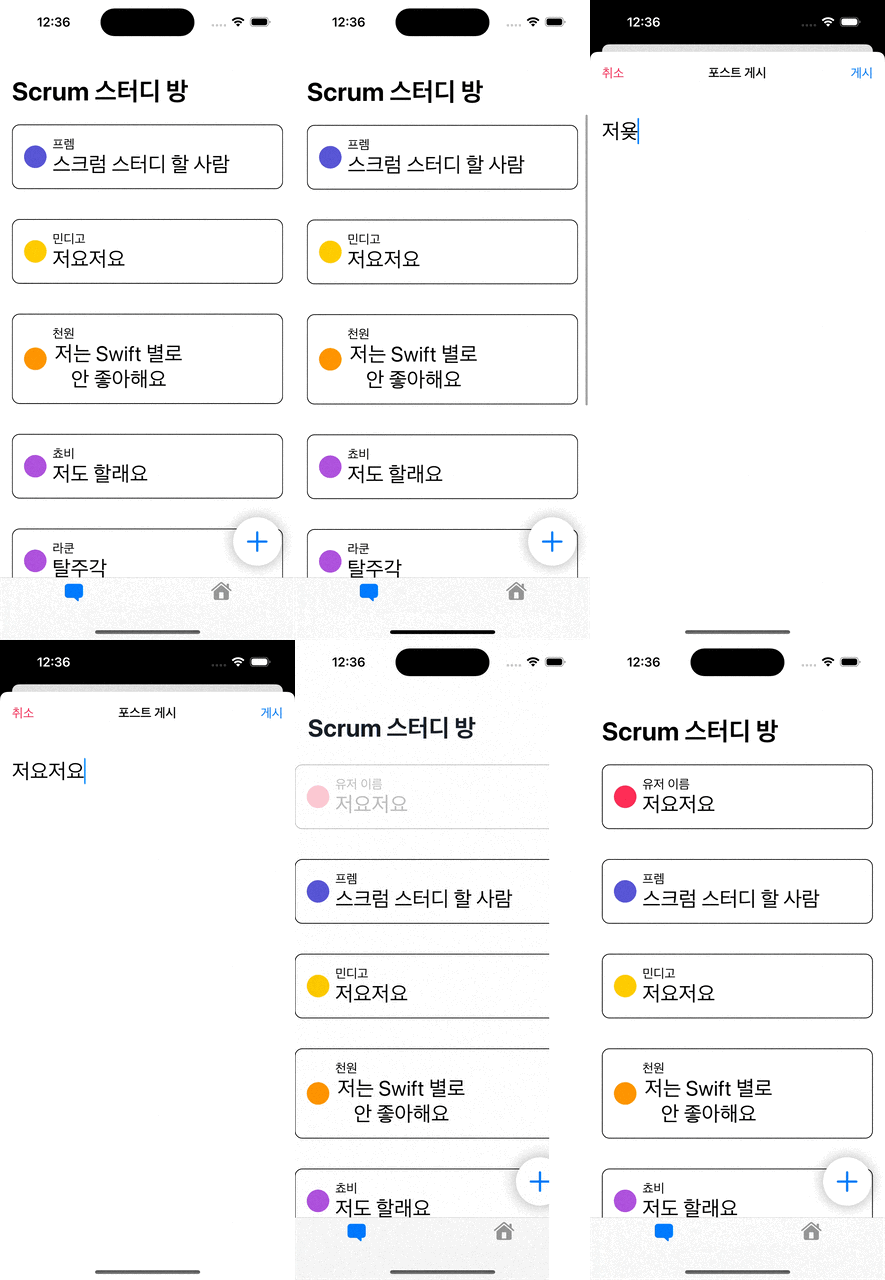
지금 구조에서 한번 생각을 해볼게요.
유저는 Post Add View를 통해 포스팅을 할 수 있어요. 그리고 포스팅된 글을 터치하면 Navigation으로 Post Detail View가 나오게 되구요.
그런데 Post Detail에서 수정 버튼을 눌러서 포스팅을 수정해야 할 경우에 어떻게 해야할까요?
새로운 View를 만들어주기보단 이전에 사용했던 Post Add View를 그대로 사용하면 좋을 것 같지 않아요?
이렇게 재사용을 하고 싶다면 Post Add View는 수정이 필요할 경우에 Post Model을 전달 받아야 합니다.
먼저 PostDetail 뷰를 수정해볼까요?
struct PostDetail: View {
    @State private var showEditView: Bool = false
    let post: Post
    var body: some View {
        VStack(spacing: 20) {
            Text(post.username)
            Text(post.content)
            Button {
                showSubmitView.toggle()
            } label: {
                Image(systemName: "pencil")
                Text("수정")
            }
            .sheet(isPresented: $showEditView) {
                PostAdd { post in

                }
            }
        }
    }
}
아하잇 sheet로 PostAdd를 띄워주려고 보니까 지금 구조, 뭔가 잘못된 것 같다는 생각이 드네요
Post Add View를 통해서 게시할 때 로직을 클로져로 전달했던 것도 수정이 필요하겠어요. 기존에 작성했던 action 클로져를 없애주고
Post ViewModel을 만든 후에 action 로직을 ViewModel에서 처리하게 만들어 줍시다
class PostViewModel: ObservableObject {
    @Published var list: [Post] = Post.list

    func addPost(text: String) {
        let newPost = Post(username: "유저 이름", content: text)
        list.insert(newPost, at: 0)
    }
}

struct PostAdd: View {
    @FocusState private var focused: Bool
    @Environment(\.dismiss) private var dismiss
    @State private var text: String = ""

    @ObservedObject var postVM = PostViewModel()

    var body: some View {
        NavigationView {
            VStack {
                TextField("포스트를 입력해주세요...", text: $text)
                    .font(.title)
                    .padding()
                    .padding(.top)
                    .focused($focused)
                    .onAppear { focused = true }
                Spacer()
            }
            .navigationTitle("포스트 게시")
            .navigationBarTitleDisplayMode(.inline)
            .toolbar {
                ToolbarItem(placement: .navigationBarLeading) {
                    Button("취소") { dismiss() }
                }

                ToolbarItem(placement: .navigationBarTrailing) {
                    Button("게시") {
                        postVM.addPost(text: text)
                        dismiss()
                    }
                }
            }
        }
    }
}
Post ViewModel을 만들었구 PostAdd View에서 ObservedObject로 선언해 줬는데 생각해보니까 postList를 Forum에서도 뿌려줘야겠네요
struct Forum: View {
//    @State private var list: [Post] = Post.list
    @ObservedObject private var postVM = PostViewModel()
    @State private var showAddView: Bool = false
    var body: some View {
        ScrollView {
            LazyVStack {
                ForEach(postVM.list) { post in
                    NavigationLink {
                        PostDetail(post: post)
                    } label: {
                        PostRow(post: post)
                    }
                    .tint(.primary)
                }
            }
        }
        .refreshable { }
        .safeAreaInset(edge: .bottom, alignment: .trailing) {
            Button {
                showAddView.toggle()
            } label: {
                Image(systemName: "plus")
                    .font(.largeTitle)
                    .padding()
                    .background(Circle().fill(.white).shadow(radius: 4))
            }
            .padding()
        }
        .sheet(isPresented: $showAddView) {
            PostAdd()
        }
    }
}
Post Detail 쪽에도 Post Add View의 클로져를 지워주고!
그리고 나서 실행을 해보면 포스팅이 추가가 안 될 거에요 왜냐?
PostAddView에서도 ObservedObject로 객체를 만들고 Forum에서도 ObservedObject로 객체를 따로 만들었으니까요!
그럼 Single Source of Truth 는 누구로 할 것인가?
Forum이 더 상위에 있으니까 Forum이 들고 있는 애가 진짜가 되게 해주고, 이 진짜 Object를 하위로 넘겨주면 되겠네요
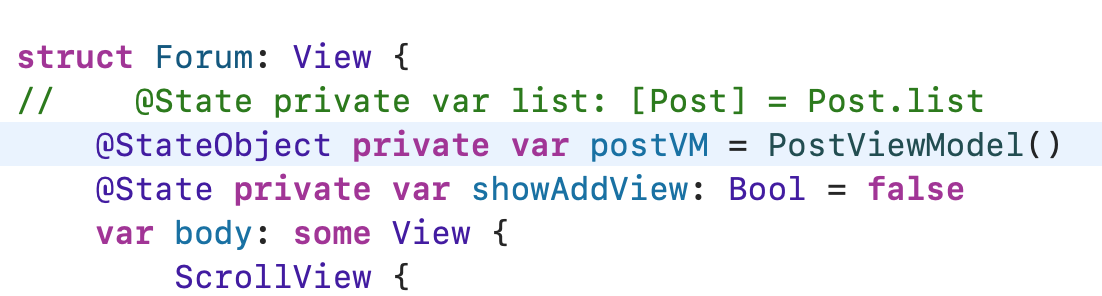
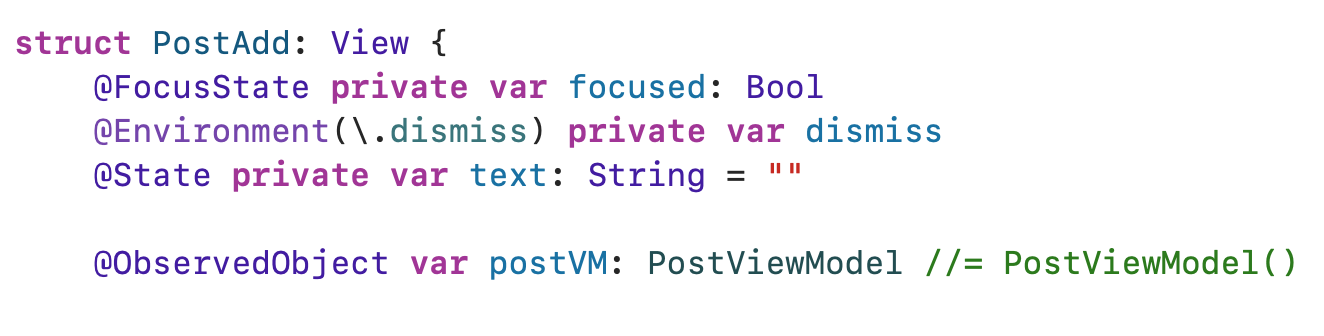
Post Add View의 ObservedObject 타입만 지정해줬어요! 이제 Post Add View는 PostViewModel 타입을 받는 구멍이 뚫리게 됐으니까 Forum 쪽에서 넘겨주면 될거에요
아하잇 근데 PostDetail 쪽에 문제가 생겼네요. PostAdd View에서 postViewModel 구멍이 뚫렸으니까 PostDetail에도 구멍이 뚫려서 넘겨져야됩니다.
struct PostDetail: View {
    @State private var showEditView: Bool = false
    @ObservedObject var postVM: PostViewModel
    let post: Post
    var body: some View {
        VStack(spacing: 20) {
            Text(post.username)
            Text(post.content)
            Button {
                showEditView.toggle()
            } label: {
                Image(systemName: "pencil")
                Text("수정")
            }
            .sheet(isPresented: $showEditView) {
                PostAdd(postVM: postVM)
            }
        }
    }
}
PostDetail에 구멍이 뚫렸으니까 Forum에서 선언한 StateObject를 넘겨주면 되겠네요
근데 지금 약간 이상한느낌이 들지 않아요?
PostDetail View의 입장에선 PostViewModel을 직접적으로 쓰고 있지 않단 말이에요? 단순히 객체를 넘겨주기 위해서 구멍이 뚫렸는데 이거 이상하잖아요?
이럴 때 쓰는게 @EnvironmentObject입니다.
수정을 해볼게요

PostDetail에 기존에 있던 ObservedObject는 지워주고
Post Add View에 있던 ObservedObject는 EnvironmentObject로 변경할게요
EnvironmentObject로 변경하면 PostAdd View의 파라미터를 통해서 직접적으로 넘겨줄 필요는 없어요.
그리고 나서 남은 중요한 작업은 .environmentObject로 StateObject를 뷰 계층의 하위로 뿌려주는 거에요
그럼 Forum View에서 선언하지 말고 NavigationView로 감싸고 있는 ContentView에서 StateObject를 선언하고 하위로 넣어주면 되겠네요
Forum View에 있던 걸 EnvironmentObject로 변경하고
그리고 Content View 에서 StateObject를 선언해 줍시다
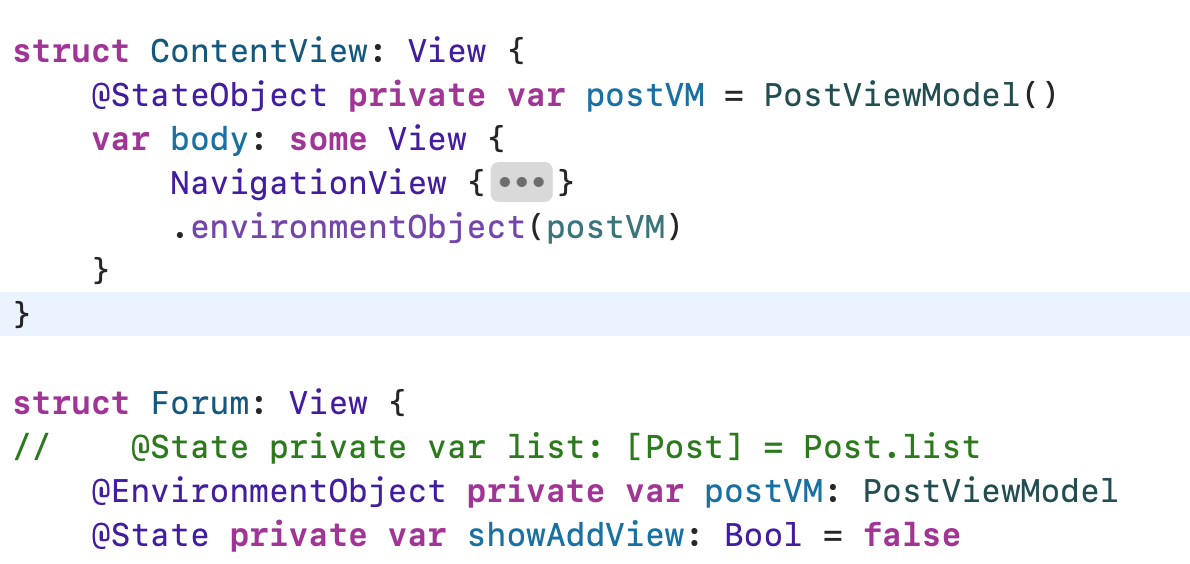
지금 이대로 포스팅의 수정 버튼을 눌러보면 뭔가 이상한 걸 발견하게 돼요
수정 버튼을 눌렀을 때 Post Add View를 띄운 후에 닫게 되면 Forum View까지 dismiss되버리는 걸까요?
EnvironmentObject의 문제라기 보다는 ObservedObject로 넘겨도 똑같더라구요. 어떤 SwiftUI에서의 View Life Cycle과 관련된 문제인 것 같아요. 해결 하는 방법은 2가지 입니다. 최상단 Content View의 Navigation View를 Navigation Stack으로 변경하면 해결 되고, 아니면 .sheet로 띄우던 걸 .fullScreenCover로 변경해줘도 돼요 (왜 이런지는 솔직히 모르겠습니다..�찾아봐야 되겠어요)
.fullScreenCover로 변경하는 걸로 해결할게요. 이번에 알아보고자 하는 건 NavigationStack에 관한게 아니라서..! Navigation Stack이 궁금하신 분들은 요 영상을 참고하셔도 될 것 같네요. https://www.youtube.com/watch?v=61lwZNXuVzc
아무튼
Post Detail의 modal을 fullscreencover로 변경했구요. 지금 해보려던 게 Detail View에서 수정 버튼을 누르면 Post Model을 넘겨 받아서 수정하려는 포스팅의 데이터를 이어서 작업할 수 있게 하려는 �거였죠
그럼 Post Add View 같은 경우 textField랑 Binding된, 그러니까 연결된 text의 값이 edit을 할 때는 edit하는 Post model을 알아야겠네요
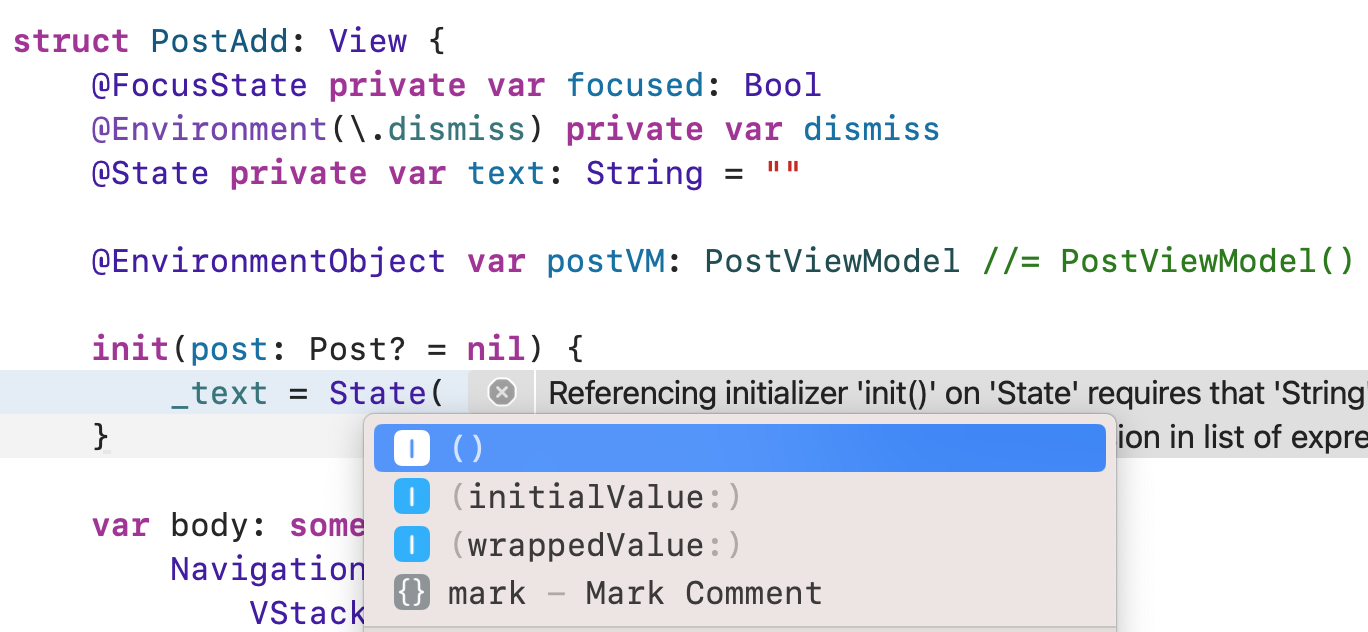
State의 초기값을 init할 때 지정하는 방법은
언더바 text = State 괄호를 열면 initialValue랑 wrappedValue가 나오는데 이둘은 똑같게 동작합니다.
프로퍼티 래퍼가 나오던 초기에 initialValue로 초기값을 표현했는데 추후에 wrappedValue로 표현이 변경 됐고, 이전 버전과의 호환성을 위해서 initialValue라는 표현이 남게 됐다는 의견이 있더라구요.
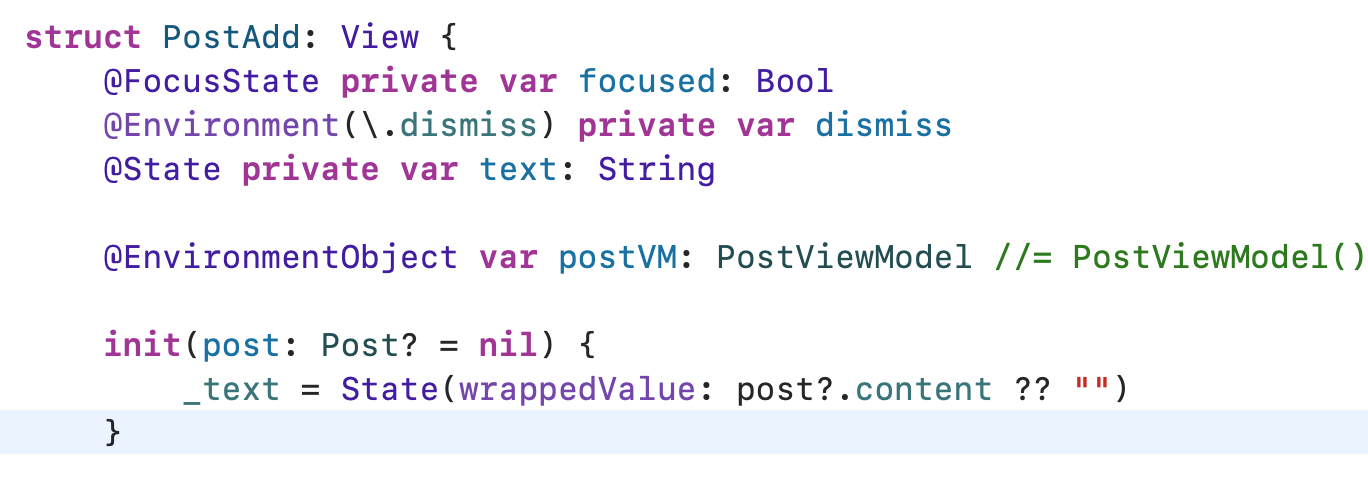
View가 init되는 시점에 초기값을 외부에서 주입할 수 있게 해주고 옵셔널한 post 값에 따라서 nil이 아니라면 넘겨받은 post를 사용하고, nil이라면 빈 텍스트가 되게 해줄게요.
아 그리고! 만약에 EnvironmentObject가 아니고 ObservedObject였다면 파라미터로 객체를 init구문에서 넘겨줘야할 거에요 근데 지금 EnvironmentObject는 따로 안넘겨줘도 가능하단 말이죠? 그 이유는 EnvironmentObject는 body가 호출 될 때 넘겨지게 됩니다. 그래서 init구문에서 사용할 수 없을 뿐더러, View가 생성되는 시점엔 존재하지도 않는 거죠. 요런 두 프로퍼티 래퍼에도 차이가 있다는거! 알고 가면 될 것 같아요.
그리고 Post Detail View에선 PostAdd View를 init할 때 현재 수정하려는 post를 넘겨주면 될거에요
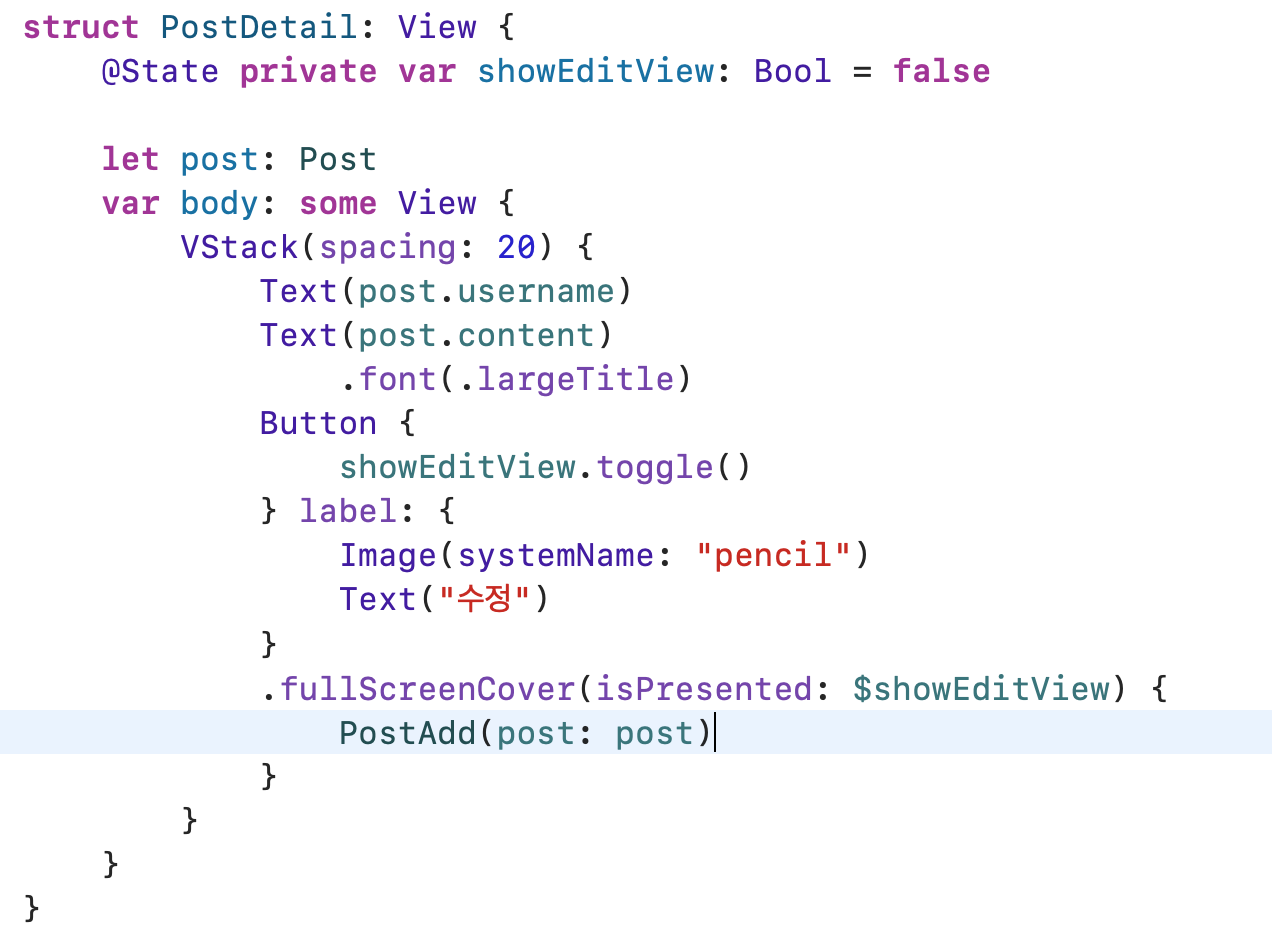
한번 실행해볼까요?
오케이! 제대로 수정하려는 포스트가 넘겨지네요
이제 해줘야 하는 건 포스팅을 수정할 때 Post List에서 해당 Post를 찾고 변경해주면 될거에요
근데!!! 이렇게 wrappedValue를 직접적으로 사용해서 State의 초기값을 init구문에서 작성하는 거! 해도 될까요?
정답은 안됩니다! 이렇게 사용하면 안돼요!!
그 근거로 찾을 수 있는건 wrappedValue의 공식 문서를 읽어보면 알 수 있어요 https://developer.apple.com/documentation/swiftui/state/init(wrappedvalue:)
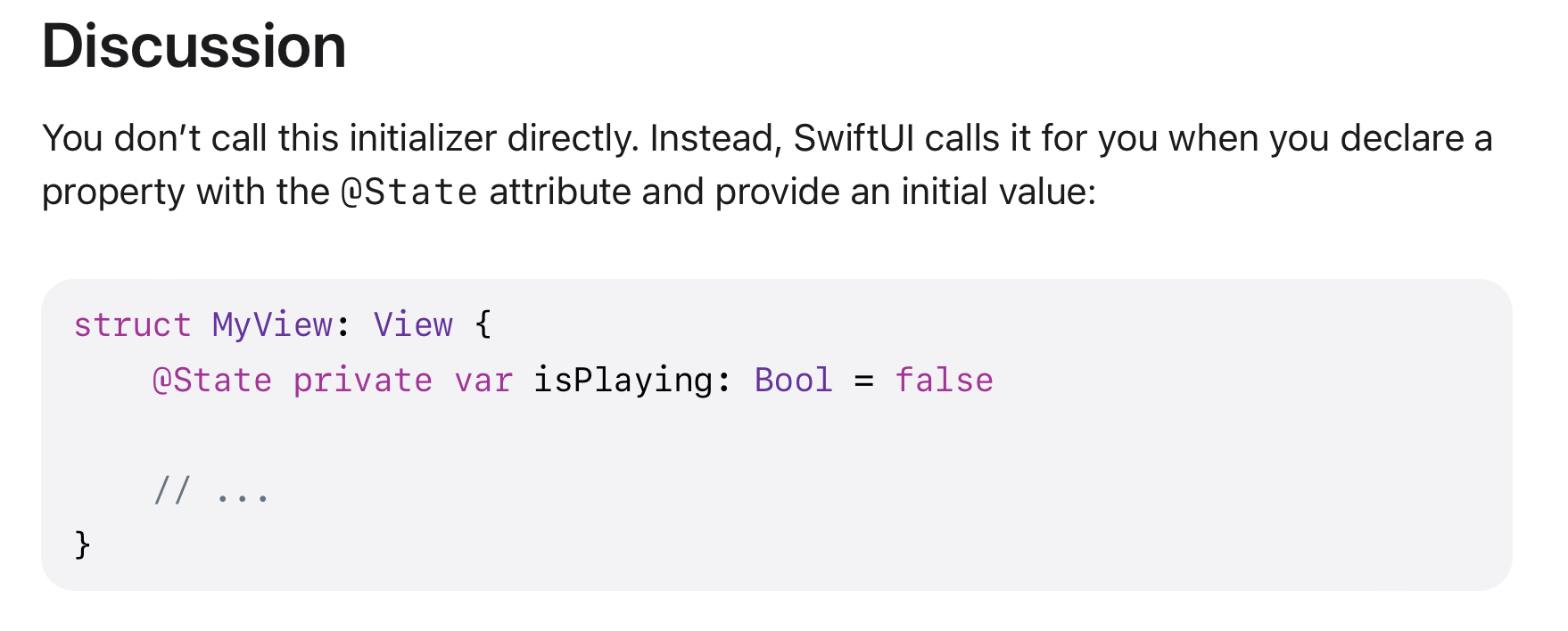
그리고 WWDC 초기 SwiftUI 세션 발표에서 나온 “상태 값인 State는 View만이 소유하고 관리한다!“는 규칙을 생각해볼 때 View를 init하는 시점에 외부에서 State 상태의 초기값을 지정해주는 건 피해야 합니다.
그럼 어떻게 변경해야 될까요? 정말 많이 고민을 했는데 애플의 Scrumdinger 튜토리얼에서 그 답을 찾게 됐어요.
이렇게 외부에서 상태값을 넘겨받고 싶다면 init 구문에서 초기값을 지정하는 게 아니라 그냥 @Binding을 쓰면 돼요.
Scrumdinger 코드의 일부이구요.
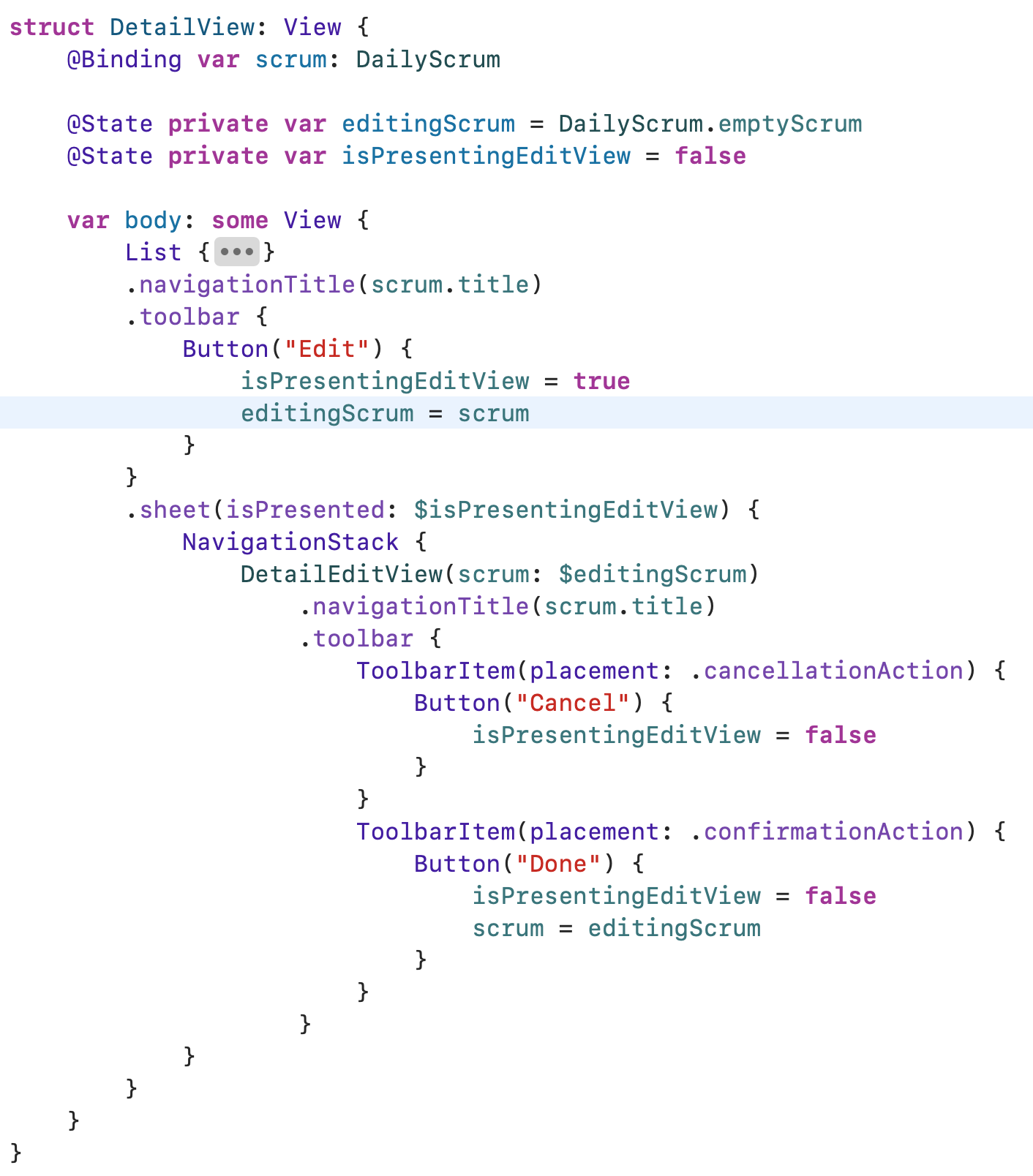
지금처럼 Detail View에서 edit이 필요한 시점에 초기값이 빈 값이었던 상태값에 Binding을 통해서 DetailEditView로 넘겨줍니다.
다시 전체적으로 수정이 필요하겠네요
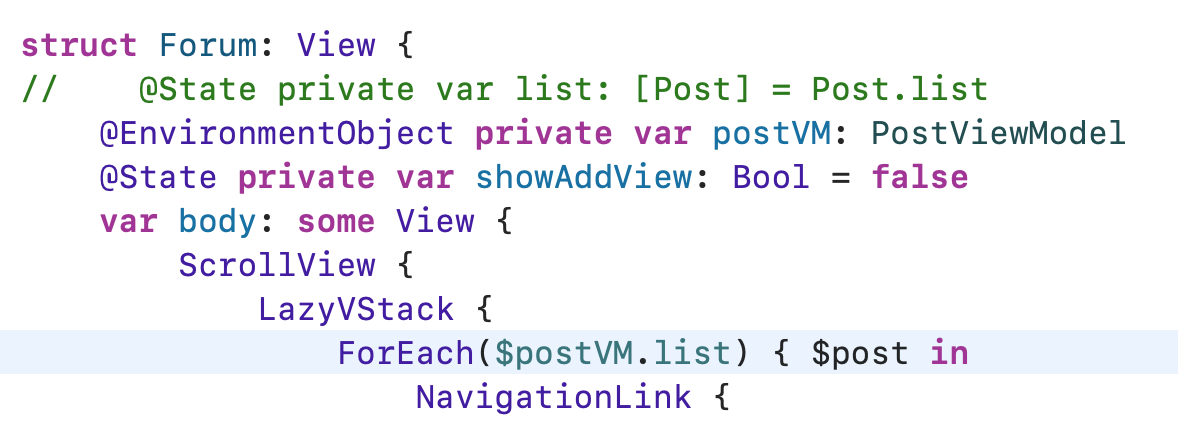
먼저 Forum View에서 ForEach를 통해서 뿌려줄 때 Binding "모델들" 과 Binding post 모델을 넘겨주는 표현을 쓸게요
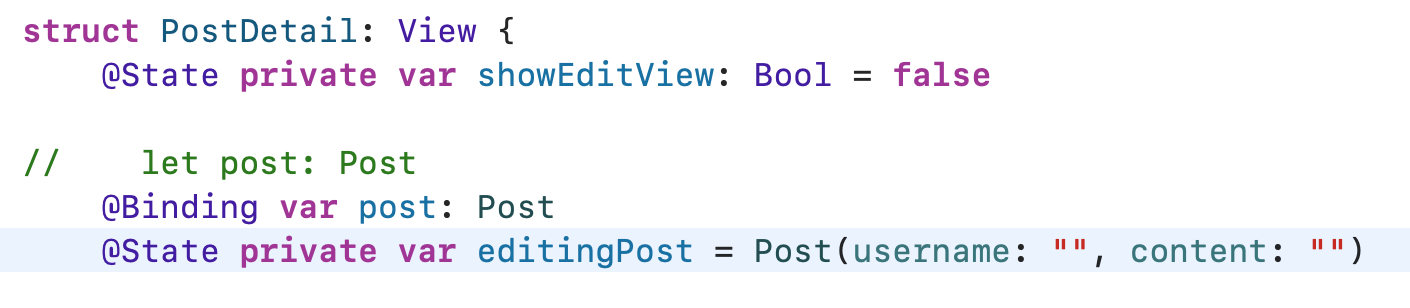
그리고 PostDetail에서도 Binding으로 Post를 넘겨받아야 해요. @State로 빈 Post 모델도 만들어 주고요!
그럼 Forum 쪽에서도 PostDetailView가 Binding으로 넘겨받아 줘야겠죠?
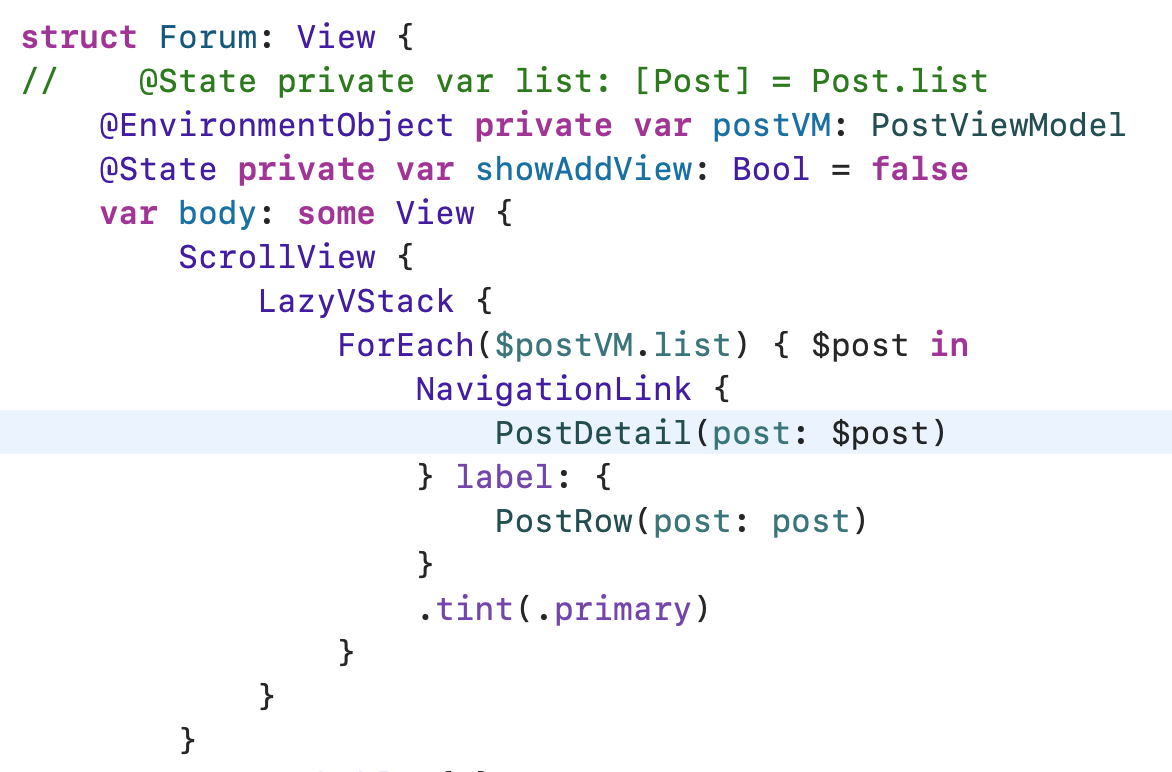
그리고 기존의 PostAdd View에 있던 NavigationView와 .toolbar아이템도 PostDetail로 옮겨와줄게요.
이제 Post Add View를 정리해줍시다
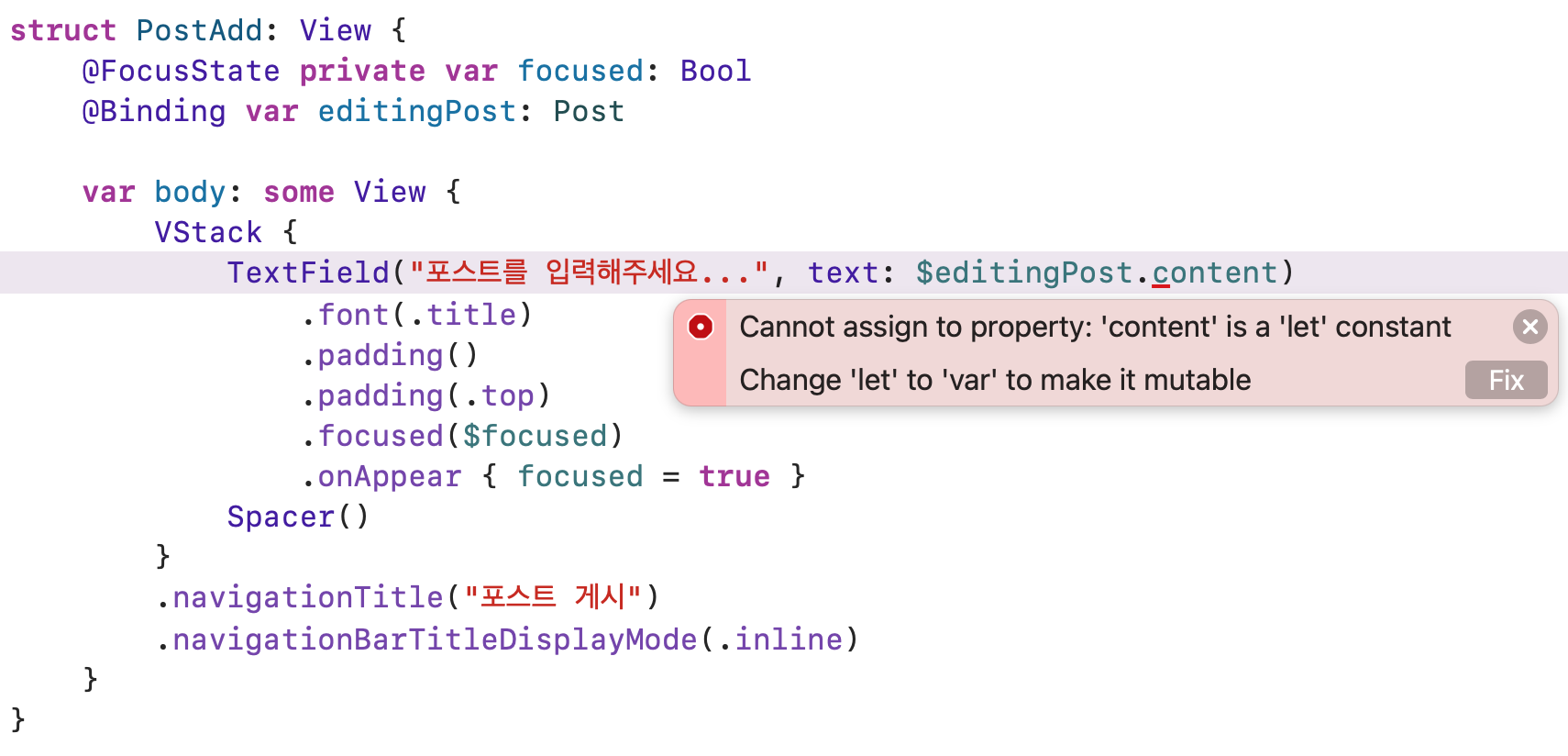
기존에 wrappedValue를 직접 init할 때 넣어주던 걸 지워주고, text 값도 지워주고 Edit하는 Post를 Binding 해줍시다. dismiss 액션도 없애줬어요. 기존의 모델에서 let으로 선언했던 content 프로퍼티를 var로 바로 바꿔주고요!
PostDetail View로 넘어와서 나머지 에러를 해결 해주면 되겠네요
struct PostDetail: View {
    @State private var showEditView: Bool = false

//    let post: Post
    @Binding var post: Post
    @State private var editingPost = Post(username: "", content: "")

    var body: some View {
        VStack(spacing: 20) {
            Text(post.username)
            Text(post.content)
                .font(.largeTitle)
            Button {
	            editingPost = post
                showEditView = true
            } label: {
                Image(systemName: "pencil")
                Text("수정")
            }
            .fullScreenCover(isPresented: $showEditView) {
                NavigationView {
                    PostAdd(editingPost: $editingPost)
                        .toolbar {
                            ToolbarItem(placement: .navigationBarLeading) {
                                Button("취소") { showEditView = false }
                            }

                            ToolbarItem(placement: .navigationBarTrailing) {
                                Button("게시") {
                                    post = editingPost
                                    showEditView = false
                                }
                            }
                        }
                }
            }
        }
    }
}
Forum View 쪽에도 새로 Add 할 때 사용하게 되는 Post 값을 선언해주고 이전이랑 마찬가지로 Navigation View랑 .toolbar를 추가해주면~
struct Forum: View {
//    @State private var list: [Post] = Post.list
    @EnvironmentObject private var postVM: PostViewModel
    @State private var showAddView: Bool = false
    @State private var newPost = Post(username: "유저 이름", content: "")

    var body: some View {
        ScrollView {
            LazyVStack {
                ForEach($postVM.list) { $post in
                    NavigationLink {
                        PostDetail(post: $post)
                    } label: {
                        PostRow(post: post)
                    }
                    .tint(.primary)
                }
            }
        }
        .refreshable { }
        .safeAreaInset(edge: .bottom, alignment: .trailing) {
            Button {
                showAddView.toggle()
            } label: {
                Image(systemName: "plus")
                    .font(.largeTitle)
                    .padding()
                    .background(Circle().fill(.white).shadow(radius: 4))
            }
            .padding()
        }
        .sheet(isPresented: $showAddView) {
            NavigationView {
                PostAdd(editingPost: $newPost)
            }
            .toolbar {
                ToolbarItem(placement: .navigationBarLeading) {
                    Button("취소") {
                        newPost = Post(username: "유저 이름", content: "")
                        showAddView = false
                    }
                }

                ToolbarItem(placement: .navigationBarTrailing) {
                    Button("게시") {
                        postVM.addPost(text: newPost.content)
                        showAddView = false
                        newPost = Post(username: "유저 이름", content: "")
                    }
                }
            }
        }
    }
}
이렇게 작성하고 나니까 PostViewModel도 필요 없겠네요. 다른 로직이 필요한 게 아니라면 그냥 Forum View에서 바로 State로 Post list를 선언해줘도 될 것 같네요.
네 오늘은 State Binding ObservedObject StateObject EnvironmentObject를 모두 사용해봤어요. 그리고 실수하기 쉬운 State의 초기값을 지정하는 경우에 어떻게 해야되는지도 알아봤구요.
struct ContentView: View {
    var body: some View {
        NavigationView {
            TabView {
                Forum()
                    .tabItem {
                        Image(systemName: "bubble.right")
                    }
                Text("두번째 탭")
                    .tabItem {
                        Image(systemName: "house")
                    }
            }
        }
    }
}

struct Forum: View {
    @State private var list: [Post] = Post.list
    @State private var showAddView: Bool = false
    @State private var newPost = Post(username: "유저 이름", content: "")

    var body: some View {
        ScrollView {
            LazyVStack {
                ForEach($list) { $post in
                    NavigationLink {
                        PostDetail(post: $post)
                    } label: {
                        PostRow(post: post)
                    }
                    .tint(.primary)
                }
            }
        }
        .refreshable { }
        .safeAreaInset(edge: .bottom, alignment: .trailing) {
            Button {
                showAddView.toggle()
            } label: {
                Image(systemName: "plus")
                    .font(.largeTitle)
                    .padding()
                    .background(Circle().fill(.white).shadow(radius: 4))
            }
            .padding()
        }
        .sheet(isPresented: $showAddView) {
            NavigationView {
                PostAdd(editingPost: $newPost)
                    .toolbar {
                        ToolbarItem(placement: .navigationBarLeading) {
                            Button("취소") {
                                newPost = Post(username: "유저 이름", content: "")
                                showAddView = false
                            }
                        }

                        ToolbarItem(placement: .navigationBarTrailing) {
                            Button("게시") {
                                list.insert(newPost, at: 0)
                                showAddView = false
                                newPost = Post(username: "유저 이름", content: "")
                            }
                        }
                    }
            }
        }
    }
}

struct PostAdd: View {
    @FocusState private var focused: Bool
    @Binding var editingPost: Post

    var body: some View {
        VStack {
            TextField("포스트를 입력해주세요...", text: $editingPost.content)
                .font(.title)
                .padding()
                .padding(.top)
                .focused($focused)
                .onAppear { focused = true }
            Spacer()
        }
        .navigationTitle("포스트 게시")
        .navigationBarTitleDisplayMode(.inline)
    }
}

struct PostDetail: View {
    @State private var showEditView: Bool = false

    @Binding var post: Post
    @State private var editingPost = Post(username: "", content: "")

    var body: some View {
        VStack(spacing: 20) {
            Text(post.username)
            Text(post.content)
                .font(.largeTitle)
            Button {
                editingPost = post
                showEditView = true
            } label: {
                Image(systemName: "pencil")
                Text("수정")
            }
            .fullScreenCover(isPresented: $showEditView) {
                NavigationView {
                    PostAdd(editingPost: $editingPost)
                        .toolbar {
                            ToolbarItem(placement: .navigationBarLeading) {
                                Button("취소") { showEditView = false }
                            }

                            ToolbarItem(placement: .navigationBarTrailing) {
                                Button("게시") {
                                    post = editingPost
                                    showEditView = false
                                }
                            }
                        }
                }
            }
        }
    }
}

struct PostRow: View {
    let post: Post
    let colors: [Color] = [
        Color.orange, Color.green, Color.purple, Color.pink, Color.blue, Color.yellow, Color.brown, Color.cyan, Color.mint, Color.indigo, Color.teal
    ]

    var body: some View {
        HStack {
            Circle()
                .fill(colors.randomElement() ?? .brown)
                .frame(width: 30)
            VStack(alignment: .leading) {
                Text(post.username)
                Text(post.content)
                    .font(.title)
            }
            Spacer()
        }
        .padding()
        .background {
            RoundedRectangle(cornerRadius: 10)
                .strokeBorder()
        }
        .padding()
    }
}

struct Post: Identifiable {
    let id = UUID()
    let username: String
    var content: String
}

extension Post {
    static var list: [Post] = [
        Post(username: "프렘", content: "스크럼 스터디 할 사람"),
        Post(username: "민디고", content: "저요저요"),
        Post(username: "천원", content: "저는 Swift 별로 안 좋아해요"),
        Post(username: "쵸비", content: "저도 할래요"),
        Post(username: "라쿤", content: "탈주각"),
        Post(username: "스티브", content: "저도 하고 싶어요"),
    ]
}

struct ContentView_Previews: PreviewProvider {
    static var previews: some View {
//        ContentView()
//        PostDetail(post: Post(username: "스티브", content: "안녕하세요"))
//        PostAdd() { post in
//
//        }
//        NavigationView {
//            Forum()
//        }
        ContentView()
    }
}