
Created
December 11, 2018 22:55
-
-
Save wynand1004/5e06ce54a430619785e355fd9b60fff3 to your computer and use it in GitHub Desktop.
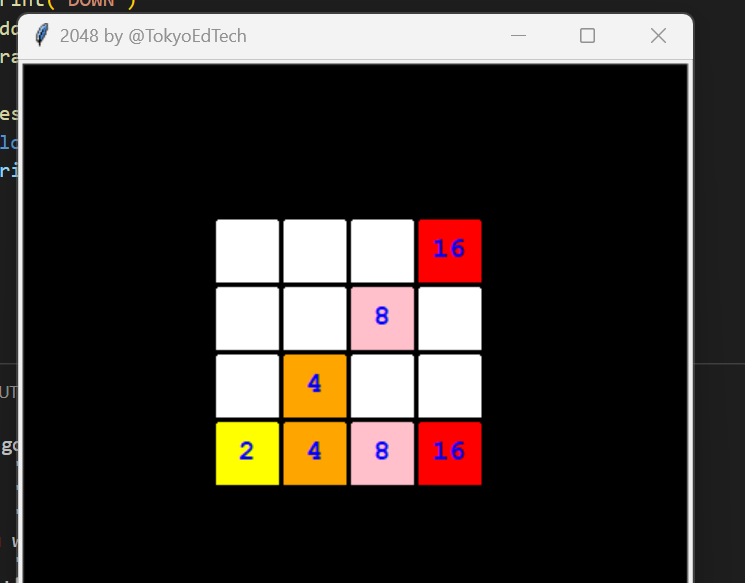
An simple Python implementation of the game 2048 written in Python 3.
This file contains hidden or bidirectional Unicode text that may be interpreted or compiled differently than what appears below. To review, open the file in an editor that reveals hidden Unicode characters.
Learn more about bidirectional Unicode characters
| # 2048 in Python 3 for Beginners (Alpha Version) | |
| # By @TokyoEdTech | |
| import turtle | |
| import random | |
| # Set up the screen | |
| wn = turtle.Screen() | |
| wn.title("2048 by @TokyoEdTech") | |
| wn.bgcolor("black") | |
| wn.setup(width=450, height=400) | |
| wn.tracer(0) | |
| # Score | |
| score = 0 | |
| # Grid list | |
| grid = [ | |
| [0, 0, 0, 16], | |
| [0, 0, 8, 0], | |
| [0, 4, 0, 0], | |
| [2, 4, 8, 16] | |
| ] | |
| grid_merged = [ | |
| [False, False, False, False], | |
| [False, False, False, False], | |
| [False, False, False, False], | |
| [False, False, False, False] | |
| ] | |
| # Pen | |
| pen = turtle.Turtle() | |
| pen.speed(0) | |
| pen.shape("square") | |
| pen.color("white") | |
| pen.penup() | |
| pen.hideturtle() | |
| pen.turtlesize(stretch_wid=2, stretch_len=2, outline=2) | |
| pen.goto(0, 260) | |
| # Functions | |
| def draw_grid(): | |
| colors = { | |
| 0: "white", | |
| 2: "yellow", | |
| 4: "orange", | |
| 8: "pink", | |
| 16: "red", | |
| 32: "light green", | |
| 64: "green", | |
| 128: "light purple", | |
| 256: "purple", | |
| 512: "gold", | |
| 1024: "silver", | |
| 2048: "black" | |
| } | |
| # Top -100, 100 | |
| grid_y = 0 | |
| y = 120 | |
| # Draw the grid | |
| for row in grid: | |
| grid_x = 0 | |
| x = -120 | |
| y -= 45 | |
| for column in row: | |
| x += 45 | |
| pen.goto(x, y) | |
| # Set the color based on the value | |
| value = grid[grid_y][grid_x] | |
| color = colors[value] | |
| pen.color(color) | |
| pen.stamp() | |
| pen.color("blue") | |
| if column == 0: | |
| number = "" | |
| else: | |
| number = str(column) | |
| pen.sety(pen.ycor() - 10) | |
| pen.write(number, align="center", font=("Courier", 14, "bold")) | |
| pen.sety(pen.ycor() + 10) | |
| grid_x += 1 | |
| grid_y += 1 | |
| def add_random(): | |
| added = False | |
| while not added: | |
| x = random.randint(0, 3) | |
| y = random.randint(0, 3) | |
| value = random.choice([2, 4]) | |
| if grid[y][x] == 0: | |
| grid[y][x] = value | |
| added = True | |
| def up(): | |
| # Go through row by row | |
| # Start with row 1 (note this is the index) | |
| for x in range(0, 4): | |
| print("---{}---".format(x)) | |
| for y in range(1, 4): | |
| print("-{}-".format(y)) | |
| # Empty | |
| if grid[y-1][x] == 0: | |
| grid[y-1][x] = grid[y][x] | |
| for y2 in range(y, 3): | |
| grid[y][x] = grid[y+1][x] | |
| grid[2][x] = grid[3][x] | |
| grid[y][x] = 0 | |
| y = 0 | |
| continue | |
| # Same | |
| if grid[y-1][x] == grid[y][x] and not grid_merged[y-1][x]: | |
| grid[y-1][x] = grid[y][x] * 2 | |
| grid_merged[y-1][x] = True | |
| grid[y][x] = 0 | |
| y = 0 | |
| continue | |
| reset_grid_merged() | |
| print("UP") | |
| add_random() | |
| draw_grid() | |
| def down(): | |
| # Go through row by row | |
| # Start with row 1 (note this is the index) | |
| for _ in range(4): | |
| for y in range(2, -1, -1): | |
| for x in range(0, 4): | |
| # Empty | |
| if grid[y+1][x] == 0: | |
| grid[y+1][x] = grid[y][x] | |
| grid[y][x] = 0 | |
| x -= 1 | |
| continue | |
| # Same | |
| if grid[y+1][x] == grid[y][x] and not grid_merged[y+1][x]: | |
| grid[y+1][x] = grid[y][x] * 2 | |
| grid_merged[y+1][x] = True | |
| grid[y][x] = 0 | |
| x -= 1 | |
| continue | |
| reset_grid_merged() | |
| print("DOWN") | |
| add_random() | |
| draw_grid() | |
| def reset_grid_merged(): | |
| global grid_merged | |
| grid_merged = [ | |
| [False, False, False, False], | |
| [False, False, False, False], | |
| [False, False, False, False], | |
| [False, False, False, False] | |
| ] | |
| def left(): | |
| pass | |
| draw_grid() | |
| def right(): | |
| pass | |
| draw_grid() | |
| draw_grid() | |
| # Keyboard bindings | |
| wn.listen() | |
| wn.onkeypress(left, "Left") | |
| wn.onkeypress(right, "Right") | |
| wn.onkeypress(up, "Up") | |
| wn.onkeypress(down, "Down") | |
| wn.mainloop() |


Author
You should be able to download and run it. Give it a try!
…On Mon, Nov 21, 2022, 01:46 WrathRagnarr ***@***.***> wrote:
***@***.**** commented on this gist.
------------------------------
[image: image]
<https://user-images.githubusercontent.com/43742293/202914605-3dc555d1-93f3-4274-802c-abcf89bd5702.png>
Can I also play it?
—
Reply to this email directly, view it on GitHub
<https://gist.github.com/5e06ce54a430619785e355fd9b60fff3#gistcomment-4375769>
or unsubscribe
<https://github.com/notifications/unsubscribe-auth/ADG373WGS73WGW5MLIAVFRTWJJIVJBFKMF2HI4TJMJ2XIZLTSKBKK5TBNR2WLJDHNFZXJJDOMFWWLK3UNBZGKYLEL52HS4DFQKSXMYLMOVS2I5DSOVS2I3TBNVS3W5DIOJSWCZC7OBQXE5DJMNUXAYLOORPWCY3UNF3GS5DZVRZXKYTKMVRXIX3UPFYGLK2HNFZXIQ3PNVWWK3TUUZ2G64DJMNZZDAVEOR4XAZNEM5UXG5FFOZQWY5LFVA4TGNJSGQZDIOFHORZGSZ3HMVZKMY3SMVQXIZI>
.
You are receiving this email because you authored a thread.
Triage notifications on the go with GitHub Mobile for iOS
<https://apps.apple.com/app/apple-store/id1477376905?ct=notification-email&mt=8&pt=524675>
or Android
<https://play.google.com/store/apps/details?id=com.github.android&referrer=utm_campaign%3Dnotification-email%26utm_medium%3Demail%26utm_source%3Dgithub>
.

Thanks for sharing the sample code. I am not clear how can i play this and try . Can you please guide
Author
Heya. Just download it, open it on your IDE, and run it. I think you use
the arrow keys...or maybe wasd...it's been a while since I looked at this
one!
…On Wed, Apr 12, 2023, 13:18 BooksBorn2 ***@***.***> wrote:
***@***.**** commented on this gist.
------------------------------
Thanks for sharing the sample code. I am not clear how can i play this and
try . Can you please guide
—
Reply to this email directly, view it on GitHub
<https://gist.github.com/wynand1004/5e06ce54a430619785e355fd9b60fff3#gistcomment-4534012>
or unsubscribe
<https://github.com/notifications/unsubscribe-auth/ADG373WWZMHHOJ2WTS54JADXAYUH7BFKMF2HI4TJMJ2XIZLTSKBKK5TBNR2WLJDHNFZXJJDOMFWWLK3UNBZGKYLEL52HS4DFQKSXMYLMOVS2I5DSOVS2I3TBNVS3W5DIOJSWCZC7OBQXE5DJMNUXAYLOORPWCY3UNF3GS5DZVRZXKYTKMVRXIX3UPFYGLK2HNFZXIQ3PNVWWK3TUUZ2G64DJMNZZDAVEOR4XAZNEM5UXG5FFOZQWY5LFVA4TGNJSGQZDIOFHORZGSZ3HMVZKMY3SMVQXIZI>
.
You are receiving this email because you authored the thread.
Triage notifications on the go with GitHub Mobile for iOS
<https://apps.apple.com/app/apple-store/id1477376905?ct=notification-email&mt=8&pt=524675>
or Android
<https://play.google.com/store/apps/details?id=com.github.android&referrer=utm_campaign%3Dnotification-email%26utm_medium%3Demail%26utm_source%3Dgithub>
.

This doesn't even work...
Lol
Author
It works just fine for me. What system are you using?
…On Tue, Nov 7, 2023, 22:52 EvilEnderman ***@***.***> wrote:
***@***.**** commented on this gist.
------------------------------
This doesn't even work...
Lol
—
Reply to this email directly, view it on GitHub
<https://gist.github.com/wynand1004/5e06ce54a430619785e355fd9b60fff3#gistcomment-4752829>
or unsubscribe
<https://github.com/notifications/unsubscribe-auth/ADG373RUC776QXPEGGK2XLTYDI4IDBFKMF2HI4TJMJ2XIZLTSKBKK5TBNR2WLJDHNFZXJJDOMFWWLK3UNBZGKYLEL52HS4DFQKSXMYLMOVS2I5DSOVS2I3TBNVS3W5DIOJSWCZC7OBQXE5DJMNUXAYLOORPWCY3UNF3GS5DZVRZXKYTKMVRXIX3UPFYGLK2HNFZXIQ3PNVWWK3TUUZ2G64DJMNZZDAVEOR4XAZNEM5UXG5FFOZQWY5LFVA4TGNJSGQZDIOFHORZGSZ3HMVZKMY3SMVQXIZI>
.
You are receiving this email because you authored the thread.
Triage notifications on the go with GitHub Mobile for iOS
<https://apps.apple.com/app/apple-store/id1477376905?ct=notification-email&mt=8&pt=524675>
or Android
<https://play.google.com/store/apps/details?id=com.github.android&referrer=utm_campaign%3Dnotification-email%26utm_medium%3Demail%26utm_source%3Dgithub>
.
Well, it does work, as in it runs, but it's not a true representation of 2048. Left and right are not implemented,
def left(): pass draw_grid()
and there are a few mistakes eg:
grid[2][x] = grid[3][x]
I did manage to edit it and get it working properly though.
Author
Thanks for the feedback. That's much more helpful.
…On Wed, Nov 8, 2023, 01:31 EvilEnderman ***@***.***> wrote:
***@***.**** commented on this gist.
------------------------------
Well, it does work, as in it runs, but it's not a true representation of
2048. Left and right are not implemented,
def left(): pass draw_grid()
and there are a few mistakes eg:
grid[2][x] = grid[3][x]
I did manage to edit it and get it working properly though.
—
Reply to this email directly, view it on GitHub
<https://gist.github.com/wynand1004/5e06ce54a430619785e355fd9b60fff3#gistcomment-4753050>
or unsubscribe
<https://github.com/notifications/unsubscribe-auth/ADG373TKSMVWGWC7UTPFZKDYDJO7RBFKMF2HI4TJMJ2XIZLTSKBKK5TBNR2WLJDHNFZXJJDOMFWWLK3UNBZGKYLEL52HS4DFQKSXMYLMOVS2I5DSOVS2I3TBNVS3W5DIOJSWCZC7OBQXE5DJMNUXAYLOORPWCY3UNF3GS5DZVRZXKYTKMVRXIX3UPFYGLK2HNFZXIQ3PNVWWK3TUUZ2G64DJMNZZDAVEOR4XAZNEM5UXG5FFOZQWY5LFVA4TGNJSGQZDIOFHORZGSZ3HMVZKMY3SMVQXIZI>
.
You are receiving this email because you authored the thread.
Triage notifications on the go with GitHub Mobile for iOS
<https://apps.apple.com/app/apple-store/id1477376905?ct=notification-email&mt=8&pt=524675>
or Android
<https://play.google.com/store/apps/details?id=com.github.android&referrer=utm_campaign%3Dnotification-email%26utm_medium%3Demail%26utm_source%3Dgithub>
.
Sign up for free
to join this conversation on GitHub.
Already have an account?
Sign in to comment

Can I also play it?