Skip to content

Instantly share code, notes, and snippets.

@yuvalif
Last active May 31, 2022 17:03
Show Gist options
  • Select an option

  • Save yuvalif/a21da13f7a388456a1f66606e322ecf8 to your computer and use it in GitHub Desktop.

Select an option

Save yuvalif/a21da13f7a388456a1f66606e322ecf8 to your computer and use it in GitHub Desktop.

Goal

The goal of this setup is to overload a single RGW so that adding another one would increase the throughput without overloaifng the OSDs.

Setup

  • machine with multiple nvme drives and enough CPU/RAM to run both Ceph and the clients. e.g.
$ lsblk
NAME        MAJ:MIN RM   SIZE RO TYPE MOUNTPOINT
sda           8:0    0 893.8G  0 disk 
└─sda1        8:1    0 893.8G  0 part /
nvme1n1     259:0    0   1.5T  0 disk 
nvme4n1     259:1    0   1.5T  0 disk 
nvme7n1     259:2    0   1.5T  0 disk 
nvme3n1     259:3    0   1.5T  0 disk 
nvme5n1     259:4    0   1.5T  0 disk 
nvme6n1     259:5    0   1.5T  0 disk 
nvme2n1     259:6    0   1.5T  0 disk 
nvme0n1     259:7    0   1.5T  0 disk 
└─nvme0n1p1 259:8    0   1.5T  0 part
  • run vstart where RGW is doing compression and OSDs use the nvme drives. e.g.
sudo MON=1 OSD=2 MDS=0 MGR=0 RGW=2 ../src/vstart.sh -n --bluestore-devs "/dev/nvme7n1,/dev/nvme6n1" --rgw_compression zlib --bluestore -o "bluestore_block_size=1500000000000" -o "rgw_dynamic_resharding=false"

Test

Payload is using multiple s3cmd clients to upload 1GB files (using multipart upload) in parallel. The attached script upload.sh could be used to upload 800 object to one RGW to or to upload them across 2 RGWs.

Metrics

Following metrics could be used to estimate when using another RGW would increase the overall throughput of the system:

  • queue length: estimating how much pending work the RGW has
sudo ./bin/ceph --admin-daemon out/radosgw.8000.asok perf dump 2>/dev/null | jq .rgw.qlen
sudo ./bin/ceph --admin-daemon out/radosgw.8001.asok perf dump 2>/dev/null | jq .rgw.qlen
  • object put latency:
sudo ./bin/ceph --admin-daemon out/radosgw.8000.asok perf dump 2>/dev/null | jq .rgw.put_initial_lat.avgtime
sudo ./bin/ceph --admin-daemon out/radosgw.8001.asok perf dump 2>/dev/null | jq .rgw.put_initial_lat.avgtime

TODO

  1. Setting the threshold at 80% of queue capacity would be useful given that the maximum queue capacity is set correctly. In some cases, increasing the queue capacity would increase the throughout, while in other cases adding another RGW would be more useful.
  2. The put latency is currently not using a sliding window. See this issue. To woraround that, the metrics.py is calculating a 5 seconds sliding window latency.
  3. The put latency is mainly impacted by the object size and the OSD latency. Need to add "RGW only" latency
import subprocess
import time
import sys
rolling_lat_sum_arr1 = [0.0 for i in range(5)]
rolling_lat_count_arr1 = [0 for i in range(5)]
rolling_lat_sum_arr2 = [0.0 for i in range(5)]
rolling_lat_count_arr2 = [0 for i in range(5)]
def system(cmd):
output = subprocess.check_output(cmd, shell=True).decode(sys.stdout.encoding).strip()
return output
while True:
pid = system('pgrep radosgw | head -1')
cpu1 = system('top -p '+pid+' -b -n 1 | ag radosgw | awk \'{print $9}\'')
qlen1 = system('./bin/ceph --admin-daemon out/radosgw.8000.asok perf dump 2>/dev/null | jq .rgw.qlen')
lat_count = int(system('./bin/ceph --admin-daemon out/radosgw.8000.asok perf dump 2>/dev/null | jq .rgw.put_initial_lat.avgcount'))
lat_sum = float(system('./bin/ceph --admin-daemon out/radosgw.8000.asok perf dump 2>/dev/null | jq .rgw.put_initial_lat.sum'))
for i in range(4, 0, -1):
rolling_lat_count_arr1[i] = rolling_lat_count_arr1[i-1]
rolling_lat_sum_arr1[i] = rolling_lat_sum_arr1[i-1]
rolling_lat_count_arr1[0] = lat_count
rolling_lat_sum_arr1[0] = lat_sum
sum_diff = rolling_lat_sum_arr1[0] - rolling_lat_sum_arr1[4]
count_diff = rolling_lat_count_arr1[0] - rolling_lat_count_arr1[4]
if count_diff == 0:
latency1 = 0.0
else:
latency1 = sum_diff/count_diff
pid = system('pgrep radosgw | tail -n -1')
cpu2 = system('top -p '+pid+' -b -n 1 | ag radosgw | awk \'{print $9}\'')
qlen2 = system('./bin/ceph --admin-daemon out/radosgw.8001.asok perf dump 2>/dev/null | jq .rgw.qlen')
lat_count = int(system('./bin/ceph --admin-daemon out/radosgw.8001.asok perf dump 2>/dev/null | jq .rgw.put_initial_lat.avgcount'))
lat_sum = float(system('./bin/ceph --admin-daemon out/radosgw.8001.asok perf dump 2>/dev/null | jq .rgw.put_initial_lat.sum'))
for i in range(4, 0, -1):
rolling_lat_count_arr2[i] = rolling_lat_count_arr2[i-1]
rolling_lat_sum_arr2[i] = rolling_lat_sum_arr2[i-1]
rolling_lat_count_arr2[0] = lat_count
rolling_lat_sum_arr2[0] = lat_sum
sum_diff = rolling_lat_sum_arr2[0] - rolling_lat_sum_arr2[4]
count_diff = rolling_lat_count_arr2[0] - rolling_lat_count_arr2[4]
if count_diff <= 0:
latency2 = 0.0
else:
latency2 = sum_diff/count_diff
print(qlen1, '%.2f'%latency1, cpu1, qlen2, '%.2f'%latency2, cpu2)
time.sleep(1)
#!/bin/bash
if [ "$#" -ne 1 ]; then
echo "Usage: $0 <#RGWs>"
exit 1
fi
num_of_rgw=$1
echo "generating 1GB file"
head -c 1G </dev/urandom > myfile
host1=localhost:8000
if [ $num_of_rgw == 1 ]; then
echo "uploading all objects to: $host1"
host2=$host1
else
echo "uploading objects to: $host1 and: $host2"
host2=localhost:8001
fi
access=0555b35654ad1656d804
secret=h7GhxuBLTrlhVUyxSPUKUV8r/2EI4ngqJxD7iBdBYLhwluN30JaT3Q==
s3cmd --no-ssl --host=$host1 --host-bucket="$host1%(bucket)" --access_key=$access --secret_key=$secret mb s3://mybucket
start_time=$(date +%s)
for i in {1..400}; do
prefix=$(cat /dev/urandom | tr -cd 'a-f0-9' | head -c 5)
sleep 0.1
s3cmd --no-ssl --host=$host1 --host-bucket="$host1/%(bucket)" --access_key=$access --secret_key=$secret put myfile s3://mybucket/$prefix &
pids[${i}]=$!
done
for i in {1..400}; do
prefix=$(cat /dev/urandom | tr -cd 'a-f0-9' | head -c 5)
sleep 0.1
s3cmd --no-ssl --host=$host2 --host-bucket="$host2/%(bucket)" --access_key=$access --secret_key=$secret put myfile s3://mybucket/$prefix &
pids[${i}]=$!
done
for pid in ${pids[*]}; do
wait $pid
done
end_time=$(date +%s)
echo "================="
echo "Overall time is: " $((end_time-start_time)) "seconds"
echo "================="
@yuvalif
Copy link
Author

yuvalif commented May 30, 2022

stats

@yuvalif
Copy link
Author

yuvalif commented May 30, 2022

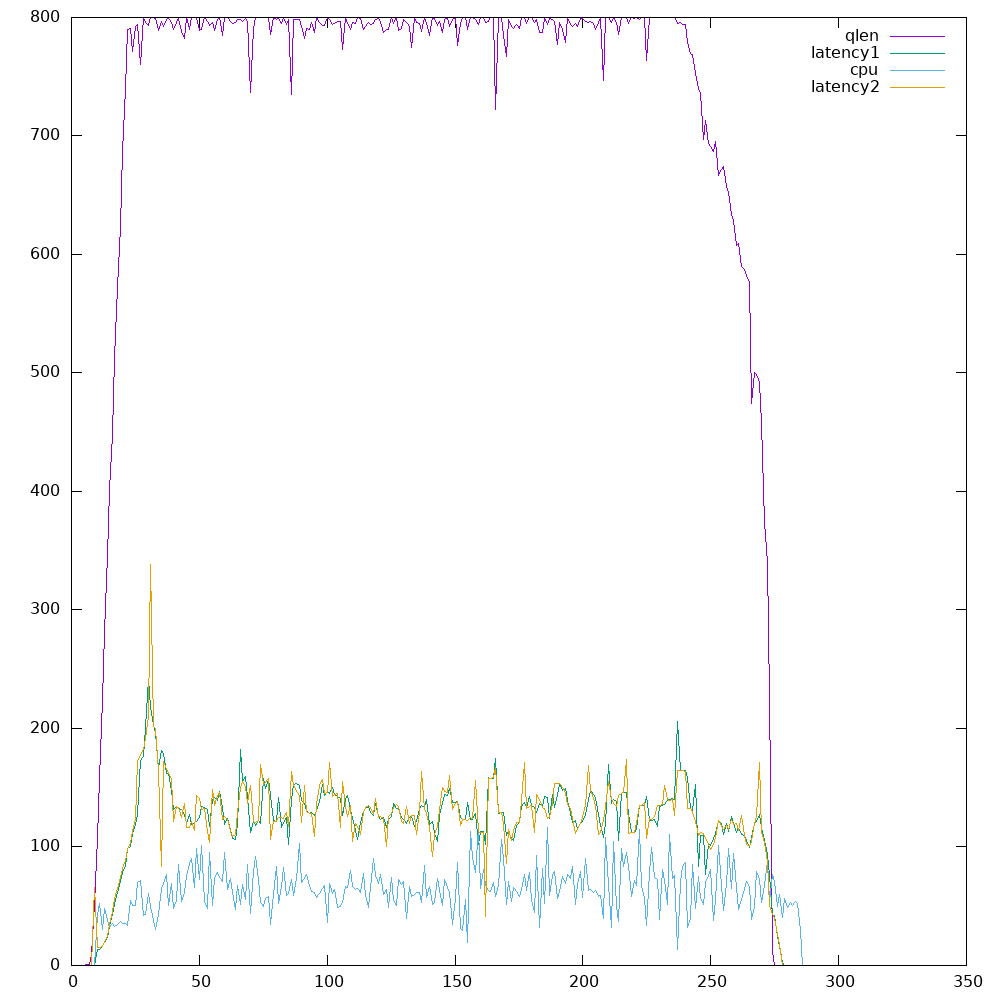
the above chart is for 2 RGW:
qlen = qlen1 + qlen2
cpu = cpu1 + cpu2 (percent out of 100)
latency1, latency2 = using a 5 second sliding window separately for each RGW (multiplied by 10 to fit the scale of the other metrics)
800GB are uploaded at 980 seconds (~816MB/s)

@yuvalif
Copy link
Author

yuvalif commented May 30, 2022

stats

@yuvalif
Copy link
Author

yuvalif commented May 30, 2022

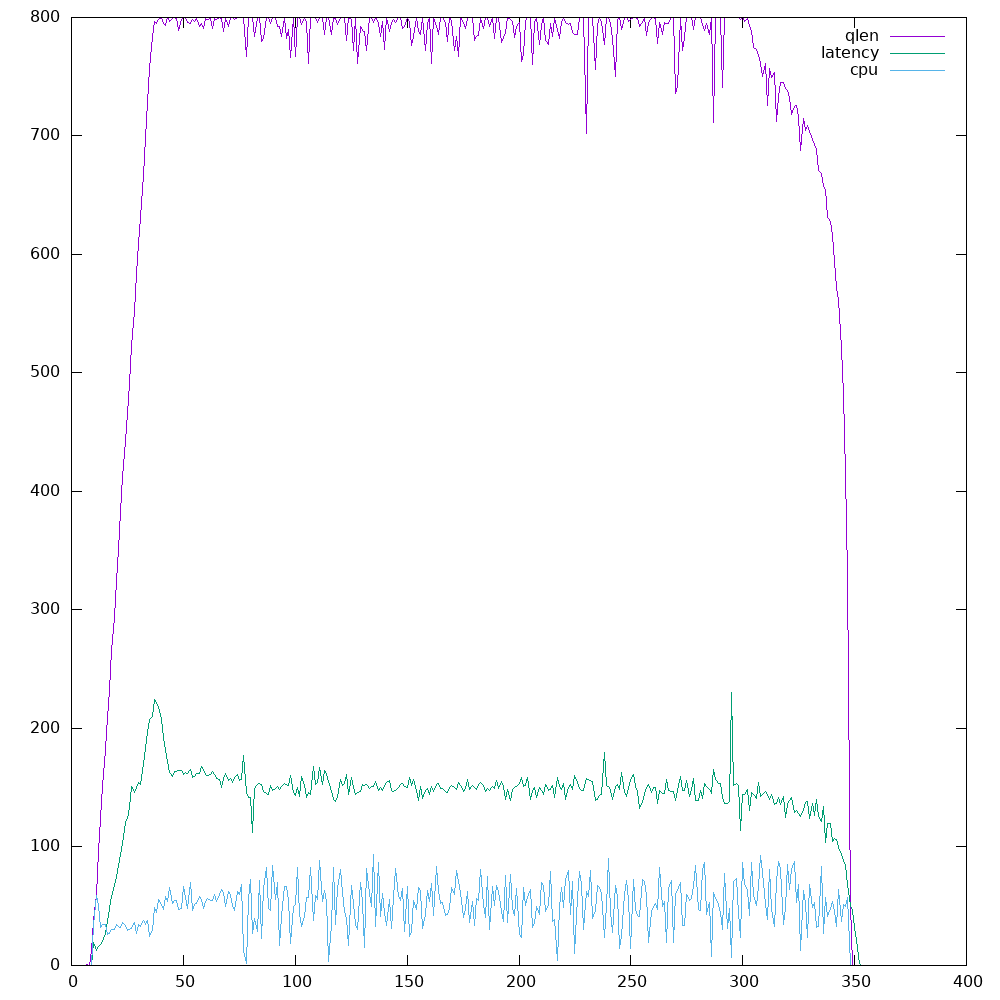
the above chart is for 1 RGW:
latency = using a 5 second sliding window (multiplied by 10 to fit the scale of the other metrics)
800GB are uploaded at 1084 seconds (~738MB/s)

Sign up for free to join this conversation on GitHub. Already have an account? Sign in to comment