
Related: replacing the Converge ONT entirely with a GPON SFP stick on a MikroTik RB5009: https://blog.homestack.space/converge-gpon-sfp-stick-mikrotik/
- Go to Network - WAN - WAN Connection
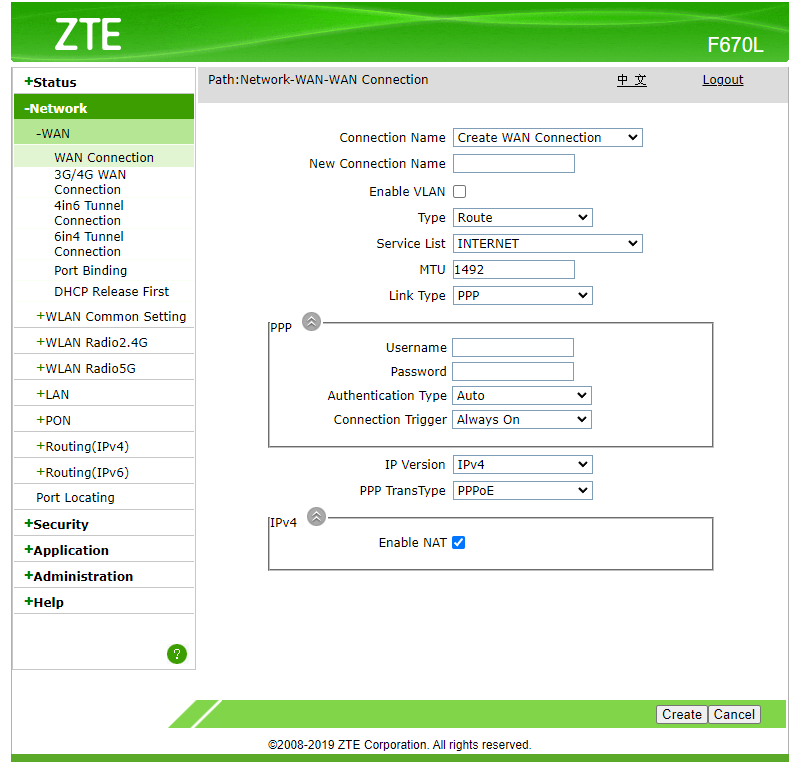
- Right click Type Route dropdown select and click "Inspect" in the context menu.
In console, run the code below:document.getElementById('Frm_mode').options[document.getElementById('Frm_mode').options.selectedIndex].setAttribute('value', 'BRIDGE'); Change_mode();
- Input New Connection Name. Example:
Bridge. Click Create. - Go to Network - WAN - Port - Binding
Select the Bridge WAN Connection. Check LAN3. Check other WAN connections and make sure LAN3 is not checked. - Connect the WAN connection of your Router to Port3 of the Converge CPE.
- Configure your router's DHCP client.


This does not work. Any solutions?