Skip to content

Instantly share code, notes, and snippets.

Show Gist options
  • Select an option

  • Save HimDek/e09340eae2861e1ad8b7f6bdba5ee9ff to your computer and use it in GitHub Desktop.

Select an option

Save HimDek/e09340eae2861e1ad8b7f6bdba5ee9ff to your computer and use it in GitHub Desktop.
This Guide will show you how to install and run apk files or Android apps in any Edition of Windows 11 using Windows Subsystem for Android. WSA or Windows Subsystem for Android is a Tool that allows Windows to run Android Apps directly without using any emulator.

Install Android apps or apk files in Windows using Windows Subsystem for Android

WSA or Windows Subsystem for Android is a Tool that allows Windows to run Android Apps directly without using any emulator. The problem is Windows Subsystem for Android is currently only available through preview via the Beta Channel of the Windows Insider Program. But if you follow my guide, you don't have to be in Windows Insider Program to try it out. The only thing you need is Windows 11 installed and some patience.

Prerequisites:

  • Windows Subsystem for Android or WSA must be Installed.

Click here to view the guide that shows how to install Windows Subsystem for Android in any Edition of Windows 11 (including Windows 11 Home) non Inider or stable release.

How to Install Android Apps or apk files in Windows Subsystem for Android:

  • First install Windows Subsystem for Android. Click here to know how to do that.
  • Search and run Windows Subsystem for Android Setting from Windows start menu.
  • The window shown in the screenshot below will appear. There, click on the icon in the extreme left side of the Files box. This will start Windows Subsystem for Android and open the File Manager App in Android. This can take some time so be patient.
  • Keep File Manager running otherwise Windows Subsystem for Android will terminate itself.
  • Enable Optional Diagnostic Data and Developer mode in Windows Subsystem for Android Setting Window and click the Refresh button in the IP address Section.
  • Click here to download the latest version of adb and extract the downloaded zip file.
  • Inside the extracted folder, there should be a file named adb.exe along with a plenty of other files.
  • Put the apk files of the Android apps that you want to install in this folder, and rename them to names that are easier to remember.

    Note: You can download apk files of Android apps from websites like APKPure, APKMirror or F-Droid. These are trusted websites.

  • Copy the path of this folder from the pathbox in Windows File Explorer as shown in the screenshot below: 11
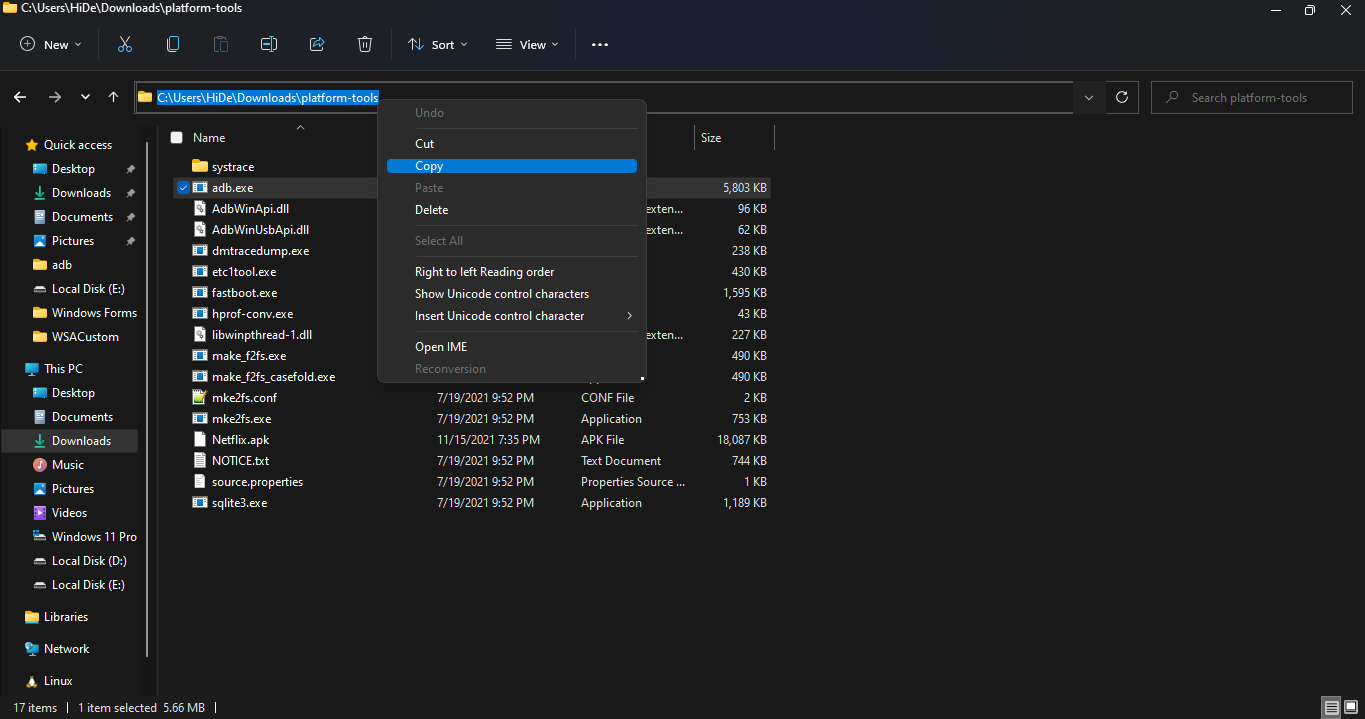
  • Search for Command Prompt in Windows Start Menu and Open it.
  • Type cd "" in the command prompt. Inside those "", paste the copied path by pressing Ctrl + V. The windows should look something like the below screenshot. Then press Enter. 12
  • Now, type adb connect 127.0.0.1:58526 in the Command Prompt Window. Press Enter and wait for the connection.
  • Once connected, type adb install "name.apk" in the Command Prompt. Replace name with the name of the apk file that you want to install and press Enter. After successful install, the installed App will appear in Windows Start Menu. Repeat this step for all the apk files that you want to install and they will appear in Windows Start Menu as well.

Thats it! Thanks for using this Guide. I hope it helped.

@SteveMicheal
Copy link
Copy Markdown

Thanks for posting i because It will be very helpful for my swamp names.

@jamwilliam703-star
Copy link
Copy Markdown

If you're wondering 100k a year is how much an hour, this calculator provides a quick and accurate answer. Based on a standard 40-hour workweek and 52 weeks per year, $100,000 annually works out to approximately $48.08 per hour before taxes. This is a very useful tool for comparing job offers, understanding your earning potential, and planning your monthly budget more effectively.

@muhammadkhaliq1667
Copy link
Copy Markdown

Arbeits‑Zeitrechner.de is a German online work-time calculator that helps users quickly calculate daily and weekly working hours by entering start time, end time, and break duration. The platform automatically determines net working time, overtime, and decimal hours commonly used for payroll processing, while also offering useful information about German labor laws, break regulations, and working-time rules for employees and employers.

@uzaimatet-netizen
Copy link
Copy Markdown

You can easily play psp games easily no matter what your device is just download ppsspp gold apk in your android or IOS device and start playing.

@uzaimatet-netizen
Copy link
Copy Markdown

Easily convert text into dots and dashes with our morse code generator tool. Whether you want to learn Morse code, send secret messages, or create fun encoded text, this tool quickly translates your words into accurate Morse code instantly. It’s simple to use, fast, and perfect for students, hobbyists, and creators. Click here to use the morse code generator now.

@uzaimatet-netizen
Copy link
Copy Markdown

Explore fun and easy Simple Coloring Pages designed for kids, beginners, and anyone who loves relaxing creativity. From cute animals to basic shapes and friendly cartoons, these printable coloring sheets are perfect for learning and entertainment. Download and print your favorite Simple Coloring Pages anytime for free. Click here to start coloring now.

@uzaimatet-netizen
Copy link
Copy Markdown

Convert symbols, hidden messages, and unique character styles instantly with our Wingding translator tool. Simply enter your text to translate normal letters into Wingdings or decode Wingding symbols back into readable text within seconds. This easy-to-use tool is perfect for fun messages, creative designs, and social media content. Click here to use the Wingding translator now.

@uzaimatet-netizen
Copy link
Copy Markdown

Create eye-catching social captions and trendy text styles instantly with our brat generator tool. Whether you want bold aesthetic text for TikTok, Instagram, or memes, this tool helps you generate stylish brat-inspired typography in seconds. No design skills are needed—just type your text and transform it into a viral internet style. Click here to use the brat generator now.

@m666gamenet-oss
Copy link
Copy Markdown

M666 game is particularly developed for Pakistani users who want to use their game capacities on web exposures and as a result they achieve an excellent rewards.

@playpkrgamepk-code
Copy link
Copy Markdown

Real-money gaming apps are growing fast in Pakistan, and PlayPKR Game has become one of the names users frequently search for. Most people want a simple platform where they can play games, manage PKR payments, and access quick features directly from mobile devices.

@junaidalie91-rgb
Copy link
Copy Markdown

junaidalie91-rgb commented May 27, 2026

Installing Android apps or APK files in Windows using Windows Subsystem for Android is a great way to run mobile apps on a PC without needing a phone. It helps users enjoy a bigger screen experience, better performance, and easier multitasking. Many users also explore entertainment apps like OnStream to watch movies and shows more comfortably on desktop while using Android support on Windows.

@danialtaqi66-design
Copy link
Copy Markdown

danialtaqi66-design commented May 29, 2026

Windows Subsystem for Android makes it easy to install and run Android apps or APK files on a Windows PC. After setting up WSA and enabling virtualization, users can sideload their favorite Android applications directly on Windows. Many people use this method to access streaming and entertainment apps by searching terms such as inat tv indir online.

@umerismaeel1998-cyber
Copy link
Copy Markdown

Been playing 8 Ball Pool for a while now and the biggest thing that helped my game was actually understanding cue ball spin properly. Most beginners just aim and shoot without thinking about where the cue ball ends up after contact. Once you start applying back spin and top spin intentionally, your whole game changes. I put together a full breakdown of tips and tricks including shot planning and spin control over at — might be useful for anyone trying to level up their game.

@sajidraza88875-ops
Copy link
Copy Markdown

TeraBox Mod Pro is a resource focused on cloud storage solutions, file management, and backup-related information. It helps users explore ways to store, organize, and access files across devices more efficiently. The site covers topics related to storage space, backups, and digital file accessibility.

@scomastera-ux
Copy link
Copy Markdown

666W Game provides a modern and accessible gaming experience for users seeking entertainment on their mobile devices. With its diverse game selection, simple navigation, and ongoing promotions, it continues to attract players who enjoy interactive digital entertainment.

@gossipidea
Copy link
Copy Markdown

Excellent guide – this is the cleanest way to run Android APKs on Windows 11 without heavy emulators like Bluestacks.
One thing to add for anyone installing modded APKs (cracked or modified games/apps):
WSA works fine with modded APKs, but some mods require specific Android architecture (arm64 vs x64). Most mods are built for arm64, and WSA translates them, but you may notice slower performance on certain games.
If an app crashes after installation, try enabling “Developer mode” and use adb logcat to see the error – often it's a missing Google Play Services dependency.
For example, I’ve tested modded APK games like Toca Boca (often searched as tocabocamodapps.com) on WSA. They run smoothly as long as you use the arm64 version of the mod. Just follow the OP’s ADB method exactly.
Also, a small tip: instead of renaming APK files, you can install directly using adb install -r path\to\file.apk (the -r flag reinstalls without data loss).
Thanks again for the detailed write-up – this saved me from joining the Insider Program.

@apkcracked8
Copy link
Copy Markdown

APKCracked: Unlock Unique Apps & Games
Explore a curated collection of the web’s most unique apps and games. We provide high-quality, hand-picked APKs designed to enhance your mobile experience.

Sign up for free to join this conversation on GitHub. Already have an account? Sign in to comment