Skip to content

Instantly share code, notes, and snippets.

@danilobatistaqueiroz
Last active May 17, 2019 19:48
Show Gist options
  • Select an option

  • Save danilobatistaqueiroz/3318bd8604d484c3c98708aa4a539aeb to your computer and use it in GitHub Desktop.

Select an option

Save danilobatistaqueiroz/3318bd8604d484c3c98708aa4a539aeb to your computer and use it in GitHub Desktop.
configuring java

Aplicativo para Editar Context Menu no Windows

Para trabalhar com programas Default, context Menu, trocar Edit With, etc:
https://superuser.com/questions/68852/change-windows-7-explorer-edit-context-menu-action-for-jpg-and-other-image-fil

Modificar o Context Menu do Windows Explorer CMD/Git Bash

Para que o cmd apareça sem precisar do Shift no Windows Explorer é necessário entrar em:
HKEY_CLASSES_ROOT\Directory\Background\shell\cmd
E remover a String Extended
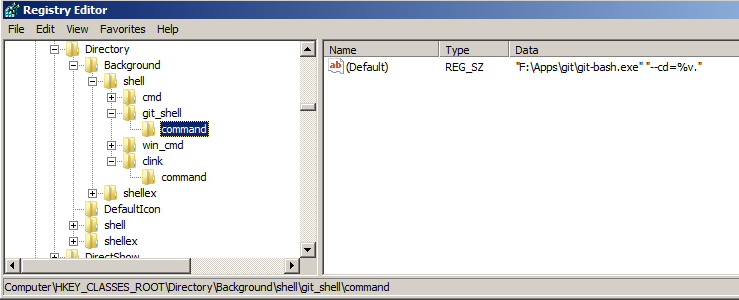
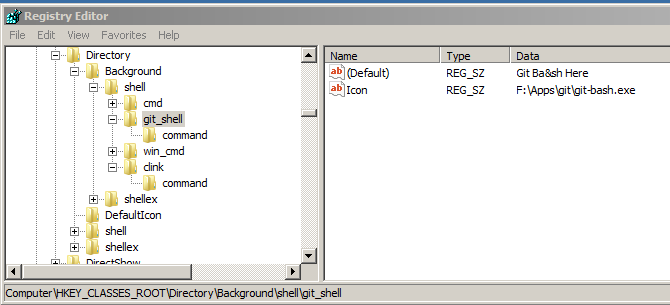
É possível alterar o texto e o ícone conforme foi feito na imagem:
regedit

Remover e Adicionar Itens do Menu de Contexto Novo

Procurar no regedit por Chaves ShellNew


Windows Registry Editor Version 5.00

[HKEY_CLASSES_ROOT\Directory\Background]

[HKEY_CLASSES_ROOT\Directory\Background\shell]

[HKEY_CLASSES_ROOT\Directory\shell] @="none"

[HKEY_CLASSES_ROOT\Directory\Background\shell\git_shell] @="Git Ba&sh Here" "Icon"="F:\Apps\git\git-bash.exe"

[HKEY_CLASSES_ROOT\Directory\Background\shell\git_shell\command] @=""F:\Apps\git\git-bash.exe" "--cd=%v.""

[HKEY_CLASSES_ROOT\Directory\Background\shell\win_cmd] @="cmd here" "Icon"="C:\Windows\System32\cmd.exe"

[HKEY_CLASSES_ROOT\Directory\Background\shell\win_cmd\command] @="cmd.exe /s /k pushd "%V""

[HKEY_CLASSES_ROOT\Directory\shell\git_shell] @="Git Ba&sh Here" "Icon"="F:\Apps\git\git-bash.exe"

[HKEY_CLASSES_ROOT\Directory\shell\git_shell\command] @=""F:\Apps\git\git-bash.exe" "--cd=%1""

[HKEY_CLASSES_ROOT\Directory\shell\win_cmd] @="cmd here" "Icon"="C:\Windows\System32\cmd.exe"

[HKEY_CLASSES_ROOT\Directory\shell\win_cmd\command] @="cmd.exe /s /k pushd "%V""
right_click1

right_click2

Eclipse

workspace

Spring

Maven

M2_HOME

JDK JRE

Tomcat

HKEY_CLASSES_ROOT
.docx
WordDocument.12
ShellNew
NullFile
___
links:
http://www.thewindowsclub.com/remove-items-from-new-context-menu
https://www.askvg.com/how-to-add-remove-items-from-new-menu-in-windows/
set JAVA_HOME=f:\java\jdk\1.8
set JDK_HOME=f:\java\jdk\1.8
set JRE_HOME=f:\java\jdk\1.8\jre
set M2_HOME=f:\java\maven
set NODE_HOME=f:\node\nodejs
set PATH=%PATH%;%JAVA_HOME%\bin;%JRE_HOME%\bin;%M2_HOME%\bin;%NODE_HOME%
REG delete HKCU\Environment /F /V JAVA_HOME
REG delete HKCU\Environment /F /V JDK_HOME
REG delete HKCU\Environment /F /V JRE_HOME
REG delete HKCU\Environment /F /V M2_HOME
setx JAVA_HOME "f:\java\jdk\1.8"
setx JDK_HOME "f:\java\jdk\1.8"
setx JRE_HOME "f:\java\jdk\1.8\jre"
setx NODE_HOME "f:\node\nodejs"
setx PATH "%JAVA_HOME%\bin;%JRE_HOME%\bin;%M2_HOME%\bin;%NODE_HOME%"
Sign up for free to join this conversation on GitHub. Already have an account? Sign in to comment