Skip to content

Instantly share code, notes, and snippets.

View gerardorochin's full-sized avatar

Gerardo Rochín gerardorochin

View GitHub Profile

LLM Wiki

A pattern for building personal knowledge bases using LLMs.

This is an idea file, it is designed to be copy pasted to your own LLM Agent (e.g. OpenAI Codex, Claude Code, OpenCode / Pi, or etc.). Its goal is to communicate the high level idea, but your agent will build out the specifics in collaboration with you.

The core idea

Most people's experience with LLMs and documents looks like RAG: you upload a collection of files, the LLM retrieves relevant chunks at query time, and generates an answer. This works, but the LLM is rediscovering knowledge from scratch on every question. There's no accumulation. Ask a subtle question that requires synthesizing five documents, and the LLM has to find and piece together the relevant fragments every time. Nothing is built up. NotebookLM, ChatGPT file uploads, and most RAG systems work this way.

@bmatcuk
bmatcuk / create-usb.sh
Created May 30, 2019 04:38
Creating a Bootable Windows USB from ISO on a Mac
# First, we need to find our device. BEFORE inserting your USB drive, run the
# following:
diskutil list
# This will output a bunch of info about all of the disk drives connected to
# your Mac. Each entry will have a header in the form "/dev/diskX", where X is
# some number starting at 0. Now, insert your USB drive and run the command
# again. You should see a new entry. Make note of the name (ie, /dev/diskX).
diskutil list
@tzmartin
tzmartin / embedded-file-viewer.md
Last active August 24, 2026 14:13
Embedded File Viewer: Google Drive, OneDrive

Office Web Apps Viewer

('.ppt' '.pptx' '.doc', '.docx', '.xls', '.xlsx')

http://view.officeapps.live.com/op/view.aspx?src=[OFFICE_FILE_URL]

<iframe src='https://view.officeapps.live.com/op/embed.aspx?src=[OFFICE_FILE_URL]' width='px' height='px' frameborder='0'>
</iframe>

OneDrive Embed Links

@m0rff
m0rff / send_sms.py
Last active November 28, 2022 12:45
Sending a SMS with Python and pyserial via an USB 3G Modem on pfSense/FreeBSD
#!/usr/bin/env python2.7
# -*- coding: utf-8 -*-
#
# Sending a SMS with Python and pyserial via an USB 3G Modem on pfSense/FreeBSD
# tested with: Huawei Technologies Co., Ltd. E620 USB Modem
# and a Telekom SIM card
import serial
from curses import ascii
import time
@LucaRosaldi
LucaRosaldi / distance-sample.php
Last active February 12, 2024 09:05
PHP: Get Distance Between two Geolocated Points (lat/lon)
<?php
/* These are two points in New York City */
$point1 = array('lat' => 40.770623, 'long' => -73.964367);
$point2 = array('lat' => 40.758224, 'long' => -73.917404);
$distance = getDistanceBetweenPoints($point1['lat'], $point1['long'], $point2['lat'], $point2['long']);
foreach ($distance as $unit => $value) {
echo $unit.': '.number_format($value,4).'<br />';
}
@zenorocha
zenorocha / multiple-3rd-party-widgets.js
Last active March 11, 2026 14:24
Loading multiple 3rd party widgets asynchronously
(function() {
var script,
scripts = document.getElementsByTagName('script')[0];
function load(url) {
script = document.createElement('script');
script.async = true;
script.src = url;
scripts.parentNode.insertBefore(script, scripts);
@chrismytton
chrismytton / 01-README.md
Created October 29, 2012 20:46
Mutt Gmail config with OS X keychain

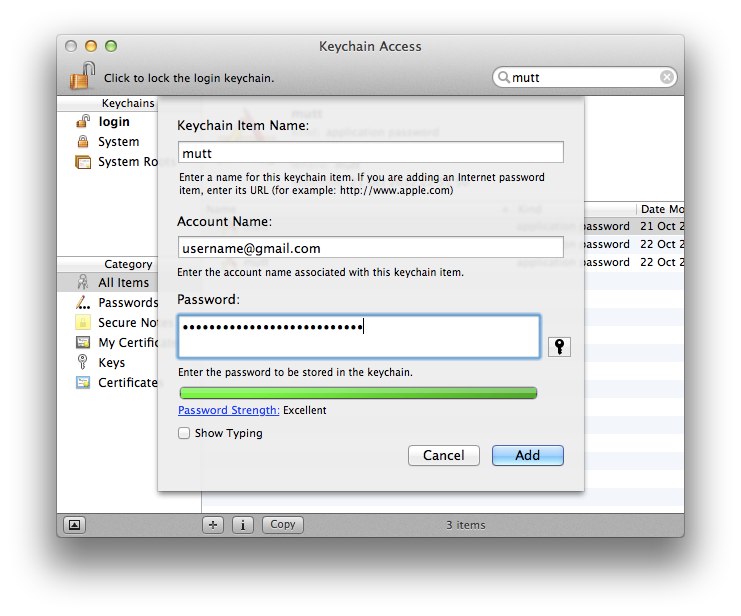
Mutt/Gmail/OS X Keychain

Create a new keychain item, enter the Keychain Item Name as mutt, the Account Name as your gmail email address and then enter your password, then add the keychain item.

2-step auth

If you're using Google 2-step auth, you'll need to generate an Application-specific password from your Google Account settings and enter that as the password.

@artero
artero / launch_sublime_from_terminal.markdown
Last active March 10, 2026 11:29 — forked from olivierlacan/launch_sublime_from_terminal.markdown
Launch Sublime Text 2 from the Mac OS X Terminal

Launch Sublime Text 2 from the Mac OS X Terminal

Sublime Text 2 ships with a CLI called subl (why not "sublime", go figure). This utility is hidden in the following folder (assuming you installed Sublime in /Applications like normal folk. If this following line opens Sublime Text for you, then bingo, you're ready.

open /Applications/Sublime\ Text\ 2.app/Contents/SharedSupport/bin/subl

You can find more (official) details about subl here: http://www.sublimetext.com/docs/2/osx_command_line.html

Installation

@jwage
jwage / SplClassLoader.php
Last active July 28, 2026 02:27
Add MIT license.
<?php
/*
* THIS SOFTWARE IS PROVIDED BY THE COPYRIGHT HOLDERS AND CONTRIBUTORS
* "AS IS" AND ANY EXPRESS OR IMPLIED WARRANTIES, INCLUDING, BUT NOT
* LIMITED TO, THE IMPLIED WARRANTIES OF MERCHANTABILITY AND FITNESS FOR
* A PARTICULAR PURPOSE ARE DISCLAIMED. IN NO EVENT SHALL THE COPYRIGHT
* OWNER OR CONTRIBUTORS BE LIABLE FOR ANY DIRECT, INDIRECT, INCIDENTAL,
* SPECIAL, EXEMPLARY, OR CONSEQUENTIAL DAMAGES (INCLUDING, BUT NOT
* LIMITED TO, PROCUREMENT OF SUBSTITUTE GOODS OR SERVICES; LOSS OF USE,